MagicMirror Forum
    • Recent
    • Tags
    • Unsolved
    • Solved
    • MagicMirror² Repository
    • Documentation
    • 3rd-Party-Modules
    • Donate
    • Discord
    • Register
    • Login
    1. Home
    2. ianperrin
    3. Posts
    A New Chapter for MagicMirror: The Community Takes the Lead
    Read the statement by Michael Teeuw here.
    I
    Offline
    • Profile
    • Following 0
    • Followers 6
    • Topics 6
    • Posts 164
    • Groups 1

    Posts

    Recent Best Controversial
    • MMM-ModuleScheduler - Module Schedules and Notifications

      Description:

      A helper module for creating schedules which

      • Hide, show or dim individual modules, groups of modules or all modules
      • Send notifications to other modules (e.g. to restart/turn off your MagicMirror, turn on/off your screen, and turn off your Pi via MMM-Remote-Control

      As ever this is work in progress, so check out the ReadMe file for installation and configuration notes, keep your module updated and do report any issues.

      Screenshots:

      Add as many screenshots as you like.
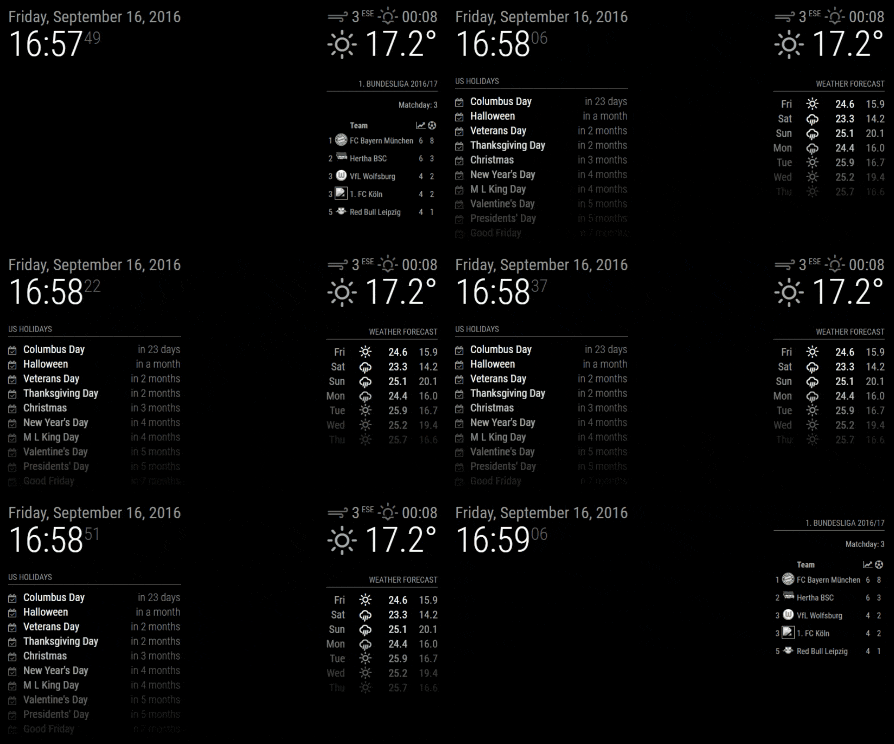
      Example Scheduling

      Download:

      [card:ianperrin/MMM-ModuleScheduler]


      Change Log

      Version 1.4

      • Added global schedules which allow a single schedule to show/hide/dim all modules
      • Added group schedules which allow a single schedule to show/hide/dim a subset of modules
      • Added support for visibility locking introduced in Magic Mirror 2.1.0
      • Added debug config option to control output to logs

      Version 1.3

      • Added ability to schedule sending notifications to other modules

      Version 1.2

      • Added ability dim modules (instead of hiding them)

      Version 1.1.0

      • Added support for multiple schedules per module

      Version 1.0.1

      • Fixed issue with scheduled jobs when browser is refreshed

      Version 1.0.0

      • Initial version
      posted in System module schedule cron notifications
      I
      ianperrin
    • MMM-NetworkScanner

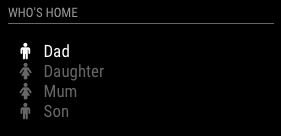
      Here is a module I have been working on to display the status of devices on the network.

      [card:ianperrin/MMM-NetworkScanner]

      The original concept was to display an indicator of who was at home based on whether the persons phone was connected to the network (see below). As these devices have dynamic IP addresses, MMM-Ping was not an option so I temporarily created this module to show the status of these devices based on their MAC Address.

      who is at home

      There are many other ways to use the module, including displaying (monitor?) the status of some/all devices connected to the network, though I’m not sure the MagicMirror it is the best place for this :)

      As ever this is work in progress, so check out the ReadMe file for installation and configuration notes, keep your module updated and do report any issues

      cc. @shashank @strawberry-3-141

      posted in Utilities network scanner status mac address
      I
      ianperrin
    • RE: MMM-ping

      @shashank said in MMM-ping:

      @strawberry-3.141 I got this module installed working fine, I have a request here, I have many devices connected with DHCP in my local network at home, is it possible to get the IP using MAC address of the device. only IP with friendly name has to be displayed on the Mirror. At present i have 5 Rasp pi connected each in a room using as a MultiRoom audio system.

      @shashank I had a similar requirement so I temporarily created another module which scans the network for devices based on their mac address, and then displays their status. I use it to display an indicator of who is home based on the visibility of their smart phone devices…

      I was planned to see if I could merge this into MMM-Ping and create a pull request. Sadly this is bottom of the pile right now. I could publish it as a separate repository if that helps

      posted in Utilities
      I
      ianperrin
    • RE: modules day and time Depending represented

      @shashank said in modules day and time Depending represented:
      Looking at your config, I can see a couple of potential issues

      Firstly, make sure you use straight apostrophes (') not curly ones (‘ ’).

      Secondly, the expressions in the module_schedule config option (module_schedule: {from: '0 9 * * FRI', to: '20 21 * * SAT' },) should schedule the calendar so it is displayed at 09:00 on Friday and be hidden at 21:20 on Saturday.

      Is this what you intended? If so, check the logs (pm2 logs mm), you should see something like this.

      MMM-ModuleScheduler received CREATE_MODULE_SCHEDULE
      MMM-ModuleScheduler is scheduling calendar using '0 9 * * FRI' and '20 21 * * SAT'
      MMM-ModuleScheduler has scheduled calendar
      MMM-ModuleScheduler will next show calendar at Fri Sep 23 2016 09:00:00 GMT+0000 (UTC)
      MMM-ModuleScheduler will next hide calendar at Sat Sep 17 2016 21:20:00 GMT+0000 (UTC)
      

      Note the last two lines will vary depending on when start the mirror. In the example above started the mirror at 17:00 on Saturday, so the next ‘show’ (from) date is next friday (23rd) and the next hide (to) date is tonight.

      Hope this helps

      posted in General Discussion
      I
      ianperrin
    • RE: modules day and time Depending represented

      @cowboysdude said in modules day and time Depending represented:

      I guess had I investigated cron I could have found that out myself… sorry.

      Glad to help and no need to apologise at all

      posted in General Discussion
      I
      ianperrin
    • RE: modules day and time Depending represented

      @shashank - great to hear - and thanks for the feedback.

      posted in General Discussion
      I
      ianperrin
    • RE: 2nd Page

      @dominic - there’s no functionality within MagicMirror out of the box to achieve this, but I can think of two options

      • MMM-Carousel which allows modules to be displayed in a rotating carousel
      • MMM-ModuleScheduler which allows you to schedule when modules should be shown and hidden
      posted in Troubleshooting
      I
      ianperrin
    • RE: modules day and time Depending represented

      @cowboysdude - rather than add two instances of the module, try the following expressions:

      module_schedule: {from: '0 7,17 * * *', to: '0 8,23 * * *'}
      

      This should create a schedule with jobs to show the module at 07:00hrs and 17:00hrs, and jobs to hide the module at 08:00hrs and 23:00hrs

      I can see there are use cases where multiple schedules might be required, so I’ve created an enhancement request on github to cover that one - https://github.com/ianperrin/MMM-ModuleScheduler/issues/2

      posted in General Discussion
      I
      ianperrin
    • RE: modules day and time Depending represented

      Earlier versions of the module would create duplicate cron jobs if the Mirror recreated the modules (e.g. after a page refresh in the browser). The current version attempts to resolve this.

      Trailblazers who’ve already grabbed a copy of the module please run git pull from the module directory - see https://github.com/ianperrin/MMM-ModuleScheduler#updating for more details

      posted in General Discussion
      I
      ianperrin
    • 1
    • 2
    • 11
    • 12
    • 13
    • 14
    • 15
    • 16
    • 17
    • 13 / 17