MagicMirror Forum
    • Recent
    • Tags
    • Unsolved
    • Solved
    • MagicMirror² Repository
    • Documentation
    • 3rd-Party-Modules
    • Donate
    • Discord
    • Register
    • Login
    1. Home
    2. ianperrin
    3. Posts
    A New Chapter for MagicMirror: The Community Takes the Lead
    Read the statement by Michael Teeuw here.
    I
    Offline
    • Profile
    • Following 0
    • Followers 6
    • Topics 6
    • Posts 164
    • Groups 1

    Posts

    Recent Best Controversial
    • MMM-ModuleScheduler - Module Schedules and Notifications

      Description:

      A helper module for creating schedules which

      • Hide, show or dim individual modules, groups of modules or all modules
      • Send notifications to other modules (e.g. to restart/turn off your MagicMirror, turn on/off your screen, and turn off your Pi via MMM-Remote-Control

      As ever this is work in progress, so check out the ReadMe file for installation and configuration notes, keep your module updated and do report any issues.

      Screenshots:

      Add as many screenshots as you like.
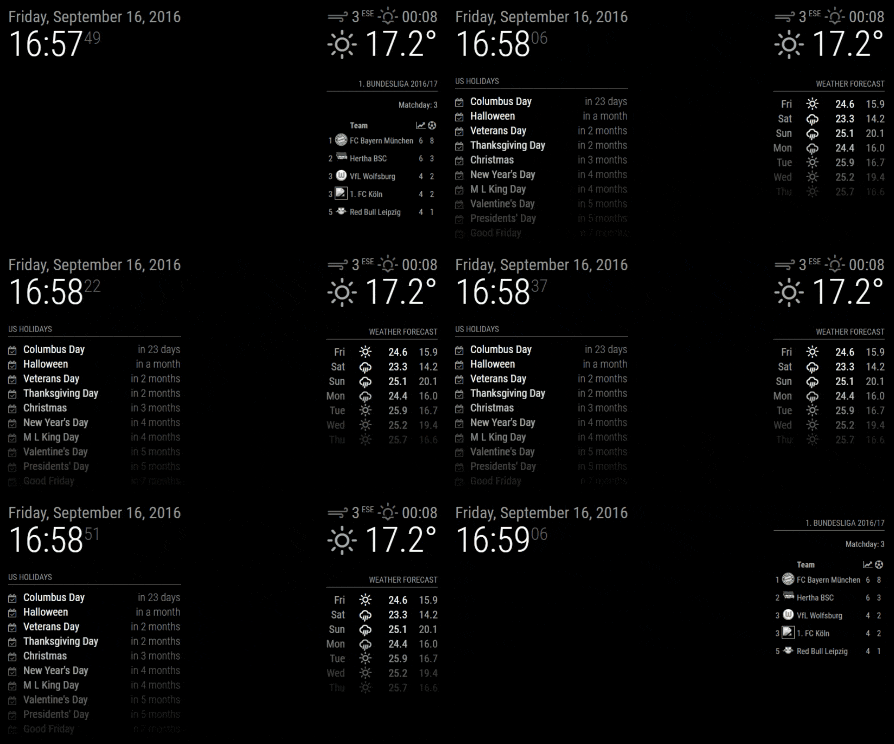
      Example Scheduling

      Download:

      [card:ianperrin/MMM-ModuleScheduler]


      Change Log

      Version 1.4

      • Added global schedules which allow a single schedule to show/hide/dim all modules
      • Added group schedules which allow a single schedule to show/hide/dim a subset of modules
      • Added support for visibility locking introduced in Magic Mirror 2.1.0
      • Added debug config option to control output to logs

      Version 1.3

      • Added ability to schedule sending notifications to other modules

      Version 1.2

      • Added ability dim modules (instead of hiding them)

      Version 1.1.0

      • Added support for multiple schedules per module

      Version 1.0.1

      • Fixed issue with scheduled jobs when browser is refreshed

      Version 1.0.0

      • Initial version
      posted in System module schedule cron notifications
      I
      ianperrin
    • MMM-NetworkScanner

      Here is a module I have been working on to display the status of devices on the network.

      [card:ianperrin/MMM-NetworkScanner]

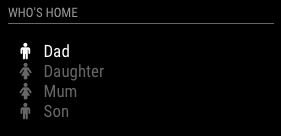
      The original concept was to display an indicator of who was at home based on whether the persons phone was connected to the network (see below). As these devices have dynamic IP addresses, MMM-Ping was not an option so I temporarily created this module to show the status of these devices based on their MAC Address.

      who is at home

      There are many other ways to use the module, including displaying (monitor?) the status of some/all devices connected to the network, though I’m not sure the MagicMirror it is the best place for this :)

      As ever this is work in progress, so check out the ReadMe file for installation and configuration notes, keep your module updated and do report any issues

      cc. @shashank @strawberry-3-141

      posted in Utilities network scanner status mac address
      I
      ianperrin
    • RE: MMM-ping

      @shashank said in MMM-ping:

      @strawberry-3.141 I got this module installed working fine, I have a request here, I have many devices connected with DHCP in my local network at home, is it possible to get the IP using MAC address of the device. only IP with friendly name has to be displayed on the Mirror. At present i have 5 Rasp pi connected each in a room using as a MultiRoom audio system.

      @shashank I had a similar requirement so I temporarily created another module which scans the network for devices based on their mac address, and then displays their status. I use it to display an indicator of who is home based on the visibility of their smart phone devices…

      I was planned to see if I could merge this into MMM-Ping and create a pull request. Sadly this is bottom of the pile right now. I could publish it as a separate repository if that helps

      posted in Utilities
      I
      ianperrin
    • RE: modules day and time Depending represented

      @shashank said in modules day and time Depending represented:
      Looking at your config, I can see a couple of potential issues

      Firstly, make sure you use straight apostrophes (') not curly ones (‘ ’).

      Secondly, the expressions in the module_schedule config option (module_schedule: {from: '0 9 * * FRI', to: '20 21 * * SAT' },) should schedule the calendar so it is displayed at 09:00 on Friday and be hidden at 21:20 on Saturday.

      Is this what you intended? If so, check the logs (pm2 logs mm), you should see something like this.

      MMM-ModuleScheduler received CREATE_MODULE_SCHEDULE
      MMM-ModuleScheduler is scheduling calendar using '0 9 * * FRI' and '20 21 * * SAT'
      MMM-ModuleScheduler has scheduled calendar
      MMM-ModuleScheduler will next show calendar at Fri Sep 23 2016 09:00:00 GMT+0000 (UTC)
      MMM-ModuleScheduler will next hide calendar at Sat Sep 17 2016 21:20:00 GMT+0000 (UTC)
      

      Note the last two lines will vary depending on when start the mirror. In the example above started the mirror at 17:00 on Saturday, so the next ‘show’ (from) date is next friday (23rd) and the next hide (to) date is tonight.

      Hope this helps

      posted in General Discussion
      I
      ianperrin
    • RE: modules day and time Depending represented

      @cowboysdude said in modules day and time Depending represented:

      I guess had I investigated cron I could have found that out myself… sorry.

      Glad to help and no need to apologise at all

      posted in General Discussion
      I
      ianperrin
    • RE: modules day and time Depending represented

      @shashank - great to hear - and thanks for the feedback.

      posted in General Discussion
      I
      ianperrin
    • RE: 2nd Page

      @dominic - there’s no functionality within MagicMirror out of the box to achieve this, but I can think of two options

      • MMM-Carousel which allows modules to be displayed in a rotating carousel
      • MMM-ModuleScheduler which allows you to schedule when modules should be shown and hidden
      posted in Troubleshooting
      I
      ianperrin
    • RE: modules day and time Depending represented

      @cowboysdude - rather than add two instances of the module, try the following expressions:

      module_schedule: {from: '0 7,17 * * *', to: '0 8,23 * * *'}
      

      This should create a schedule with jobs to show the module at 07:00hrs and 17:00hrs, and jobs to hide the module at 08:00hrs and 23:00hrs

      I can see there are use cases where multiple schedules might be required, so I’ve created an enhancement request on github to cover that one - https://github.com/ianperrin/MMM-ModuleScheduler/issues/2

      posted in General Discussion
      I
      ianperrin
    • RE: modules day and time Depending represented

      Earlier versions of the module would create duplicate cron jobs if the Mirror recreated the modules (e.g. after a page refresh in the browser). The current version attempts to resolve this.

      Trailblazers who’ve already grabbed a copy of the module please run git pull from the module directory - see https://github.com/ianperrin/MMM-ModuleScheduler#updating for more details

      posted in General Discussion
      I
      ianperrin
    • RE: modules day and time Depending represented

      @cowboysdude said in modules day and time Depending represented:

      It’s turning anything off with 'classes: ‘scheduler’, attached no matter what time you set

      The expected functionality is that the module is shown between the dates specified, so once the module has done it’s thing, it hides the modules and they are not shown until the next ‘from’ date.

      In more detail, it should follow the following process once it receives the notification (DOM_OBJECTS_CREATED) that all modules have been loaded:

      • It checks each module to see if it contains the ‘scheduler’ class
      • If yes, it checks whether the module config includes the ‘module_scheduler’ option
      • if yes, it checks whether the option includes the ‘from’ and ‘to’ properties
      • if yes, it creates the cron jobs to show (‘from’) and hide (‘to’) the module
      • if the next show (‘from’) date for the module is in the future and less than the next hide (‘to’) date, it hides the module
      • when the ‘from’ cron job is triggered, it sends a notification to show the module
      • when the ‘to’ cron job is triggered, it sends a notification to hide the module

      Now, as this is work in progress I haven’t had time to check all permutations of modules and cron expressions. However, it’s logging is rather verbose so please do check out the console log (pm2 logs mm) to see what it thinks it is doing!

      If you find problems, can you post your config (or at the least, which module you are trying to schedule and the values for the module_scheduler option?

      Thanks

      posted in General Discussion
      I
      ianperrin
    • RE: modules day and time Depending represented

      @cowboysdude said in modules day and time Depending represented:

      Only thing I can see wrong is the speed [decreased] of loading the mirror!

      As part of the install process, npm install needs to be run to install the dependency on node-cron. This can take a little time, but is only required once. Having completed the install, I’m not seeing the performance issues you mention so we might need to look into that a little further.

      posted in General Discussion
      I
      ianperrin
    • RE: modules day and time Depending represented

      @bjoern - I have created an initial version of MMM-ModuleScheduler and pushed it to github -https://github.com/ianperrin/MMM-ModuleScheduler

      If you would like to test it, feel free to install it on your Mirror and report back here.

      However, please remember that this is work in progress and has not yet been fully tested, so please do use with care.

      posted in General Discussion
      I
      ianperrin
    • RE: modules day and time Depending represented

      So, my current thinking is based around the following config

      {
      	module: 'MMM-ModuleScheduler'
      },
      {
      	module: 'calendar',
      	position: 'top_left',
      	classes: 'scheduler',
      	config: {
      		// Show at 9:00 and hide at 18:00 every day from Monday through Friday
      		module_schedule: {from: '0 9 * * 1-5', to: '0 18 * * 1-5'}
      	}
      },
      {
      	module: 'MMM-soccer',
      	position: 'top_right',
      	classes: 'scheduler',
      	config: {
      		// Show at 9:00 on Saturday and hide at 20:00 on Sunday
      		module_schedule: {from: '0 9 * * SAT', to: '0 20 * * SUN'}
      	}
      }
      

      Modules would then be shown and hidden based on the addition of a specific class classes: 'scheduler' and a module_schedule config option containing the cron expressions which control when the module should be shown (from) and hidden (to).

      How does that sound?

      p.s. here’s another useful cron resource - http://crontab.guru/

      posted in General Discussion
      I
      ianperrin
    • RE: modules day and time Depending represented

      @bjoern - a common way of scheduling activity is use cron expressions which give an enormous amount of flexibility for defining when things should happen.

      I would think this is a better way to tackle the solution rather than try to create custom scheduling logic.

      I’ve built the basis of the module which hides and shows other modules based on the config options, but will need a little time to add and test the scheduling. Give me a day or so.

      Ian

      posted in General Discussion
      I
      ianperrin
    • RE: assign a symbol to a module

      Hi @dominic

      The simplest approach would be to add a “br” element between the temperature and humidity.

      However, I would consider putting them in an unordered list and take advantage of the inbuilt layout controls within FontAwesome. E.g.

      getDom: function() {
      	var wrapper = document.createElement("div");
      	if(this.dataFile){
      
      		var humidityRegExp = /Humidity = (.*?) %/ig;
      		var humidity = humidityRegExp.exec(this.dataFile)[1];
      
      		var temperatureRegExp = /Temperature = (.*?) *C/ig;
      		var temperature = temperatureRegExp.exec(this.dataFile)[1];
      
      		var list = document.createElement("ul");
      		list.classList.add("fa-ul");
      
      		// add temperature
      		var temperature_item = document.createElement("li");
      		var temperature_symbol =  document.createElement("i");
      		temperature_symbol.classList.add("fa", "fa-li", "fa-home");
      		temperature_item.appendChild(temperature_symbol);
      		temperature_item.appendChild(document.createTextNode(" " + temperature + "°C"));
      		list.appendChild(temperature_item);
      
      		// add humidity 
      		var humidity_item = document.createElement("li");
      		var humidity_symbol =  document.createElement("i");
      		humidity_symbol.classList.add("fa", "fa-li", "fa-tint");
      		humidity_item.appendChild(humidity_symbol);
      		humidity_item.appendChild(document.createTextNode(" " + humidity + "%"));
      		list.appendChild(humidity_item);
      
      		wrapper.appendChild(list);
      
      	} else {
      		wrapper.innerHTML = "No data";
      	}
      	return wrapper;
      },
      
      posted in Troubleshooting
      I
      ianperrin
    • RE: assign a symbol to a module

      @Plati glad to help - and we’re all learning here so don’t worry!

      Fontawesome provides lots of support for managing the display of icons, so if the icons are throwing the alignment in the table out try making the icons Fixed Width by adding “fa-fw” to the icon e.g. icon.classList.add("fa", "fa-fw", "fa-" …

      Alternatively, set the icon font-size to the same as the message, by using the inbuilt MM styles, e.g. iconCell.classList.add("small");

      or a combination of both :)

      posted in Troubleshooting
      I
      ianperrin
    • RE: assign a symbol to a module

      You could also consider making the icon configurable via the options,

      First add the default values for the options

      	defaults: {
      		max: 5,
      		format: false,
      		types: {
      			INFO: "dimmed",
      			WARNING: "normal",
      			ERROR: "bright"
      		},
      		icons: {
      			INFO: "info",
      			WARNING: "exclamation",
      			ERROR: "exclamation-triangle"
      		}
      	},
      

      Then change the code to create the icon (and for bonus points, set class for the icon to the same as the message.

      		var iconCell = document.createElement("td");
      		var icon =  document.createElement("i");
      		if(this.config.icons.hasOwnProperty(this.messages[i].type)){
      			icon.classList.add("fa", "fa-" + this.config.icons[this.messages[i].type]);
      		} else {
      			icon.classList.add("fa", "fa-question");
      		}
      		if(this.config.types.hasOwnProperty(this.messages[i].type)){
      			icon.classList.add(this.config.types[this.messages[i].type]);
      		}
      		iconCell.appendChild(icon);
      		callWrapper.appendChild(iconCell);


      Warning - this code was entered directly here in the comment so may contain TyoPs ;)

      posted in Troubleshooting
      I
      ianperrin
    • RE: assign a symbol to a module

      @Plati said in assign a symbol to a module:

      Hi @ianperrin

      | Icon | Message | Time | should be ok

      In that case, try this

      
      		var iconCell = document.createElement("td");
      
      		var icon =  document.createElement("i");
      		if (this.messages[i].type === "INFO"){
      			icon.className = "fa fa-info";
      		}
      		else if (this.messages[i].type === "WARNING"){
      			icon.className = "fa fa-exclamation";
      		}
      		else if (this.messages[i].type === "ERROR"){
      			icon.className = "fa fa-exclamation-triangle";
      		}
      		else {
      			icon.className = "fa fa-question";
      		}
      
      		iconCell.appendChild(icon);
      		callWrapper.appendChild(iconCell);
      		
      		//Set caller of row
      		var caller =  document.createElement("td");
      		caller.innerHTML = "[" + this.messages[i].type + "] " + this.messages[i].message;
      
      posted in Troubleshooting
      I
      ianperrin
    • RE: assign a symbol to a module

      Hi @Plati

      The solution depends on how you want to display the table.

      Do you want

      • 3 columns in the following order: | Icon | Message | Time |
      • Or 2 columns laid out as follows: | Message Icon | Time |
      posted in Troubleshooting
      I
      ianperrin
    • 1
    • 2
    • 5
    • 6
    • 7
    • 8
    • 9
    • 7 / 9