MagicMirror Forum
    • Recent
    • Tags
    • Unsolved
    • Solved
    • MagicMirror² Repository
    • Documentation
    • 3rd-Party-Modules
    • Donate
    • Discord
    • Register
    • Login
    1. Home
    2. j.e.f.f
    3. Posts
    A New Chapter for MagicMirror: The Community Takes the Lead
    Read the statement by Michael Teeuw here.
    J
    Offline
    • Profile
    • Following 0
    • Followers 22
    • Topics 27
    • Posts 681
    • Groups 2

    Posts

    Recent Best Controversial
    • RE: My display so far...

      Here’s my Nest module

      [card:jclarke0000/MMM-MyNest]

      https://github.com/jclarke0000/MMM-MyNest

      Note that I have no idea what this looks like with multiple thermostats, as I only have one in my home. Nor have I tested list mode. Kind of defeats the purpose of why I modified this module.

      posted in Showcase
      J
      j.e.f.f
    • RE: My display so far...

      I should mention that I have a few rules in my custom CSS that apply to all modules. You won’t get my exact same visual style with just these modules alone. Add whichever rules you want from those below into your custom.css file:

      /* Limit the width of the left and right columns to 300px */
      .region.right .module-content,
      .region.left .module-content {
        max-width: 300px;
      }
      
      /* Increase vertical spacing of text in table cells */
      table td {
        line-height: 1.75;
      }
      
      /* Allows styling of row elements in tables.  You need this for the next rule */
      table.small {
        border-collapse:collapse;
      }
      
      /* Add an underline to table rows - also requires the rule above this one */
      table tr {
        border-bottom: solid 1px #222;
      }
      
      /* blue colour styling for module headers */
      .module-header {
        color: #82bae5;
        border-bottom-color: #82bae5;
        font-size: 15.5px;
        font-family: "Roboto";
      }
      
      posted in Showcase
      J
      j.e.f.f
    • MMM-MyCalendar

      [card:jclarke0000/MMM-MyCalendar]

      UPDATE: v2.0 released – requires MagicMirror v 2.2.0
      See below for details.

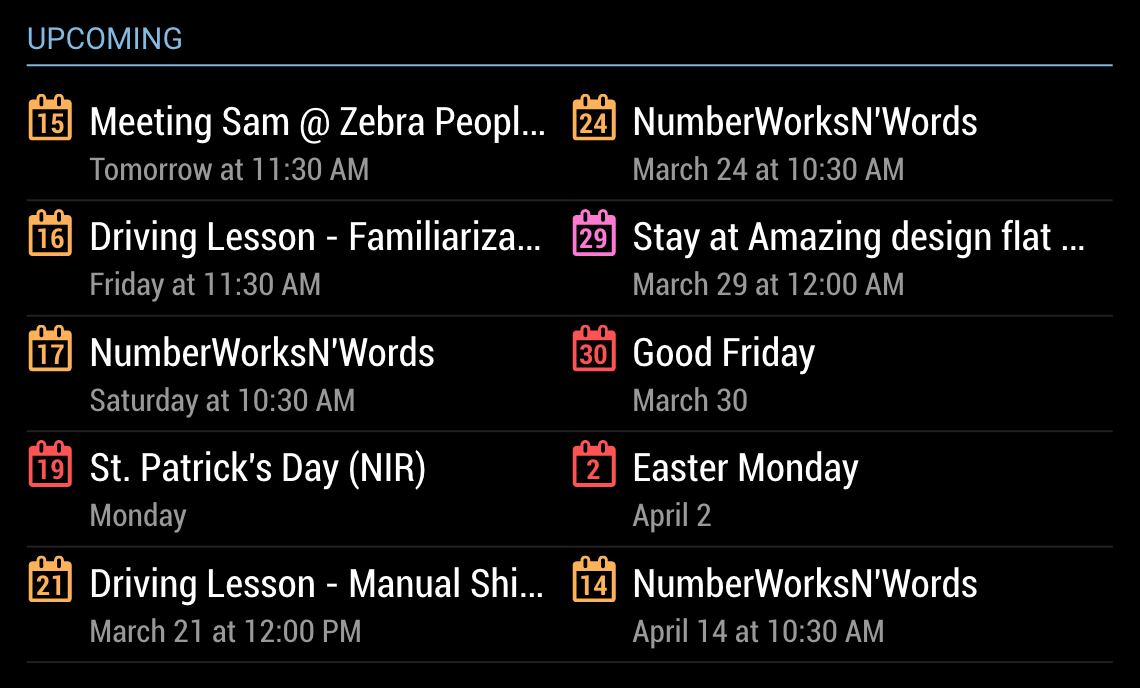
      This is based on the default calendar module, and is functionally exactly the same. The difference is in presentation layout:

      0_1494633843517_Screen Shot 2017-05-12 at 8.00.40 PM.png

      A note on v2.0:
      I’ve updated this module to use the new Nunjucks templating system. It also adds a new optional 2-column layout, useful if you’ve assigned MMM-MyCalendar to a wide region in your layout. See screenshot below. If you want to use this version you will need MagicMirror v2.2.0. Otherwise, you can download v1.0 here, which will work with earlier MM versions but will not have the 2-column layout option:
      https://github.com/jclarke0000/MMM-MyCalendar/releases/tag/v1.0

      0_1521028879950_Screen Shot 2018-03-14 at 12.00.41 PM.png

      posted in Utilities
      J
      j.e.f.f
    • RE: My display so far...

      Here’s my calendar app. Configuration is identical to the default calendar app. if you clone this, then change your calendar config to MMM-MyCalendar, it should just work.

      [card:jclarke0000/MMM-MyCalendar]

      https://github.com/jclarke0000/MMM-MyCalendar.git

      posted in Showcase
      J
      j.e.f.f
    • RE: My display so far...

      @ring23 I actually plan on making a new sports module that combines all the sports into one.

      posted in Showcase
      J
      j.e.f.f
    • RE: My display so far...

      …and MMM-MyWeather:

      [card:jclarke0000/MMM-MyWeather]

      https://github.com/jclarke0000/MMM-MyWeather

      posted in Showcase
      J
      j.e.f.f
    • MMM-MyCommute

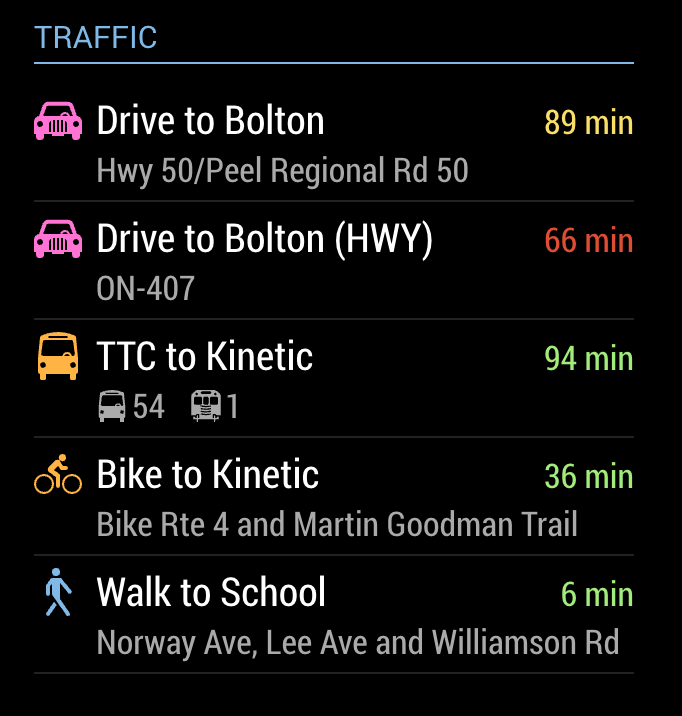
      This is a fork of the great little module mrx-work-traffic created by Dominic Marx. It adds a few extra features, like the ability to specify transport mode for each of your destinations, and the ability to color the transport icons.

      [card:jclarke0000/MMM-MyCommute]

      0_1495594933233_MMM-MyCommute.png

      Enjoy!

      posted in Transport
      J
      j.e.f.f
    • RE: My display so far...

      OK Here’s my first crack at this. I’ve forked mrx-work-traffic to make MMM-MyCommute.

      [card:jclarke0000/MMM-MyCommute]

      https://github.com/jclarke0000/MMM-MyCommute

      Will work on the others soon.

      posted in Showcase
      J
      j.e.f.f
    • RE: Facial Recognition - customize your mirror for every user!

      Also one more thought: I’m thinking of turning the camera 90 degrees so that it takes a vertical image – better chance of capturing faces of people of different heights that – thinking myself as a tall adult vs my kids, 9 and 6 years old. I’m thinking a 2:3 image (or 9:16 in the case of an HD cam) would really work well here to turn a wide FoV to a “tall” FoV – perfect for people standing right in front of the mirror… If I just turn the camera 90 degrees, and use it to train and capture in that orientation, will the facial recognition algorithms work as-is (i.e.: Can they recognize a face turned sideways) or would the module need to be changed to rotate the capture first before feeding into the algorithm?

      posted in Troubleshooting
      J
      j.e.f.f
    • RE: Facial Recognition - customize your mirror for every user!

      So I’ve managed to get this working with a Logitech C170 USB webcam, and I’m pretty stoked!

      I have a few questions:

      • Facial recognition is generally pretty slow… I need to stand in front of the camera for about 10 seconds before I am recognized. Is this normal or a bi-product of the fact that this is a fairly low quality camera… e.g.: if I were to upgrade say to the C920 instead, should I expect better performance? I’ve left the polling setting in config.js at the default 2 seconds – if the recognition were to happen this fast I’d be pretty happy!

      • There is a reference earlier in the thread that the capture resolution can be increased by modifying the module code. Where do I modify this? The c170 can capture natively at 640x480, so I’d like to experiment with capturing both the training images and the real-time facial recognition at this resolution, in an effort to see if I can get better confidence numbers. I’m currently seeing high 40s to mid 50s confidence. At the default threshold of 50, I am often not recognized, but it works more frequently if I increase the threshold to 60. (Training is based on about 50 images all captured from the c170 in representative lighting.) EDIT: one day later and I’m now often seeing confidence in the high 60’s so I needed to increase the threshold to 70.

      • I’d like to experiment with the other recognition algorithms, but I can only get LBPH to work. If I try to use Fisher or Eigen I get an error that the training data has not yet been computed. Training.xml was generated using the appropriate algorithm, and config.js was set to the matching algorithm.

      • With MMM-Facial-Recognition-Tools module, I’m having the same issue as the previous post where I get an error when trying to run tests using facerecognition.py (same error as above). So I need to do my tests with the actual MMM-Facial-Recognition module running on MagicMirror, which as you can imagine is fairly time consuming. Anyone have any insight on getting the test script working?

      For context, I’m opting for a webcam instead of the picam because webcams generally look nicer. I’ve spent HOURS scouring the web for a picam enclosure that didn’t look like a high school engineering project, without finding a single one. The closest I could find is this one by Adafruit but it has two problems:

      • I don’t like that the cover is clear – I don’t want to see the electronics
      • I don’t like how it routes the ribbon cable

      This first point is easily remedied with a can of spray paint, but the second is a little harder to deal with. If anyone has found a nice sleek enclosure for the picam, please share a link!

      Secondly, I like that webcams generally also have a microphone built-in, so that I can also use it for voice control. I REALLY wish I could use this one but I contacted their support and they told me it wouldn’t work at all with the Raspberry Pi. Too bad… was hoping the 4-microphone array would really with not having to yell at my mirror to get it to hear me and I like how sleek it is. Would look quite unassuming sitting on top of my mirror.

      Thanks for the help
      -Jeff
      posted in Troubleshooting
      J
      j.e.f.f
    • 1
    • 2
    • 64
    • 65
    • 66
    • 67
    • 68
    • 69
    • 66 / 69