Nicely done
J
Offline
A New Chapter for MagicMirror: The Community Takes the Lead
Read the statement by Michael Teeuw here.
Read the statement by Michael Teeuw here.
Posts
-
RE: MM digital display hung like a picture
@rmonkey Thanks. I will get it published, don’t know when, but will get it published
-
RE: MagicMirror2 Default Calendar module does not display reoccuring Monthly, or Weekly events with in your GMT window.
@sdetweil said in MagicMirror2 Default Calendar module does not display reoccuring Monthly, or Weekly events with in your GMT window.:
@jbat66 ok, for the test file the UUID values have to be unique
UID:ccccccc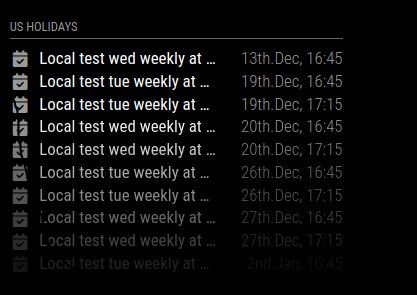
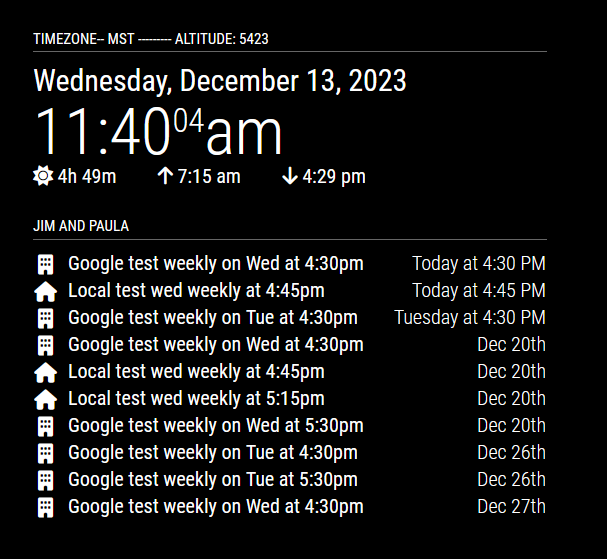
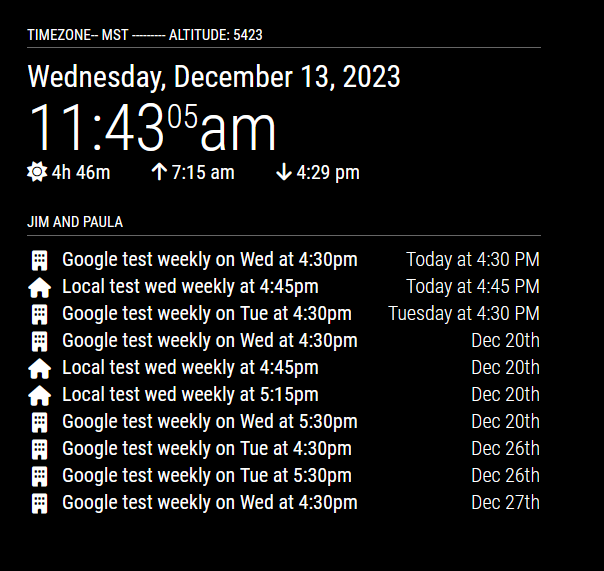
On your screen shot, you should have a "Local test wed weekly at… 13th Dec, 17:15 entry, but it is missing.
-
RE: MagicMirror2 Default Calendar module does not display reoccuring Monthly, or Weekly events with in your GMT window.
@sdetweil
Thanks for the UID info. I have not manualy edited an ICS file before and didn’t know that.
I updated the UID: to unique values, same results tho. Still missing the google and local after 5pm events.BEGIN:VCALENDAR
BEGIN:VEVENT
…
UID:cccccc
…
END:VEVENTBEGIN:VEVENT
…
UID:ccccc
…
END:VEVENTBEGIN:VEVENT
…
UID:cccc
…
END:VEVENTBEGIN:VEVENT
…
UID:ccc
…
END:VEVENTEND:VCALENDAR
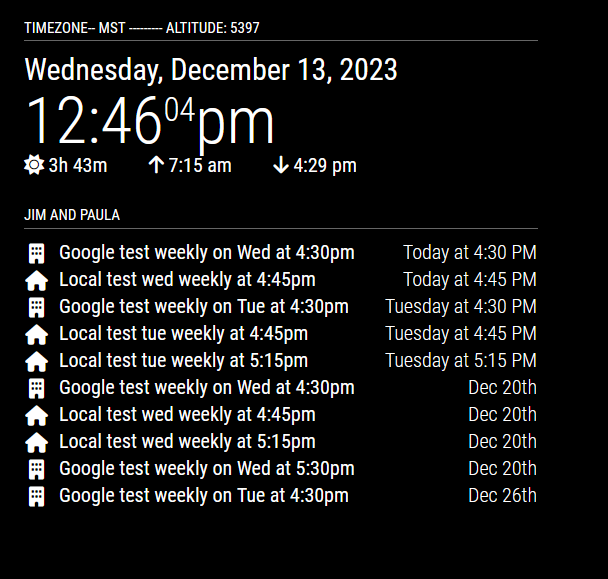
-
RE: MagicMirror2 Default Calendar module does not display reoccuring Monthly, or Weekly events with in your GMT window.
@sdetweil I appreciate you looking into this.
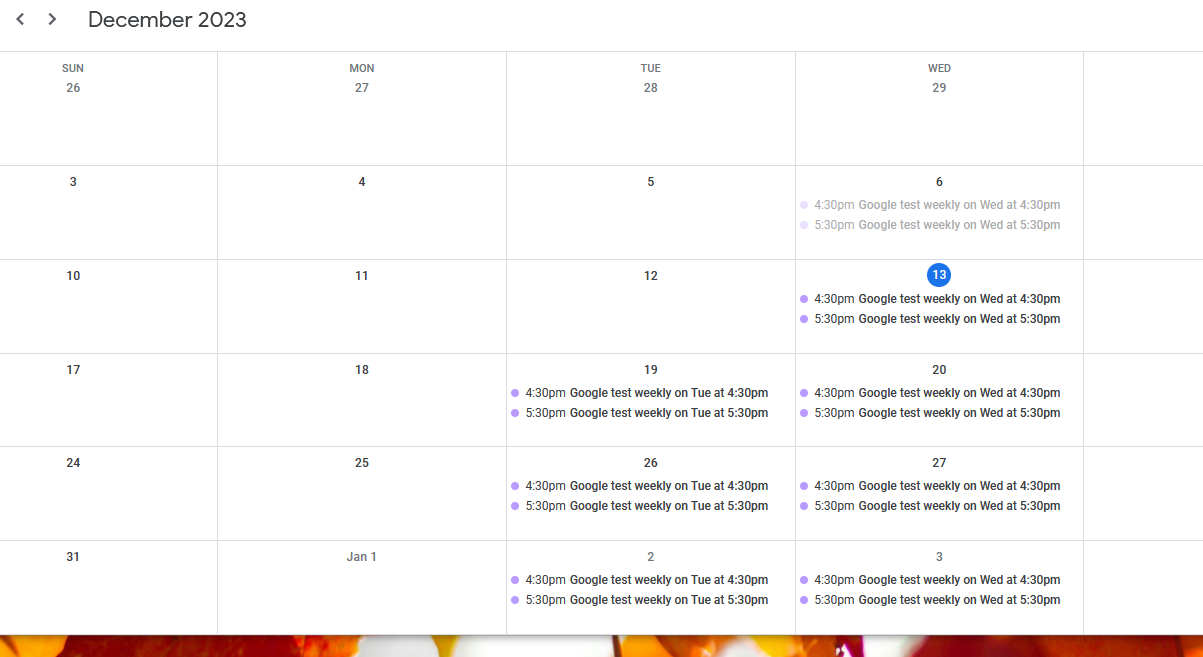
There should be a “Local test wed Weekly at 5:15pm” for today that doesn’t show up, and a “Google test weekly on Wed at 5:30pm” that doesn’t show up. -
RE: MagicMirror2 Default Calendar module does not display reoccuring Monthly, or Weekly events with in your GMT window.
@sdetweil said in MagicMirror2 Default Calendar module does not display reoccuring Monthly, or Weekly events with in your GMT window.:
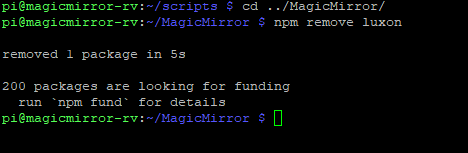
npm remove luxon
Before removing luxon, I got the local ics working, but because it was for Tuesday and today is Wednesday it worked, any reoccuring in the future work, just today’s does not. So I added two entries in the local ics file for Wednesday as well as left in the Tuesday entries.
I also made a new google calendar and made Wednesday repeating as well. Both the local test and the google test do not show up anything after 5pm mst. I did the removal and there was no change. I did restart MM between the test. Here is the updated ICS
BEGIN:VCALENDARBEGIN:VEVENT
DTSTART;TZID=America/Denver:20231205T171500
DTEND;TZID=America/Denver:20231205T181500
RRULE:FREQ=WEEKLY;BYDAY=TU
DTSTAMP:20231212T213725Z
UID:ccccccc
CREATED:20231212T213613Z
LAST-MODIFIED:20231212T213613Z
SEQUENCE:0
STATUS:CONFIRMED
SUMMARY:Local test tue weekly at 5:15pm
TRANSP:OPAQUE
END:VEVENTBEGIN:VEVENT
DTSTART;TZID=America/Denver:20231205T164500
DTEND;TZID=America/Denver:20231205T174500
RRULE:FREQ=WEEKLY;BYDAY=TU
DTSTAMP:20231212T213725Z
UID:ccccc
CREATED:20231212T213523Z
LAST-MODIFIED:20231212T213537Z
SEQUENCE:2
STATUS:CONFIRMED
SUMMARY:Local test tue weekly at 4:45pm
TRANSP:OPAQUE
END:VEVENTBEGIN:VEVENT
DTSTART;TZID=America/Denver:20231206T171500
DTEND;TZID=America/Denver:20231206T181500
RRULE:FREQ=WEEKLY;BYDAY=WE
DTSTAMP:20231212T213725Z
UID:ccccccc
CREATED:20231212T213613Z
LAST-MODIFIED:20231212T213613Z
SEQUENCE:0
STATUS:CONFIRMED
SUMMARY:Local test wed weekly at 5:15pm
TRANSP:OPAQUE
END:VEVENTBEGIN:VEVENT
DTSTART;TZID=America/Denver:20231206T164500
DTEND;TZID=America/Denver:20231206T174500
RRULE:FREQ=WEEKLY;BYDAY=WE
DTSTAMP:20231212T213725Z
UID:ccccc
CREATED:20231212T213523Z
LAST-MODIFIED:20231212T213537Z
SEQUENCE:2
STATUS:CONFIRMED
SUMMARY:Local test wed weekly at 4:45pm
TRANSP:OPAQUE
END:VEVENTEND:VCALENDAR
Here is my config.js
	{
		disabled: false,
module: “calendar”,
header: “Jim and Paula”,
position: “top_left”,
config: {
limitDays: 0, // Days to search into the future 0 is unlimited
maximumNumberOfDays: 30, // The maximum number of days in the future. You may have to restart MM for this to work.
maximumEntries: 10, // The maximum number of events shown.
timeFormat: “relative”, //Display event times as absolute dates, or relative time, or using absolute date headers with times for each event next to it (absolute, relative,)
getRelative: 0, // How much time (in hours) should be left until calendar events start getting relative? Possible values: 0 (events stay absolute) - 48 (48 hours before the event starts) Default value: 6
urgency: 7, // If timeFormat of absolute the urgency setting display events within a specific time frame as relative. a positive integer representing the number of days for which you want a relative date Default 6
nextDaysRelative: false, // If this is set to true, the appointments of today and tomorrow are displayed relatively, even if the timeformat is set to absolute.Default: false
fade: false,
fadePoint: 0.25,
maxTitleLength: 45, // The maximum title length.
wrapEvents: false, // Wrap event titles to multiple lines. Breaks lines at the length defined by maxTitleLength
maxTitleLines: 1, // The maximum number of lines a title will wrap vertically before being cut (Only enabled if wrapEvents is also enabled)
fetchInterval: 60000,
sliceMultiDayEvents: false, // If this is set to true, events exceeding at least one midnight will be sliced into separate events including a counter like (1/2). This is especially helpful in “dateheaders” mode.
tableClass: “small”, // Name of the classes issued from main.css. Possible values: xsmall, small, medium, large, xlarge.Default small.
customEvents: [{keyword: ‘Birthday’, symbol: ‘birthday-cake’, color: ‘Gold’}],
calendars: [
{
symbol: “building”,
url: “https://calendar.google.com/calendar/ical/bd007470089e22eace0d824caab026a2b1ef7290f6c51f166c166f7f47d551dd%40group.calendar.google.com/public/basic.ics” //testing via google public url
},
{
symbol: “house”,
url: “http://magicmirror-rv.rendezvous:8080/modules/default/calendar/testing.ics” //testing
}
]
}
},
-
RE: MagicMirror2 Default Calendar module does not display reoccuring Monthly, or Weekly events with in your GMT window.
@sdetweil said in MagicMirror2 Default Calendar module does not display reoccuring Monthly, or Weekly events with in your GMT window.:
npm install node-ical@0.17.0
I tried it, but it made no difference. :-(
-
RE: MagicMirror2 Default Calendar module does not display reoccuring Monthly, or Weekly events with in your GMT window.
@sdetweil Thanks for the info. Do you think there is fix coming on next release, for this issue?
-
RE: MagicMirror2 Default Calendar module does not display reoccuring Monthly, or Weekly events with in your GMT window.
@sdetweil
Howdy from Wyoming, I’m MDT GMT -7This one works
BEGIN:VEVENT
DTSTART;TZID=America/Denver:20231205T164500
DTEND;TZID=America/Denver:20231205T174500
RRULE:FREQ=WEEKLY;BYDAY=TU
DTSTAMP:20231212T213725Z
UID:ccccc
CREATED:20231212T213523Z
LAST-MODIFIED:20231212T213537Z
SEQUENCE:2
STATUS:CONFIRMED
SUMMARY:test weekly at 4:45pm
TRANSP:OPAQUE
END:VEVENTBelow doesn’t work
BEGIN:VEVENT
DTSTART;TZID=America/Denver:20231205T171500
DTEND;TZID=America/Denver:20231205T181500
RRULE:FREQ=WEEKLY;BYDAY=TU
DTSTAMP:20231212T213725Z
UID:ccccccc
CREATED:20231212T213613Z
LAST-MODIFIED:20231212T213613Z
SEQUENCE:0
STATUS:CONFIRMED
SUMMARY:test weekly at 5:15pm
TRANSP:OPAQUE
END:VEVENT -
RE: MagicMirror2 Default Calendar module does not display reoccuring Monthly, or Weekly events with in your GMT window.
@sdetweil I posted a reply, but it got rejected, let me try again.
-
RE: MM digital display hung like a picture
@rmonkey
I wrote a bash script that will take lat and lon, do an API call to Openweather, and get the sunset and sunrise times. then it will schedule a sunrise program and a sunset program to run via ‘at’. You can have +/- offsets for sunrise/sunset and you can just have a settime. So what I’m doing is doing api calls to MM at 10pm to turn off my background images, and then dim the screen via the remote api. then at 15 min after sunrise it puts it back to normal.I have never published to github, but probably will at some point. Do you think this would be something folks would want? it is not a module. it does require jq and at to be installed on the linux system.
-
MagicMirror2 Default Calendar module does not display reoccuring Monthly, or Weekly events with in your GMT window.
Platform [ Raspberry Pi 4 ]:
Node Version [ “version”: “2.25.0”, ]:
MagicMirror Version [ V2 ]:
Description:
MagicMirror2 Default Calendar module does not display reoccuring Monthly, or Weekly events with in your GMT window.
What I mean is that my GMT is -7, so any reoccuring Monthly, or Weekly event with a time of (midnight -7) aka 5:00pm my time does not get displayed on the day of the event.
Daily reoccuring events with times do not get affected.Using Google Calendars with Secret address in iCal format.
I also tested Google Calendars with public address in iCal format.I’m GMT -7
7 Hours before midnight is 5:00pm, and that is when reoccuring Monthly, and Weekly (but not daily) events break and do not show on MagicMirror
Here are my test results and how you can replicate the problem.
OK-Test weekly no time
OK-Test monthly - today - no time
OK-Test monthly - tomarrow - no timeOK-test monthly 12th at 4:45pm
OK-test-monthly 2ndtue 4:45pm
BAD-test monthly 12th at 5:15pm
BAD-test monthly 2ndtue at 5:15pmOK-test weekly at 1100am
OK-test weekly at 1:00pm
OK-test weekly at 4:00pm
OK-test weekly at 4:45pm
BAD-test weekly at 5:00pm
BAD-test weekly at 5:15pm
BAD-test weekly at 6:00pm
BAD-test weekly at 11:00pmOK-test daily at 4:45pm
OK-test daily at 5:00pm
OK-test daily at 5:15pm
OK-test daily at 11:00pmOK-test monthly 12th at 4:45pm
OK-test-monthly 2ndtue 4:45pm
BAD-test monthly 12th at 5:15pm
BAD-test monthly 2ndtue at 5:15pmSteps to Reproduce: Make a weekly repeating event 15 min (as an example) before your GMT -X time, and make another one 15 min after you GMT -X time. The one after will not display.
Expected Results: Repeading weekly or montly events that have a time in the future of today still show up until the time has past.
Actual Results: missing events
Configuration:
{ disabled: false,// turn this one back on
module: “calendar”,
header: “Jim and Paula”,
position: “top_left”,
config: {
limitDays: 0, // Days to search into the future 0 is unlimited
maximumNumberOfDays: 7, // The maximum number of days in the future. You may have to restart MM for this to work.
maximumEntries: 10, // The maximum number of events shown.
timeFormat: “relative”, //Display event times as absolute dates, or relative time, or using absolute date headers with times for each event next to it (absolute, relative,)
getRelative: 0, // How much time (in hours) should be left until calendar events start getting relative? Possible values: 0 (events stay absolute) - 48 (48 hours before the event starts) Default value: 6
urgency: 7, // If timeFormat of absolute the urgency setting display events within a specific time frame as relative. a positive integer representing the number of days for which you want a relative date Default 6
nextDaysRelative: false, // If this is set to true, the appointments of today and tomorrow are displayed relatively, even if the timeformat is set to absolute.Default: false
fade: false,
fadePoint: 0.25,
maxTitleLength: 45, // The maximum title length.
wrapEvents: false, // Wrap event titles to multiple lines. Breaks lines at the length defined by maxTitleLength
maxTitleLines: 1, // The maximum number of lines a title will wrap vertically before being cut (Only enabled if wrapEvents is also enabled)
fetchInterval: 120000,
sliceMultiDayEvents: false, // If this is set to true, events exceeding at least one midnight will be sliced into separate events including a counter like (1/2). This is especially helpful in “dateheaders” mode.
tableClass: “small”, // Name of the classes issued from main.css. Possible values: xsmall, small, medium, large, xlarge.Default small.
customEvents: [{keyword: ‘Birthday’, symbol: ‘birthday-cake’, color: ‘Gold’}],
calendars: [
{
symbol: “gift”,
//maximumEntries: 1,
//maximumNumberOfDays: 7, // you have to restart MagicMirror for this to work
//url: “webcal://www.calendarlabs.com/ical-calendar/ics/76/US_Holidays.ics”
//url: “https://calendar.google.com/calendar/ical/en.usa%23holiday%40group.v.calendar.google.com/public/basic.ics” //Holidays from Google
url: “https://calendar.google.com/calendar/ical/1111111111111111111111111111111111111111%40group.calendar.google.com/private-1111111111111111111111111111111/basic.ics” //Traditional Holidays from Jim
},
{
symbol: “calendar-check”,
//maximumEntries: 5,
//maximumNumberOfDays: 7, // you have to restart MagicMirror for this to work
url: “https://calendar.google.com/calendar/ical/ggggggg%40gmail.com/private-2222222222222222222222222222222222222/basic.ics” //Jims
},
{
symbol: “calendar-xmark”,
//maximumEntries: 2,
//maximumNumberOfDays: 7, // you have to restart MagicMirror for this to work
url: “https://calendar.google.com/calendar/ical/hhhhhhhhhhhhh%40gmail.com/private-3333333333333333333333333333333333/basic.ics” //Paulas
},
{
symbol: “building”,
//maximumEntries: 1,
//maximumNumberOfDays: 7, // you have to restart MagicMirror for this to work
url: “https://calendar.google.com/calendar/ical/kkkkkkkkkkkkkkkkkkkkkkkkkkkkk%40group.calendar.google.com/private-444444444444444444444444444444444444/basic.ics” //Jims Work
}
]
}
}, -
RE: MM digital display hung like a picture
@rmonkey I really like how thin it is.