@savage_gr1nd there’s no text on screen when you turn on/off module. can you get display text or display image commands to work? right now the text/image/video will remain on the screen, the video will be played in a loop, but you can simply add a timeout to hide this module after few seconds. The ‘next up’ Youtube video idea is also cool, do you think you can implement it yourself?
J
Offline
A New Chapter for MagicMirror: The Community Takes the Lead
Read the statement by Michael Teeuw here.
Read the statement by Michael Teeuw here.
Posts
-
RE: MMM-MirrorMirrorOnTheWall - Alexa voice control to hide/show modules and display text/images
-
RE: MMM-MirrorMirrorOnTheWall - Alexa voice control to hide/show modules and display text/images
@savage_gr1nd ?? to run npm install? in the magic mirror module folder, where package.json is
-
RE: MMM-MirrorMirrorOnTheWall - Alexa voice control to hide/show modules and display text/images
@savage_gr1nd erhhh, inside the module folder. you also need to copy the certs folder over
-
RE: MMM-MirrorMirrorOnTheWall - Alexa voice control to hide/show modules and display text/images
@savage_gr1nd yeah, i was really excited when i got it working. :) let me know when you do!
-
RE: MMM-MirrorMirrorOnTheWall - Alexa voice control to hide/show modules and display text/images
@savage_gr1nd this is my npm list
├─┬ alexa-sdk@1.0.6 │ ├─┬ aws-sdk@2.9.0 │ │ ├─┬ buffer@4.9.1 │ │ │ ├── base64-js@1.2.0 │ │ │ ├── ieee754@1.1.8 │ │ │ └── isarray@1.0.0 │ │ ├── crypto-browserify@1.0.9 │ │ ├── jmespath@0.15.0 │ │ ├── querystring@0.2.0 │ │ ├── sax@1.1.5 │ │ ├─┬ url@0.10.3 │ │ │ └── punycode@1.3.2 │ │ ├── uuid@3.0.0 │ │ ├── xml2js@0.4.15 │ │ └─┬ xmlbuilder@2.6.2 │ │ └── lodash@3.5.0 │ ├── i18next@3.5.2 │ └── i18next-sprintf-postprocessor@0.2.2 ├─┬ aws-iot-device-sdk@1.0.14 │ ├── crypto-js@3.1.6 │ ├── minimist@1.2.0 │ ├─┬ mqtt@1.11.2 │ │ ├─┬ commist@1.0.0 │ │ │ └── leven@1.0.2 │ │ ├─┬ concat-stream@1.6.0 │ │ │ ├─┬ readable-stream@2.2.2 │ │ │ │ ├── buffer-shims@1.0.0 │ │ │ │ ├── process-nextick-args@1.0.7 │ │ │ │ └── util-deprecate@1.0.2 │ │ │ └── typedarray@0.0.6 │ │ ├─┬ end-of-stream@1.1.0 │ │ │ └─┬ once@1.3.3 │ │ │ └── wrappy@1.0.2 │ │ ├── help-me@0.1.0 │ │ ├── inherits@2.0.3 │ │ ├─┬ mqtt-connection@2.1.1 │ │ │ ├── reduplexer@1.1.0 │ │ │ └── through2@0.6.5 │ │ ├── mqtt-packet@3.4.7 │ │ ├── pump@1.0.2 │ │ ├─┬ readable-stream@1.0.34 │ │ │ ├── core-util-is@1.0.2 │ │ │ ├── isarray@0.0.1 │ │ │ └── string_decoder@0.10.31 │ │ ├── reinterval@1.1.0 │ │ ├─┬ split2@2.1.1 │ │ │ └─┬ through2@2.0.3 │ │ │ └── readable-stream@2.2.2 │ │ └── xtend@4.0.1 │ └─┬ websocket-stream@3.3.3 │ ├─┬ duplexify@3.5.0 │ │ ├── end-of-stream@1.0.0 │ │ ├── readable-stream@2.2.2 │ │ └── stream-shift@1.0.0 │ ├─┬ through2@2.0.3 │ │ └── readable-stream@2.2.2 │ └─┬ ws@1.1.1 │ ├── options@0.0.6 │ └── ultron@1.0.2 ├─┬ google-images@2.0.0 │ └─┬ got@6.7.1 │ ├─┬ create-error-class@3.0.2 │ │ └── capture-stack-trace@1.0.0 │ ├── duplexer3@0.1.4 │ ├── get-stream@3.0.0 │ ├── is-redirect@1.0.0 │ ├── is-retry-allowed@1.1.0 │ ├── is-stream@1.1.0 │ ├── lowercase-keys@1.0.0 │ ├── safe-buffer@5.0.1 │ ├── timed-out@4.0.0 │ ├── unzip-response@2.0.1 │ └─┬ url-parse-lax@1.0.0 │ └── prepend-http@1.0.4 └─┬ youtube-node@1.3.0 ├── colors@1.0.3 ├─┬ prompt@0.2.14 │ ├── pkginfo@0.4.0 │ ├─┬ read@1.0.7 │ │ └── mute-stream@0.0.7 │ ├── revalidator@0.1.8 │ ├─┬ utile@0.2.1 │ │ ├── async@0.2.10 │ │ ├── deep-equal@1.0.1 │ │ ├── i@0.3.5 │ │ ├─┬ mkdirp@0.5.1 │ │ │ └── minimist@0.0.8 │ │ ├── ncp@0.4.2 │ │ └─┬ rimraf@2.5.4 │ │ └─┬ glob@7.1.1 │ │ ├── fs.realpath@1.0.0 │ │ ├── inflight@1.0.6 │ │ ├─┬ minimatch@3.0.3 │ │ │ └─┬ brace-expansion@1.1.6 │ │ │ ├── balanced-match@0.4.2 │ │ │ └── concat-map@0.0.1 │ │ └── path-is-absolute@1.0.1 │ └─┬ winston@0.8.3 │ ├── colors@0.6.2 │ ├── cycle@1.0.3 │ ├── eyes@0.1.8 │ ├── pkginfo@0.3.1 │ └── stack-trace@0.0.9 └─┬ request@2.53.0 ├── aws-sign2@0.5.0 ├── bl@0.9.5 ├── caseless@0.9.0 ├─┬ combined-stream@0.0.7 │ └── delayed-stream@0.0.5 ├── forever-agent@0.5.2 ├─┬ form-data@0.2.0 │ └── async@0.9.2 ├─┬ hawk@2.3.1 │ ├── boom@2.10.1 │ ├── cryptiles@2.0.5 │ ├── hoek@2.16.3 │ └── sntp@1.0.9 ├─┬ http-signature@0.10.1 │ ├── asn1@0.1.11 │ ├── assert-plus@0.1.5 │ └── ctype@0.5.3 ├── isstream@0.1.2 ├── json-stringify-safe@5.0.1 ├─┬ mime-types@2.0.14 │ └── mime-db@1.12.0 ├── node-uuid@1.4.7 ├── oauth-sign@0.6.0 ├── qs@2.3.3 ├── stringstream@0.0.5 ├─┬ tough-cookie@2.3.2 │ └── punycode@1.4.1 └── tunnel-agent@0.4.3 -
RE: MMM-MirrorMirrorOnTheWall - Alexa voice control to hide/show modules and display text/images
@savage_gr1nd my node_modules is 24.2MB. How are you testing the lambda function? try something simple, like the hello intent first
-
RE: MMM-MirrorMirrorOnTheWall - Alexa voice control to hide/show modules and display text/images
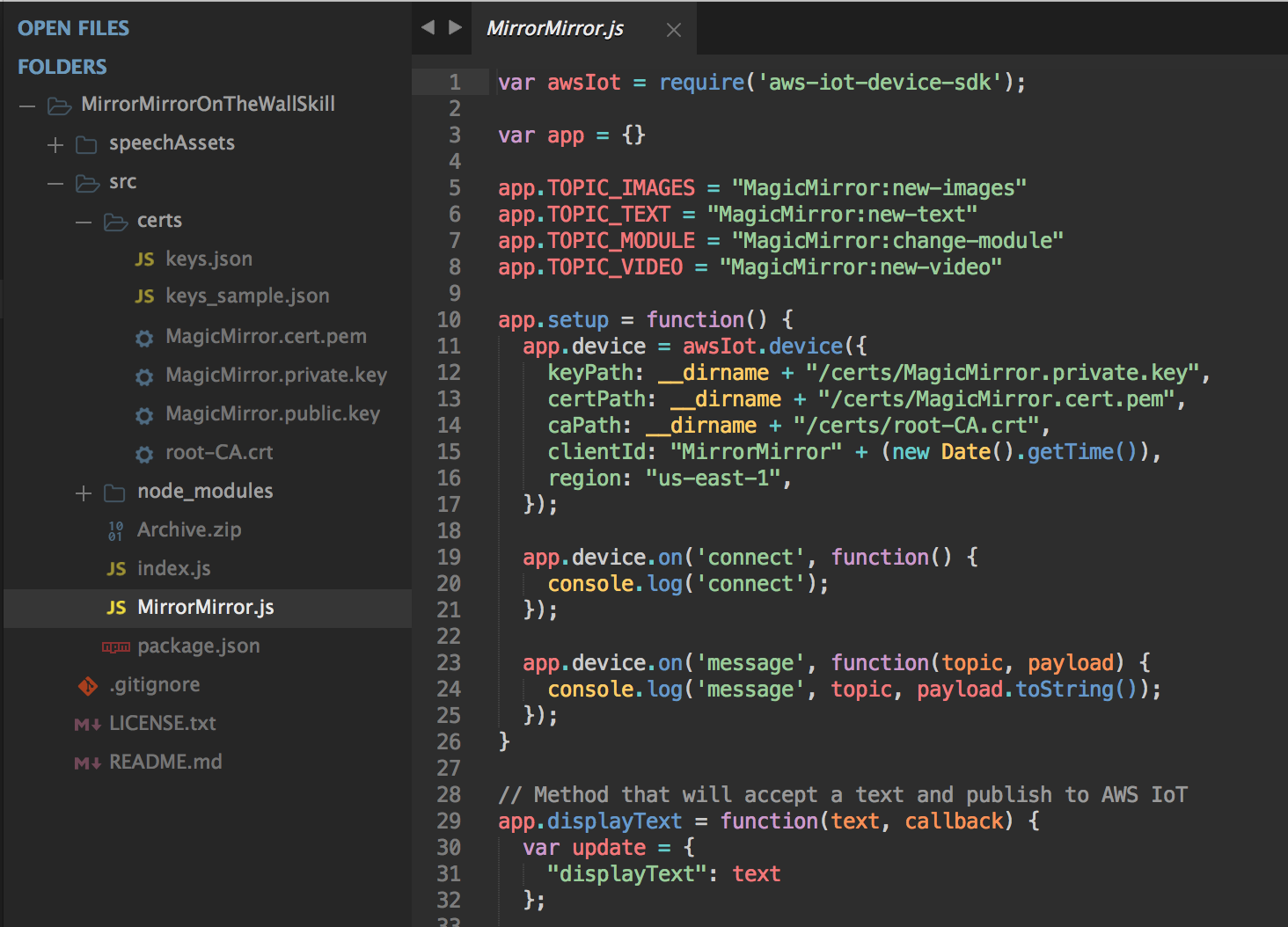
@savage_gr1nd the zip shouldn’t be too large, mine was 5.1MB. I’m not sure what you are saying about path to certs and keys.json. have a look of my folder structure
-
RE: MMM-MirrorMirrorOnTheWall - Alexa voice control to hide/show modules and display text/images
@savage_gr1nd you need to include node_modules in the src folder. run ‘npm install’ inside src folder.
-
RE: MMM-MirrorMirrorOnTheWall - Alexa voice control to hide/show modules and display text/images
For people struggling with setting up Lambda and Alexa Skill, here’s a good visual instructions for a different Skill. Use your judgment when dealing with differences with my skill.
https://github.com/alexa/skill-sample-nodejs-calendar-readerHere’s Amazon’s instructions for setting up a AWS IoT device, it’ll also be slightly different when you setup your own device, but it’s good enough.
http://docs.aws.amazon.com/iot/latest/developerguide/iot-console-signin.html
-
RE: MMM-MirrorMirrorOnTheWall - Alexa voice control to hide/show modules and display text/images
@Gunwoody i’ve never seen another mirror module which works with a Alexa skill
-
RE: MMM-MirrorMirrorOnTheWall - Alexa voice control to hide/show modules and display text/images
@zman3 you don’t have certs and node_modules?
-
RE: MMM-MirrorMirrorOnTheWall - Alexa voice control to hide/show modules and display text/images
@Gunwoody sorry to hear that. This is quite advanced as you have to setup AWS IoT, Lambda and Alexa skill, so it does need you to have some experiences with programming and using AWS services. I’m thinking about how to simplify this and get it to work with multiple users, but thanks for trying.
-
RE: MMM-MirrorMirrorOnTheWall - Alexa voice control to hide/show modules and display text/images
@bartalluyn is your code on Github? I’m quite interested in your Alexa Java client, it’d be great if it was a Mirror Module, so Alexa and Mirror can communicate directly without going through AWS IoT.
-
RE: MMM-MirrorMirrorOnTheWall - Alexa voice control to hide/show modules and display text/images
@Gunwoody it says you can invoke your function right now. if it’s not ok, it would give you a red error message. Anyways, you can click on the test button, see whether your function works. but before that, you need to setup a test case
-
RE: MMM-MirrorMirrorOnTheWall - Alexa voice control to hide/show modules and display text/images
@Gunwoody you should definitely include node_modules, but my zip file is 5.1MB, I think the limit is 50MB. it’s not an error, you can ignore it.
-
RE: MMM-MirrorMirrorOnTheWall - Alexa voice control to hide/show modules and display text/images
@bartalluyn really nice work! but since you have to change the Alexa Java client app to get it to work, it wouldn’t work for our application, since we need to get it to work with off-the-shelf Alexa or Alexa Echo. Right now my Alexa skill can only be used by one user, so I’m thinking about how to get it to work with multiple users so I can publish this skill, so people don’t need to worry about setting up Lambda and Alexa skill.
-
RE: MMM-MirrorMirrorOnTheWall - Alexa voice control to hide/show modules and display text/images
@Journeytojah it usually happens when you zip the src folder, you have to go inside the src folder, and select all the files and folder, including node_modules, and certs, and compress them to a zip file.
-
RE: MMM-MirrorMirrorOnTheWall - Alexa voice control to hide/show modules and display text/images
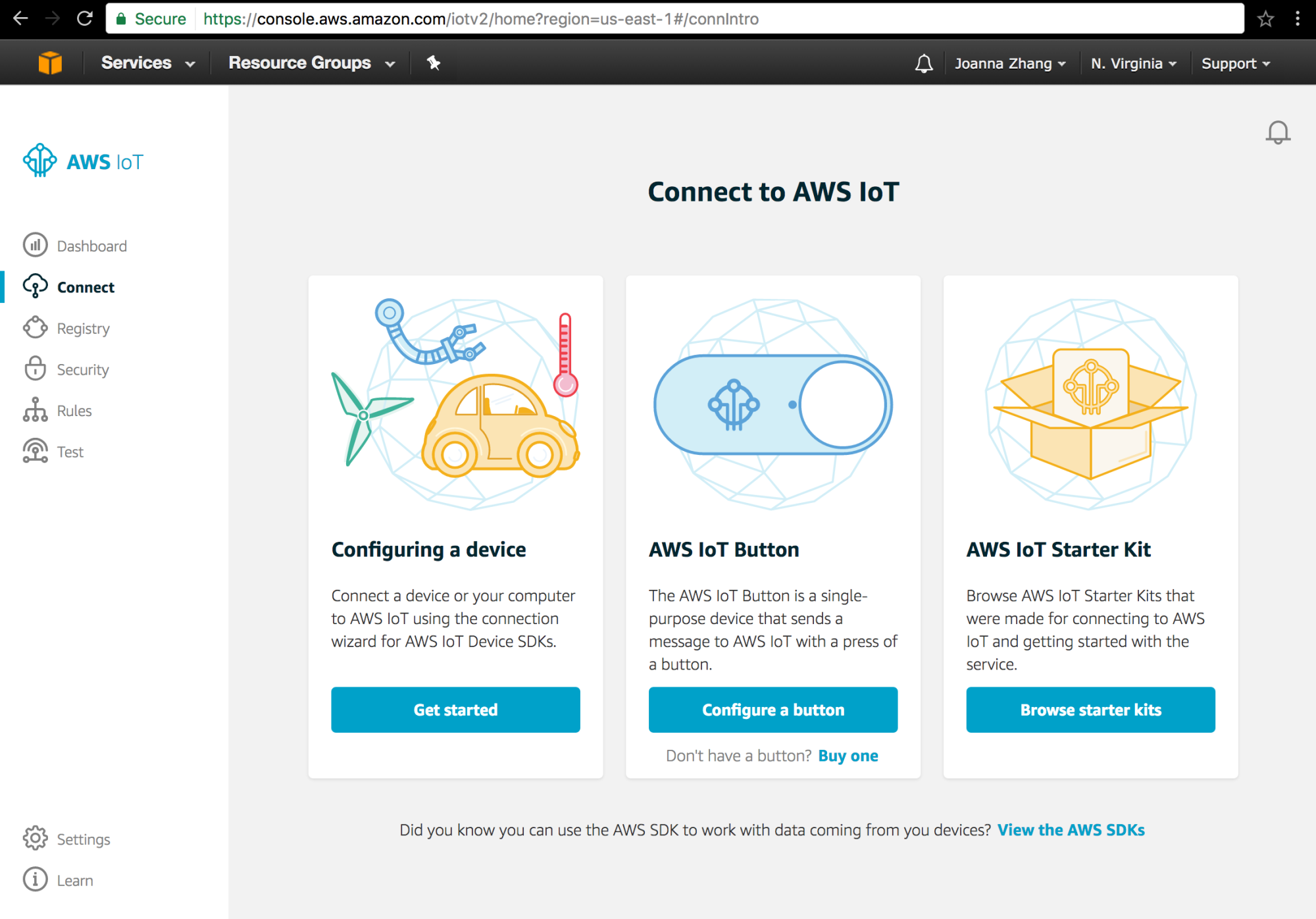
@lucallmon yes you must setup an AWS IoT device, it should be free, I don’t know where you are seeing basic or developer whatever.
You should see something like this
-
RE: MMM-MirrorMirrorOnTheWall - Alexa voice control to hide/show modules and display text/images
@zman3 no you just need one Alexa app running. The Alexa sample app is perfectly fine.
-
RE: MMM-MirrorMirrorOnTheWall - Alexa voice control to hide/show modules and display text/images
@Journeytojah do you still have the same error? I thought you got it running.