MagicMirror Forum
    • Recent
    • Tags
    • Unsolved
    • Solved
    • MagicMirror² Repository
    • Documentation
    • 3rd-Party-Modules
    • Donate
    • Discord
    • Register
    • Login
    1. Home
    2. jtmoore81
    3. Posts
    A New Chapter for MagicMirror: The Community Takes the Lead
    Read the statement by Michael Teeuw here.
    J
    Offline
    • Profile
    • Following 0
    • Followers 0
    • Topics 6
    • Posts 17
    • Groups 0

    Posts

    Recent Best Controversial
    • RE: Reboot black screen

      @justjim1220 , here is my calendar config. Hopefully this helps.

      	{
      		module: "calendar",
      		header: "Family",
      		position: "top_left",
      		config: {
      	calendars: [
      		{
      			url: 'https://xxxxxxx:port/caldav/xxxxxxxx/eopscxu/',
      			symbol: 'calendar',
      			auth: {
      			    user: 'username',
      			    pass: 'password',
      			    method: 'basic'
      			}
      		},
      	]
      		}
      	},
      
      posted in Troubleshooting
      J
      jtmoore81
    • Reboot black screen

      Hello,

      I’m having an issue where my calendar times out about 24 hours and I have to either manually refresh the screen or reboot the system. I opted to setup a cron job that will reboot every morning. The only problem is now when it reboots sometimes it just boots to a black screen and if I do a manually refresh it refreshes the screen and everything is good until the next morning.

      Thanks,

      posted in Troubleshooting
      J
      jtmoore81
    • Blank Screen after update raspi

      Good Morning,
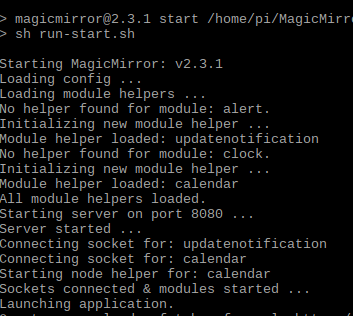
      I did a sudo apt-get udpate && sudo apt-get upgrade to my raspi this morning and now MM stalls out on npm start and hangs on the black screen. I’ve even tried to use the original sample config but get the same results. Not sure where to go from here.

      0_1528901654578_77e497b8-88dd-46a9-98e0-5c8cbe9623e2-image.png

      edit: Not sure what the differece is but I have this in a virtual enviornment and after rebooting the server the VM is on, seemed to boot up. Not sure what was hanging up.

      posted in Troubleshooting
      J
      jtmoore81
    • RE: Connecting Monitor without raspi

      @idoodler Both are good ideas. Thank you.

      posted in Hardware
      J
      jtmoore81
    • Connecting Monitor without raspi

      Has anyone attempted or successfully installed a MM in a mirror without using a Raspi? I have mine setup through a virtual machine as proof of concept and would like to keep it in the VM and I could in theory run the display through Ethernet. But I can’t quiet wrap my head around the logistics just yet.

      posted in Hardware
      J
      jtmoore81
    • RE: Weather Module feels like is a little high

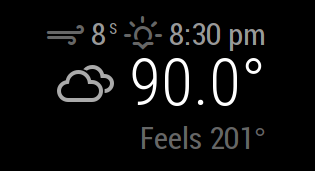
      Not sure what changed. I had the MM running overnight and when I checked it this morning the Feels like temp was correct. My guess is that there was an issue with the OpenWeather api.

      0_1527861107434_ebdbcc5d-c821-43e8-af09-b957f62102b0-image.png

      Thanks,

      posted in Troubleshooting
      J
      jtmoore81
    • RE: Temp suddenly showing 239 degrees

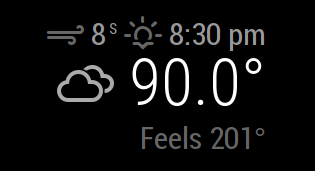
      @michmich Was this ever pushed? I believe I’m having the same issue.

      0_1527799115984_48b49553-2db1-4a20-a831-f429c4a72bc3-image.png

      posted in Troubleshooting
      J
      jtmoore81
    • RE: Weather Module feels like is a little high

      @waynerigley I have the config units set as imperial which is why I get the 90.0. I’ve even tried do set the units in the module config as well but get the same results.

      posted in Troubleshooting
      J
      jtmoore81
    • Weather Module feels like is a little high

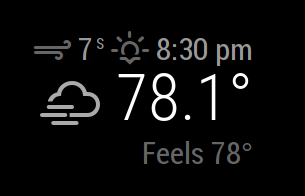
      Is this something that I’ve done wrong or is the data from the api incorrect? I thought it felt a little warm outside :)

      0_1527793340084_2b56934b-7f4d-441b-9776-a48aa7c0e74f-image.png

      posted in Troubleshooting
      J
      jtmoore81
    • RE: Ubuntu 18.04 install issues

      @hriereb Sorry I couldn’t help with those errors.

      posted in Troubleshooting
      J
      jtmoore81
    • RE: Ubuntu 18.04 install issues

      @hriereb No worries. I’m still trying to figure it out myself. The way I have setup up my system was to add Hyper V Manager to my windows system. Then you can install different OS under the Hyper V system. You can use just about any virtual management system you want, I chose Hyper V because it available on my windows 10 system. It should act just as a stand alone system. I installed the Raspberry Pi Desktop OS and set it up as you would if it were on a raspi.

      posted in Troubleshooting
      J
      jtmoore81
    • RE: Making changes without stopping MM

      @idoodler I haven’t installed it on this machine…I guess I should. Thanks.

      posted in Troubleshooting
      J
      jtmoore81
    • Making changes without stopping MM

      I"m starting to get things up and running with MM. I do have a question. Is there a way you can develop or make changes to the config file without having to stop the MM, then make the changes, then restart the system?

      Thanks,

      posted in Troubleshooting
      J
      jtmoore81
    • RE: Ubuntu 18.04 install issues

      @axled I did install them but kept getting dependency errors and figured there had to be a better way.

      posted in Troubleshooting
      J
      jtmoore81
    • RE: Ubuntu 18.04 install issues

      @hriereb I had to install the Debian Stretch (Raspi Desktop version) as a Virtual Machine. Then follow the manual install instructions.After that it is seems to be working well.

      posted in Troubleshooting
      J
      jtmoore81
    • RE: Ubuntu 18.04 install issues

      Just to circle back up I kept getting errors trying to install in a VM on Ubuntu so I decided to install another VM for a raspi desktop and followed the manual installation process without any issues.

      Now time to make some modifications and figure out how to display the VM onto a stand alone monitor.

      posted in Troubleshooting
      J
      jtmoore81
    • Ubuntu 18.04 install issues

      Hello,

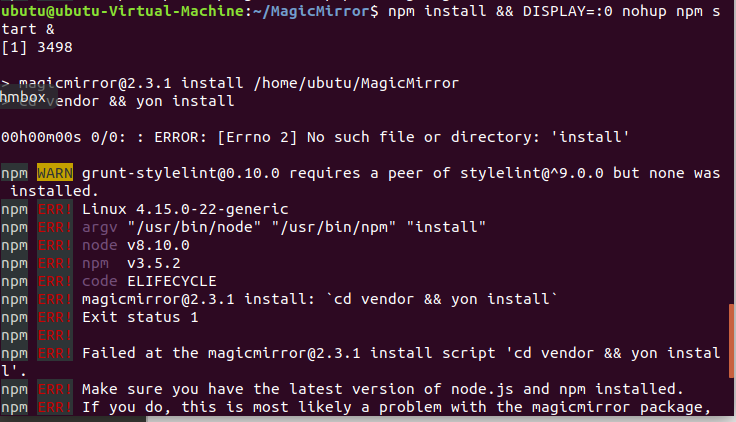
      I’m new to Magic Mirror and having some install issues. I’m trying to install Magic Mirror on Ubuntu 18.04 within a virtual environment. Doesn’t seem to matter what I do I run into dependency issues. Is there a way to install all the dependencies without having to go one by one or have I missed a step?

      0_1527625328320_96a1e42f-8a8d-432a-b512-a3d263853746-image.png

      posted in Troubleshooting
      J
      jtmoore81
    • 1 / 1