@feuerball, I meant, add more IR lights for the camera to “see” better at night.
A New Chapter for MagicMirror: The Community Takes the Lead
Read the statement by Michael Teeuw here.
Read the statement by Michael Teeuw here.
 Offline
Posts
-
RE: Face Recognition with inferred light
-
RE: Question about the mirror
It’s a warning, sure. And perhaps their product is indeed easily scratched. Ask around, go a different place or vendor, see what kind of response you get.
-
RE: Question about the mirror
Like I mentioned, how you treat your mirror will depend on how long it lasts. Using abrasive cleaners is bad, but a clean, damp, micro fiber cloth goes a long way.
-
RE: Question about the mirror
Acrylic mirrors, sure. Glass mirrors, while you can still scratch them, they do last a lot longer than acrylic ones. ANY mirror is prone to scratches, it’s how you treat it that depends how long it lasts.
-
RE: Releasing stable
We could release v2 (stable), keep v2-beta to continue developing on that release. Or, start a new branch (v2-StuffWeThoughtWorkedButReallyDoesnt)… Or just start with v2.1, v2.2 etc., etc. At least till there’s another major update, or we’ve mucked with it so much that it’s not really a base v2 anymore…
-
RE: Getting started tutorial
Taking this topic back to the storage question above, I did a fresh install on another rPi-3 and captured some info. One a stock Raspbian Jessie, running on an 8G card, with all apps updated, nothing removed, once you have MM up and running, you’re looking at the following for storage:
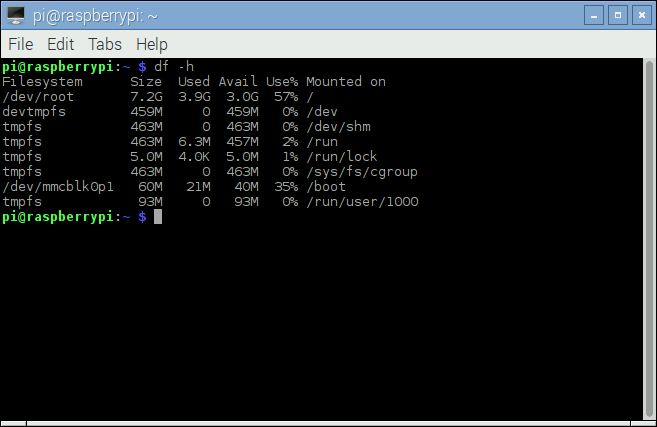
Now, since you’re likely to only use this for MM and nothing else, there’s no sense in leaving all of the other apps on it that are pre-installed. So, I removed some of the big ones:
wolfram-engine
scratch
nu-scratch
sonic-pi
idle3
smartsim
penguinspuzzle
java-common
minecraft-pi
python-minecraftpi
python3-minecraftpi
libreoffice*
And after running
autoremoveas well, which cleared even more space removing other unneeded apps, you’re down to this: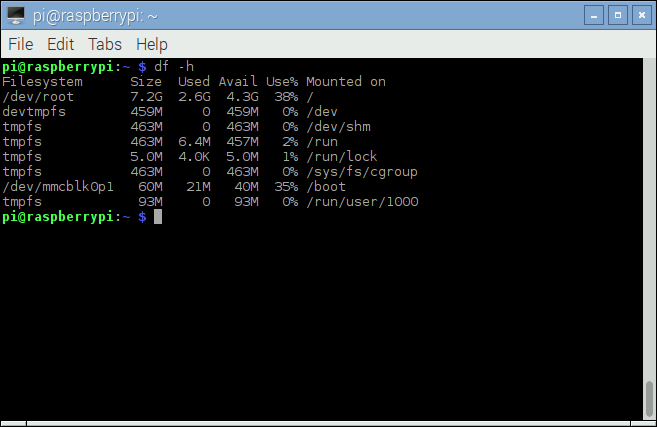
That’s 1.3G worth of storage that I just cleared up. So unless you need a larger SD card for other stuff, an 8G works just fine. Potentially even a 4G. You’ll still have plenty of room left after you clean up the installation.
Another option is to start with Raspbian Jessie-lite on a 4G card, but then you have to install the X server, desktop environment, and a login manager yourself. Assuming you get it all done correctly, you’ll end up with a very light weight installation of the OS, taking up only 53% of storage (remember, 4G card), with MM running lean and clean on top of that. I did try that as well but ran into issues with electron.js and for the time involved, knowing I wasn’t going to run it on there, it wasn’t worth continuing. I will leave that as an exercise to the brave.
-
RE: Getting started tutorial
The config.js.sample file that comes with it gives you all the examples you need. If you rename it to config.js and start your mirror, you will see the modules pop up. Use that as your starting point.
-
RE: Display and Connection to the Pi3
Just entering
'LTN101NT08 display board'and this was the first result:
http://r.ebay.com/IWsZDwVGA, HDMI, looks like composite. Remote control, speakers, buttons panel … All the fixings for a custom built frame.