Where there’s a will, there’s a way.
A New Chapter for MagicMirror: The Community Takes the Lead
Read the statement by Michael Teeuw here.
Read the statement by Michael Teeuw here.
 Offline
Posts
-
RE: Simple Music Player Module
@EoF, correct. That’s why I said, for those who can’t or don’t want to just a touchscreen. They will need a different method to interact with the display.
-
RE: Simple Music Player Module
Well, certainly installing it won’t help. :) But yeah, if CSS is hiding it too, then it’s a moot point.
-
Simple Music Player Module
[UNTESTED] For those who don’t (or can’t) use a touch screen, I believe not installing
unclutterwould give them mouse control. -
Screen capture on a Raspberry Pi
I had to look this one up myself today. For those of you wanting to do a screen capture on your MM2 on the raspberry pi, you can install the
scrotpackage (sudo apt-get install scrot) and use it to do that. Simply issuing thescrotcommand from a terminal will take a screen capture of what’s being displayed and saves a PNG file in the current folder. You can also tell it where to put the file by issuingscrot /path/to/file.png- note you must put in a file name as well for this to work.Now obviously you can’t do that when MM2 is running, but you can do it through an SSH login to the raspberry pi. You will have to tell it which display to use:
DISPLAY=:0 scrot /path/to/file.png.Because I develop from a remote machine (through SSH), the above command comes in handy because I can drop the file onto a shared folder and access it from my remote system.
Using
scrotbeats taking a picture of the screen whenever you want to show something on your MM installation. -
RE: Calendar event dates enhancement
This isn’t a bug per se, I just happen to notice it. So my setup consists of an rPi-3 running MM2 on a screen that sits on my desk, next to my main monitor pair (I actually have 5 monitors on my desk if you count the laptop as well). Anyway, I don’t generally touch the main MM2 display on the rPi unless I have to. Now on my main system, I run MM2 in a browser by hitting the rPi’s MM 2port. This allows me to make changes to the code, reload it in the browser, and then compare the output from one screen to the other (on the rPi which has not been reloaded with the changes yet.) This works great …
Well, today this caught my attention:
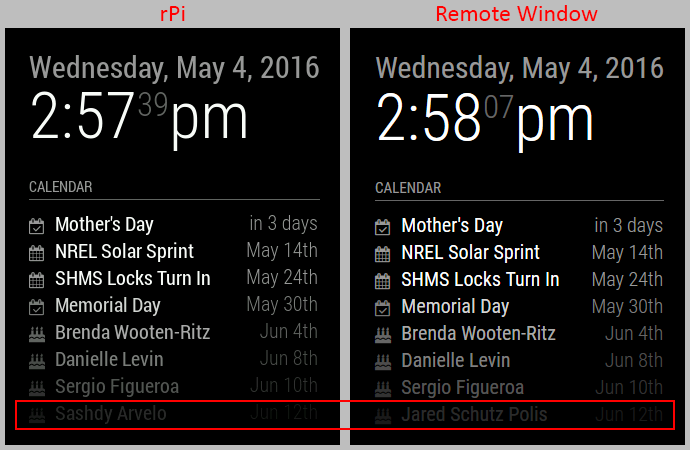
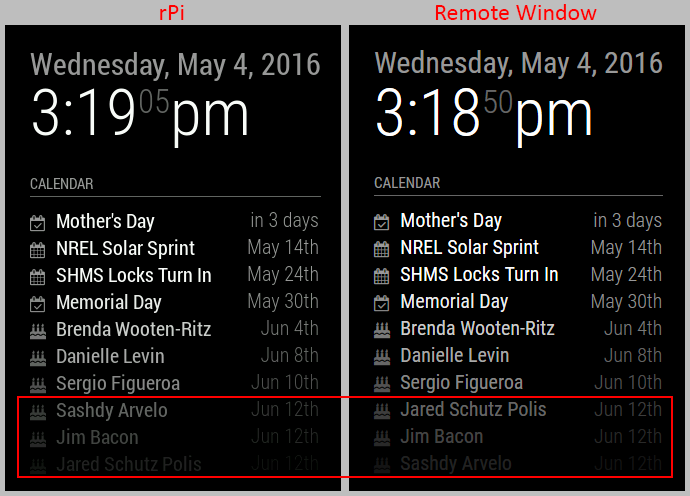
Both those birthdays happen on that day (in fact, there are three of them.) So I made a change in my config to show more events so I can see all three birthdates. And for some reason, the sorting is different on the rPi versus the remote browser window.
Please note, this isn’t a bug specifically, as all the data is there, and nothing’s getting mangled. This is purely a sorting thing between how Javascript runs on an rPi and how it runs on a different platform. On the rPi it’s in reverse order than what is displayed on my Windows machine. I just thought that was kinda interesting.
-
RE: Releasing stable
Hey @MichMich, you’re certain it’s the rPi B+ (512Mb) that has the curl issue, not the rPi-2 B (1Gb)? Perhaps this is one of those times where telling folks to upgrade their hardware is a better/easier solution considering a) how cheap they are, and b) hardware-wise, we’re several iterations ahead already. There’s a point where supporting older hardware (running older and unsupported base software) just becomes a pain.
-
RE: Releasing stable
Ugh … I should be beaten with a stick. I knew I forgot something. I ordered another rPi-3 yesterday and completely forgot to add an rPi-2 to the order to use as dev/test platform. But, I did order more HDMI cables and uSD cards … just forgot the rPi itself. Oh well … another shipping charge. I’ll get it eventually …