@BKeyport Okay, no rush 🙂
 K
Offline
K
Offline
A New Chapter for MagicMirror: The Community Takes the Lead
Read the statement by Michael Teeuw here.
Read the statement by Michael Teeuw here.
Posts
-
RE: Too many API calls in default weather module after update
Sam is right, that was caused by the big rewrite (which resolved other issues, particularly a fundamental architectural one).
A fix is already in the develop branch: https://github.com/MagicMirrorOrg/MagicMirror/pull/4092
Are you familiar enough with Git to test the develop branch?
-
RE: OpenWeather loaded but info is empty since update
So that you can start receiving weather data again right away and don’t have to wait until we’ve figured the issue out, I’d suggest you try a different provider.
-
RE: OpenWeather loaded but info is empty since update
@SdR, did
apiVersion: "2.5"really still work before the MM update? That version was deprecated a long time ago (June 2024). See https://forum.magicmirror.builders/topic/18662/modules-using-openweather-api-need-review. -
RE: All modules shown on one page after Update to 2.35
@oskisch Are you still on the develop branch? Are there still errors in the console?
-
RE: All modules shown on one page after Update to 2.35
Failed to connect to Wayland display: No such file or directory (2)
Try
node --run start:x11 -
RE: All modules shown on one page after Update to 2.35
- SYSTEM: manufacturer: Raspberry Pi Foundation; model: Raspberry Pi 3 Model B Rev 1.2; virtual: false; MM: v2.36.0-develop
Why are you on the develop branch?
-
RE: Default Calendar Not Loading Events After New MM Update
A workaround for users still having issues with the calendar. There was a problem with the
node-icalpackage for some events. This has just been fixed with a newnode-icalrelease (v0.26.0).To use the new version, run this command in the MagicMirror directory:
npm install node-ical@latest.Note that this will change your
package.jsonandpackage-lock.jsonfiles, which would cause conflicts during the next MagicMirror update. Therefore, also run the following to restore them:
git restore package*.jsonYou will then have v0.26.0 installed - the
package.jsonfile say otherwise, but that doesn’t matter.Please give some feedback if that helps :-)
-
RE: Default Calendar Not Loading Events After New MM Update
[2026-04-02 19:59:16.671] [ERROR] [calendar] Could not expand event “Tax Day”: ical.expandRecurringEvent is not a function
Looks like you didn’t update the dependencies after you pulled the new MM version.
Please run
node --run install-mmand check again. -
RE: MMM-CalendarExt3Agenda - Event Transforming not working - Mirror 2.35.0
@BKeyport It should be fixed with v1.5.0. Please update and check :-)
-
RE: All modules shown on one page after Update to 2.35
@Niggich What do you user for the pages? MMM-Carousel or MMM-pages? Do you use a fork?
I tested the original projects of MMM-Carousel and MMM-pages without any issues.
-
RE: MMM-ApothekenNotdienst bug
@Niggich I made a mistake when I recently added translations to the module. I’ve fixed it now. Please update and check :-)
-
RE: MMM-Art
@christian-klein I like it! Don’t forget to add it to the module list: https://github.com/MagicMirrorOrg/MagicMirror/wiki/3rd-party-modules 🙂
-
RE: MMM-RainRadarDWD
@OliWer Nice. Don’t forget to add it to the module list: https://github.com/MagicMirrorOrg/MagicMirror/wiki/3rd-party-modules
-
RE: MMM-AtomVisualizer language
what should I write inside the [] parenthesis to cycle through all the elements?
I just released version 0.1.5. With this update, all elements are used when the array is empty 🙂
-
RE: MMM-AtomVisualizer language
I think the first in the getTranslations list is the default.
Ah, yes the first is used as the fallback language. It was German, which is not the best choice :-)
I changed it to English and released a new version.
@nowayto Please update and check 🙂
-
RE: MMM-PublicTransportHub
@evroom Nice. Thanks for the feedback! 🙂
The only thing that I would like to additionally see, is the last 2 departures/arrivals in the past
Like the Hafas module it’s currently not possible to display past departures, sorry.
-
MMM-PublicTransportHub
Hi 😃
I stumbled across Transitous, a thriving open community-driven project that aggregates public transport data from many regions through a shared API.
I have now built a new module based on it:
MMM-PublicTransportHub.The main advantage compared to previous public transport modules is the much broader geographic coverage. So for users who haven’t had a public transport module for their region until now, this module might change that - check out the sources list if your region is on it.
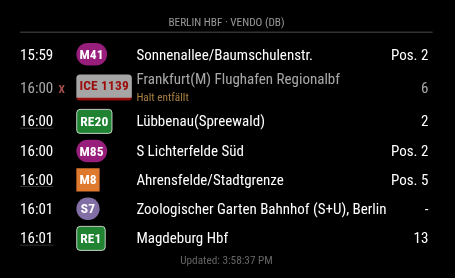
Setup details and more information are in the repo: https://github.com/KristjanESPERANTO/MMM-PublicTransportHub
I would be happy to hear your feedback.
-
RE: Sharing a concept that I am working on for my daughter's house - MagicMirror layout
@wswenson Nice! :-)
MMM-PeriodicTable is not on the module list. Where did you get it?
-
RE: MagicMirror MCP Server Integration For AI Assistants
@Rags Nice! 👏 I also thought about something like this.
Just out of curiosity: Why are you using an very old version of axios instead of build-in fetch?