@sdetweil aha!!! This did it! It’s ugly but it is working… now to spend time improving the design of the table and make my code more effective.
THANK YOU SO MUCH! I will probably be back with more questions, but not around this issue.
@sdetweil aha!!! This did it! It’s ugly but it is working… now to spend time improving the design of the table and make my code more effective.
THANK YOU SO MUCH! I will probably be back with more questions, but not around this issue.
strange… I just found the following code at the top of my file. I did not add it there. Going to delete it now.
const config = require("../../config/config");
I added let header = “” and let cors_url = jdhflrkgd. I did not add anything else at all.
exact code below:
        let header = "";

        // this is the API call url
        let original_url = "http://api.seatgeek.com/2/events?lat=" + self.config.latitude + "&lon=" + self.config.longitude + "&per_page=" + self.config.eventCount + "&datetime_utc.gte=" + today + "&datetime_utc.lte=" + oneweek + "&range=" + self.config.range + "&type=concert" + "&client_id=" + self.config.clientID + "&client_secret=" + self.config.clientSecret;

        // this is the cors URL
        let cors_url = "http://" + config.address==="0.0.0.0"?"localhost":config.address + ":" + config.port + "/cors?" + header + "&url=" + original_url;

        // fetching the data from seatgeek
        fetch(cors_url)
@sdetweil I got a new console error:

```
// this next block is to deal with a CORS permissions issue with the API
let header = “”;
    // this is the API call url
    let original_url = "http://api.seatgeek.com/2/events?lat=" + self.config.latitude + "&lon=" + self.config.longitude + "&per_page=" + self.config.eventCount + "&datetime_utc.gte=" + today + "&datetime_utc.lte=" + oneweek + "&range=" + self.config.range + "&type=concert" + "&client_id=" + self.config.clientID + "&client_secret=" + self.config.clientSecret;

    // this is the cors URL
    let cors_url = "http://" + config.address==="0.0.0.0"?"localhost":config.address + ":" + config.port + "/cors?" + header + "&url=" + original_url;
@sdetweil I’m going to try to fill it out like a template, let me know if I’m following.
let header = "",

let original_url = "https://api.seatgeek.com/2/events?client_id=MYCLIENTID&client_secret=MYCLIENTSECRET "

let cors_url = "http://" + config.address==="IP ADDRESS HERE"?"localhost":config.address + ":" + config.port + "/cors?" + header + "&url=" + original_url
and then I fetch(cors_url)?
Is this right?
@sdetweil I’m struggling to understand the first part. I don’t think there is any header stuff that I know of? the url is based on this format: https://api.seatgeek.com/2/events?client_id=MYCLIENTID&client_secret=MYCLIENTSECRET with other stuff added as you saw in my source code in the original post.
honestly the whole thing is a bit confusing to me. I’m not sure where it is supposed to go… as part of where I define the URL variable?
@sdetweil ugh, well that did not do it unfortunately. I’m not sure what to do now. It recommends setting the requests mode to ‘no-cors’. Is that something that might work here?
@sdetweil ok that was an issue! I got luxon installed in the right place. Now I’m getting the following errors:
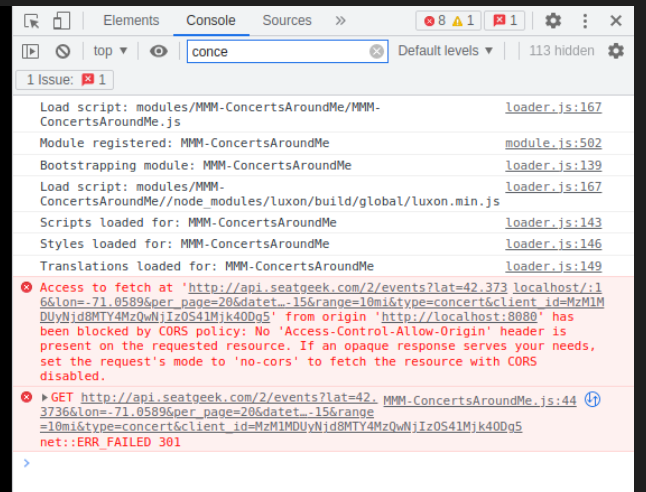
I tested the exact link from the first error “Access to fetch at…” in postman and I get a clean response
@sdetweil alright here are the errors:
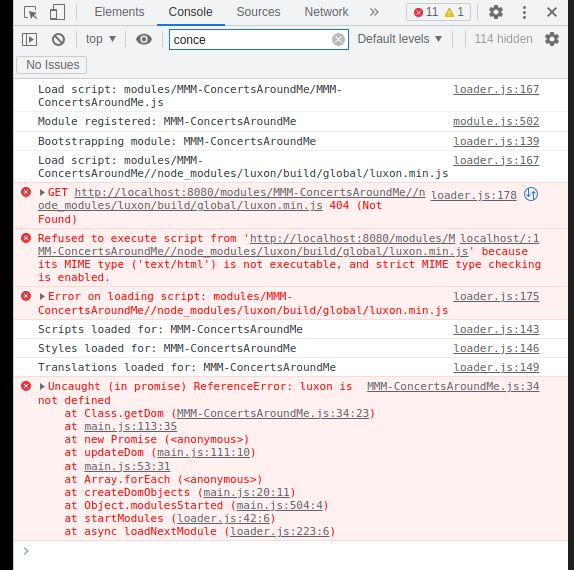
@sdetweil aha! I had tried that as well, but I did not include the ~. I am learning so much from this project :)
@sdetweil Alright I have a few errors showing, and I’m having an issue moving my file to the modules folder. I have verified the name is the same across the folder, the js file, and the config file.
First, I got the following message when trying to move it:
mv MMM-ConcertsAroundMe /modules
mv: cannot move 'MMM-ConcertsAroundMe' to '/modules': Permission denied
Will paste the console errors as well, I am moving between my mac and raspberry pi
@sdetweil well my module isn’t even in the modules folder even though it is in the config file which is confusing to me. I noticed in your screenshot that default is a subfolder of modules. That is true in my path to the module, but they are appearing as one combined folder. I’m not sure why that is the case. In any event, clearly my module was never actually loading at all. Any idea what the issue is here? I’ll start to update my code to remove the API call from the getDom function.
@sdetweil I’m not sure I’m following this. Do you mean in VS code or with the Magic Mirror application running?
Hi folks! I’ve been working on a module to display concerts coming up in my area in the next week using the seatgeek API. I’m not sure why the module will not display now that I’ve added it to the config. I think the code makes sense. Any advice would be greatly appreciated, I’m pasting my getDom function below:
getDom: function() {
        var wrapper = document.createElement("div");
        // create the table element
        const table = document.createElement('table');
        var self = this;

        // set variable for today
        const today = luxon.DateTime.utc().toISODate();

        // set variable for a week from today
        const oneweek = luxon.DateTime.utc().plus({ weeks: 1 }).toISODate();

        // this is the API call url
        var url = "http://api.seatgeek.com/2/events?lat=" + self.config.latitude + "&lon=" + self.config.longitude + "&per_page=" + self.config.eventCount + "&datetime_utc.gte=" + today + "&datetime_utc.lte=" + oneweek + "&range=" + self.config.range + "&type=concert" + "&client_id=" + self.config.apiKey;


        // fetching the data from seatgeek
        fetch(url)

            // parse the json response into a JS object
            .then((response) => response.json())
            // then populate a table with the data
            .then(data => {
                // define the table headers
                const headerRow = table.insertRow();
                const artisthead = headerRow.insertCell(0);
                artisthead.innerHTML = 'Artist';
                const datetimehead = headerRow.insertCell(1);
                datetimehead.innerHTML = 'Date & Time';
                const cityhead = headerRow.insertCell(2);
                cityhead.innerHTML = 'City';
                const venuehead = headerRow.insertCell(3);
                venuehead.innerHTML = 'Venue'

                // loop through the data and create row for each item
                for (let i = 0; i < self.config.eventCount && i < data.events.length; i++) {
                    const row = table.insertRow();

                    // populte the cells with data from the API response
                    const artist = row.insertCell(0);
                    artist.innerHTML = data.events[i].performers[0].name;
                    const datetime = row.insertCell(1);
                    datetime.innerHTML = data.events[i].datetime_local;
                    const city = row.insertCell(2);
                    city.innerHTML = data.events[i].venue.city;
                    const venue = row.insertCell(3);
                    venue.innerHTML = data.events[i].venue.name;
                    }

                // add this table to the wrapper
                wrapper.appendChild(table);
                })
        .catch(function() {
            // if the API call is unsuccessful, display error message
            wrapper.innerHTML = "Error calling data to display event information";
            });
    return wrapper;
    },