@thymon thanks thymon for the wake up call. I am updating the module right now. Logos already work again. Stay tuned!
A New Chapter for MagicMirror: The Community Takes the Lead
Read the statement by Michael Teeuw here.
Read the statement by Michael Teeuw here.
 L
Offline
L
Offline
Posts
-
RE: MMM-soccer v2
-
RE: birthday list Implementation
@veldje I have solved this by including a “birthday” calendar from google and giving at an own symbol.
For that I have created an own calendar within google, transferred all birthdays to that (didn’t take long) and included that calendar into the config.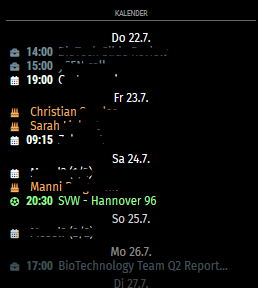
-
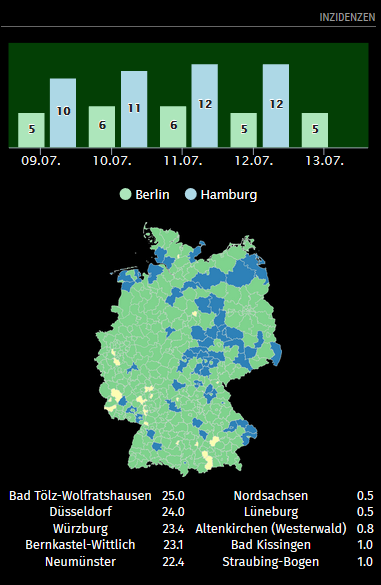
MMM-COVID19-Inc [DE only!]
Another (and hopefully the last!) COVID19-related module.
https://github.com/lavolp3/MMM-COVID19-Inc
This one can show
- incidence rates of different districts(Landkreise) in Germany.
- a map of Germany with colored districts.
- a list of highest/lowest incidence rates.
The rates are pulled from a private API that refers to RKI data, but may not be complete / up to date.
I just recently found a few data points missing.Screenshot:
-
RE: MMM-MyCommute
@matt216 no errors here.
You could also try @qistophs fork
https://github.com/qistoph/MMM-MyCommute
If you’e not doing already.
The original module has been abandoned. -
RE: MMM-MyCommute
@matt216 there might be an issue with your start and end time. Can you post your config for the module?
-
RE: MMM-MyCommute
@matt216 said in MMM-MyCommute:
@sdetweil thanks for the help (again).
I’m not sure I understand… it seems to take a second browser loading the page for the main mirror to display the module.See my response. Every time any instance on any browser (pi/laptop) gets created, it sends a request to the server-side node_helper. This happens with most of the modules.
node_helper sends it back and all the instances get fresh data and certain functions get triggered.Here is the client side: running when you open the broser (note the
this.getdata()function.start: function() { Log.info('Starting module: ' + this.name); //start data poll this.getData(); var self = this; setInterval(function() { self.getData(); }, this.config.pollFrequency); },and here the client side receives the data from node_helper : note the
this.isHidden=falseandthis.show()functions at the end.socketNotificationReceived: function(notification, payload) { if ( notification === 'GOOGLE_TRAFFIC_RESPONSE' + this.identifier ) { this.predictions = payload; if (this.loading) { this.loading = false; if (this.isHidden) { this.updateDom(); this.show(1000, {lockString: this.identifier}); } else { this.updateDom(1000); } } else { this.updateDom(); this.show(1000, {lockString: this.identifier}); } this.isHidden = false; } -
RE: MMM-MyCommute
@matt216 said in MMM-MyCommute:
Additional question - the startTime option doesn’t seem to be working correctly for me. The module doesn’t display in the morning on the pi/mirror, even after the specified startTime. Weirdly, when I browse to the mirror from my laptop or phone (http://ip:8080) that seems to trigger the module to display on the pi.
Any ideas there?!I think I remember with this module that it has an odd hide/show behaviour. Are you working with MMM-pages or any module scheduler being able to hide modules?
When you open your browser, a request is sent to node_helper and it sends the data back to the module (like Sam said, ALL instances). With receipt f the data the module.show() function gets triggered, so it gets shown again while it has been hidden for some reason before. -
RE: Which type of mirror to use
@mickyvi said in Which type of mirror to use:
Ciao thank you
Grazie.
This one is very very expensive but interesting. Let us know if you’re satisfied with it.FYI, this is how I manipulate CSS to get brighter text:
.dimmed {
  color: #aaaaaa;
}

.normal {
  color: #fdfdfd;
}

.bright {
  color: #ffffff;
}

body {
  color: #fdfdfd;
}
The selectors are usually used in the modules to highlight or dim text. The
bodycolor property is the fallback in case no other selector is used. So I set it as the same color asnormal.You can find all the selectors in main.css where less birght colors have been used. In custom.css you can overwrite the properties.
-
RE: Which type of mirror to use
@mickyvi Ciao Micky,
Meanwhile I am using a mirror provided by Goldjunge_Chriz though one of his mirror distribution activities. I think the chrome spy is nearly as good and better than the mirastar.
Very important is the monitor. You need to play with brightness (as low as possible), contrast (as high as possible) and ( in my case) also the control of each rgb color to get best results for the black background.Also don’t forget that you can set brightness of the text to a higher level via css.
But none of the mirrors i have used are even close to an actual mirror. It is different.
-
RE: MMM-Soccer - Standings, Schedules and Top Scorers
@strawberry-3-141 Really great work man!
-
RE: Introducing MMM-euro2021
@0m4r said in Introducing MMM-euro2021:
I have added some layout improvements and also reduced the number of API calls for the time no game in on
Looks very good.
I am failing getting my module based on football-data.org finished in time.
Hopefully until end of the week.
Have you included tables? -
RE: MMM DWD Warn Weather not working since 2 Days
@stoffbeuteluwe Same problem for me. Will investigate
-
RE: MMM-A2Display Error
@rebecca Don’t know if you found solution at this other forum, but have you checked if the module was installed in the right folder?
Seems like it hasn’t been installed/cloned where it should be.
-
RE: MMM-OralB / Bluetooth equipped toothbrush integration
@oberfragger
Actually the better module currently to work with the toothbrush is MMM-BluetoothDevices
I think I have that working.However, pairing is necessary.
At which point are you failing, what description have you used?
-
RE: Are you tired of editing config.js, or have trouble doing it, see my new module
@sdetweil Happy to see this developing further. Have waited for something like this for ages!
-
RE: Expensive Bedside Clock
@harney Looks cool! I want to do something like that in a wood case sometime
-
RE: MMM-OralB / Bluetooth equipped toothbrush integration
@oberfragger yeah I had this running.
Might retry these days.You need to pair the toothbrush with your RasPi. If that didn’t work the module itself probably won’t work.
Where did it fail?
-
RE: MMM-OpenWeatherForecast - Replacement for MMM-DarkSkyForecast
Is there then the possibility to turn off the severe weather warnings completely?
I used a css “hack” for that
Add to custom.css
.MMM-OpenWeatherForecast .weather-alert {
    display: none;
}
You can also set
showSummary: falsein the config but would then lose the whole summary -
RE: calendar shading
@george Sorry George but that’s not the appropriate way to do it.
Doing that you will mess things up as soon as you want to update the module.Every css-thing you want to change, you transfer to custom.css and make your changes there.
custom.css always overwrites entries in the module css files, so it takes precedence.Also I think the calendar module is meant here and not MMM-MyCalendar.
@Sceetch congrats to the vaccination :-).
Also, move into the modules/default/calendar folder, look into the calendar.css for any time entries. You will find:.calendar .time { padding-left: 30px; text-align: right; vertical-align: top; }Now edit custom.css and add
.calendar .time {

}
Every entry you make here adds to the above from calendar.css.
Try to play with this, e.g. by putting infont-wight: bold -
RE: MMM-OpenWeatherForecast - Replacement for MMM-DarkSkyForecast
@biebermann A workaround would be to additionally use MMM-DWD-WarnWeather which works pretty well.
Another option could be to run the warning through the google-translate npm module which you could add to the module.
https://www.npmjs.com/package/@vitalets/google-translate-api
Might be a bit much however.