I have MMM-Flights working well except mapFixedArea: true, seems to be ignored.
The map changes width depending upon the ac in the area.
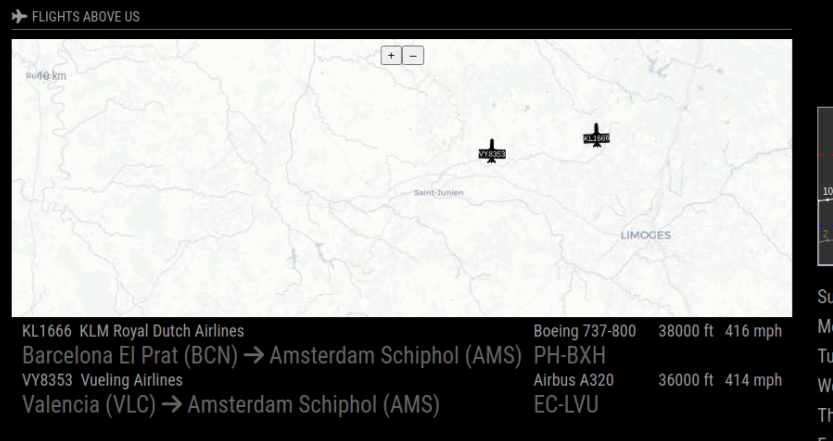
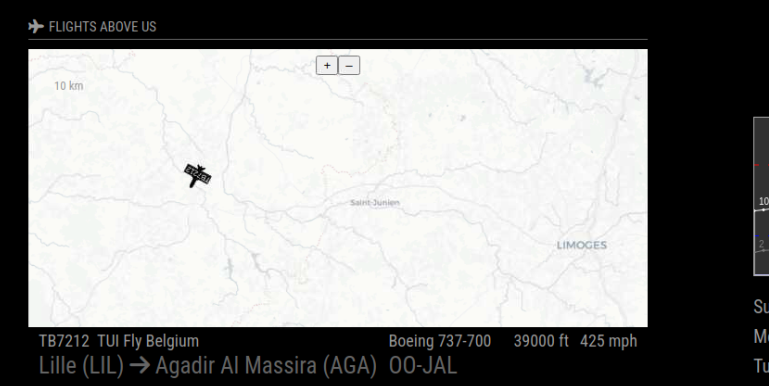
Also the map shows even with no traffic and showMap: “ifTraffic”,
Any ideas or thoughts?
I have MMM-Flights working well except mapFixedArea: true, seems to be ignored.
The map changes width depending upon the ac in the area.
Also the map shows even with no traffic and showMap: “ifTraffic”,
Any ideas or thoughts?
Thank you very much for your reply, I’ll see if that works later tonight.
Best regards
Hi,
Thanks for creating this, I’ve installed it and while it dims and brightens, it doesn’t do it at the times I set-up in config.js
 {
    module: 'MMM-AutoDimmer',
    position: 'fullscreen_above',
    header: '',
  // Don't change anything above this line
    config: {
      schedules: [
        {}, // default schedule - 8pm to 7am daily
        {
        // will dim to default level of 0.9, from 8am to 5pm, Mon-Fri
          days: ["Monday","Tuesday","Wednesday","Thursday","Friday"],
          dimTime: 2330,
          brightTime: 730
        // defaults are used for values that are not explicitly set
        }
      ]
    }
  },
Sorry, I don’t know what time it is actually dimming, the monitor is in my office but is it possible it’s taking the times from another Time Zone? I’m in CET.
Best regards
Thanks, that worked.
I typed too soon, just after I posted that I applied a MagicMirror upgrade, now it doesn’t display my personal calendar.
I use this to display 3 calendars in the same column
{
module: “calendar”,
header: “Our Calendar”,
position: “top_left”,
config: {
calendars: [
{
fetchInterval: 7 * 24 * 60 * 60 * 1000,
symbol: “calendar-check”,
url: ‘https://calendar.google.com/calendar/ical/en.uk%23holiday%40group.v.calendar.google.com/public/basic.ics’,
},
{
color: ‘#FFFF00’,
symbol: “calendar”,
url: ‘https://calendar.google.com/calendar/ical/fr.french%23holiday%40group.v.calendar.google.com/public/basic.ics’,
},
{
color: ‘#00FF00’,
symbol: “calendar”,
url: ‘https://calendar.google.com/calendar/ical/xxxx%40gmail.com/private-xxxxxxxxxxxxxxxxxxxxxxxxxxxxxxx/basic.ics’,
                                    },
			]
		}
	},
Over the past 3 or 4 months MMM-CurrencyExchange has stopped working, it just displays ‘Loading’
I have changed the api from
apiBase: “http://api.exchangeratesapi.io/latest”,
to
apiBase: “http://api.exchangeratesapi.io/v1/latest”,
and then
“http://api.exchangeratesapi.io/v1/latest?access_key=xxxxxxxxxxxxxxxxxxxxxxxx”
as per the instructions at https://manage.exchangeratesapi.io/quickstart
I have noticed that if I click on the link at https://manage.exchangeratesapi.io/quickstart
I get
{
“error”:{
“code”:“https_access_restricted”,
“message”:“Access Restricted - Your current Subscription Plan does not support HTTPS Encryption.”
}
}
I assume that the http:// is being redirected to https:// and I don’t know of a way to force it back to http://
Has anyone any other thoughts or other suggestions for a GBP:EUR currency exchange module?
Thanks is advance.
@sdetweil said in SharedImageManager::ProduceSkia: Trying to Produce a Skia representation from a non-existent mailbox.:
@lif yes… currently 64 bit mode is sketchy in my opinion
OK
@sdetweil said in SharedImageManager::ProduceSkia: Trying to Produce a Skia representation from a non-existent mailbox.:
aarch64 GNU/Linux
ah 64 bit mode…
Does that make much of a difference?
Done, I’ll tell you in a week or so if it’s worked :-)
It’s held for 7 days, so thank you very much.