@shadymaple
ok now i got the problem.
can you please update the module. To do that just type git pullin the module directory (…/modules/MMM-Globe/). And in your config file you have to change your path to https://github.com/ddzurko/Mirror/blob/master/Gear.png?raw=true.
Then it should work.
L
Offline
A New Chapter for MagicMirror: The Community Takes the Lead
Read the statement by Michael Teeuw here.
Read the statement by Michael Teeuw here.
Posts
-
RE: Building an Image Module.
-
RE: Building an Image Module.
Could you please try to comment out line 61 of MMM-Globe.js and tell me if it works then?
-
RE: Printing to output Terminal
It you call console.log() in the module.js, the output will go to your browsers web-console. Have in mind, that the module.js is executed by your browser (client-like) when you open magicmirror there while the node_helper.js is executed when you start the magicmirror-server (server-like) and runs all the time. So to bring the output of your module.js to your terminal, you would have to send this data with a socketNotification to your node_helper.js and print it there.
-
RE: Building an Image Module.
You could just use my module and put the path of your image in the “ownImagePath” value of the config. It’s explained in the README but if you need help, let me now.
[card:LukeSkywalker92/MMM-Globe] -
RE: MMM-SoccerLiveScore
@d3r said in MMM-SoccerLiveScore:
That looks like a really cool module. I’ll give this a try this weekend.
About suggestions, maybe show the goalscores and goal times.
If a match is still going on, display how long the game has been on for. Somewhat like livescore.Don’t you think that this would use too much space?
-
RE: MMM-SoccerLiveScore
@nem1 said in MMM-SoccerLiveScore:
@LukeCodewalker said in MMM-SoccerLiveScore:
Here are some features I want to implement in the future if theres interest:
- only show scores when there is a match running
- goal notifications
Do you have more ideas?
I am really interested in the module and your plan to develop it as mentioned in the quote.
What will the module show if there aren’t any livegames in my chosen leagues/cups? The results of the last matches? The soccer table?
Thanks for your work!
Right now it show’s the result of the last matches or the upcoming matches. depends on which of them are closer. Tables would be possible but what would you do with a cup without a table?
I thought of just hiding the module when there’s no match running in the moment. -
RE: MMM-SoccerLiveScore
@tismepaulo thank you. it’s that way now. just update the module.
-
RE: Something I'm working on ...
Hey,
another problem with tables:if you use html-tables in your GitHub README.md it’s not displayed the right way.
Example: http://beta.magicmirror.builders/module/33/soccerlivescore -
RE: MMM-SoccerLiveScore
Here are some features I want to implement in the future if theres interest:
- only show scores when there is a match running
- goal notifications
Do you have more ideas?
-
RE: MMM-SoccerLiveScore
Maybe someone could give me some feedback if it’s running on the raspberry pi, because right now i don’t have one here to check it.
Thanks -
MMM-SoccerLiveScore
Description:
Hey guys,
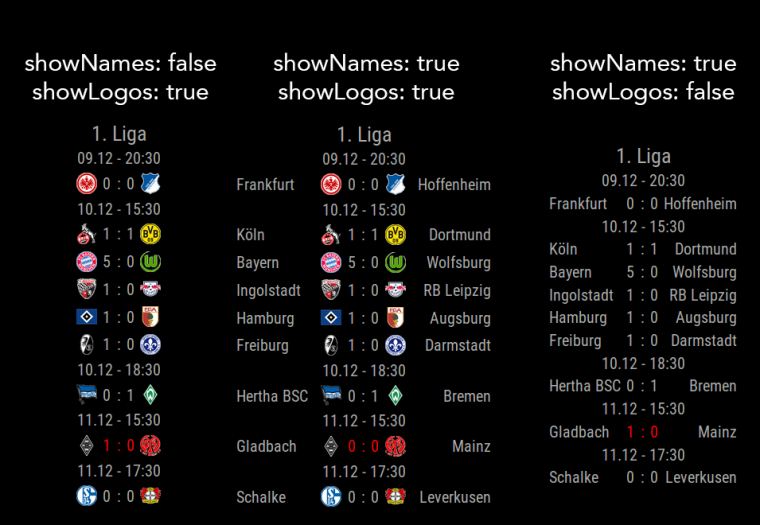
here is my new module called ‘MMM-SoccerLiveScore’.It displays live scores of your favorite soccer leagues and competitions. If you want to have more than 1 league displayed the module automatically switches between the leagues. It also takes care of the update-interval. If there’s a game running it will update the standings more often. The standings of running games are displayed in red. You can choose weather you want to display the names or logos of the teams - or both =)
I hope you’ll enjoy it!Screenshots:

Download:
[card:LukeSkywalker92/MMM-SoccerLiveScore]
Initial Version
Update 1
- added tables and an option
-
RE: MMM-Globe
@matt25 Puh. I don’t get what’s going wrong here. Could it be possible that there’s another module is having influence? Maybe you could show us your whole config file.
-
RE: Tips for a module showing graphs from HTML scraping
@jhillairet
Hey, i would recomend you to do all in javascript. I love python, but what you’ve planed is perfectly doable in javascript. See chart.js for example. As long as it’s possible to write a project in one language, i would never combine more languages. -
RE: MMM-DWD-WarnWeather - Wetterwarnungen
@Matthes0815 said in MMM-DWD-WarnWeather - Wetterwarnungen:
You’re welcome… take your time, it’s not really a problem.
Here now a photo of the indented warnings:
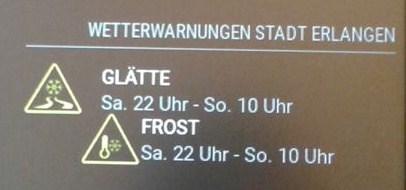
Are you using the latest version of this module? I could not reproduce this bug.
Are you
-
RE: MMM-DWD-WarnWeather - Wetterwarnungen
Ok. Firefox bug should be fixed now.
Maybe you see the warning twice because DWD is having it twice on their website?
For further issues please use the new Trubleshooting thread. Thank you. -
MMM-DWD-WarnWeather - Wetterwarnungen
Trubleshooting for MMM-DWD-WarnWeather - Wetterwarnungen.
-
RE: MMM-DWD-WarnWeather - Wetterwarnungen
@Matthes0815 Thank you.
I will have a look over that, when I got some time. -
RE: MMM-Globe
@GinSeng
Thank you. I don’t really understand what you mean with fade. Do you want to have a fade between to images in the moment when a new picture was loaded? Or do you want to fade it over a longer time? Then you should try ‘natColor’ as the style property in your config for this module. -
RE: MMM-DWD-WarnWeather - Wetterwarnungen
Ok now it looks like this:
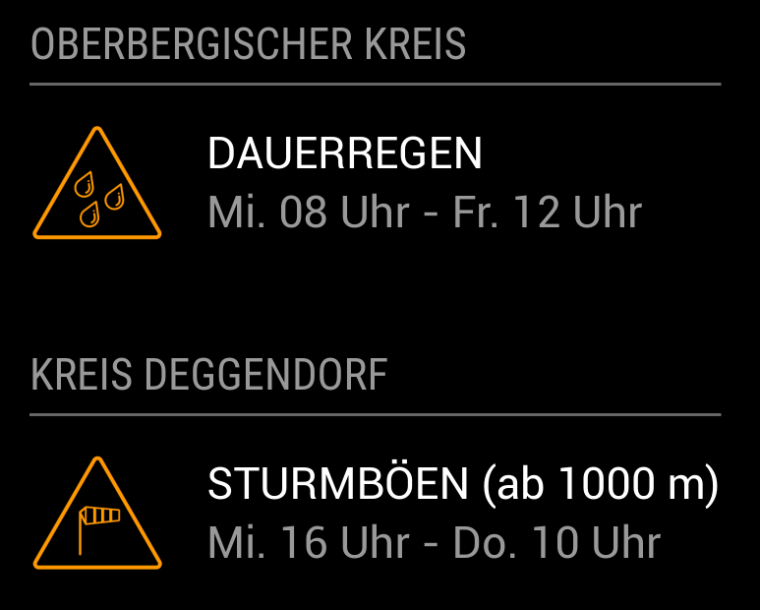
It’s using the default header functionality now.
To have more than one region you have to put the module two times in your config like{ module: 'MMM-DWD-WarnWeather', position: 'bottom_left', header: 'Oberbergischer Kreis', config: { region: 'Oberbergischer Kreis', changeColor: true, interval: 10*60*1000 } }, { module: 'MMM-DWD-WarnWeather', position: 'bottom_left', header: 'Kreis Deggendorf', config: { region: 'Kreis Deggendorf', changeColor: true, interval: 10*60*1000 } } -
RE: MMM-DWD-WarnWeather - Wetterwarnungen
@weedorbeat hey,
do you have an idea, how the warnings should show for which region they are? Just making a header for each region would not be very nice in my opinion. My first idea was to put the region in brackets behind the warning. But i definitely want to keep the appearance of the module very simple/small. Another thing I want to implement is the starting altitude of the warning (like “Schneefall ab 400m”). But there i have the same problem: I don’t had an idea how to display it with keeping the module looking nice.