MagicMirror Forum
    • Recent
    • Tags
    • Unsolved
    • Solved
    • MagicMirror² Repository
    • Documentation
    • 3rd-Party-Modules
    • Donate
    • Discord
    • Register
    • Login
    1. Home
    2. MadScientist
    3. Best
    A New Chapter for MagicMirror: The Community Takes the Lead
    Read the statement by Michael Teeuw here.
    M
    Offline
    • Profile
    • Following 0
    • Followers 3
    • Topics 6
    • Posts 207
    • Groups 0

    Posts

    Recent Best Controversial
    • RE: Cooling Raspberry

      I finally received my heat sinks and had the time to play with my second Pi (3b+, not my mirror-Pi, which is just a 3b).

      The heat sink is fixed to the CPU via heat conducting double-sided adhesive. It’s a small surface but it holds well. The 30mm 12V fan is connected to the 5V and GND of the Pi. That’s enough to get it running and it’s totally silent. The airflow is enough to keep everything cool.

      To fix the fan to the heat sink I just used some wood screws. Didn’t have any nicer looking ones…

      Costs:

      • list itemFan 1.17€ from Aliexpress
      • list itemHeat sink: 1.16€ (for 5 pieces) from Aliexpress, You can also buy just once but I will use the others for other projects.
      • list itemHeat conducting adhesive: 1.08€ for 48 pieces (25x25mm). You can buy less but I also use it for other projects…
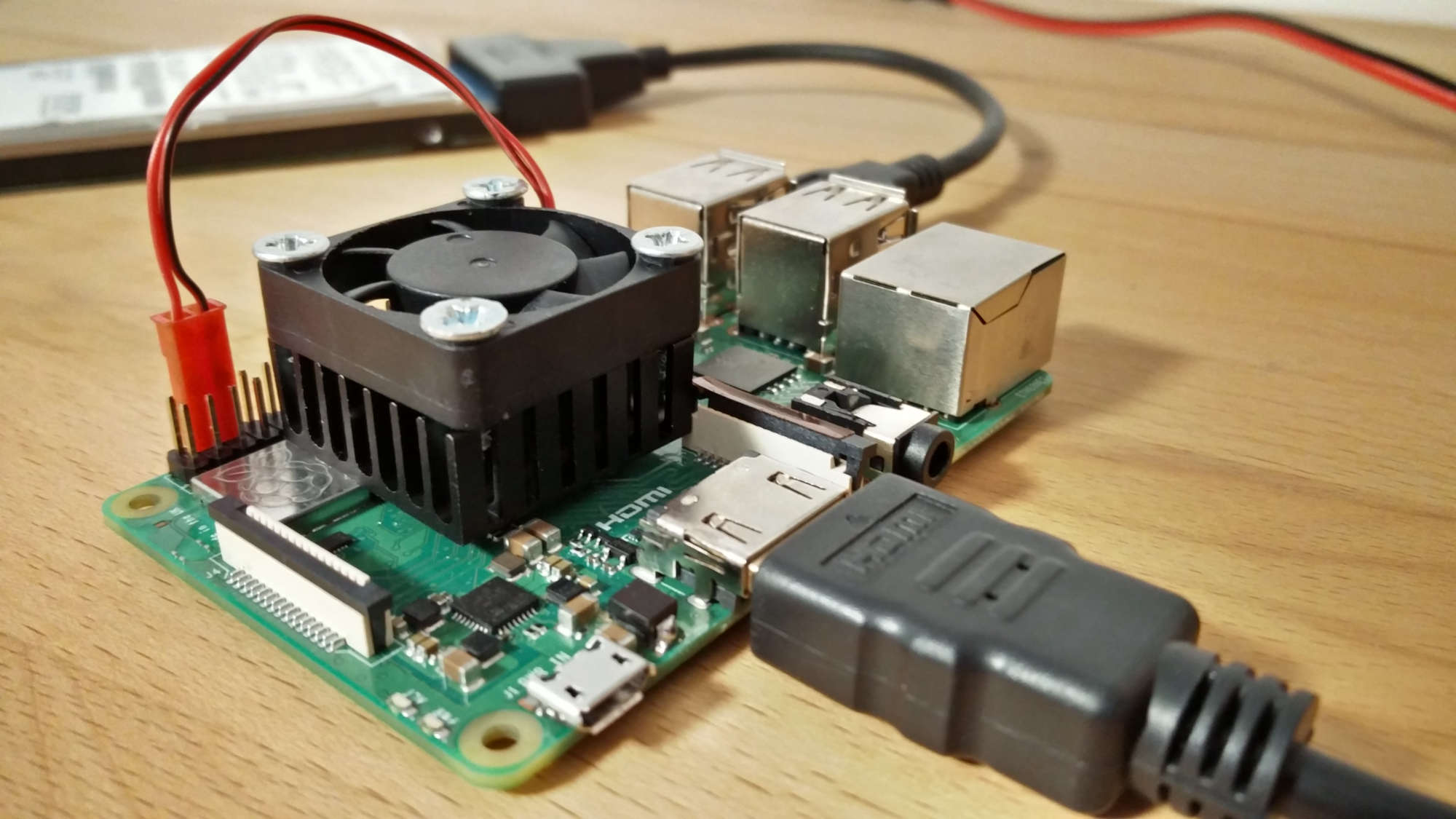
      0_1538493521110_IMG_20181002_170652.jpg

      posted in Troubleshooting
      M
      MadScientist
    • RE: New Bulid

      I use a 12V power supply for the LCD screen. From the 12V power supply I have a step-down module which takes the 12V and puts 5V out for the Raspberry Pi. It runs perfectly fine for almost 5 years now.

      posted in System
      M
      MadScientist
    • RE: Powering my mirror?

      You should check how much power your mirror, incl. screen and RaPi, consumes and buy an appropriate LED power supply. Especially the IP67 ones are very slim. My 60W power supply is only 33mm high. My whole system uses max. 30W so I decided to go bigger (46W was out of stock, 50W has the same dimensions). If you’re at max. below 30W you could aim for a 36W power supply that are even smaller (I think 20mm high).

      You could use buck-boost-converters to adjust the voltage you need for the Pi or the LCD. In my case the LCD is driven by a V59 universal controller board that runs on 12V, so it can be powered directly from the supply. The Pi will get the power also from the power supply but with a buck-converter in-between, that reduces the 12V to 5V.

      posted in Hardware
      M
      MadScientist
    • RE: Cannot rotate display on new MM 2.4.0

      Thanks MichMich. That’s useful info.

      posted in Troubleshooting
      M
      MadScientist
    • RE: RPI Picture Frame?

      Of course it runs on a Pi. Even a Pi0. You can either directly use OpenElec, an SD card image that runs Kodi directly, or install it via sudo apt-get install kodi. It’s a general mediaplayer that can also display pictures and shuffle through them. Though, I don’t know how to set it up to load the pictures automatically after booting. That’s what you’ll have to find out.

      posted in General Discussion
      M
      MadScientist
    • RE: Slim display due to thin space

      You could buy a universal LCD controller board like the V56. Buy the longest LVDS cable you can find. The board itself, w/o LED driver cost around 7.50€-8.00€ incl. shipping. The cheapest LVDS cable I found was 0.88€ incl. shipping. Usually they are around 20cm but you could also make a longer one yourself. A universal LED driver should be less than a euro, too.
      You could then lead the cables to the inside of the cabinet (via the hinges probably). and hide the electronic boards in a hidden double floor board (if you know what I mean). Like a box inside, or on top of the mirror. Just make sure you allow air flow for cooling.

      posted in Hardware
      M
      MadScientist
    • RE: Problem update

      It looks like you made changes to your compliments.js. Did you add compliments to the module? It’s generally better to add them to the config.js instead.
      I’d suggest to move your new compliments over to the config.js, undo the changes in the compliments.js and then run the update.

      posted in Troubleshooting
      M
      MadScientist
    • RE: MMM-PIR-Sensor

      @j.e.f.f said in MMM-PIR-Sensor:

      @codyS75 The way I set up mine was I removed the dome over the sensor, and drilled a small (2-3mm) hole in the frame. The sensor is mounted behind the hole and can only “see” directly forward. This works really well, since you only want the PIR sensor to be triggered when someone is standing right in front of the mirror. And the you don’t have to see the ugly dome either!

      I did the same. I drilled a 3mm hole through the frame and on the inside half way through a 8mm hole which holds the PIR sensor. Works incredibly well. A radar sensor CAN be a better solution, but keep in mind it works 360° and also through thin walls. It didn’t work well for me. Got too many unwanted triggers. A metal enclosure could have solved the problem but the PIR was the easier way to go.

      posted in Troubleshooting
      M
      MadScientist
    • RE: I fried my Raspberry Pi 3 model b+...

      Thanks, it’s a start. Google didn’t give me anything useful.

      posted in Hardware
      M
      MadScientist
    • RE: MM Crashed twice. Time to abandon MM?

      Not sure since I don’t use the node serveronlyin my setup but a simple ctrl+cmight do the trick. Or you use pm2. Make a short script with nano mm_so.shand paste the following (make sure your MagicMirror directory is correct)

      cd ~/MagicMirror
      node serveronly
      

      ctrl+xfollowed by a confirmation with ywill save it. Then type chmod a+x mm_so.sh.
      If you have pm2 installed you can then just run it by typing pm2 start mm_so.sh. You stop it again by just entering pm2 stop mm_so.

      Disclaimer: I haven’t tried any of the above and it might contain errors or be simply wrong. Just give it a try. It doesn’t break anything.

      posted in Troubleshooting
      M
      MadScientist
    • RE: MMM-PIR-Sensor

      @codyS75 Yes. The 8mm hole perfectly fits the sensor. Drill the 3mm hole first. This way you can use it as the center point to drill the 8mm hole.

      posted in Troubleshooting
      M
      MadScientist
    • RE: E-paper large screen instead of a mirror

      I think that’s why the title says “… instead of the mirror”. I think it is supposed to be a kind of infoboard. I really like the idea but it will probably still takes ages before larger displays are available and affordable.

      posted in Hardware
      M
      MadScientist
    • RE: My Custom Mirror

      That’s a very nice build. For the camera you should check out the PS3 camera. It also comes with microphones is dirt cheap. I bought one for 4€ (incl. shipping) on ebay. Don’t have it yet, though. I can imagine that it will look much neater on your mirror and the microphones (afaik 4 of them) are supposed to be of good quality.

      posted in Show your Mirror
      M
      MadScientist
    • RE: Rpi 3B+, can't install

      That’s why I run mine from a cheap SSD (Kingston A400, 120GB iirc). Much faster and no risk of corrupting it. I paid 27€ for my SSD. At this price I think it is worth considering buying one.

      posted in Troubleshooting
      M
      MadScientist
    • RE: I fried my Raspberry Pi 3 model b+...

      I ordered cheap SMBJ5.0A diodes from Aliexpress for a couple of cents and now my Pi is as good as new. Not the best solder job but I don’t care.

      Maybe I should see if that really worked by feeding it with 12V again? :clown_face:

      posted in Hardware
      M
      MadScientist
    • RE: My First Take at the Magic Mirror

      This is incredibly impressive!

      posted in Show your Mirror
      M
      MadScientist
    • RE: Cronjob

      Glad it worked! :smiling_face_with_open_mouth:

      posted in Troubleshooting
      M
      MadScientist
    • RE: Cheapest Magic Mirror

      For the LCD you can ask at your local recycling center if they have a bunch of old monitors they’d be willing to donate to the school. Otherwise try places like Craigslist or so. You should find old 17" LCD screens for around 5 bucks. If they are not working, but the LCD panel looks ok, you can buy very cheap universal LCD controller boards like this.
      The board runs on 5V so you also need a power supply. Try to find cheap 12V power supplies. Those to drive LEDs are generally very inexpensive. 25W should be enough per MagicMirror, but it greatly depends on the number and size of the CCFLs of the LCD. Use a 12V-to5V DC-DC buck converter. I have this one and I can also use it to power my RaspPi.
      You’ll also need either an inverter or LED driver for the backlight. I am not linking a product here because it depends on the number of CCFL’s/LED strips but they should generally be less than 2 bucks a piece.

      You’ll also need a HDMI to VGA adapter and if you don’t have a VGA cable, something like this.

      That’s my input from the LCD side of the project. Let me know if you need help or have any questions. I only posted AliExpress links but you can check any other places of course. Check out eBay, Banggood.com, Gearbest and so on. Make sure you do some searching to always get the best price! Especially if it has to be as cheap as possible.

      Edit: fixed mainly typos.

      posted in Hardware
      M
      MadScientist
    • RE: Magic mirror install on Ubuntu 16.04

      @Preve Hi there!
      The Other day I installed MM on the latest Linux Mint and it worked without any issues. All I did before the npm installwas to run curl -sL https://deb.nodesource.com/setup_6.x | sudo -E bash - which was poested by @Mykle1 poested in this post. There were no errors during the installation. Give it a try and report back if that worked for you. :slightly_smiling_face:

      posted in Troubleshooting
      M
      MadScientist
    • RE: Cheapest Magic Mirror

      I just felt like setting something up and take a picture to visualize the whole thing better.

      For my actual mirror I use a V59 controller board which is great but it costs more. The board I linked above can control a large number of screens that run on either 3.3V or 5V. It can’t handle 12V panels, though. AFAIK 12V panels are mainly used in larger screens like TVs. Regular computer screens should use 5V. Anyway, always look for the data sheets before connecting the board to the LCD.

      The LED driver for the LCD backlight generally needs 9-30V input. Since the LCD controller board only provides 5V I am drawing 12V directly from the power supply.

      Somehow can’t add pictures so just click here!

      posted in Hardware
      M
      MadScientist
    • 1 / 1