@RIKKO14 said in MMM-GoogleMapsTraffic : black screen by copying the code in config.js:
width: ‘300px’
I think you missed a comma at the end of that line.
@RIKKO14 said in MMM-GoogleMapsTraffic : black screen by copying the code in config.js:
width: ‘300px’
I think you missed a comma at the end of that line.
@cowboysdude The module works with a weather.io API. The Waether Underground API is not an issue in this case.
Also in my case it stopped working. Has anybody figured out yet why this is happening?
Maybe try a MOSFET to get 3.3V. However, I am not very confident that would work. I don’t understand why it didn’t work when you combined the pins 28 and 30 with 2 and 3.
What happens when you only put 3.3V on pin 30, leaving 28 (VDD) disconnected? And what happens if you reverse it (28 = 3.3V, 30 = 0V)?
Maybe somebody else with more experiences with LCDs could join the conversation?
@Daiki Do you have an extra LED driver for LCDs? You could take the connections from there. Kinda like in this picture:
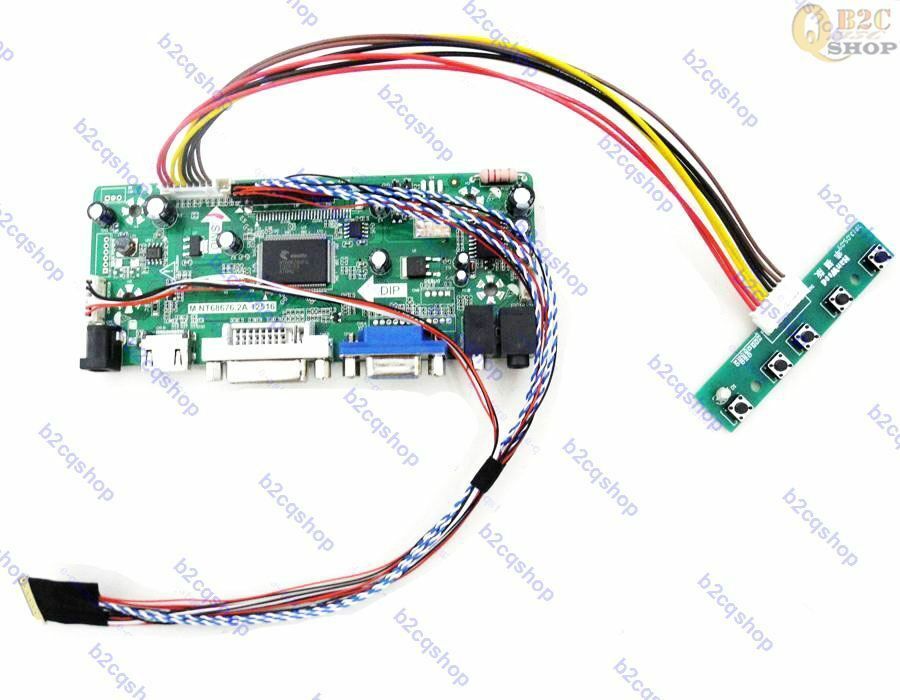
I am not really sure how correct I am but it looks to me that those pins are for the LED backlight of the LCD panel. As far as I can see the LCD controller board doesn’t have an in-build LED driver. VDD and V(LED_EN) are both 3.3V. Maybe combine those pins with pin 2 and 3 and see what happens.
Of course there is always a risk of frying your panel so I am not taking any responsibility! It’s just a suggestion of what you could try to do. Please report once you got it to work.
Do you have the LVDS cable? A 6bit-1CH LVDS has different pin population that for instance a 8bit-2CH. Vcc and GND are at different locations and a wrong cable could potentially fry your LCD.
I am on my phone without my glasses, so I can’t see very well but on the imgur picture it looks like a 8bit-2CH cable while a 1366 resolution seems more like 6bit-1CH (just a guess from my little experience with LCD panels, don’t take it as a fact).
Have you tried to hook it back up to the old laptop to see if it’s still working?
Also, have you flashed the right firmware for the controller board?
@sw76 I am sorry, I couldn’t find a datasheet for that screen. It’s generally tough to find datasheets for TV displays. Had the same problem when I build my mirror. In the end I found a free broken computer screen with a working LCD panel. Maybe that’s a better option for you.
Also, I assume the blue tint is a problem with the panel itself and not a problem with the controller board. Maybe it’s just the cable, though. Check both end for continuity.
Good luck with your project!
You can find universal LCD controller boards for cheap on eBay or AliExpress. Try to find the datasheet and if the LCD has a LVDS interface I’ll help finding the best controller board. A quick Google search didn’t show anything useful. Maybe post pictures of the LCD panel with all labels visible.
@aimorris Not sure I can help. I am not really good analyzing logs but I could see this
ssh_askpass: exec(/usr/bin/ssh-askpass): No such file or directory
Permission denied (publickey).
fatal: Could not read from remote repository.

Please make sure you have the correct access rights
and the repository exists
Are you trying to start MM remotely? Does MM require root (sudo)? If you start it remotely, have you tried to start it locally?
Hi there,
what you want is a display with high contrast. I think VA panels have the best. At least on paper.
To power my mirror I use a 12V power supply for the LCD and a buck converter to reduce the 12V to 5V for my RasPi. That’s a dirt cheap solution which is working really well for more than 2 years.
There are also really, really cheap universal LCD controller boards that run on 5V only (around 4-5€, up to FullHD resolution, 30 pin LVDS, 2-CH, 8-bit) You configure them via jumpers. Although they have only a VGA output. Which means you’ll need an additional VGA to HDMI adapter (usually less than 3€). T
And of course: In bright conditions you should pick a mirror with a higher transmission rate. In darker conditions a lower transmission rate will do. What mirror have you got?
I use the cheapest SSD I could get for my Pi at that time. It’s running non-stop for 2 years without any issues. You can get 120GB SSD’s for less than 20€. A SATA-USB adapter costs around 2€ from China. Maybe that’s an option for you.
SD cards are not designed to be permanently written to. They wear out too fast.
@Preve Hi there!
The Other day I installed MM on the latest Linux Mint and it worked without any issues. All I did before the npm installwas to run curl -sL https://deb.nodesource.com/setup_6.x | sudo -E bash - which was poested by @Mykle1 poested in this post. There were no errors during the installation. Give it a try and report back if that worked for you. :slightly_smiling_face:
Ok, ust for fun I installed MM an the Atomic Pi and the installation went through without a problem. MM runs pretty smooth, although I haven’t installed any demanding modules.
I also installed windows 10 on an external SSD, connected via the USB 3.0 port. It works and runs okay but I hoped it would feel a bit faster. Not sure if the USB drive is to blame or the CPU. I’d like to test a slimmed down LTSB version but I couldn’t get my hands on an iso :slightly_frowning_face:
I have no experiences with any offline speech recognition modules but I’ll get into it in July. I won’t really have the time to play around with it at the moment.
Any other modules I should try?
It’s powered with 5V via the GPIO pins. I soldered a barrel jack to a pin header to power the Atomic Pi. This is one of the flaws and quirks… They do sell different breakout boards but they weren’t available when I ordered my Pi.
I didn’t have too much time playing with it software wise. I was doing some soldering to extend the number of USB ports and to power the thing. However, I have successfully installed Linux Mint and it is running smooth. Ubuntu should run well, too.
Maybe I’ll try installing MM tomorrow and report back but I can’t promise to find the time for it. Also, I am not really a programmer (at all!) so I’ll stay away from the GPIO pins for now (until I can copy what others have done :face_with_stuck-out_tongue_winking_eye: ).
My summary so far: it does have some flaws and quirks but for the price it is amazing.
Hi all,
I am surprised nobody is talking about the Atomic Pi yet.
It’s a x86 SBC that cost around the same as a Raspberry Pi but instead comes with 16GB eMMC storage, 2GB of RAM and an Intel Atom CPU, and USB3. You can find it here.
I ordered mine last week when it was only $35 (now ~$39, they are popular, prices will probably go up a bit more) and I received it yesterday in Germany. Including shipping and import fees I paid something around 43€.
They are in and out of stock all the time but right now they’re in stock. Don’t wait too long to place an order…
Before I try MM on it I’ll probably play around a bit using different OS, especially Windows 10.
I thought this could be of interest for some users. I know there’re always plenty of people looking for a more performant SBC and this could be it.
You have to execute npm startin the MagicMirror directory, not in the home directory of your user pi. E.g. do cd MagicMirror (or /home/pi/MagicMirroror whatever your MM directory is) and then run npm start.
@mytamhuyet What? Why would it power down without being told to do so. My mirror runs for months without a restart.