@sdetweil I did try with another hdmi cable with no success, after that I lower the frequency, first it seemed to work but then the second time I rotate the screen went all black. This is so strange. It did work perfect a couple of month ago.
M
Offline
A New Chapter for MagicMirror: The Community Takes the Lead
Read the statement by Michael Teeuw here.
Read the statement by Michael Teeuw here.
Posts
-
RE: Black screen when rotate
-
Black screen when rotate
Hello, when I do rotate screen with the screen configuration the screen went all black and I have to restart the raspberry pi with the cable. Anyone know what happen? 1 of 10 times it work and the rest of it the screen went all black so it’s not everytime.
-
Problem with MMM-PhoneDetect
I did the install of the MMM-PhoneDetect but can’t get it to work. Does anyone know what do to? There seem to be no conection between my phone and the module. It’s a grey dot on the screen that is supposed to be green. When I did the log check I get this:
m@raspberrypi:~ $ pm2 logs [TAILING] Tailing last 15 lines for [all] processes (change the value with --lines option) /home/m/.pm2/pm2.log last 15 lines: PM2 | 2024-06-16T14:23:34: PM2 log: App [MagicMirror:0] starting in -fork mode- PM2 | 2024-06-16T14:23:34: PM2 log: App [MagicMirror:0] online PM2 | 2024-06-16T14:39:28: PM2 log: Change detected on path config/config.js for app MagicMirror - restarting PM2 | 2024-06-16T14:39:28: PM2 log: Stopping app:MagicMirror id:0 PM2 | 2024-06-16T14:39:29: PM2 error: Error: kill EPERM PM2 | 2024-06-16T14:39:29: PM2 error: Error: kill EPERM PM2 | 2024-06-16T14:39:29: PM2 log: pid=859 msg=failed to kill - retrying in 100ms PM2 | 2024-06-16T14:39:29: PM2 log: pid=859 msg=failed to kill - retrying in 100ms PM2 | 2024-06-16T14:39:29: PM2 log: pid=859 msg=failed to kill - retrying in 100ms PM2 | 2024-06-16T14:39:29: PM2 log: pid=859 msg=failed to kill - retrying in 100ms PM2 | 2024-06-16T14:39:29: PM2 log: pid=859 msg=failed to kill - retrying in 100ms PM2 | 2024-06-16T14:39:29: PM2 log: App [MagicMirror:0] exited with code [0] via signal [SIGINT] PM2 | 2024-06-16T14:39:30: PM2 log: pid=859 msg=process killed PM2 | 2024-06-16T14:39:30: PM2 log: App [MagicMirror:0] starting in -fork mode- PM2 | 2024-06-16T14:39:30: PM2 log: App [MagicMirror:0] online /home/m/.pm2/logs/MagicMirror-error.log last 15 lines: 0|MagicMir | [1193:0616/142444.467634:ERROR:atom_cache.cc(229)] Add WM_CHANGE_STATE to kAtomsToCache 0|MagicMir | [2024-06-16 14:39:29.388] [ERROR] MMM-PhoneDetect: Error performing nmap scan: Command failed: sudo nmap -sn 192.168.1.0/24 0|MagicMir | 0|MagicMir | [2024-06-16 14:39:29.400] [ERROR] (node:1193) UnhandledPromiseRejectionWarning: Error: Command failed: sudo nmap -sn 192.168.1.0/24 0|MagicMir | 0|MagicMir | at ChildProcess.exithandler (node:child_process:422:12) 0|MagicMir | at ChildProcess.emit (node:events:514:28) 0|MagicMir | at maybeClose (node:internal/child_process:1105:16) 0|MagicMir | at Socket.<anonymous> (node:internal/child_process:457:11) 0|MagicMir | at Socket.emit (node:events:514:28) 0|MagicMir | at Pipe.<anonymous> (node:net:337:12) 0|MagicMir | (Use `electron --trace-warnings ...` to show where the warning was created) 0|MagicMir | [2024-06-16 14:39:29.401] [ERROR] (node:1193) UnhandledPromiseRejectionWarning: Unhandled promise rejection. This error originated either by throwing inside of an async function without a catch block, or by rejecting a promise which was not handled with .catch(). To terminate the node process on unhandled promise rejection, use the CLI flag `--unhandled-rejections=strict` (see https://nodejs.org/api/cli.html#cli_unhandled_rejections_mode). (rejection id: 1) 0|MagicMir | /home/manino/MagicMirror/node_modules/electron/dist/electron exited with signal SIGINT 0|MagicMir | [3682:0616/144334.609151:ERROR:atom_cache.cc(229)] Add WM_CHANGE_STATE to kAtomsToCache /home/m/.pm2/logs/MagicMirror-out.log last 15 lines: 0|MagicMir | [2024-06-16 15:09:17.175] [LOG] MMM-PhoneDetect: Mirror turned off. 0|MagicMir | [2024-06-16 15:09:17.915] [LOG] MMM-PhoneDetect: Turning off the mirror... 0|MagicMir | [2024-06-16 15:09:17.942] [LOG] MMM-PhoneDetect: Mirror turned off. 0|MagicMir | [2024-06-16 15:09:22.384] [LOG] MMM-PhoneDetect: Turning off the mirror... 0|MagicMir | [2024-06-16 15:09:22.439] [LOG] MMM-PhoneDetect: Mirror turned off. 0|MagicMir | [2024-06-16 15:09:23.045] [LOG] MMM-PhoneDetect: Turning off the mirror... -
RE: Magic Touch Display
@sdetweil And what is another.module?
I have the MMM-ModuleController, MMM-Calculator, MMM-DrawingBoard. Do you mean someone of those or is it something else? I do understand what is supposed to happen, but can’t figure out HOW to do it with those lines.
-
RE: Magic Touch Display
@sdetweil Yes, but should I copy paste it into config or what?
I’m on a very low level of the Magic Mirror, have been here for only a month and I can’t understand were to put the line or lines. I have tried at least 50 different places, in files, cofig, and also the css. I can’t do it right.
-
RE: Magic Touch Display
@Pjarki Funny modules! I have them now, and have been thinking about to not use the MMM-ModuleController. I like the blurry background for the calculator. But there is one issue with the MMM-DrawingBoard for me, It is a bit laggy.
Do you know if it’s because of the non existing ModuleController in my config?
First of all then, I don’t know where to put these, can you tell me where to put them?
this.sendNotification(‘HIDE_MODULES’, { exceptionList: [“MMM-DrawingBoard”] });
this.sendNotification(‘SHOW_MODULES’);
-
RE: Request or... is there already a module like this? Showing pictures from an folder.
@sdetweil Yes that’s correct, I wan’t an preview of the image to click on. Either an folder or just pictures you can make bigger by click on it.
I don’t use the display with an mirror, so fingerprints wouldn’t be a problem for me.
Maybe I have to make more pages and add big pictures instead.
-
RE: Request or... is there already a module like this? Showing pictures from an folder.
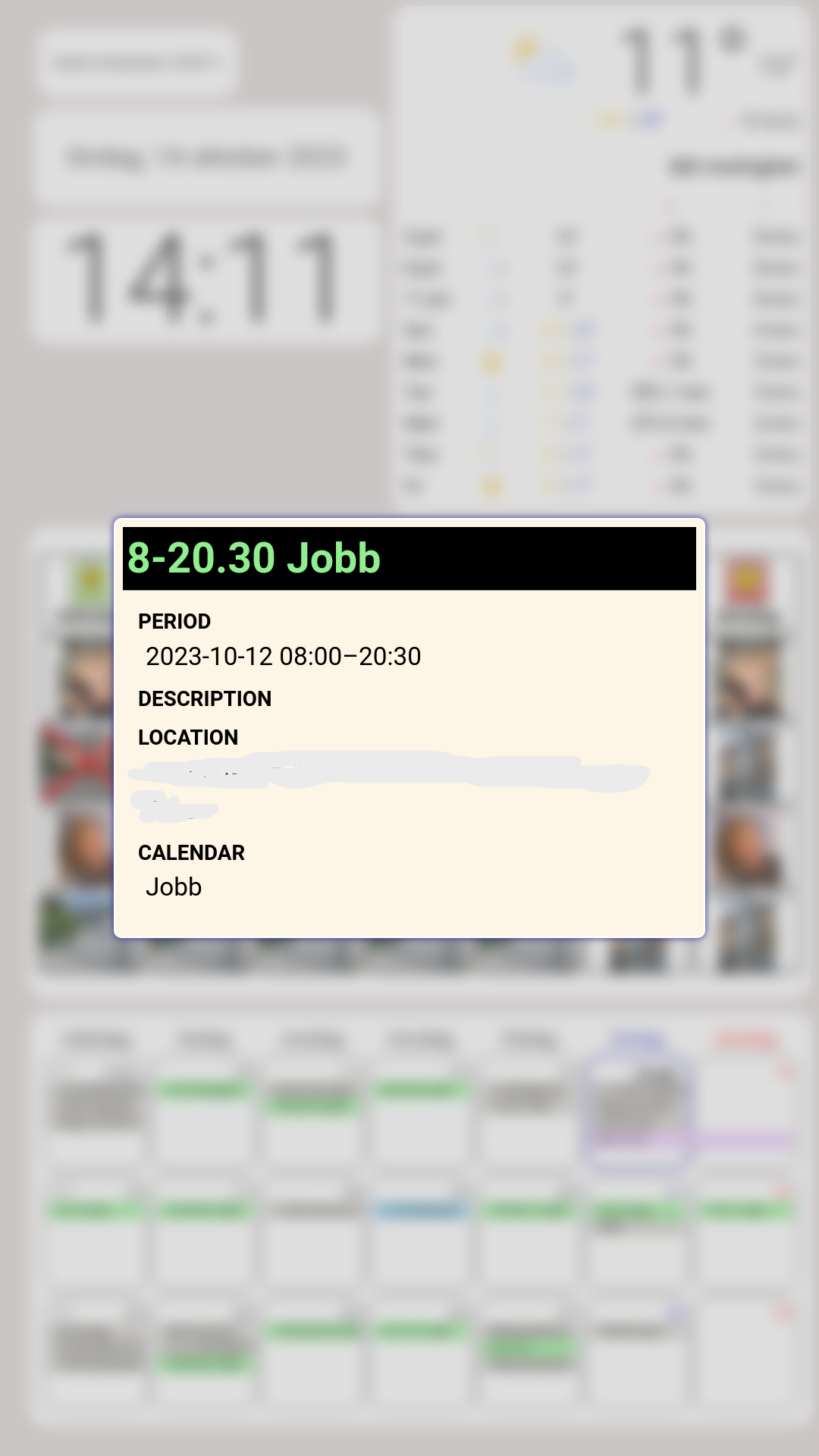
@sdetweil It’s not possible with an touchscreen either? It’s a thing called “popover” in the CalendarExt3 module, maybe it could work like that? I’ll show a picture. The “popover” show up when I click an event in the CalendarExt3.
-
Request or... is there already a module like this? Showing pictures from an folder.
Is there a module where you can have pictures/files in a folder an click to open one of them and see it and then click to close it again? Think about files in pdf and jpg.
If there is no module like this, anyone interested in making one?
-
RE: Touchscreen works wrong when screen is rotated vertical
@sdetweil Ahaaa! Thought you talk about the driver for the monitor.
-
RE: Touchscreen works wrong when screen is rotated vertical
@sdetweil Driver was only for Windows. I have buttons on the screen, but could’nt choose to rotate screen. All text was black except the one for rotate that was grey.
Maybe it’s because of this, found in the Dell manuall : NOTE: “Horizontal Position and Vertical Position adjustments
are only available for “VGA” input.”I’m using HDMI. I don’t even know if the VGA would have solved my problem. But no need to know, @viktorzonix solved the problem for us. So glad for u guys helping, I haven’t asked one question at MM forum and not getting helped.
-
RE: Touchscreen works wrong when screen is rotated vertical
@viktorzonix Yes, that’s it. Thank you so much, can’t describe how glad I am for this, I really appreciate you share this for us!
-
Touchscreen works wrong when screen is rotated vertical
I want to use my touchscreen vertically, but when I do that, the touch can’t click right. It’s like the mouse won’t turn side to vertical.
I have tried the screen with my PC, works perfect. It’s something between the screen, Rasperry pi and the Magic Mirror. Anybody have an idea about what? I do the rotate with the “screen layoute editor”. Have tried reebot.
-
RE: How to disable seconds in clock time?
@sdetweil Oh, that’s good to know!!
-
RE: How to disable seconds in clock time?
@sdetweil Intresting, no need for trailing comma when it was only
{
module; "clock",
position: "top_left"
},
It did work with a trailing comma after position line, thanks!
-
RE: How to disable seconds in clock time?
Somone know why it does’nt work for me? I have tried:
{
module; "clock",
position: "top_left"
         config: {
         displaySeconds: false
}
},
and
{ module; "clock", position: "top_left" config: { displaySeconds: false, } }, -
RE: MMM-weatherforecast not working correct, or?
@sdetweil I did change weather module and first it did’nt work. But after a while it did. Think it was the 3.0 onecall api take some time after I did sign up. Thanks for the tip!
-
RE: MMM-weatherforecast not working correct, or?
@sdetweil
Yes, they are 2 modules, the top_right is MMM-OpenmapWeather.Hm ok so there can be limited data. This is my config and there is no difference if i take those out (I put them in by myself)
showRainAmount: true,
maxNumberOfDays: 8,
scale: “50%”,{ module: "MMM-weatherforecast", position: "middle_center", header: "Vädret i", // This can be any of the regions. // Best results in bottom_bar region due to horizontal default layout and icon sizes. config: { showRainAmount: true, maxNumberOfDays: 8, scale: "50%", // See 'Configuration options' for more information. location: "Stockholm, Sweden", locationID: "", //Location ID from http://openweathermap.org/help/city_list.txt appid: "xxxx" //openweathermap.org API key. } },