MagicMirror Forum
    • Recent
    • Tags
    • Unsolved
    • Solved
    • MagicMirror² Repository
    • Documentation
    • 3rd-Party-Modules
    • Donate
    • Discord
    • Register
    • Login
    1. Home
    2. maxbachmann
    3. Posts
    A New Chapter for MagicMirror: The Community Takes the Lead
    Read the statement by Michael Teeuw here.
    M
    Offline
    • Profile
    • Following 0
    • Followers 2
    • Topics 5
    • Posts 164
    • Groups 0

    Posts

    Recent Best Controversial
    • RE: Module Position

      @justjim1220 Same for me I am absolutely new to javascript. I generally know the system const because I use a lot of c++, but testing here seems like the variables actually get not deleted after SocketNotificationreceived function ends. And I have absolutely no clue on when to use the type let and which advantage it offers over var, because on some variables let works on others only var. const actually never worked in there.

      I have my code here not fully ready yet:

      socketNotificationReceived: function(notification, payload) {
          if (notification === 'HIDE_SHOW') {
      	
      	var obj = JSON.parse(payload.data.toString());
      	
      	var max = obj.slots.length;
      
      	for (let i = 0; i < max; ++i){
                      if (obj.slots[i].slotName === "HIDE" ||
                          obj.slots[i].slotName === "SHOW") {
                          var HideShow = obj.slots[i].slotName;
                      }
                  }
      
                  for (let i = 0; i < max; ++i){
                      if (obj.slots[i].slotName === "MODULE") {
                          var Module = obj.slots[i].value.value;
      			break;
                      }
                  }
                  var Message = HideShow + "_" + Module;
      
      		
      		const moduleToMove = 'clock';
      		const targetRegion = 'top.left';
      		
      		MM.getModules().enumerate((module) => {
      		    if (module.name === moduleToMove) {
      		        const instance = document.getElementById(module.identifier);
      		        const region = document.querySelector(`div.region.${targetRegion} div.container`);
      		        region.appendChild(instance);
      			//region.insertBefore(instance, region.childNodes[0])
      		        region.style.display = 'block';
      		    }
      		});
            	this.loaded = true;
      	this.sendNotification(Message);
          }
      
          if (notification === 'ERROR') {
            this.sendNotification('SHOW_ALERT', payload);
          }
        }
      

      So at which positions would it be better to use const/let instead of var? And how is the performance of them? Because in c++ I definetly use const a lot for variables or member functions
      posted in Development
      M
      maxbachmann
    • RE: Module Position

      @justjim1220 it already works the way @strawberry-3-141 proposed :)
      Only thing I am not quite sure about yet is when can I use const?
      I have the code in socketmessagereceived. Can I use const in there when I do only give the variable one value each time it runs the function? Because for me it seems like the variables still exist when the function gets called again which would mean const does not work

      posted in Development
      M
      maxbachmann
    • RE: Module Position

      @strawberry-3-141 ty that works.

      Added the possibility

      region.insertBefore(instance, region.childNodes[0])
      

      so I can prepend and append the module

      posted in Development
      M
      maxbachmann
    • RE: Module Position

      @strawberry-3-141 so in general use all 3 commands and then it works in both senarios? where can I find the right ID for each module?

      posted in Development
      M
      maxbachmann
    • RE: Module Position

      Ah did not know that ;) well yes then it’s definetly in my program. All my program does so far is subscribe to a mqtt broker, load some data and according to this show/hide modules. Now I want to add the possibility to move modules to different positions.
      Can send the current code later

      posted in Development
      M
      maxbachmann
    • RE: Module Position

      In general I want to add it to all kind of modules so I can change the position when sending them a socketmessage to do so

      posted in Development
      M
      maxbachmann
    • RE: Module Position

      @strawberry-3-141 and where to add that? is that already the “end code”? I tried in the domupdate function and it did not work, so I guess that was wrong

      posted in Development
      M
      maxbachmann
    • RE: Module Position

      @strawberry-3-141 So I always have to know wether there is already a element in that region? Is there a way to check all modules and return the ID’s of the elements that are in this position?

      posted in Development
      M
      maxbachmann
    • RE: German Voice Recognition

      @Mykle1 yes the animation is really impressive will have to see wether I get it running or otherwise might try to get my old laptop mainboard back ^^
      I think only the power supply is broken

      posted in Fun & Games
      M
      maxbachmann
    • RE: Module Position

      @strawberry-3-141 Can you help me with how that would look like in software? I am sorry this project is the first time I use javascript at all and absolutely clueless when it’s about the dom

      posted in Development
      M
      maxbachmann
    • RE: Module Position

      I just asked my friend google:

       var d = document.getElementById(wrapper);
       d.style.left = newx_pos;
       d.style.top = newy_pos;
      

      is that how to do it?

      posted in Development
      M
      maxbachmann
    • RE: Module Position

      @strawberry-3-141
      How can I do that in there (sorry I am a absolute noob with the dom)

      posted in Development
      M
      maxbachmann
    • RE: German Voice Recognition

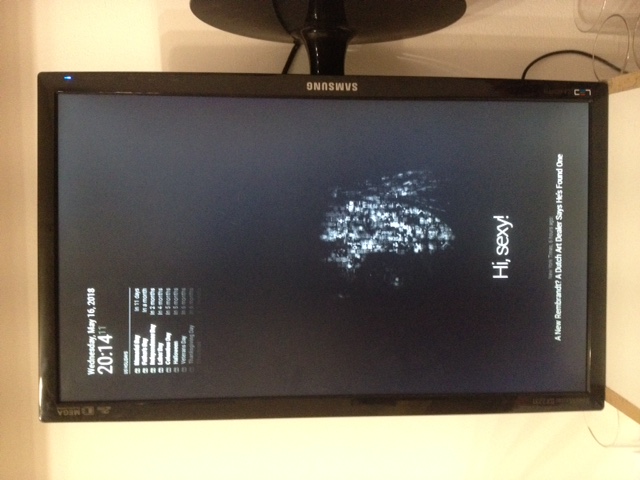
      0_1526502229554_IMG_5310(1).JPG

      @Mykle1 Your Lucy png with MMM-eyecandy makes this look so much more intelligent … :winking_face:
      (I can’t give up on this got to try it again when I have my first 3b+ and when the 4 comes out lol)

      posted in Fun & Games
      M
      maxbachmann
    • RE: Module Position

      @dherl0623 ty Ik I can change it in there, but would have been cool to change during runtime so I can blend the module in at whatever place I currently need it ;) Well can’t change when it’s not possible

      posted in Development
      M
      maxbachmann
    • RE: Attempt to Rebuild MMM-Slack with media handling, includes dont seem to load

      a slack module sounds great

      posted in Development
      M
      maxbachmann
    • Module Position

      can I change the position of a module while MM2 is running?

      posted in Development
      M
      maxbachmann
    • RE: current weather feels 185F!!!

      The Temperature says 81.2 F which is pretty good I guess ;)
      The other one 185F is the feels like temperature. It’s calculated from the normal temperature and the windspeed.

      var windchillinF = Math.round(35.74+0.6215*tempInF-35.75*Math.pow(windInMph,0.16)+0.4275*tempInF*Math.pow(windInMph,0.16));
      			var windChillInC = (windchillinF - 32) * (5/9);
      			// this.feelsLike = windChillInC.toFixed(0);
      
      			switch (this.config.units){
      			case "metric": this.feelsLike = windChillInC.toFixed(0);
      				break;
      			case "imperial": this.feelsLike = windChillInF.toFixed(0);
      				break;
      			case "default":
      				var tc = windChillInC - 273.15;
      				this.feelsLike = tc.toFixed(0);
      				break;
      			}
      

      doing the calculation manually given the 81.2 degree and 5 Beaufort you should have a feel like of somewhat around 84 degree. You might want to check what the results in between are that you get to find the fault. However if you just want to see the actual temperature you can aswell just deativate this feels-like temperature

      posted in Troubleshooting
      M
      maxbachmann
    • RE: Led without Bread-boards !

      @4lice When you only want to control the color in a easy way you could just use one of those led stripes that already have a remote control to set the colors. If you want to control them with the raspberry pi it’s definetly easier to use the GPIO pins than USB ;) Why you want to use USB over the GPIO Pins? Breadboard is generally a fast build thing you use for testing purposes. You will have to consider that when using long LED stripes you definetly need more power than a raspberry pi can deilver so you will need to use a external power supply for them.

      posted in Requests
      M
      maxbachmann
    • RE: German Voice Recognition

      @kruemel :) glad you like it

      posted in Fun & Games
      M
      maxbachmann
    • RE: German Voice Recognition

      @Mykle1 do you known whether it’s possible to change the position of a module while MM2 is running? did a first try changing this.data.position, but did not work. So not sure wether I did it wrong or it just is not possible

      And Already included the Pages command (just did not define which modules to show for a certain page yet)

      posted in Fun & Games
      M
      maxbachmann
    • 1
    • 2
    • 3
    • 4
    • 5
    • 6
    • 7
    • 8
    • 9
    • 6 / 9