@hrmax23
Hmmmm… Could you try without MMM-MyScoreboard module?
M
Offline
A New Chapter for MagicMirror: The Community Takes the Lead
Read the statement by Michael Teeuw here.
Read the statement by Michael Teeuw here.
Posts
-
RE: MMM-Scenes2
@hrmax23
I need a log when it stops. (It would not be backend-log, it should be frontend-log.) If possible, Use MMM-LogExt to record long term front-end log. -
RE: MMM-CalendarExt3
@bobbylx
CX3* series may not work on MIDORI, sorry. It’s too old browser, doesn’t support advanced modern JavaScript technologies. -
RE: MMM-CalendarExt3
@nicmoly
Usually, your symptom happens by insufficientwaitFetch. Give it more. (By default it would be 5_000 ms. Give it more like 10_000) -
RE: mmm-scenes2 and mmm-wallpaper
@redbeardedninja
You have 3 scenes - [“info”, “unnamed”, “photos”].
However, “info” scene has noexitorder, so all modules in the previous scene will remain as they were.
I think you need to describeenterandexit, which modules should act in the target scene. -
RE: MMM-CalendarExt3
@Lilleberg If possible, can you share the copy of your calendar? (And the final config file also) (eouia0819@gmail.com)
Without the real data I couldn’t catch what really happened in yours. -
RE: MMM-CalendarExt3
@Lilleberg
CheckbroadcastEvents:truein your MMM-GoogleCalendar’s config. Unlike the original calendar module, MMM-GoogleCalendar has this value asfalseby default. -
MMM-AlertExt
MMM-AlertExt
Alternative alert module for MagicMirror
Demo
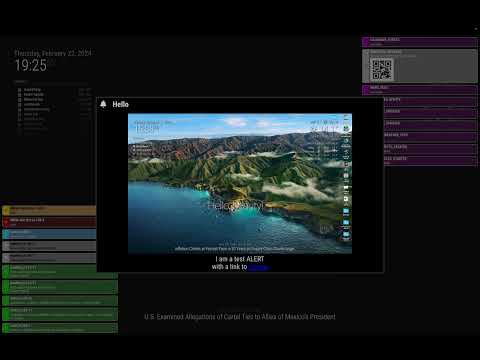
Why?
- I need a more decorated alert feature than the current default
alertmodule. - Not only
SHOW_ALERT, I want to see more various notifications and messages on the screen. (e.g.Log.log(),UnhandledExceptionError,CALENDAR_UPDATEDnotifications…) - I made this module for a kind of shared programmable output-presenter of some modules.
- I need a more decorated alert feature than the current default
-
RE: MMM-CalendarExt3
@bobbylx said in MMM-CalendarExt3:
     }
     return payload
   } // <== HERE
                   eventTransformer: (ev) => {
                    if (ev.title.search('Allie') > -1) ev.color = 'blue'
                    return ev
                   }
You’ve missed
comma(,)in the end ofweatherPayloaddefinition. -
RE: MMM-CalendarExt3Journal not displaying
@jlward73
Perhaps,… Are you place CX3 and CX3J to same region? Overflow may happens so the module locates out of screen… Just a guess. -
RE: Automatic checking of all MagicMirror² modules
I don’t care if it is not updated or not as long as it works.
However, we can call someunmaintained-anymoremoduleslegacy. Maybe a taglegacyto some old modules be a good way to distinguish. By contrast, the other side might bemodern.If possible, I wish for more features/rules for common
"modern"modules. These could help automate the management of modules.-
Installer command/script/instruction
Some modules may need additional manual pre-requisition or dependency jobs (e.g. getting auth), but most of the modules would be possible to prepare simple scripts for installation. (inpackage.jsonand specificinstallerfolder). If so, we can provide anauto-install/updatefeature to MM. -
Basic default configuration example file.
If possible, adefaultconfig example would be a help for the newbie, and with that content,auto-configurationwould be possible in the installation stage.
Of course, there might beprivate-informationorAPI-Keyissues… -
Using
.envto store private/secure information. (Or private.json something…)
To separate normal configuration from sophisticated private data (e.g., API Key, Account, password, etc.) , using.envmay be the option. It could be composed through an installation script if needed.
I wish we could have something like a
plugins marketorbundle storeof other applications. -
-
RE: MMM-CalendarExt3Journal not displaying
@jlward73
What do you meanshows nothing? Is the module itself not showing anything else(even if an empty time table frame)? Or events are not showing?
Your config itself seems nothing wrong.
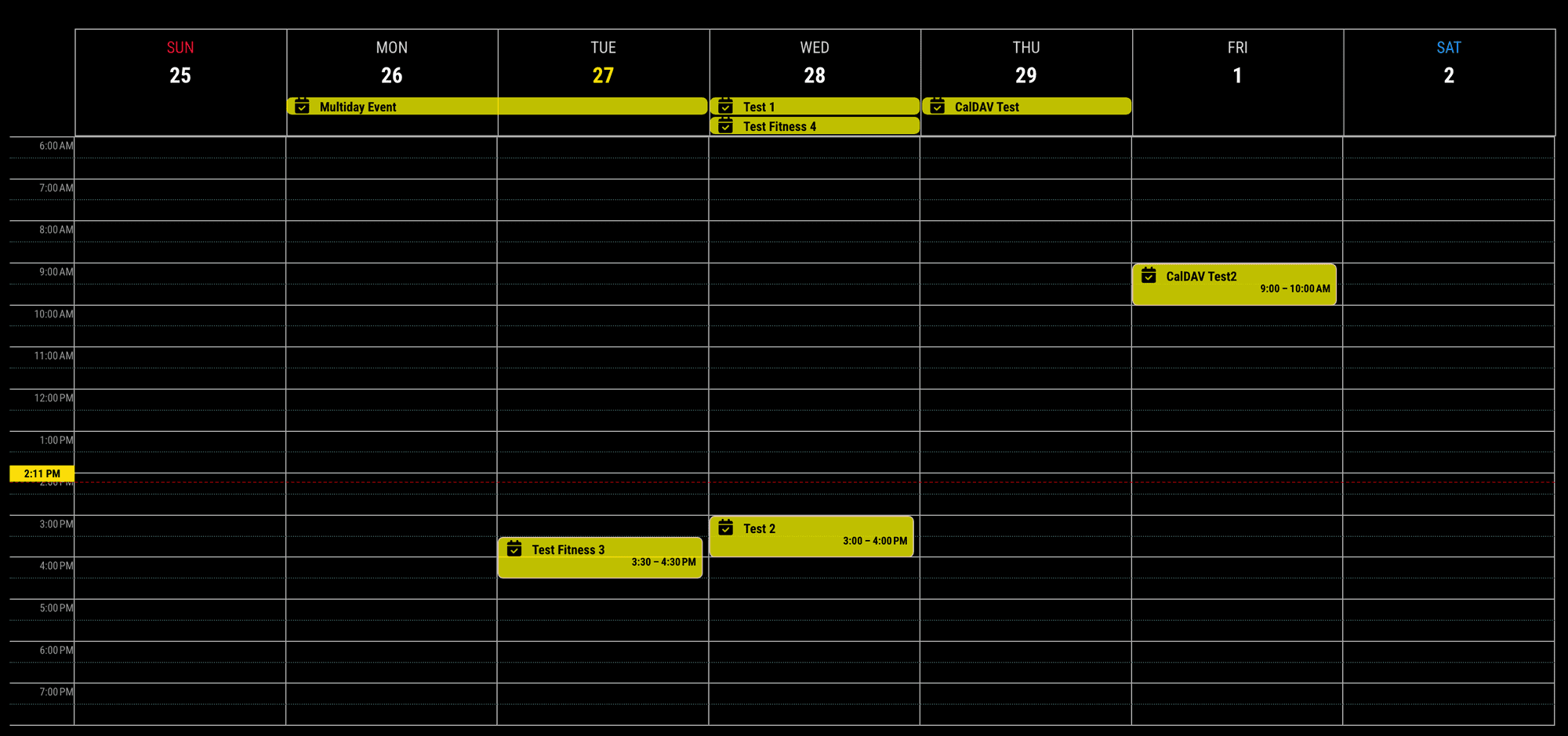
calendarSet: []meansall calendars, so it is OK.Could you show me your front-end log? (With Ctrl+Shift+i)
-
RE: MMM-CalendarExt3 show color
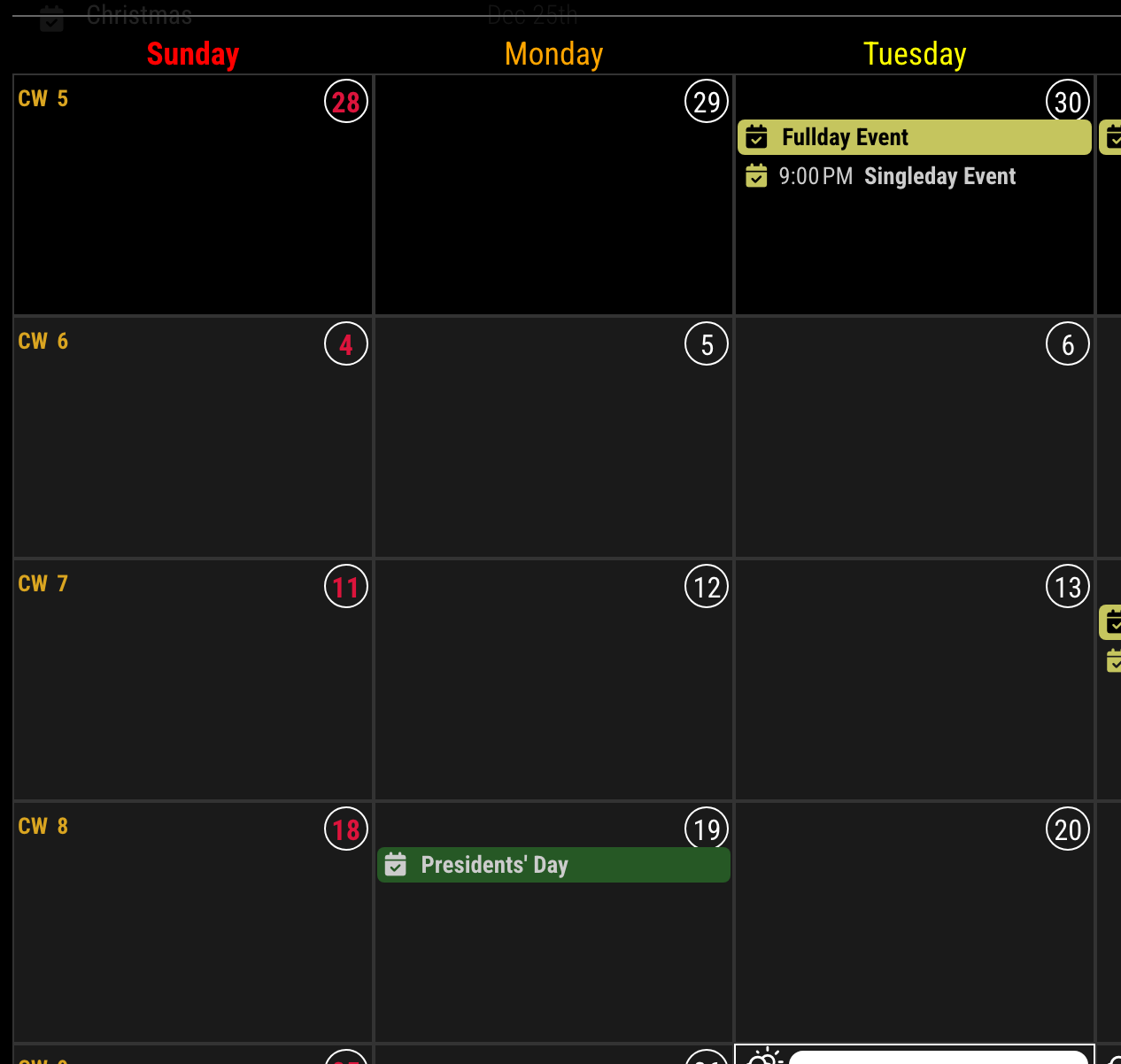
.CX3 .week:nth-child(2) .cell:first-child .cellDate .dateParts.month {
  display: none;
  /* Intentionally, I showed the month in the first cell of the calendar */
}

.CX3 .cellDate .dateParts.day {
  display: inline-block;
  box-sizing: border-box;
  text-align: center;
  width: 22px; /* Fixed width */
  height: 22px; /* W/H ratio should be 1 for circle not oval */
  line-height: 22px; /* vertical centering */
  border-radius: 50%;
  border: 1px solid #fff;
}
-
RE: MMM-CalendarExt3 show color
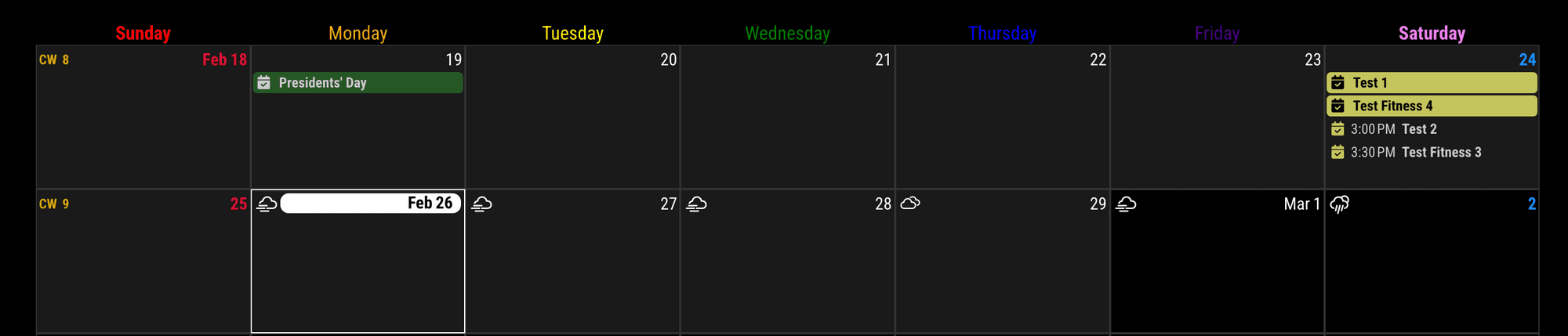
/* In your css/custom.css */ .CX3 .headerContainer .weekday_0 { color: red; } .CX3 .headerContainer .weekday_1 { color: orange; } .CX3 .headerContainer .weekday_2 { color: yellow; } .CX3 .headerContainer .weekday_3 { color: green; } .CX3 .headerContainer .weekday_4 { color: blue; } .CX3 .headerContainer .weekday_5 { color: indigo; } .CX3 .headerContainer .weekday_6 { color: violet; } -
RE: A few CalExt3 questions: background images, glance, and symbols
@greedyvegan
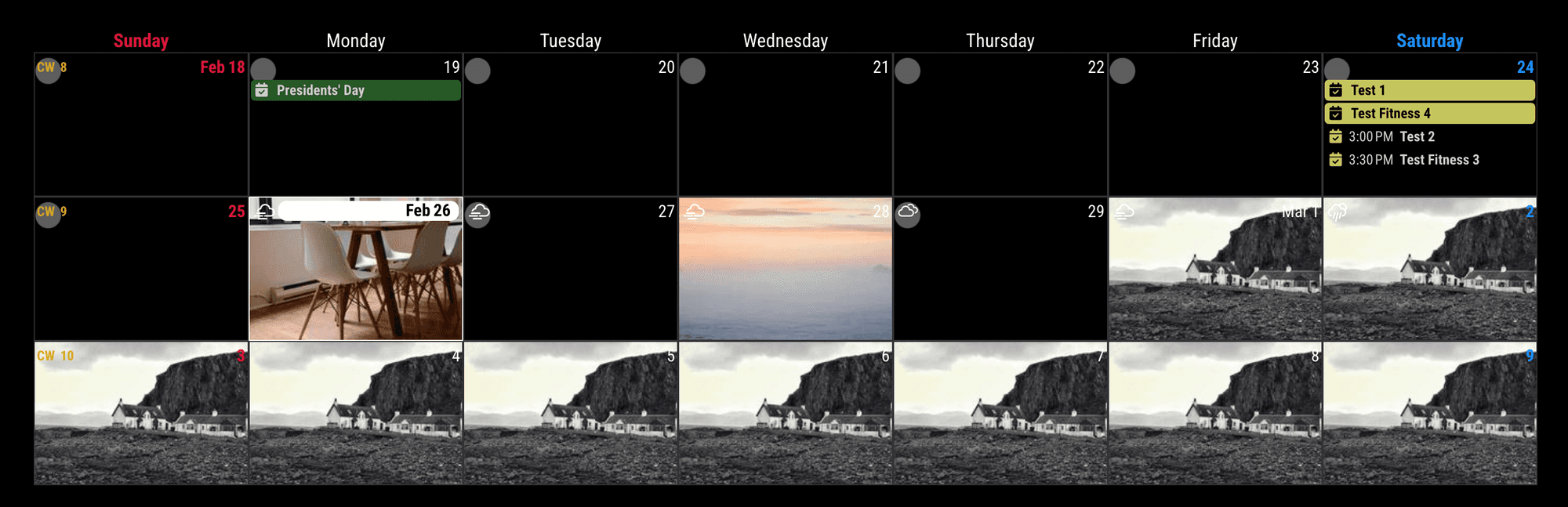
Of course, you may need some adjusting size and position, anyway, its possible./* In your css/custom.css */ .CX3 .cell { background-image: url("https://forum.magicmirror.builders/assets/uploads/files/1708912838487-calendar-background.001.png"); background-position: top left; background-size: cover; background-repeat: no-repeat; } .CX3 .cell.today { background-image: url("https://picsum.photos/200?1"); background-position: center center; } .CX3 .cell.month_2.date_28 { background-image: url("https://picsum.photos/200?2"); background-position: center center; } .CX3 .cell.month_3 { background-image: url("https://picsum.photos/200?3"); background-position: center center; }You can also use other prepred selectors like
thisWeek,thisMonth,thisYear,year_2025,weekday_3, and its combination.
And this method was by the static date.
If you want to change the background of the specific cell dynamically by the event, See the cell manipulation parts in README. -
RE: MMM-GoogleCalendar Not Loading
-
ETIMEDOUTgenerally happens when the server is busy, or the connection is extraordinarily slow. To prevent it,keep aliveheader is recommended. (Not sure that is the reason, anyway.) -
CX3* can also be fed from MMM-GoogleCalendar. But by compatibility issues due to unmatched format, broadcasts from MMM-GoogleCalendar should be converted before consumption.
-
You can alternatively try
MMM-CalDAV+default calendar moduleinstead ofMMM-GoogleCalendarif you still have issues.
-
-
RE: Calendar / CalendarExt3 Font-Color and Symbol
Original. (All these
testevents are from the same calendar)
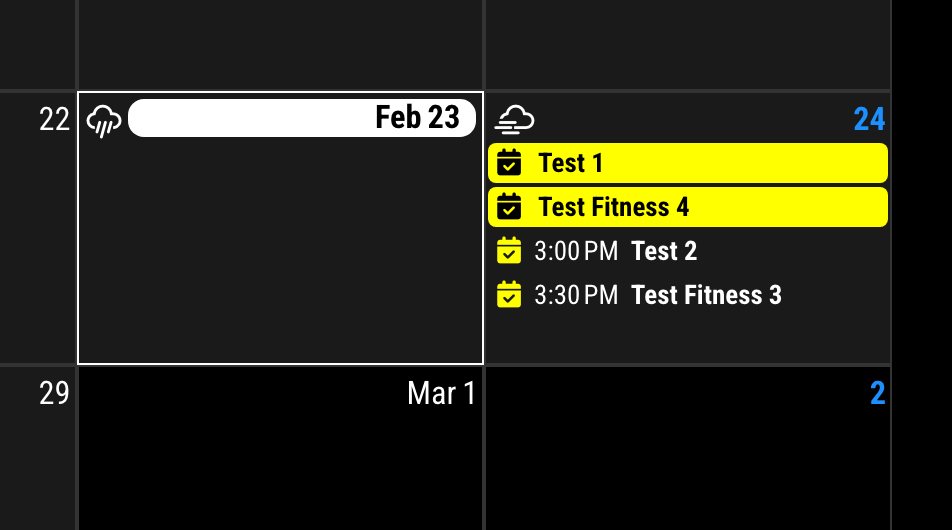
eventTransformer: (ev) => {
	if (ev.title.search('Fitness') !== -1) {
		ev.symbol = [ 'fa-solid fa-dumbbell' ]
		if (!ev.isFullday) ev.title = ev.title.replace('Fitness', '<font color="pink">Fitness</font>')
	}
	return ev
}
After.
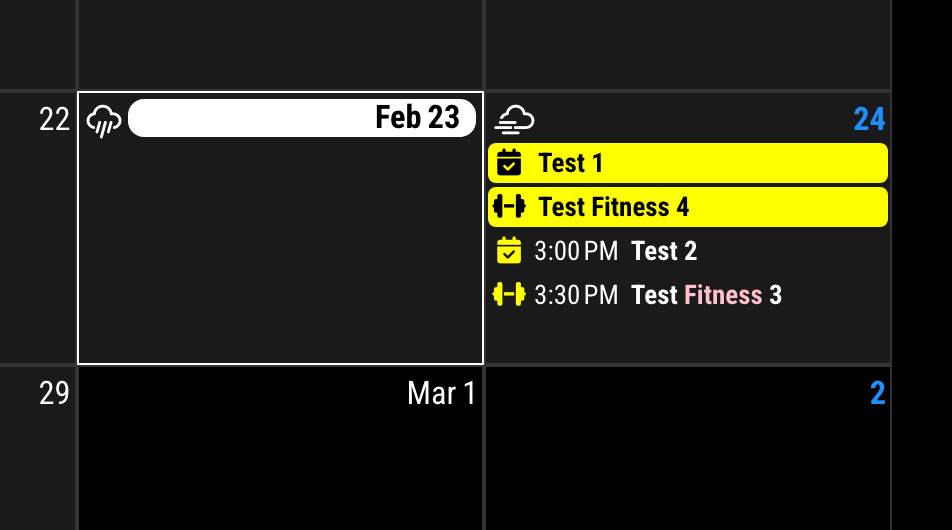
-
RE: Calendar / CalendarExt3 Font-Color and Symbol
if I use ev.sybol = ‘trash-can’ my calendar module is no longer displayed, but if I use ev.symbol = [‘trash-can’] the entry is displayed without a symbol.
Broadcasted events information from default calendar module is not so well-formed. You should use like this.
["fa-solid fa-trash-can"]I’m not sure somebody fix this issue, I reported long days ago. Anyway, until fix, use that way.
for “Fitness” I have selected the color “pink”. However, the “Fitness” entry is not colored pink, only the symbol. How do I make the font pink?
That was my intention. (I hate colored text. :D)
If you really want
colored text, append belows into yourcss/custom.css/* custom.css */ .CX3 .event.singleday .headline .title { color: var(--calendarColor); }If I abbreviate a birthday with “Geb.” and want to see the “birthday-cake” symbol instead of “Geb.”, how would I have to execute the “Replace” entry?
Maybe this… (not tested)
... if (ev.title.search('Geb.') !== -1) { ev.title = ev.title.replace('Geb.', '') ev.symbol = ["fas fa-birthday-cake"] } ... -
RE: Calendar / CalendarExt3 Font-Color and Symbol
{
	module: "MMM-CalendarExt3",
	position: "bottom_bar",
	config: {
		... // other configs...
		eventTransformer: (ev) => {
			const customEvents = [
				{ keyword: "Gelber Sack", symbol: "fas fa-arrows-spin", color: "yellow" },
				{ keyword: "Hausmüll", symbol: "fas fa-trash-can", color: "green" },
			]
			const found = customEvents.find((condition) => {
				return ev.title.search(condition.keyword) !== -1
			})
			if (found) {
				ev.icon = [ found.symbol ]
				ev.color = found.color
			}
			return ev
		},
	}
},
PS. It was a somewhat late answer. For your new questions, I’ll reply again.