M
Offline
A New Chapter for MagicMirror: The Community Takes the Lead
Read the statement by Michael Teeuw here.
Read the statement by Michael Teeuw here.
Posts
-
RE: scaling gone wonky
@cyclonej
Show me the whole screen capture. And what resolution the screen has? -
RE: MMM-CalendarExt3 help
@jrd
There could be several possible reasons; but most cases might be these two. -
RE: MMM-CalendarExt3 - split/skip multiday events on specific days (weekends)
/* config section of default calendar in config/config.js */
broadcastPastEvents: true,
sliceMultiDayEvents: true,
/* config section of CX3 in config/config.js */ eventFilter: (ev) => { const day = new Date(+ev.startDate).getDay() return (ev.fullDayEvent === true && (day === 0 || day === 6)) ? false : true },BEFORE
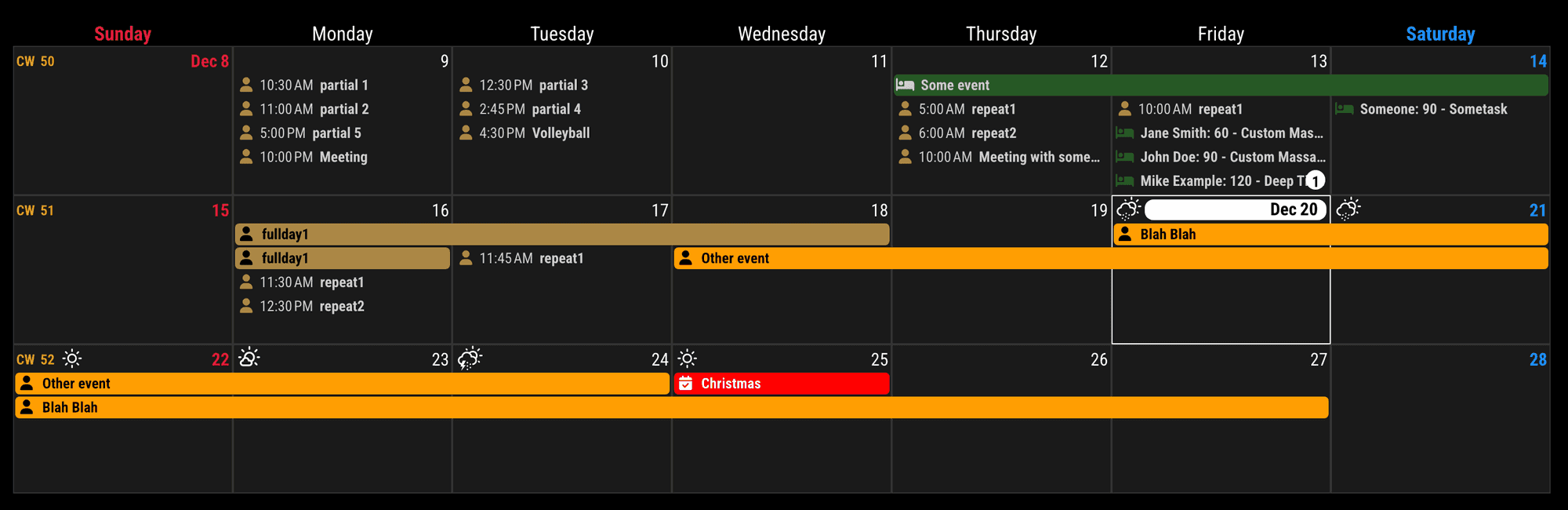
AFTER
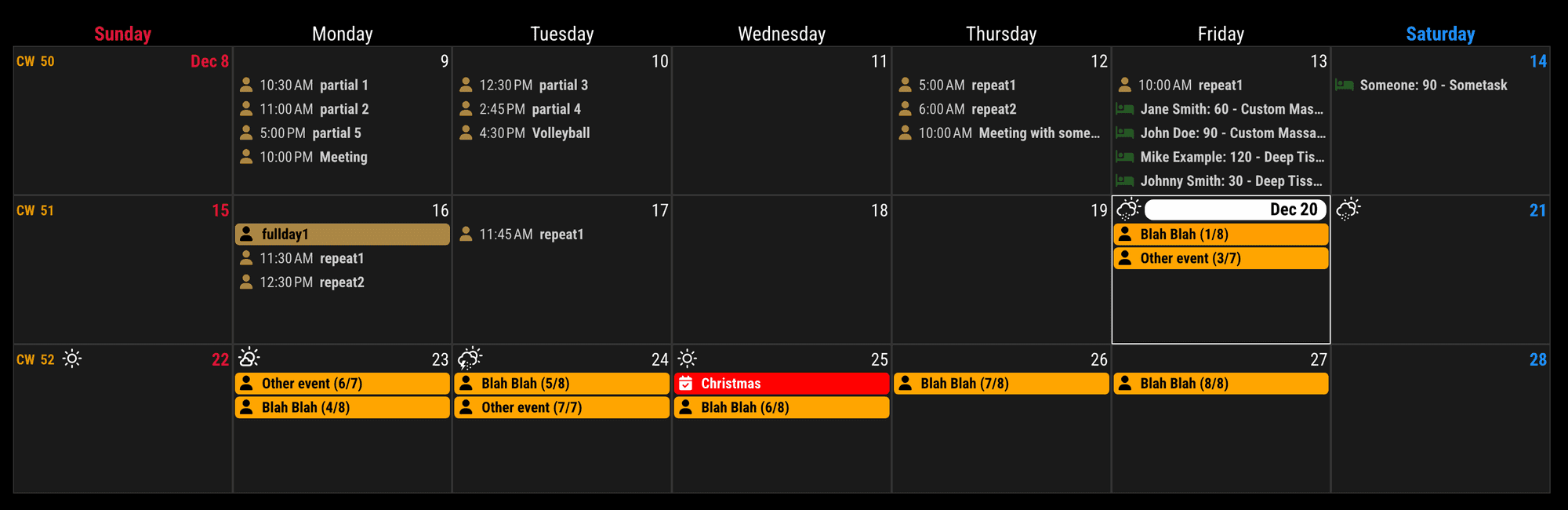
ISSUES
sliceMultiDayEventswould not emit the passed multi-day event. That’s not my fault.- looks ugly. Do you really need these splits? Generally, multi-day event means the period, not the occurrence.
Of course, you can slice events yourself for your purpose with
eventPayloadinstead ofsliceMultiDayEventsoption. -
RE: MMM-CalendarExt3 - split/skip multiday events on specific days (weekends)
@redfishbluefish
Slice first, then skip when the each event belongs to the weekends(with eventFilter or eventTransformer) -
RE: Modulo MMM-TelegramBot screenshot
I just realized that if the screen is turned off, taking a screenshot only shows the background and not the modules.
I think that is out of this module’s business.
-
RE: MMM-CalendarExt3 add non-event content to weekday cell
@redfishbluefish
By the way, handling cell header would be possible withmanipulateDateCell, You can refer this for your understanding.
https://github.com/MMRIZE/MMM-CalendarExt3/discussions/178 -
RE: MMM-CalendarExt3 add non-event content to weekday cell
@redfishbluefish
First, please clearly explain the rules that determine how Day 1 to Day 5 are decided.It seems that the fundamental principle is: “Day 1 to Day 5 follow sequentially without interruption, excluding holidays.” While this appears to be a simple and straightforward rule, there might be hidden conditions that complicate its application.
-
Could there be exceptions where the Day 1 to Day 5 sequence is disrupted, even on regular weekdays? For instance, unexpected events like a school activity might occur, causing the rule to be temporarily suspended. In such cases, it’s unclear whether the sequence is skipped entirely or deferred to the next day. The handling of these exceptions could vary, and since such cases might not be planned in advance when running the schedule system (MM), they may need to be adjusted manually as they arise. While not impossible, this would be inefficient and impractical.
-
To apply this rule effectively, the start and end dates of the sequence must be clearly defined. In countries like Korea, where the academic year is typically divided into two semesters with fixed start and end dates and few extended breaks during the semester, applying this rule is relatively straightforward. However, in Western schools that follow a trimester system or have long breaks during the term (e.g., Easter break), creating a universally applicable calculation method becomes quite challenging. This is because periods during which the rule is inactive must be explicitly defined.
Perhaps the most reliable approach would be to designate events for each applicable date within a calendar manually. By manually specifying the dates to which the rule applies, it’s possible to adapt to changes in schedules or rules. However, this method could be quite tedious.
Alternatively, if there is already a schedule table in a digital format with these dates predefined, you could import it as a source and apply the rules automatically. (This would likely require creating a dedicated module to handle this task.)
-
-
RE: MMM-CalendarExt3 no Entries since last update
@Andreas1956
You are clicking the day cell, not event. -
RE: MMM-CalendarExt3 no Entries since last update
@Andreas1956
OK. Look inside deeper.- Execute MM as dev mode.
- If you are using
pm2, stop it first. - In your MM directory, run this script.
npm run start:dev-
Or alternatively, After MM’s normal execution, Ctrl + Shift + i (Or Alt+F12, it could be different by your system environment), Anyway, open the
dev-consoleon the browser/client with hotkeys. -
It will open this kind of dev-console as a side panel.
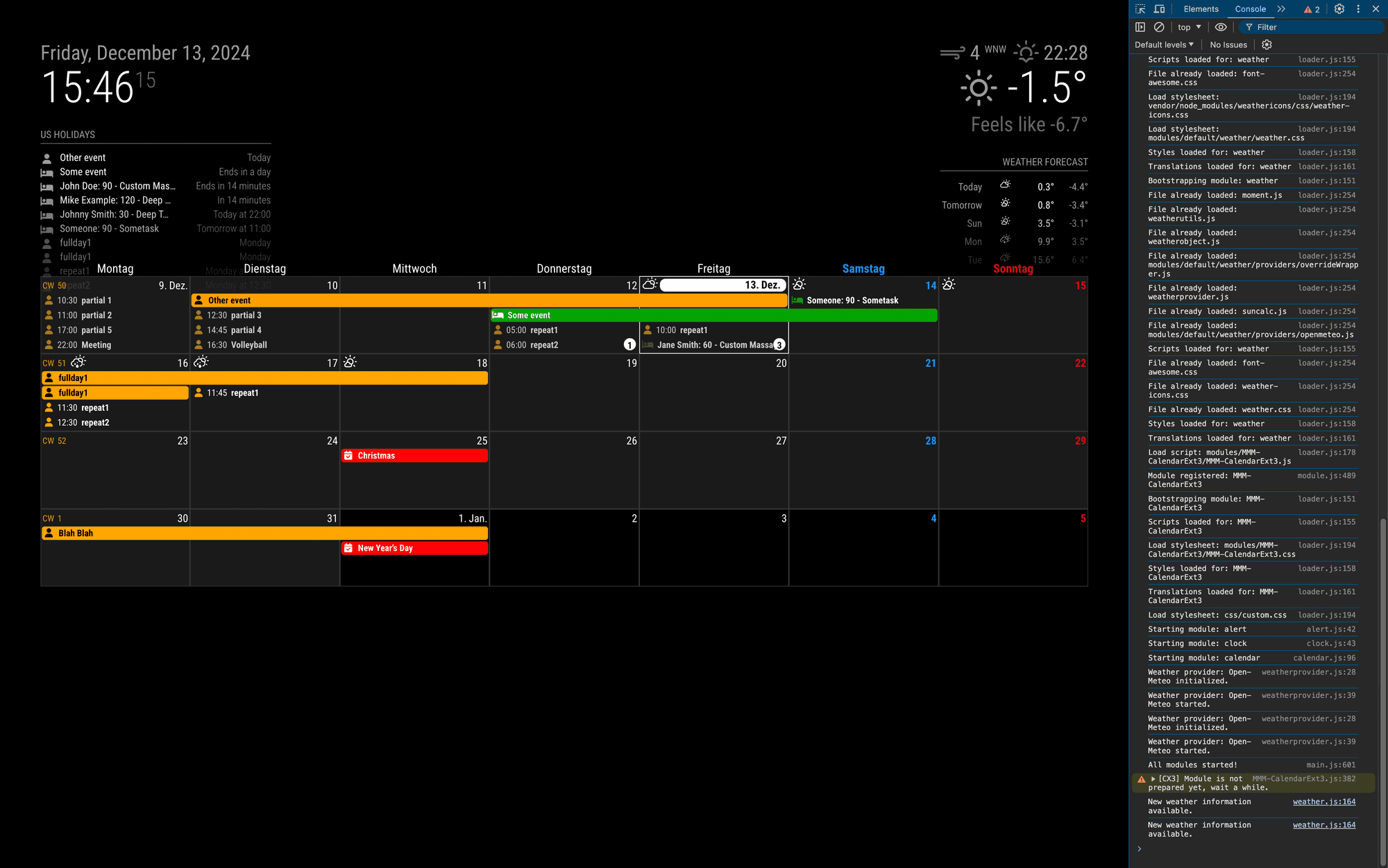
- At the panel, you can see
ElementsorConsoletab. Go toElementsTab.
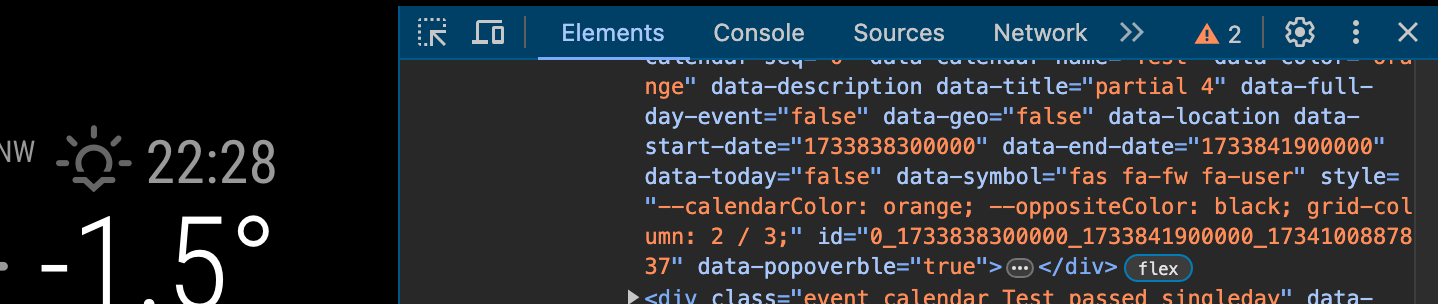
- There would also be
cursoricon (left side of theElementsTab mark); select it and click to any event element
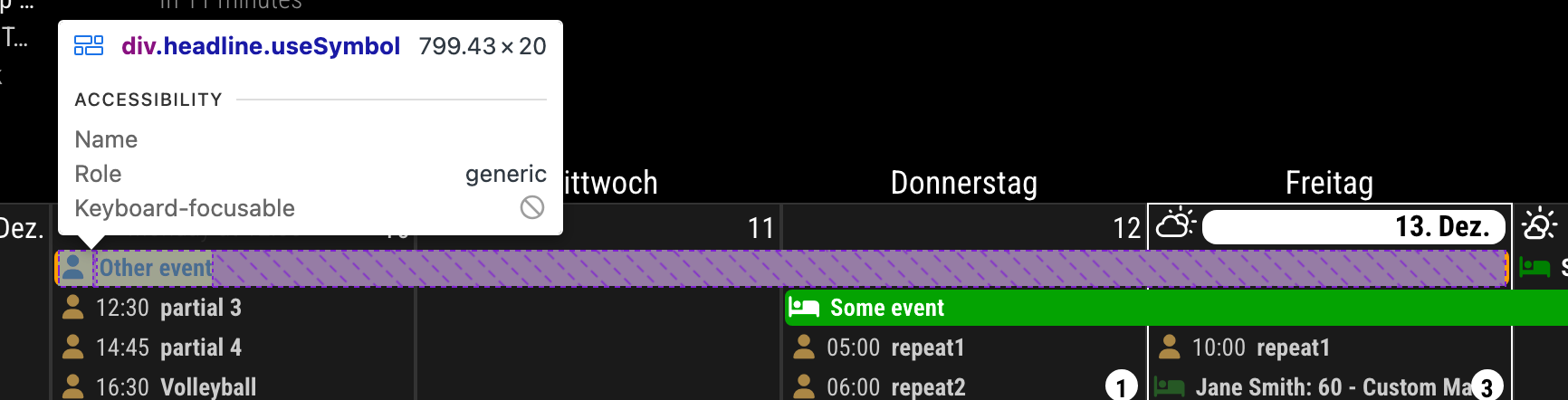
-
Now, the side
Elementstab will focus on the HTML code for the element you clicked.
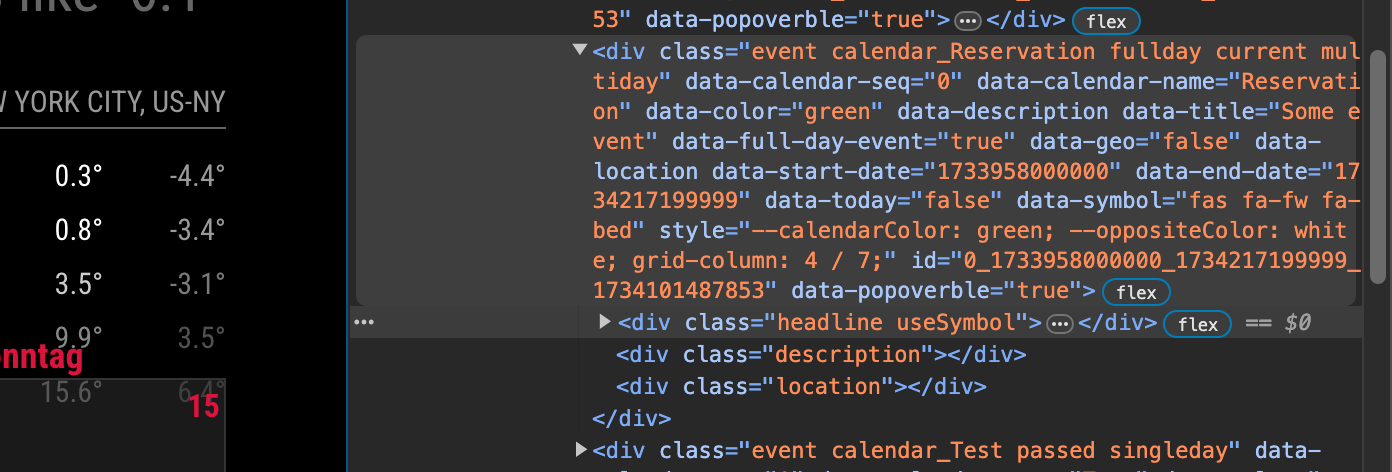
-
navigate into the
titleelement

- Check whether proper text exists there.

- And See the
Stylestab.(Somewhere in the side panel. Usually below theElementswindow)
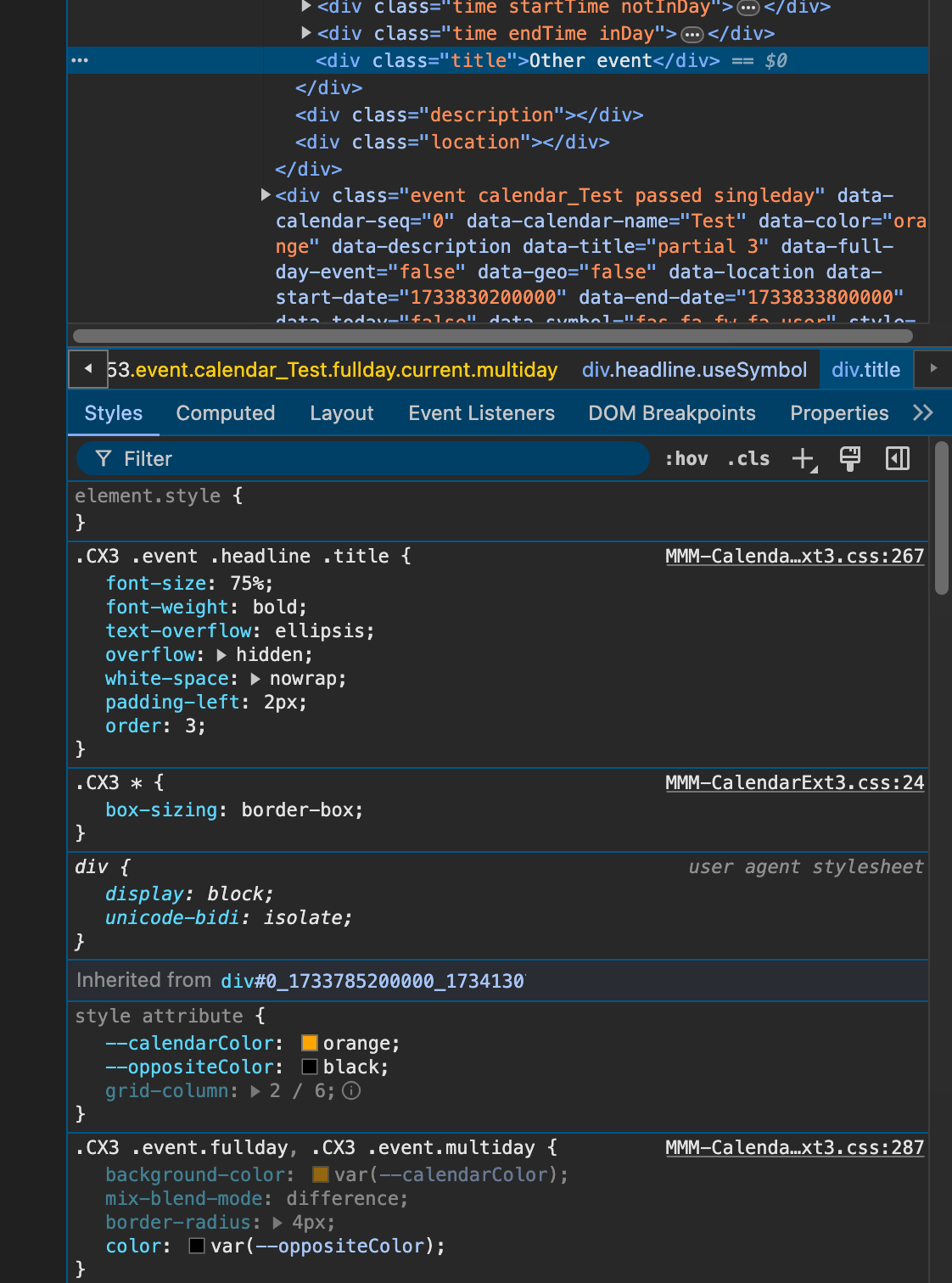
You can see there are
--calendarColorandoppositeColorattributes there. And there is no other overridden colors.- Or you can check this in
Computedtab.
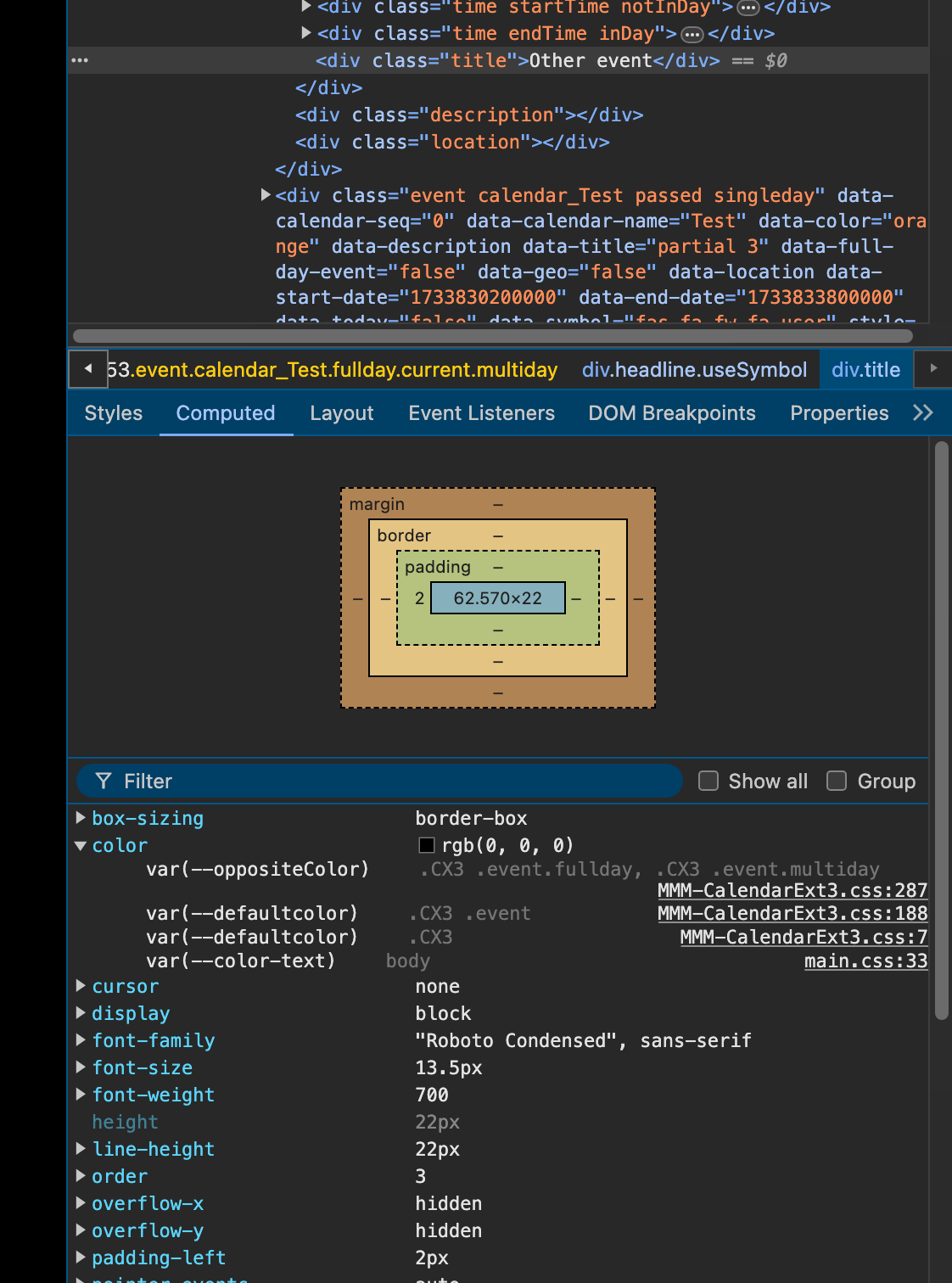
There are some
calculatedresults for the style.Could you find any suspicious things on watching your case?
-
RE: MMM-CalendarExt3 no Entries since last update
@Andreas1956
I checked your config and css but nothing seems wrong.
From which version were you updated to new one? (I think you cannot remember, but how long has it been since the previous update?)
Anyway, I think you may have missed something in the last update.- Go to the CX3 module directory, then;
git pull
npm update
I doubt you may miss
npm updatepart in your last update process.- If it still does not work, do this in your CX3 module directory
git submodule update --init --recursive-
Still not working; remove the CX3 directory and then reinstall again.
-
Still not working; let’s discuss deeper.
-
RE: MMM-CalendarExt3 no Entries since last update
@Andreas1956
Not tested yet… but.CX2in css/custom.css ??? -
RE: Modulo MMM-TelegramBot screenshot
@nic0rz
To avoid this, the module had to send the image as a file, not an image. But in that case, the preview of the image will not work in the Telegram App. Dillemma. (I’ll consider enabling the selection both ways.) -
RE: Modulo MMM-TelegramBot screenshot
@nic0rz
Telegram mobile app will reduce the size of the same image than the desktop app. -
RE: MMM-CalendarExt3 no Entries since last update
@Andreas1956
Share me the config and custom.css. -
RE: Switch URL based on value
@htilburgs
Just for your referenceconst ip_a = "..." const ip_b = "..." const apiQuery = (index, url) => { if (!url) return Promise.reject({ index, reason: 'url is not defined' }) return new Promise((resolve, reject) => { try { fetch(url) .then(response => response.json()) .then(data => { resolve({ index, value: data }) }) .catch(error => { reject({ index, reason: error }) }) } catch (error) { reject({ index, reason: error }) } }) } const queries = [] queries.push(apiQuery('A', ip_a)) queries.push(apiQuery('B', ip_b)) Promise.allSettled(queries).then((results) => { console.log('All jobs are done') results.values().forEach((result) => { if (result.status === 'fulfilled') { console.log(`Index: ${result.value.index}, Value:`, result.value.value) } else { console.log(`Index: ${result.reason.index}, Error:`, result.reason.reason) } }) }) -
RE: MMM-CalendarExt3
See the green events
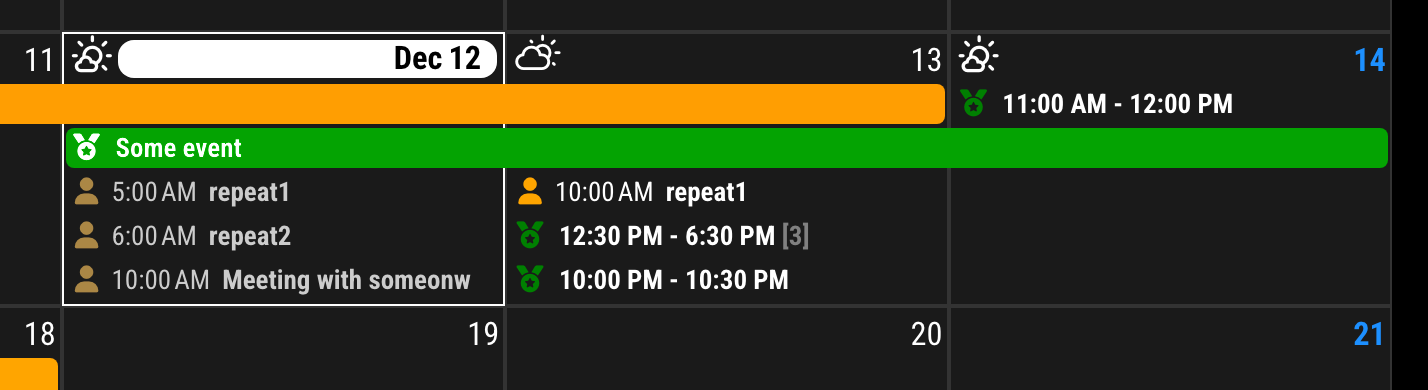
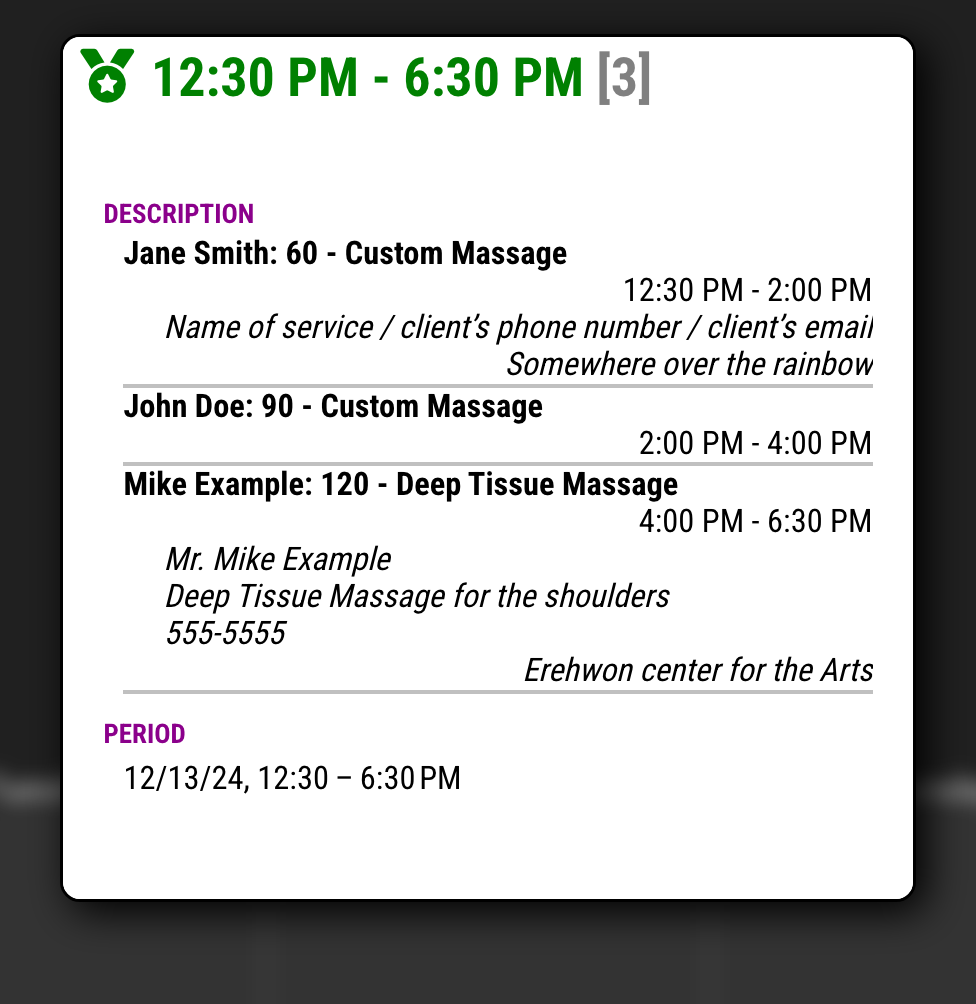
eventPayloadin CX3 config;/* CX3 config section in `config/config.js` */ eventPayload: (payload) => { const targetCalendar = "Reservation" const divideGap = 1000 * 60 * 60 * 1 const locale = 'en-US' const timeStyle = { timeStyle: 'short' } const condition = (ev) => { return (ev.calendarName === targetCalendar && ev.fullDayEvent === false) } const target = payload.filter(condition).sort((a, b) => a.endDate - b.endDate) const result = payload.filter(e => !condition(e)) const dateStr = (dateValue) => Intl.DateTimeFormat(locale, timeStyle).format(new Date(+dateValue)) const collapse = (template, ev) => { if (!template?.["title"]) template = { ...ev, collapseCount: 0, description: '', location: '' } template.collapseCount++ template.startDate = String(Math.min(+template.startDate, +ev.startDate)) template.endDate = String(Math.max(+template.endDate, +ev.endDate)) template.title = `${dateStr(template.startDate)} - ${dateStr(template.endDate)}` if (template.collapseCount > 1) template.title += ` <span class="count">${template.collapseCount}</span>` template.description += `<div class="collapsedEvent"> <p class="title">${ev.title}</p> <p class="period">${dateStr(ev.startDate)} - ${dateStr(ev.endDate)}</p>` if (ev.description) template.description += `<p class="description">${ev.description}</p>` if (ev.location) template.description += `<p class="location">${ev.location}</p>` template.description += '</div>' return template } const dateKey = (dateValue) => new Date(+dateValue).toLocaleDateString('en-CA') let collapsedEvent = {} for (const ev of target) { const currentKey = dateKey(ev.startDate) if (!collapsedEvent?.[ 'title' ]) { collapsedEvent = collapse(collapsedEvent, ev) continue } const collapsedKey = dateKey(collapsedEvent.startDate) if (collapsedKey !== currentKey || +ev.startDate - +collapsedEvent.endDate > divideGap) { result.push(collapsedEvent) collapsedEvent = collapse({}, ev) } else { collapsedEvent = collapse(collapsedEvent, ev) } } if (collapsedEvent?.[ 'title' ]) result.push(collapsedEvent) return result }You can modify
targetCalendar,divideGap,localeandetimeStylefor your purpose.To beautify;
/* css/custom.css */ .CX3 .event.calendar_Reservation .headline .time { display: none; } #CX3_POPOVER .title .count, .CX3 .calendar_Reservation .title .count { font-weight: bold; color: gray; } #CX3_POPOVER .title .count::before, .CX3 .calendar_Reservation .title .count::before { content: "["; } #CX3_POPOVER .title .count::after, .CX3 .calendar_Reservation .title .count::after { content: "]"; } #CX3_POPOVER .description .collapsedEvent { line-height: 115%; border-bottom: 2px solid silver; p { margin-top: 0; margin-bottom: 0; } .title { font-weight: bold; } .period { text-align: right; } .description { font-style: italic; white-space: pre; padding-left: 20px; } .location { font-style: italic; text-align: right; } } -
RE: MMM-CalendarExt3
@Ragged4310
Sure, that’s doable. There’s no reason why it shouldn’t be possible.This kind of work is
domain analysis, which is basically my real-world job.However, it’s not exactly simple. By simple, I mean it’ll take more than the usual 10 minutes I’d spend diving into this hobby project that genuinely interests me.
And honestly, my rate is quite high. :D (Just kidding.)
Let’s clarify a few things first.
- CX3 is usually useful for viewing events from multiple calendars at once, so you’re probably using other types of calendars (e.g., personal meetings, family schedules) together. For this task, let’s assume that the target “customer reservation” events are in a separate, independent calendar. For convenience, I’ll call this calendar “Reservation” from now on.
- Given the nature of calendars, I assume that there won’t be any overlapping events in the Reservation calendar. Additionally, I’ll assume there are no full-day events or events that span midnight.
With these assumptions, I’ll give it a shot sometime tomorrow when I have some free time. I can’t make any promises, so please don’t get your hopes up too high.
-
RE: Multiple URL Querys to fill JSON
This is not a direct answer to the question, but just for your reference.
ThefetchAPI can be executed directly in the browser, not just in a Node.js environment. You can call thefetchAPI directly inMMM-MyModule.jswithout needingnode_helper.js.Additionally, since the
fetchAPI works asynchronously, you can manage the responses of two fetch calls as follows:- If you need to use the response that arrives first, use
Promise.race()orPromise.any(). - If you need to wait for both responses to arrive before proceeding, use
Promise.all().
Using these methods can help you manage data synchronization more efficiently.
- If you need to use the response that arrives first, use