MagicMirror Forum
    • Recent
    • Tags
    • Unsolved
    • Solved
    • MagicMirror² Repository
    • Documentation
    • 3rd-Party-Modules
    • Donate
    • Discord
    • Register
    • Login
    1. Home
    2. MMRIZE
    3. Posts
    A New Chapter for MagicMirror: The Community Takes the Lead
    Read the statement by Michael Teeuw here.
    M
    Offline
    • Profile
    • Following 0
    • Followers 9
    • Topics 29
    • Posts 952
    • Groups 0

    Posts

    Recent Best Controversial
    • RE: MMM-Tool stopped displaying in 2.17.1

      @fozi
      Once I was the original creator of this module (and many others)
      For some personal reasons, I couldn’t maintain my modules anymore at that time by myself. But I didn’t want to break the maintenance of the modules for the community. So I transferred all the ownership to any volunteer who wants to take over. I believed that they could keep the module’s maintenance and develop more than me.

      After one and a half years passed, I return to this scene now.
      What I see is, …
      Some modules are being maintained still well, some are abandoned, some are, …

      Well, I will not claim my ownership back, those modules are not mine anymore from my discard. And I believe everyone has his own good mind. So I don’t care.

      However, a little sorry to you for this situation though.

      posted in Troubleshooting
      M
      MMRIZE
    • RE: ElectronOptions?

      @bert269
      Those configurations have to be located in config.
      You put them outside config.

      posted in Troubleshooting
      M
      MMRIZE
    • RE: Looking to make a static IP address for pi4

      @nneuland
      Just question.
      Do you want Fixed IP inside your LAN(e.g Home Network) or Static IP from outside of LAN?

      posted in Troubleshooting
      M
      MMRIZE
    • RE: Need Help Changing Background Image Based on Time

      @tonkxy
      Just for reference, there is a similar module already. You’d better get a hint from it.
      https://github.com/BrianHepler/MMM-WeatherBackground
      It derive the background image from unsplash collections by weather and season condition(and ideally, everything if it can be translated and notified from any modules.)

      posted in Troubleshooting
      M
      MMRIZE
    • RE: Segment fault MMM-GoogleTTS

      @jamesarm

      Hmmm. In my test, there be no issue.

      Anyway, try these steps;

      1. Update and Upgrade your MM to the latest version. If you can, Upgrade Electron and Node also.
      2. Remove MMM-GoogleTTS then reinstall (without electron-rebuild)
      3. Get credentials and config you need.
      4. Try execution.
      5. Is there an error? what kind of? show me.
      6. IF you are doubting electron-rebuild issue, try server only mode. (Still do not electron-rebuild yet)
      7. in server only mode and browser trial, it works?
      8. If it works, now do electron-rebuild process. Is there any error in process?
      posted in Troubleshooting
      M
      MMRIZE
    • RE: Need Help Changing Background Image Based on Time

      @sdetweil you are right. It was just an example. :)

      posted in Troubleshooting
      M
      MMRIZE
    • RE: [HOW_TO] MagicMirror as Desktop Wallpaper (all platform : updated)

      @doctorwhen
      Interesting. I know pcmanfm can set desktop wallpaper with image, but is it possible also application to locate in background layer?

      Anyway, now we can do it natively since 2.17

      posted in Tutorials
      M
      MMRIZE
    • RE: Segment fault MMM-GoogleTTS

      @jamesarm
      I was the original author of it. I’ll look inside tomorrow. I ran away from the my exmodules for personal reasons for a while.

      posted in Troubleshooting
      M
      MMRIZE
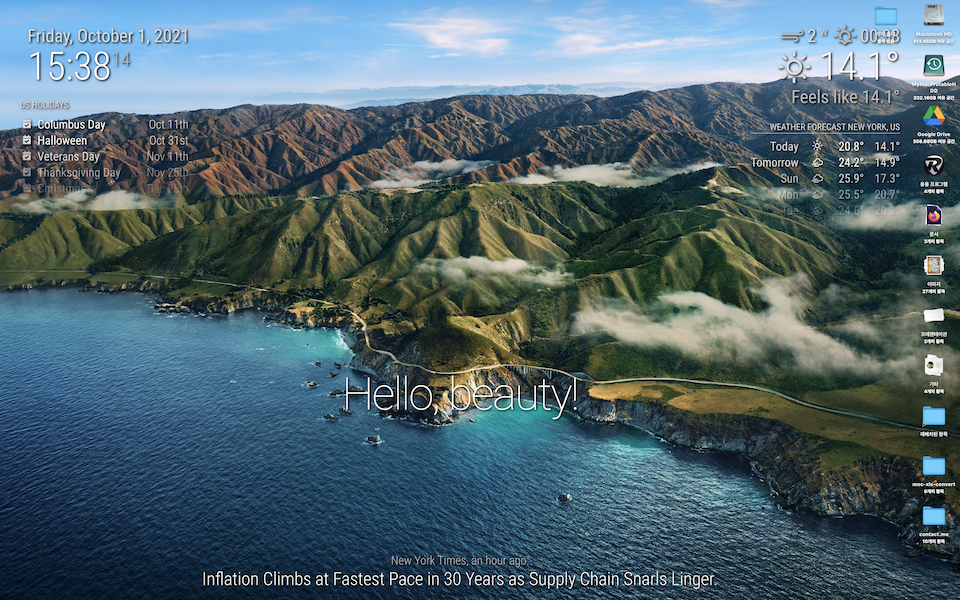
    • [HOW_TO] MagicMirror as Desktop Wallpaper (all platform : updated)

      Since MM 2.17 (2021-10-01), You can use your MM as Desktop wallpaper (like Rainmeter of window). Easy.

      Environment

      • MagicMirror >= 2.17

      For MacOS / Linux

      image

      configuration

      // in your config.js add these lines.
      // (ADDED 2024-05-16) These lines should be placed inside of `config`, not end of file.
      // I forgot to mention it because it seemed so obvious. Surprisingly, it seems to be misunderstood as appending these to the end of the file.
      
      
      electronOptions: {
      	width: 1920,
      	height: 1200,
      	fullscreen:  false,
      	backgroundColor: '#00000000',
      	titleBarStyle: 'none',
      	frame: false,
      	type: 'desktop',
      	hasShadow: false,
      	transparent: true,
      	resizable:   false,
      },
      electronSwitches: ["enable-transparent-visuals"],


      That’s all.

      For Windows 10
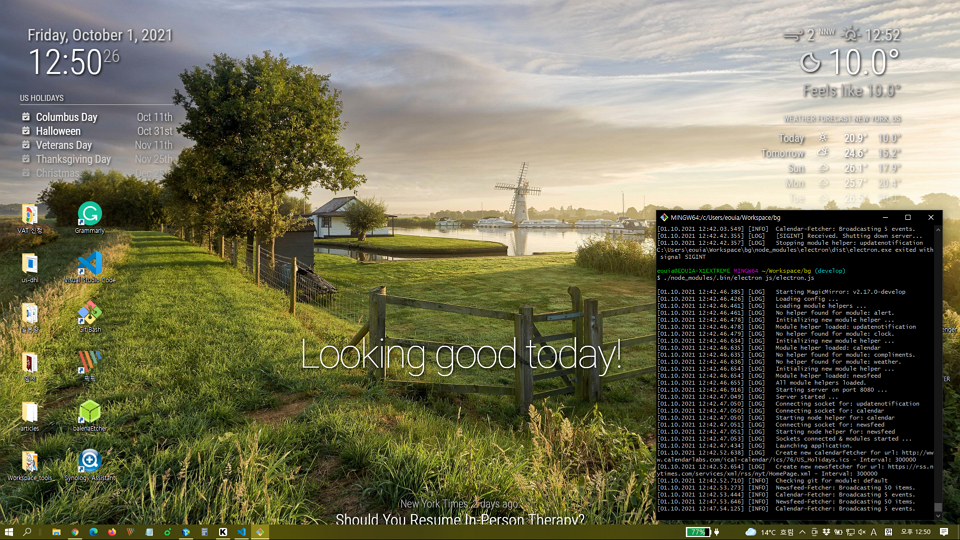
      image

      Requirements

      • You might not have python > 3.7 and node-gyp(It requires Visual Studio Tools to install).
      • So, Read this link and setup your environment. (Install Visual Studio things and python)

      Install

      Unlike Mac/Linux, for Windows, you need some hacks for preparation.

      cd ~/MagicMirror # Your magicmirror directory
      npm install --save electron-wallpaper-napi
      # If fails, you might hava some issues about Visual Studio things. Read above;
      

      Then, open js/electron.js with your editor, and add these two lines;

      //around line 7
      ...
      const electron = require("electron");
      const core = require("./app.js");
      const Log = require("logger");
      
      const electronWallpaper = require('electron-wallpaper-napi')  // <-- Insert
      
      // Config
      let config = process.env.config ? JSON.parse(process.env.config) : {};
      ...
      

      and

      // around line 50
      ...
      // Create the browser window.
      mainWindow = new BrowserWindow(electronOptions);
      electronWallpaper.attachWindow(mainWindow)  // <-- Insert
      ...
      

      Configuration

      // in your config.js add these lines.
      
      electronOptions: {
      	//width: 1920,
      	//height: 1080,
      	//x: 0,
      	//y: 0,
      	fullscreen:  true,
      	backgroundColor: '#00000000',
      	frame: false,
      	type: 'desktop',
      	transparent: true,
      },
      electronSwitches: ["enable-transparent-visuals"],


      CSS

      :root {
        --color-text: #DDD;
        --color-text-dimmed: #BBB;
        --color-text-bright: #fff;
        --color-background: rgba(0, 0, 0, 0);
       /* make fonts color brighter */
      
        --font-size: 2vh;
        --font-size-small: 0.75rem;
      
        --gap-body-top: 20px;
        --gap-body-right: 120px;
        --gap-body-bottom: 20px;
        --gap-body-left: 40px;
      /* adjust margin for your screen */
      }
      
      * {
        text-shadow: 2px 2px 5px #000000; /* make text more readable on the background image */
      }


      replace or add this to contents of your custom.css

      posted in Tutorials
      M
      MMRIZE
    • RE: Default Calendar & Nextcloud Calendar - CERT_HAS_EXPIRED

      @assassins
      Well, sorry. I have no idea anymore.

      posted in Troubleshooting
      M
      MMRIZE
    • RE: Default Calendar & Nextcloud Calendar - CERT_HAS_EXPIRED

      @assassins
      I think it’s better to upgrade your node version to v16. (and if possible, electron to v15)
      Anyway, at this moment, MM 2.17 is released. Try it first.

      posted in Troubleshooting
      M
      MMRIZE
    • RE: Default Calendar & Nextcloud Calendar - CERT_HAS_EXPIRED

      @assassins Which method did you use?

      posted in Troubleshooting
      M
      MMRIZE
    • RE: Default Calendar & Nextcloud Calendar - CERT_HAS_EXPIRED

      @m_m

      It seems to be related with this;
      https://letsencrypt.org/docs/dst-root-ca-x3-expiration-september-2021/

      To fix this there might be a few options;

      1. upgrade your node version with --use-openssl-ca flag. (at least node ver 16)
      2. modify source code. Check agentOptions.rejectUnauthorized of fetch or request (anywhich in source). I think that value or equivalent option should be false (to skip unauthorized request)
      3. DANGER : process.env.NODE_TLS_REJECT_UNAUTHORIZED = 0 This is dirty and dangerous but quick solution.
      posted in Troubleshooting
      M
      MMRIZE
    • RE: Need Help Changing Background Image Based on Time

      @sdetweil
      First url was set in start(), so I put that next of update in recursive.

      posted in Troubleshooting
      M
      MMRIZE
    • RE: MMM-CalendarExt2 freezing MagicMirror

      @sg437
      I think your ICAL URL might be wrong. Check that URL with the default calendar model. (See the log - what the module said.)

      And, I don’t recommend putting the upcoming view into the horizontal region. upcoming view has only one slot so it will not match with the horizontal layout. upcoming view in the vertical region or daily view, weeks view in the horizontal region is better.

      {
        module: "MMM-CalendarExt2",
        config: {
          firstDrawingDelay: 10,
          calendars : [
            {
              name: "Tottenham",
              url: "https://www.google.com/calendar/ical/ovb564thnod82u5c4njut98728%40group.calendar.google.com/public/basic.ics",
              icon: "emojione:chicken"
            },
            {
              name: "Leeds",
              url: "https://www.google.com/calendar/ical/h2suh4c1iqvktk4olmfqtth4lg%40group.calendar.google.com/public/basic.ics",
              icon: "emojione-v1:shield"
            }
      
          ],
          views: [
            {
              name: "Upcoming",
              header: "Upcoming Game",
              mode: "upcoming",
              position:"top_right",
              calendars: ['Tottenham']
            },
            {
              name: "Daily",
              mode: "daily",
              position: "lower_third",
              calendars: [],
              type: "row",
              slotCount: 7,
              fromNow: -2,
              useEventTimeRelative: true,
            }
          ],
          scenes: [
            {
              name: "DEFAULT",
              views:[],
            },
          ],
        }
      },
      

      69a93edb-5e47-4a6a-a254-55953e74993c-image.png

      posted in Troubleshooting
      M
      MMRIZE
    • RE: Need Help Changing Background Image Based on Time

      @tonkxy

      start: function () {
        this.timer = null
        this.targetURL = null
        this.setImageURL()
      },
      
      getDom: function () {
        console.log(">", this.targetURL)
        var dom = document.createElement('div')
        dom.style.backgroundImage = `url(${this.targetURL})`
        dom.style.height = '100vh' // I recommend to control this through CSS, but in this example, I just hardcode it.
        dom.style.width = '100vw'
        dom.style.backgroundSize = 'cover'
        return dom
      },
      
      notificationReceived: function (notification, payload, sender) {
        if (notification === 'DOM_OBJECTS_CREATED') {
          this.job()
        }
      },
      
      
      job: function () {
        clearTimeout(this.timer)
        this.updateDom()
        this.setImageURL()
        this.timer = setTimeout(() => {
          this.job()
        }, this.config.updateInterval)
      },
      
      setImageURL: function () {
        // do your logic for picking image. Here I pick the random unsplash image instead for example.
        let rand = Math.floor(Math.random() * 100000)
        this.targetURL = `https://source.unsplash.com/random?seed=${rand}`
      }
      
      posted in Troubleshooting
      M
      MMRIZE
    • RE: Need Help Changing Background Image Based on Time

      @tonkxy
      You’ve missed this.updateDom(). It needs to be called when you want to redraw your module’s output.
      Whenever you call “updateDom()”, your “getDom()” will be executed.

      posted in Troubleshooting
      M
      MMRIZE
    • RE: MMM-MQTTBridge not working

      @gkchimz
      Have you set the last line of dictionary?

        module.exports = { mqttHook,  mqttNotiCommands};
      
      posted in Troubleshooting
      M
      MMRIZE
    • RE: MMM-MQTTBridge not working

      @gkchimz
      It seems your mqttDictionaries wrong.

      posted in Troubleshooting
      M
      MMRIZE
    • RE: Desktop working gadgets

      @cyberdie

      https://de.aliexpress.com/item/1005002732234671.html?spm=a2g0o.productlist.0.0.5a045ed9cvmuqn&algo_pvid=dc097697-dee9-4607-80f2-02824dfbd531&algo_exp_id=dc097697-dee9-4607-80f2-02824dfbd531-1&pdp_ext_f={"sku_id"%3A"12000021901092684"}

      This is the almost same product I purchased but from a different seller. There could be a no-touch version or without a case or even without a controller. (If you select touch-version, you have to check the compatible controller). Anyway, hundreds of sellers are selling these items, so you need to invest time to find a best price.

      1920X480 HSD088IPW1 might be the only panel that has this size. Usually, it seems to be able to be powered from RPI4 USB3 directly without an external power source. A bigger panel wouldn’t. That’s why I chose this.

      Some LCD cased versions might have holes to fasten RPI on the backside.

      Additionally, you need some accessories;

      • mini HDMI(Controller) - micro HDMI(RPI4) Cable. (I recommend angled plug with ribbon cable)
      • USB 3(RPI4) - micro USB(Controller) Cable. (angled plug too.)
      • Of course, an RPI4 power source be needed. (LCD will drain the power so I recommend the original RPI4 power adapter or equivalent.)

      To use with RPI, you need some modification.

      • You might need to set a screen resolution profile. Default screen direction and resolution was 480x1920 vertical. So I need to find a way to rotate it.
        I cannot remember what I’ve tried at this moment. :) (many trials and fails ^^) Anyway you can google it, I believe. link might be the one of them. Or, in RPI4, Just screen setting menu would be enough. (I cannot remember what I’ve done.)
      • (on touch version) After the success of the screen rotation, I bumped to another issue, the touchscreen coordination is not rotated. But I cannot find a way, so…
        I just rotated my MM screen itself instead of above screen rotation & touch-coord rotation.

      That’s all.

      posted in Show your Mirror
      M
      MMRIZE
    • 1 / 1