MagicMirror Forum
    • Recent
    • Tags
    • Unsolved
    • Solved
    • MagicMirror² Repository
    • Documentation
    • 3rd-Party-Modules
    • Donate
    • Discord
    • Register
    • Login
    1. Home
    2. morozgrafix
    3. Best
    A New Chapter for MagicMirror: The Community Takes the Lead
    Read the statement by Michael Teeuw here.
    Offline
    • Profile
    • Following 0
    • Followers 0
    • Topics 3
    • Posts 136
    • Groups 2

    Posts

    Recent Best Controversial
    • MMM-horoscope - daily horoscope

      Description:

      Horoscope Module for MagicMirror² v.0.1.0

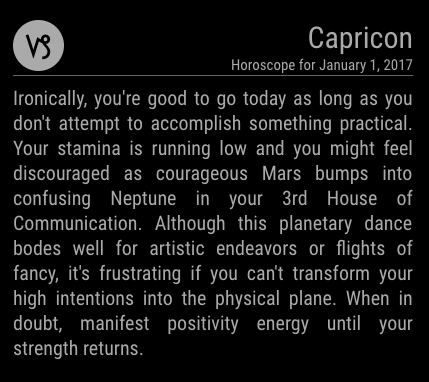
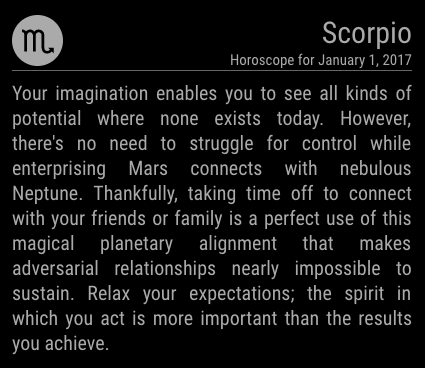
      This is a module for MagicMirror² that adds daily horoscope pulled from the Yahoo Style Horoscopes. API endpoint used for this module is not officially supported and may break at any time.

      Initial request for it was by @YoungHomie and I thought that this would be a good opportunity to try creating my first module from scratch. (I’m pretty much clueless when it comes to horoscopes or anything related to astrology) Details are in the repo, feel free to file issues on github if you find bugs or have suggestions for features. It’s also easy get in touch with me through the forum.

      Screenshots:

      0_1484679661277_upload-d6cee937-2818-40c7-847c-45bacaf73ad0

      0_1484679621312_upload-00600749-1522-47a8-9e7d-d8749a2becec

      Download:

      [card:morozgrafix/MMM-horoscope]


      Version 0.1.0

      • Initial Work committed
      posted in Entertainment
      morozgrafixM
      morozgrafix
    • RE: Creating a module to display daily horoscopes

      Here is an initial draft of the styling (I’m testing in Chrome on my Mac at the moment, haven’t had time to throw it on RasPi yet). Feedback is welcome:

      0_1483338845023_Screen Shot 2017-01-01 at 10.33.44 PM.png

      0_1483339783461_Screen Shot 2017-01-01 at 10.49.13 PM.png

      posted in Development
      morozgrafixM
      morozgrafix
    • RE: MMM-horoscope - daily horoscope

      @lolobyte At this point it is only in English, as I was only able to find one reliable API to pull data from. If you know of other API or possible RSS feeds in other languages I’m happy to look into integrating it as well.

      posted in Entertainment
      morozgrafixM
      morozgrafix
    • RE: Module programming preview, jsfiddle?

      I just stick with SublimeText 3 on my MacBook and develop most of the stuff while running node serveronly and pointing Chrome at localhost:8080. Been using sublime with tons of add-on packages (including code linters) for years now and very happy with it. When things are ready I SSH to my RasPi and test on it. As @yawns said, the only drawback of this is that you can’t work with GPIO and other RasPi proprietary things while developing locally. I haven’t ran into many problems with that. There is also an scp package that can copy files to remote on save, I use that when I need to run directly on RasPi.

      posted in General Discussion
      morozgrafixM
      morozgrafix
    • RE: Settings in config.js aren't loaded after reboot of RasPi

      @LincolnClay before reinstalling did you delete MagicMirror directory from /home/pi directory? I just want to make sure that your pi user has full access to files inside of MagicMirror directory. You can check who owns MagicMirror directory by running following command in the terminal:

      ls -l /home/$USER
      

      which will give you output similar to this:

      drwxr-xr-x  2 pi       4.0K Jan 21 14:30 foo/
      drwxr-xr-x  2 root     4.0K Jan 21 14:31 foo1/
      drwxr-xr-x 14 pi       4.0K Jan  8 14:52 MagicMirror/
      

      as you can see in the example above directory foo and MagicMirror are owned by pi user and foo1 is owned by root. To change ownership from root to pi this command needs to be executed (in the example below it will change ownership of foo1 directory from root to currently logged in user):

      sudo chown -R $USER /home/$USER/foo1/
      

      basically it does translates to this: Running as root user (one who currently owns foo1 directory and has write permissions) change owner (‘chown’) recursively (-R) to currently logged in user ($USER which is pi in our case) for directory foo1. After running this command foo1 will belong to pi and running ls -l /home/$USER should produce results similar to this:

      drwxr-xr-x  2 pi       4.0K Jan 21 14:30 foo/
      drwxr-xr-x  2 pi       4.0K Jan 21 14:31 foo1/
      drwxr-xr-x 14 pi       4.0K Jan  8 14:52 MagicMirror/
      

      QUESTION: When you changed /home/pi/MagicMirror/config/config.js did you actually save that file? I’m trying to understand what you mean by “I get the standard info displayed on MM” Does it show default settings? Did it ever show info with your local weather?

      I also see some Xlib: errors or warnings in your logs and I have no idea where that coming from.

      P.S. It maybe worth opening your own thread with exact steps that you already did for easier troubleshooting and not to highjack another thread.

      posted in Troubleshooting
      morozgrafixM
      morozgrafix
    • RE: How to load a <script> src = " " </script> into my mirror?

      @nbrenn perfect!!! i can now see your full code and have better idea what you are trying to achieve.

      Your data file is not really a CSV (Comma Separated Values) file, just a text file with values on each line, so you were correct to remove that line.split(",") part. I already spotted a few things where your code will not work correctly. I will take a closer look at it later tonight and hopefully together we can get this resolved.

      posted in Development
      morozgrafixM
      morozgrafix
    • RE: Module programming preview, jsfiddle?

      @washichi Interesting idea for the module. And glancing at your code you seem to be on the right track.

      I may be not understanding what you trying Sublime Text to do. It’s just a text editor with ability to add various packages on top of it. It’s not a full blown IDE. I don’t believe that you can compile or preview the JavaScript module directly in Sublime.

      My general workflow for module creation is something like this:

      1. Create MMM-mymodule directory inside MagicMirror/modules
      2. Open MagicMirror directory in sublime
      3. Add barebones config for the module to modules array in config.js, for example:
      {
      	module: "MMM-mymodule",
      	position: "bottom_right",
      	config : {
      		
      	}
      },
      
      1. Start node serveronly and point my Chrome with dev tools open to the http://localhost:8080
      2. Create/edit MagicMirror/modules/MMM-mymodule/MMM-mymodule.js, save it. (or other files that you need for the module)
      3. Refresh the browser to pickup my changes, debug etc.
      4. Repeat steps 5-6 as I go along. If adding/editing node_helper.js repeat steps 4-6 since node needs to pickup that file.

      Some of restarts/refreshes can be automated on file save with different tools, but I’m not going to get into that right now.

      posted in General Discussion
      morozgrafixM
      morozgrafix
    • RE: How to set ipWhitelist for all device can acess to MagicMirror v2?

      @nobita are you looking to open access to MM from all of the devices on your local network? If that’s the case you can add subnet mask of your local network.

      For example if your router gives you IP address of 192.168.1.XXX (last 3 digits aren’t important and used for example only) then you would edit ipWhitelist setting in config.js as follows:

      ipWhitelist: ["127.0.0.1", "::ffff:127.0.0.1", "::1", "192.168.1.1/24"],
      

      192.168.1.1/24 is a subnet mask for all 256 IP addresses that your router can give out to devices. (this is the most common scenario and there is a chance that your setup may be different).

      Don’t forget to restart MM app after making this change.

      posted in Troubleshooting
      morozgrafixM
      morozgrafix
    • RE: Replacing snow flakes with hearts in the MMM-SNOW module

      @tamug1 Here you go. It’s running a little sluggish on my RasPi 2 and I don’t have RasPi 3 hooked up. Please let me know how well it performs on your system.

      [card:morozgrafix/MMM-Valentine]

      Thanks.

      posted in Troubleshooting
      morozgrafixM
      morozgrafix
    • RE: I am sure nobody know it but...perhaps you know a fade in/out switch?

      @fersev that’s called dimmer light switch. Plenty of them available on the market. Most designs are tailored for household use. Keep in mind that whatever you are going to use it with should be “dimmable” like an incandescent light bulb, some of the newer LED light bulbs are also dimmable.

      posted in Hardware
      morozgrafixM
      morozgrafix
    • RE: sendSocketNotification from node_helper to Module

      @Leobaillard I think I got it.

      Lines 76-81 of MMM-JCD-Bikes.js is the culprit. I believe that once you were going into Object.keys it was losing the scope. Try changing those lines to this:

      			// List available bikes via a stations array
      			var self = this;
      			Object.keys(self.stationsData).forEach(function (key)
      			{
      				table.appendChild(self.createStationNameRow(self.stationsData[key].name));
      				table.appendChild(self.createAmountRow(self.stationsData[key]));
      			});
      

      note that I’ve added var self = this; and now calling these when appending children elements to the table: self.createStationNameRow, self.stationsData[key].name, self.createAmountRow and self.stationsData[key]

      Another spot that I’ve noticed is that createStationNameRow function didn’t appendHTML name of the station to the cell. I didn’t dig too much into it, but I think this cell.innerHTML = name; was missing from it:

      	createStationNameRow: function(name) {
      		var nameRow = document.createElement("tr");
      		var cell = document.createElement("td");
      		cell.className = "stationName";
      		cell.setAttribute("colSpan", 2);
      		cell.innerHTML = name;
      
      		nameRow.appendChild(cell);
      
      		return nameRow;
      	},
      

      Hopefully it will get you going in the right direction.

      posted in Development
      morozgrafixM
      morozgrafix
    • RE: How to set Font in Alarm Clock

      @strawberry-3.141 & @broberg I believe that default alert module has inline styles for alerts and notifications that would override any CSS that is set outside of it.

      For example take a look at https://github.com/MichMich/MagicMirror/blob/master/modules/default/alert/alert.js#L39

      		if (message.title) {
      			msg += "<span class='thin' style='line-height: 35px; font-size:24px' color='#4A4A4A'>" + message.title + "</span>";
      		}
      		if (message.message){
      			if (msg != ""){
      				msg+= "<br />";
      			}
      			msg += "<span class='light' style='font-size:28px;line-height: 30px;'>" + message.message + "</span>";
      		}
      

      and https://github.com/MichMich/MagicMirror/blob/master/modules/default/alert/alert.js#L81

      		if (params.title) {
      			message += "<span class='light' style='line-height: 35px; font-size:30px' color='#4A4A4A'>" + params.title + "</span>"
      		}
      		if (params.message) {
      			if (message != ""){
      				message += "<br />";
      			}
      
      			message += "<span class='thin' style='font-size:22px;line-height: 30px;'>" + params.message + "</span>";
      		}


      I believe that most elegant way of fixing it is to move those styles into CSS file and have ability to override it in custom.css or other file.

      posted in Troubleshooting
      morozgrafixM
      morozgrafix
    • RE: Npm start...

      @cowboysdude I managed to get it up and running locally on a super old system running Ubuntu 16.04.1 LTS. I had some trouble starting electron via SSH when running DISPLAY=:0 npm start, but npm start worked just fine

      Here is a list of steps that got it running (i’m running node v6.9.4 and npm v4.1.1):

      sudo apt-get install git
      git clone https://github.com/MichMich/MagicMirror.git
      curl -sL https://deb.nodesource.com/setup_6.x | sudo -E bash -
      sudo apt-get install -y nodejs
      node --version
      curl -sL https://www.npmjs.com/install.sh | sudo -E bash -
      npm --version
      cd MagicMirror/
      cp config/config.js.sample config/config.js
      npm install
      npm start
      

      Not sure if this will help. You can always try to run verbose mode npm start --verbose to see if there is any information that may lead you to finding a reason why it doesn’t start. It was very sluggish on my system, but this is a very old computer.

      P.S. Sorry it took me a while to get to try it out and get back to you. It has been a very long and exhausting day.

      Good luck.

      posted in Troubleshooting
      morozgrafixM
      morozgrafix
    • RE: Npm start...

      @LincolnClay I’m glad it all worked out for you. But I would be careful adding sudo command to everything. You may run into permissions issues. The reason why you need to use sudo when installing packages with apt-get is because you need to have elevated privileges as you are making system wide changes. Cloning MM repository in your home directory shouldn’t require sudo, if you use sudo to clone all files will belong to root user and your user (usually pi) will not have permissions to create or modify files in MagicMirror directory (which opens a whole different can of worms).

      TL;DR version: try to use sudo only when necessary.

      @cowboysdude Do you have only one monitor (your TV through HDMI) to your Ubuntu box? Also you may want to attempt to run https://github.com/electron/electron-quick-start just to see electron app running on your rig completely outside of MM codebase.

      @cianoo45 are you still having problems starting the MM? That writeup was specifically for @cowboysdude who was trying to get MM setup on his Ubuntu system. You should be fine with npm v4.0.0 (on my RasPi I’m running node v6.9.2 and npm v3.10.9 if that matters)

      posted in Troubleshooting
      morozgrafixM
      morozgrafix
    • RE: Settings in config.js aren't loaded after reboot of RasPi

      @LincolnClay I’m not really sure why MM code is not picking up your /home/pi/MagicMirror/config/config.js after restart.

      By the way config.js.sample is just a sample config that can be copied into config.js and it comes along with MM code and doesn’t really play any role when MM starts up, so there is no need to modify that file in any way.

      If your /home/pi/MagicMirror/config/config.js keeps your desired changes, I wonder if you somehow have 2 different locations where MM is installed and configured. (I noticed that you have node_modules directory in /home/pi which seems a bit odd.)

      I’m assuming you are starting MM with pm2 on a startup. Can you please show post contents of your /home/pi/mm.sh file (you can run cat /home/pi/mm.sh and copy/paste contents of the output) and also run pm2 list and pm2 show mm and copy/paste output here?

      Sorry I’m kind of running out of ideas without knowing more information.

      Thanks.

      P.S. I’ve forked our conversation into a separate topic, this way we will not highjack original topic.

      posted in Troubleshooting
      morozgrafixM
      morozgrafix
    • RE: How to set ipWhitelist for all device can acess to MagicMirror v2?

      @Mykle1 Sorry about delay. It looks like your RasPi is using IPv6 and earlier I gave you instructions for IPv4. Sorry about misinformation.

      For IPv6 setting ipWhitelist subnet mask to ::ffff:192.168.1.1/120 will give you access to 256 IP addresses. So your setting for ipWhitelist part in config.js would look like this:

      ipWhitelist: ["127.0.0.1", "::ffff:127.0.0.1", "::1", "::ffff:192.168.1.1/120"]
      

      After making changes restart MM and try to access from browser on your computer.

      Let me know if it worked. Thanks.

      posted in Troubleshooting
      morozgrafixM
      morozgrafix
    • RE: Replacing snow flakes with hearts in the MMM-SNOW module

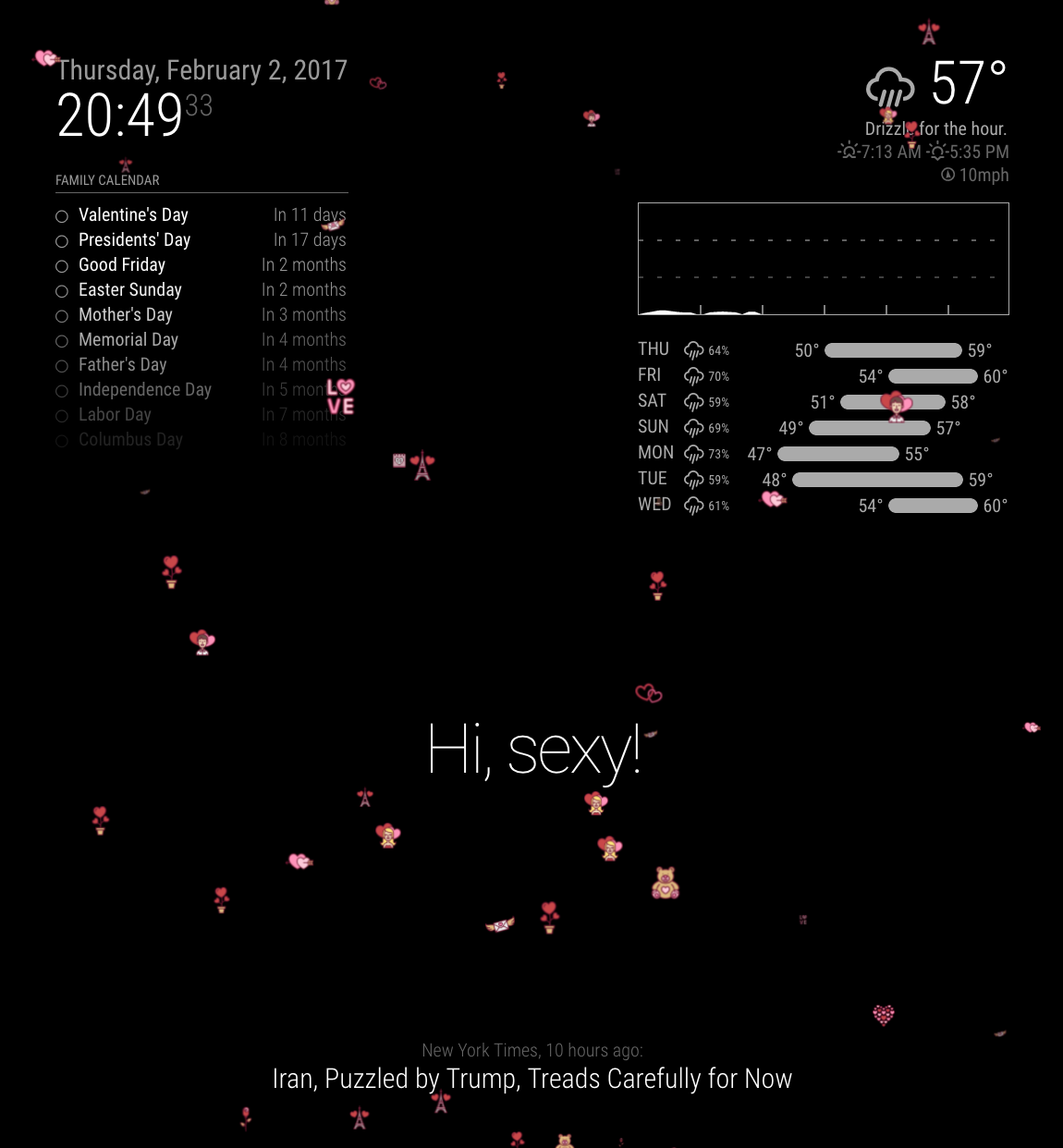
      How is it his? There are 15 different Valentines themed icons and most of the code is shamelessly borrowed from MMM-Snow by @MichMich
      0_1486097486590_upload-16416aa3-f2f1-4e99-b943-89cf8acac379

      Going to get some dinner and push it up to GitHub

      posted in Troubleshooting
      morozgrafixM
      morozgrafix
    • RE: Replacing snow flakes with hearts in the MMM-SNOW module

      @roramirez Yes you are right, I also thought about idea of general module that can be configured with various images or possibly have a schedule that will pick images from different folders and be hidden rest of the time.

      posted in Troubleshooting
      morozgrafixM
      morozgrafix
    • RE: Where are you from?

      San Francisco, CA

      posted in General Discussion
      morozgrafixM
      morozgrafix
    • RE: Creating a module to display daily horoscopes

      This topic can probably be marked as “solved” - module thread is here https://forum.magicmirror.builders/topic/1370/mmm-horoscope

      posted in Development
      morozgrafixM
      morozgrafix
    • 1 / 1