I have a Model X and also use Teslamate
I’ve incorporated that into my mirror as below:
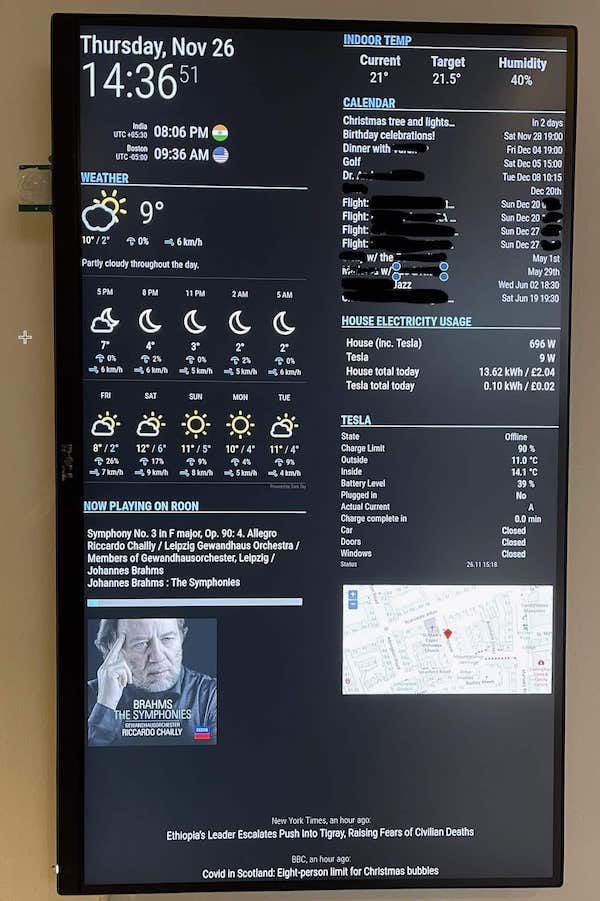
Using this module -
https://github.com/spitzlbergerj/MMM-TeslaLogger
And a little node script within an iframe to get the map
I have a Model X and also use Teslamate
I’ve incorporated that into my mirror as below:
Using this module -
https://github.com/spitzlbergerj/MMM-TeslaLogger
And a little node script within an iframe to get the map
Thanks
I couldn’t see any options either - but this chap seems to have managed something like it
https://forum.magicmirror.builders/topic/16139/4th-magic-mirror-complete
Looks great.
Any chance you could post the options you’ve used for the calendar module?
I’m trying to get the same date/time display as you
see here for my question - https://forum.magicmirror.builders/topic/16171/how-to-show-actual-times-for-todays-events
The current options for the default calendar module are as follows
module: 'calendar',
      position: 'top_right',
      header: 'CALENDAR',
      config: {
        timeFormat: 'absolute',
        maximumEntries: 21,
        maxTitleLength: 25,
        getRelative: 0,
        urgency: 1,
        nextDaysRelative: false,
        fade: false,
        displaySymbol: false,
        dateFormat: 'ddd MMM DD HH:mm',
        calendars: [
          {
For today’s events the calendar shows times as “In 2 hours” or “In 45 Minutes” or “In a day”
If I change “urgency” to 0 It shows the dates in full, but, I’d like to show today’s entry as “Today hh:mm” / “Tomorrow hh:mm” or just show “hh:mm” without the date for today
How do I go about this? Is it even possible?
Thanks
I decided against the use of a reflective surface

Includes
MMM-PIR-Sensor
MMM-Nest
MMM-Remote-Control
MMM-Teslalogger
worldclock
MM-DarkSkyForecast
iFrame
3 iFrame modules to display Roon, the car location Map and the house power display
These 3 use homemade Javascript modules to grab data from the Roon API, Teslamate and EmonCMS respectively
Tesla have an API for their cars - can be used to access info about the car and to set/start functions in the car.
Here is a thorough description of the what the API can do - https://timdorr.docs.apiary.io/#
My programming skills are not good enought to write a module to use that APi to display information about the car.
A module that displayed lock status, location, charge level, location… would be very nice.
I presume it would be quite trivial for a good programmer. The Nest API used for the NEST module seems quite similar.
Cheers
Hello,
I’ve got it working fine, except for the part where it is supposed to hide during off hours (hideOffHours config). It doesn’t. It shows with a “–” for the time for the drive outside the start and end hours.
Config is as follows.
 {
    module: 'MMM-Traffic',
    position: 'bottom_bar',
    classes: 'dimmed medium',
    config: {
        api_key: 'xxxxxxxxxxxx',
        mode: 'driving',
        origin: 'xxxxxx',
        destination: 'xxxxx',
        route_name: 'Home to  office',
        prependText: 'Current drive time to  office is',
        changeColor: true,
        limitYellow: 5, //Greater than 5% of journey time due to traffic
        limitRed: 20, //Greater than 20% of journey time due to traffic
        interval: 120000, //2 minutes
        showWeekend: false,
        allTime: false,
        startHr: 6,
        endHr: 10,
        hideOffHours: true
    }
Thanks for any help