what about SimplePIR doesnt work? did you add any issues to the github?
i wrote it so interested to know what doesn’t work, since its currently running on my mirror.
what about SimplePIR doesnt work? did you add any issues to the github?
i wrote it so interested to know what doesn’t work, since its currently running on my mirror.
@sdetweil should be done already, figured i would add it here as well.
https://github.com/ryanjblajda/MMM-SimplePIR
A simple PIR module that uses a PIR sensor with a digital output, and it utilizes gpio interrupts to check it. I liked the MMM-Pir module that once existed, but I didnt see an easy way to add a feature that physically turned off a monitor after a specified timeout, as well as blanking the screen. This utilizes the gpio outputs on the Pi to drive buttons intended for use with this RF controlled outlet (https://a.co/d/4hUItyW) [driven by some NPN transistors with current limiting resistors to prevent gpio damage].
The module emits the following notification: MMM_PIR-SCREEN_POWERSTATUS, with a boolean payload of whether the display is on or off. this happens when the display is muted, or physically turned on/off
If the module is visible, it will provide some basic debugging statistics
An example config is shown below: [actually my exact config from my mirror]
{
    module: 'MMM-SimplePIR',
    //position: 'top_left',
    hidden: true,
    config:
    {
        debug: true,            //enables debug printing
        blankScreenTimeout: 1,  //in minutes, when the screen will be blacked out.
        offScreenTimeout: 60,   //in minutes, when the screen will be physically turned off.
        pirSensorPin: 17,       //where the output of the PIR sensor should be connected
        displayOnPin: 23,       //connect this to either the on button on a display, or to the RF outlet controller [or whatever you want]
        displayOffPin: 24,      //connect this to either the off button on a display, or to the RF outlet controller [or whatever you want]
    }
},
added to the 3rd party module wiki list under the other PIR modules. github page linked as well.
@sdetweil i will post my pir module on github tonight. its much more simple, but may work for some as a replacement.
@hrjmsh use MPlayer rather than OMXplayer. thats what i am using [also using bookworm]
@sdetweil right!? my mom actually ordered a tv [unbeknownst to me] and sent it to my house and my front door camera notified me and i was like…i have no memory of ordering a new display…😂
@sdetweil thanks!! happy to have this finished and working. my parents and my in-laws have already requested i build them each one lolol.
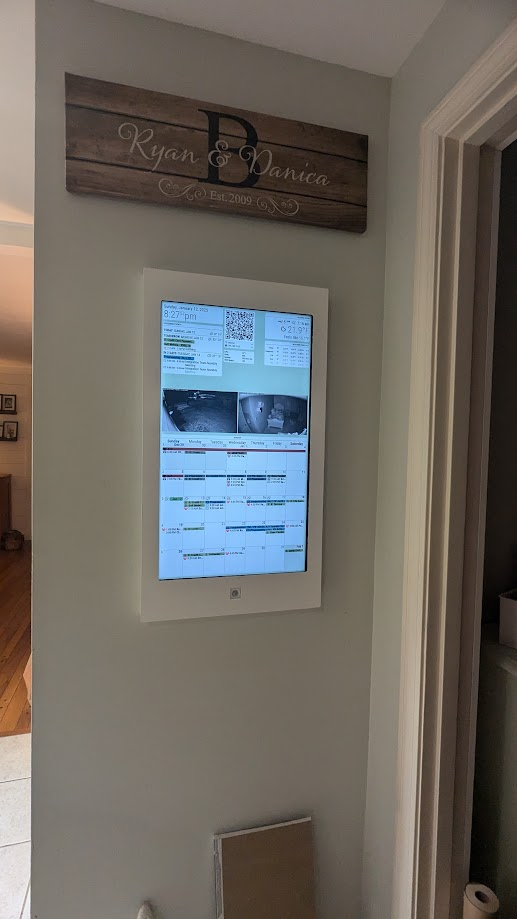
and finally complete. painted, occ sensor housing installed. I decided to just hide the button controller inside the wall rather than recess it into the frame housing. realistically i shouldnt need to access it, and theres only 2 screws to remove should i need to.
the faceplate finally came in from SendCutSend, so was able to assemble that and get it hung on the wall at least temporarily. I still need to fill the nail holes and paint it and all that jazz.
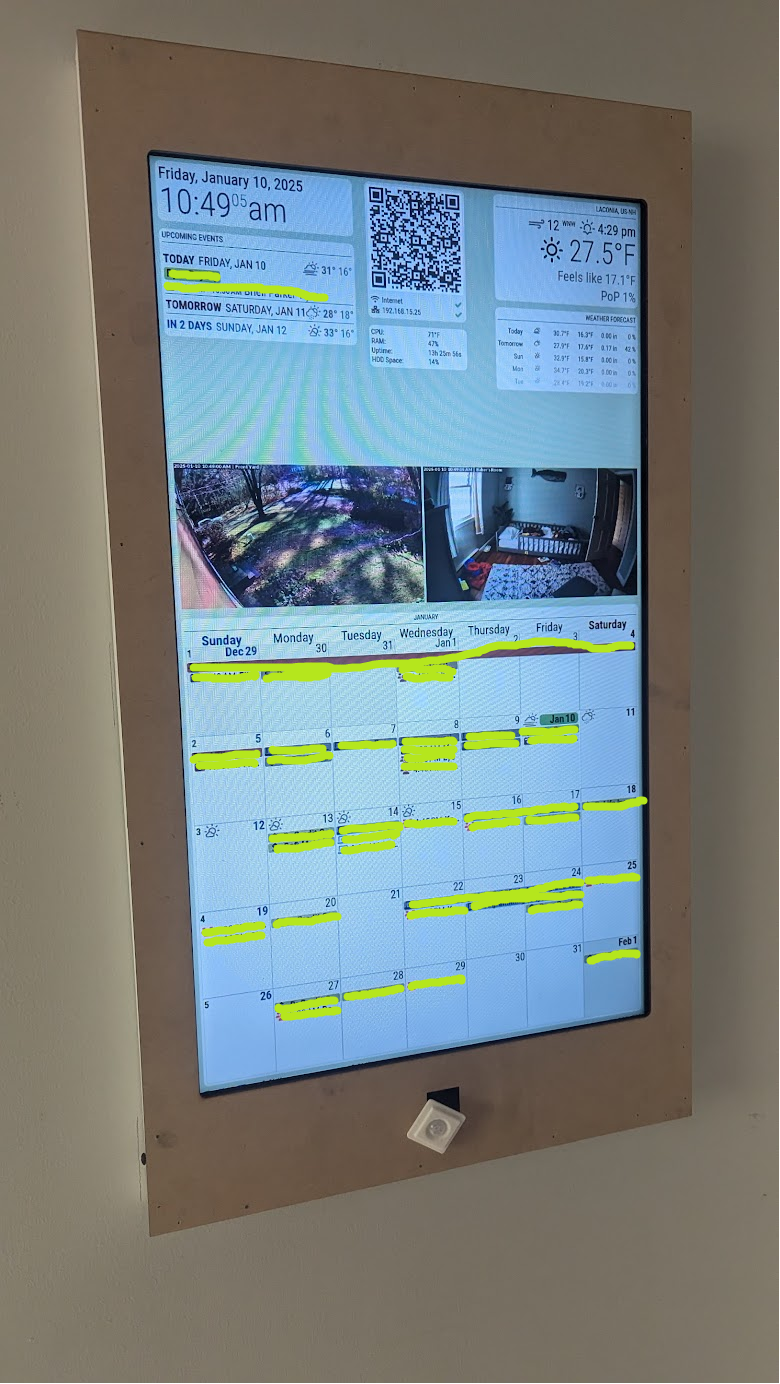
The wife likes having the physical calendar to see things, and I like using google calendar, which recently resulting in a snafu between our schedules and who was in charge of the kids, so I decided to finally build our “holy grail” kitchen calendar/family dashboard. Its not 100% complete, as I am waiting on SendCutSend for the fascia I designed in fusion360.
features:
current state of the install
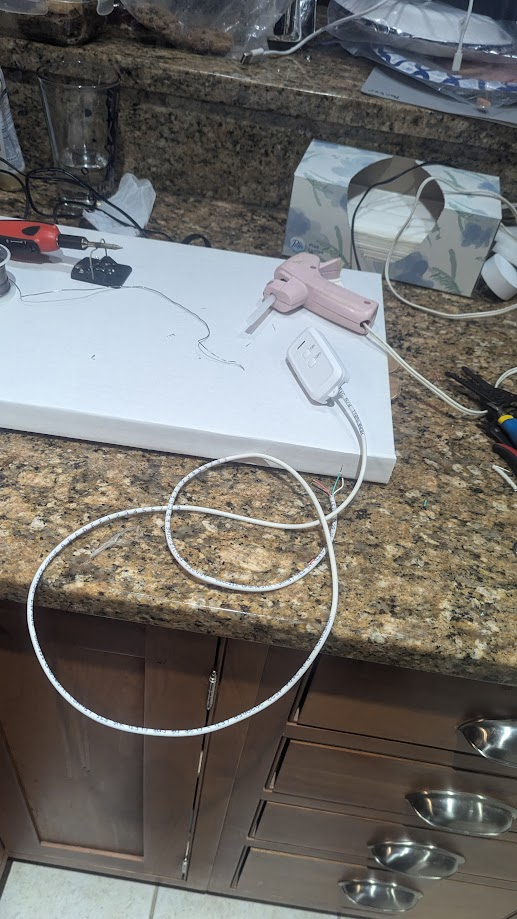
the hacked up rf remote. I wired 2 NPN transistors in parallel with the on/off switches, including current limiting resistors on the base to protect the GPIO pins on the Pi. this allowed the PI to activate the remote, and left the buttons functional as well [i am going to recess the remote into the frame somewhere not visible when installed for manual access if necessary.
yes, i did this on my kitchen counter because the wife was not home, and i needed to be able to keep an eye on my son, fume extraction was used, but not pictured.
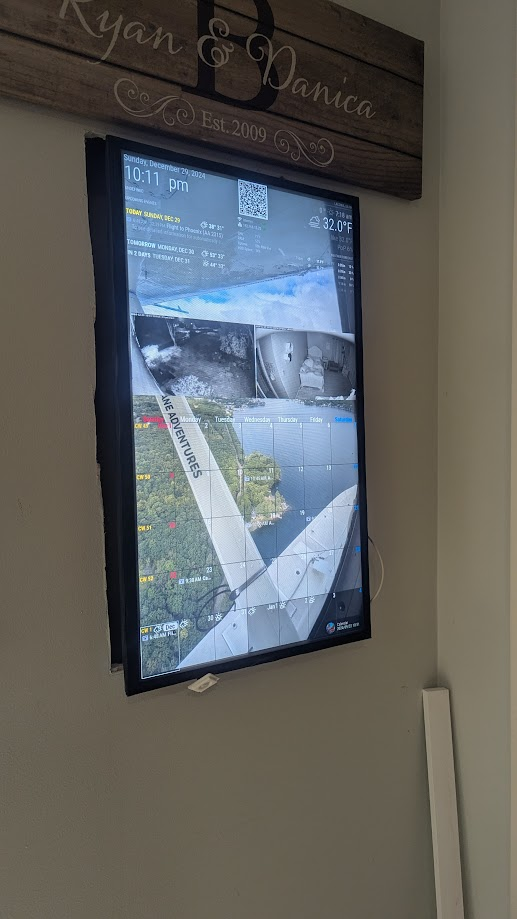
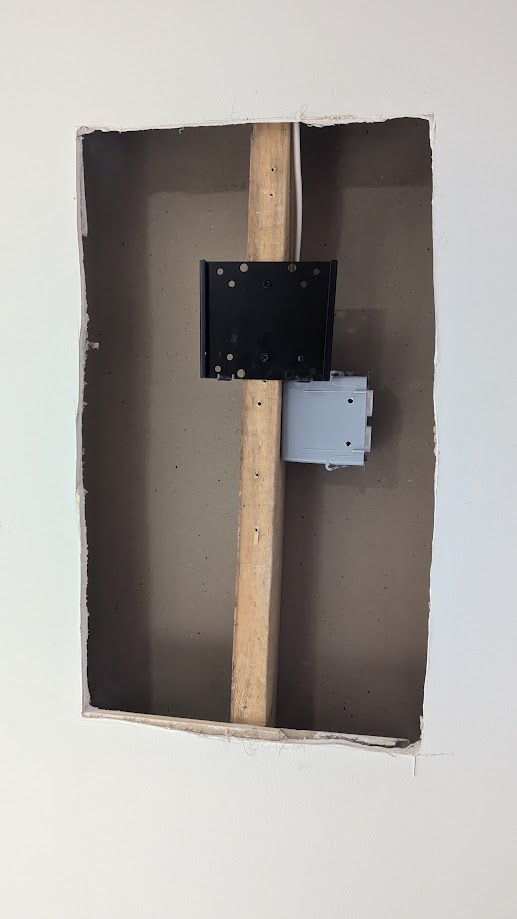
said giant a** hole [the outlet cover wasnt installed yet, but is now installed] and yes its absolutely terrible looking but will be completely hidden once the faceplate/frame is installed.
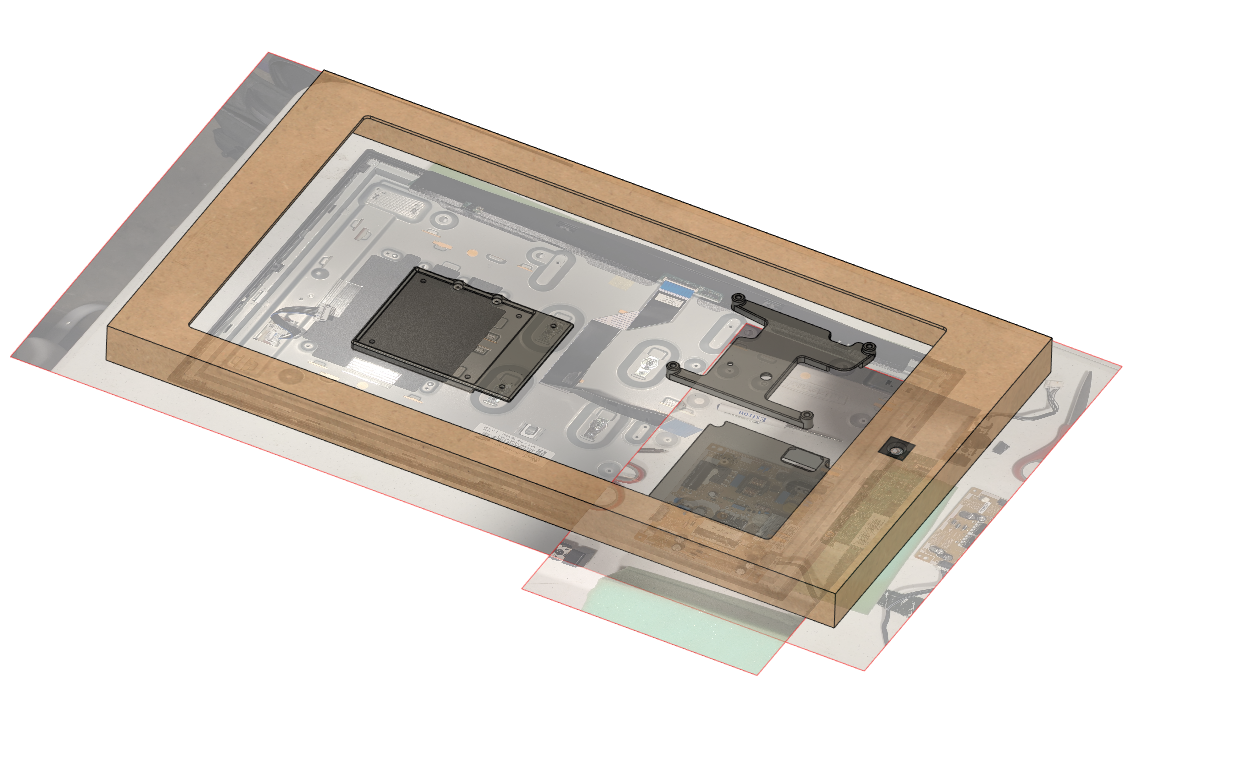
i took pictures of everything and designed some parts in fusion360.
i wanted the calendar as low-profile as possible, so i cut a giant a** hole in the drywall to recess the mount directly against the stud, which allows the TV to basically sit against the drywall. the tv was completely removed from its case, to get it as slim as possible.
this unfortunately resulted in me having to move the power and video board, and then extending the backlight wiring.
the tv mount is also persnickety, so I had to 3D print a sub-bracket to move the mount to allow me to actually hang the TV in place where i needed it.
the case will be some laser cut MDF from sendcutsend, glued & nailed to some 1x2 boards. the occupancy sensor is a cheap dude from amazon, that has a 3d printed bracket that will just be hot glued in place from the back into the hole in the face plate.
everything will be painted white and be simple to fit our shaker style aesthetic in the house.
https://a.co/d/7U4btgd – the RF outlet.
https://a.co/d/eMZXrPA – the PIR sensor
i didnt use this guide to do it, but this is how i rotated my screen.
https://www.makeuseof.com/how-to-rotate-your-raspberry-pi-screen-without-moving-the-display/
I am running the latest version of raspbian on my pi3
this results in my magicmirror instance loading in portrait mode, and my 16x9 streams loading properly where i want them without having to do any CSS rotation.
@evroom you are 100% correct regarding item #1, the streamInterval is for when multiple streams are defined, it will switch between the available streams.
regarding #2 on my pi i didnt have to rotate the mplayer orientation, but i adjusted the output of my pi to portrait and everything behaved but ymmv depending on how it’s setup.
I couldnt get the EXT-FreeboxTV module to work on my magic mirror so i gave up, and used chatgpt to help me write a module.
Its called MMM-MPlayer, and using MPlayer it will open either 1 or 2 Mplayer windows and play whatever files or rtsp streams you like. If you define multiple it will cycle through them, determined by the streamInterval. I am using it to stream 3 Unifi Cameras so that i can keep an eye on the front yard in one window, and an eye on my kids via the cameras we use as nanny cams while they nap/sleep, cycling through those two rooms every 30 seconds.
Reasons for using MPlayer over something else is that the version of raspbian that I am running on my pi3 has a broken version of VLC, which doesnt respond to command line position arguments, and also cant run OMXplayer. Its the most recent distro, i dont remember the name for it. mplayer works well, and plays on my pi3 just fine, along with all the other stuff i have running.
Obviously your use case could be for anything, cameras around your house, livestreams you like to watch. Essentially anything that mplayer can play. The module natively responds to the MMM-Pir notification so that it kills and restarts the streams when the PIR module tells the screen to turn off and on, so that the screen acts as it should.
I don’t feel like actually uploading it to github, but here is the source code, and an example config.
--------------- CONFIG.js
{
	module: 'MMM-MPlayer',  // Update the module name here
	position: 'top_left',  // Magic Mirror position
	config: {
	  useTwoWindows: true, // Use two windows
	  layout: 'row',  // Can be 'row' or 'column'
	  windowSize: { width: 525, height: 295 },  // Window size for both windows
	  windowPosition: { x: 12, y: 575 },  // Position of the first window (window1) [window2 is either 5px below or to the right of this window, depending on layout]
	  streamInterval: 30000,
	  streams: {
		window1: [
		  'somthing_else.mp4',
		  'something.mp4'
		],
		window2: [
		  'rtsp://foo',
		  'rtsp://bar',
		]
	  }
	}
},
---------------MMM-MPlayer.js
/* MagicMirror Module: MMM-MPlayer.js
 * This script communicates with the backend (node_helper.js) to control mplayer window streaming
 * It starts the stream cycle process only after the DOM is fully loaded.
 */

Module.register('MMM-MPlayer', {
    // Define the module's defaults
    defaults: {
      useTwoWindows: true,
      layout: 'column',  // Can be 'row' or 'column'
      windowSize: { width: 640, height: 480 },
      windowPosition: { x: 0, y: 0 },  // Position of the first window
      streamInterval:30000,
      streams: {
        window1: [
          'http://stream1.example.com/video1',
          'http://stream2.example.com/video1'
        ],
        window2: [
          'http://stream1.example.com/video2',
          'http://stream2.example.com/video2'
        ]
      }
    },

    // Start the module
    start: function() {
      console.log('MMM-MPlayer module starting...');

      // Send the configuration to the backend
      this.sendSocketNotification('SET_CONFIG', this.config);

      // Notify the backend to start the stream cycle (backend will handle stream cycling)
      //this.sendSocketNotification('START_STREAM_CYCLE');
    },

    // Define socket notification handlers
    socketNotificationReceived: function(notification, payload) {
      switch(notification)
      {
        case 'STREAM_CYCLE_STARTED':
          console.log('Stream cycle process started.');
          break;
      }
    },

    // This function listens to the DOM_CREATED event and starts the stream cycle process
    notificationReceived: function(notification, payload, sender) {
      switch(notification) {
        case 'DOM_OBJECTS_CREATED':
          console.log('DOM created. Starting the stream cycle process...');

          // Send the notification to the backend to initiate the stream cycle
          this.sendSocketNotification('START_STREAM_CYCLE');
          break;
        case 'MMM_PIR-SCREEN_POWERSTATUS':
          console.log(`Received PIR Screen Show Notification ${payload}`);
          if (payload == true) {
            this.sendSocketNotification('START_STREAM_CYCLE');
          }
          else {
            this.sendSocketNotification('STOP_STREAM_CYCLE');
          }
          break;
      }
    },

    getDom: function() {
        var wrapper = document.createElement("div");
        wrapper.innerHTML = '';
        return wrapper;
    }
  });
------------------ NODE HELPER
const NodeHelper = require('node_helper');
const { spawn } = require('child_process');
const { os } = require('os');
const Log = require('logger');  // Import the Log module from MagicMirror

module.exports = NodeHelper.create({
  start: function() {
    Log.info('Starting MMM-MPlayer module...');
    this.streams = {};
    this.currentStreamIndex = { window1: -1, window2: -1 };
    this.mplayerProcesses = { window1: null, window2: null }; // Track mplayer processes for each window
    this.streamInterval = 30000;
    this.streamSwitcher = null;
  },

  // Handle socket notifications from the frontend
  socketNotificationReceived: function(notification, payload) {
    switch(notification) {
      case 'SET_CONFIG':
        Log.info('Received configuration for MMM-MPlayer module');

        // Save the configuration
        this.config = payload;

        // Adjust layout and start the stream cycle
        this.adjustLayout();
        break;
      case 'START_STREAM_CYCLE':
        Log.info('Stream cycle process started.');
        this.cycleStreams(); // Start the stream cycle after receiving the notification
        break;
      case 'STOP_STREAM_CYCLE':
        Log.info('Stream cycle process stopped.');
        this.stopStreams();
    }
  },

  // Start or refresh the streams
  cycleStreams: function() {
    //fire up the streams immediately
    this.switchStream('window1');
    this.switchStream('window2');
    if (this.streamSwitcher == null) {
      this.streamSwitcher = setInterval(() => {
        this.switchStream('window1');
        this.switchStream('window2');
      }, this.config.streamInterval);  // cycle based on the config

      this.sendSocketNotification('STREAM_CYCLE_STARTED');
    }
  },

  stopStreams: function() {
    if (this.streamSwitcher != null) {
      clearInterval(this.streamSwitcher);
      this.killMPlayer('window1');
      this.killMPlayer('window2');
      this.streamSwitcher = null;
      this.currentStreamIndex = { window1: -1, window2: -1 };
    }
  },

  // Switch the stream for the given window
  switchStream: function(window) {
    const windowStreams = this.config.streams[window];
    Log.info(`Switching stream for ${window}`);
    const currentIndex = this.currentStreamIndex[window];
    const nextIndex = (currentIndex + 1) % windowStreams.length;

    // Update stream index
    this.currentStreamIndex[window] = nextIndex;

    if (currentIndex != nextIndex) {
        // Kill the old mplayer process for the window using SIGTERM
        this.killMPlayer(window);

        // Launch new mplayer process for the window
        this.launchMPlayer(windowStreams[nextIndex], window);
    }
  },

  // Kill any existing mplayer process for a window using SIGTERM
  killMPlayer: function(window) {
    const mplayerProcess = this.mplayerProcesses[window];
    if (mplayerProcess) {
      Log.info(`Killing mplayer process for ${window}...${mplayerProcess.pid}`);
      const killer = spawn(`kill`, [`${mplayerProcess.pid}`]);

      // Handle standard output and error
      killer.stdout.on('data', (data) => {
        Log.debug(`killer [${window}] stdout: ${data}`);
      });

      killer.stderr.on('data', (data) => {
        Log.error(`killer [${window}] stderr: ${data}`);
      });

      killer.on('close', (code) => {
        Log.info(`killer process for ${window} exited with code ${code}`);
      });
    }
  },

  // Launch a new mplayer process for the window using spawn
  launchMPlayer: function(stream, window) {
    const size = this.config.windowSize;
    const position = this.config[`${window}Position`] || this.config.windowPosition; // Use specific or general window position

    // Spawn a new mplayer process
    const env = { ...process.env, DISPLAY: ':0' };
    const mplayerProcess = spawn(`mplayer`, ['-noborder', '-geometry', `${position.x}:${position.y}`, `-xy`, `${size.width}`, `${size.height}`, `${stream}`], {env: env}); //C,

    Log.info(`Launched mplayer process for ${window} with PID ${mplayerProcess.pid}`);

    // Track the process for future termination
    this.mplayerProcesses[window] = mplayerProcess;

    // Handle standard output and error
    mplayerProcess.stdout.on('data', (data) => {
      Log.debug(`mplayer [${window}] stdout: ${data}`);
    });

    mplayerProcess.stderr.on('data', (data) => {
      //Log.error(`mplayer [${window}] stderr: ${data}`);
    });

    mplayerProcess.on('close', (code) => {
      Log.info(`mplayer process for ${window} exited with code ${code}`);
    });
  },

  // Adjust stream positions and size based on layout
  adjustLayout: function() {
    const windowPosition = this.config.windowPosition; // General window position for window1
    const windowSize = this.config.windowSize;
    const layout = this.config.layout;

    // Calculate position for second window automatically based on layout
    if (layout === 'column') {
      // If layout is column, position window 2 below window 1
      this.config.window2Position = {
        x: windowPosition.x,  // Same x position
        y: windowPosition.y + windowSize.height + 5 // y position of window2 is below window1
      };
    } else if (layout === 'row') {
      // If layout is row, position window 2 to the right of window 1
      this.config.window2Position = {
        x: windowPosition.x + windowSize.width + 5, // x position of window2 is to the right of window1
        y: windowPosition.y  // Same y position
      };
    }
  }
});