MagicMirror Forum
    • Recent
    • Tags
    • Unsolved
    • Solved
    • MagicMirror² Repository
    • Documentation
    • 3rd-Party-Modules
    • Donate
    • Discord
    • Register
    • Login
    1. Home
    2. noelandrews
    3. Posts
    A New Chapter for MagicMirror: The Community Takes the Lead
    Read the statement by Michael Teeuw here.
    N
    Offline
    • Profile
    • Following 0
    • Followers 1
    • Topics 5
    • Posts 20
    • Groups 0

    Posts

    Recent Best Controversial
    • RE: Mirror film in United Kingdom

      Honestly I wouldn’t bother with the film.
      I bought some from a amazon for about £15, it’s an absolute sod to fit, Sharp as hell got a nasty paper type cut from it and the end result isn’t great.

      For not much more money (depending on your mirror size) you can get an acrylic two way mirror from cutplasticsheeting who are based in plymouth. Only slight downside is the £15 delivery charge but such is life. Quality is great, ‘almost’ as good as glass

      posted in Hardware
      N
      noelandrews
    • RE: MMM-doomsDay - The countdown module,

      Thanks guys, very weird. The config is exactly as you have copied straight from github. I’ll give Event Horizon a shot.
      Thanks

      posted in Utilities
      N
      noelandrews
    • RE: MMM-doomsDay - The countdown module,

      Hi all,
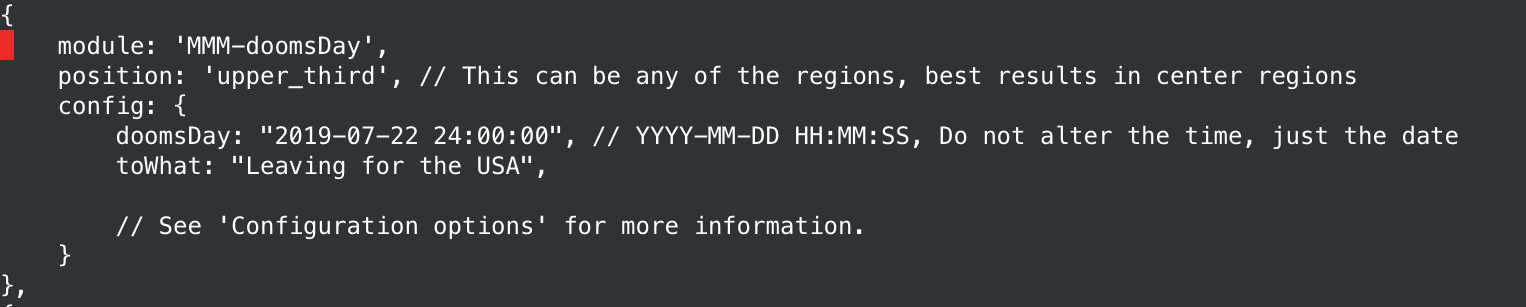
      Bringing an old thread back up, just installed and got this module activated. I think I’ve done it correctly as per github but its not working. It just displays the ‘finished’ message the death and despair bit.

      Can anyone tell me what silly obvious thing I’ve done wrong? Config in the pic below
      Thanks
      Noel0_1530566153187_8A3636F3-D374-443D-8951-8E0EBA008A38.jpeg

      posted in Utilities
      N
      noelandrews
    • RE: Tide Chart Module

      @onetwankyfive

      Hi
      This is exactly what I’m After, is it still available? I don’t see a link or anything?
      Thanks
      Noel

      posted in General Discussion
      N
      noelandrews
    • When to turn mirror on and off?

      Hi all,
      So just made my second mirror, this one is in the hall by our front door.

      I’m trying to think about when I want the mirror to be on/activated. Pretty sure there’s no need for it to be on all the time.

      I have a motion sensor in the hall so could trigger it from that easy enough but again there’s no need for it to turn on every time we walk through the hall.

      So …interested in how other people deal with this.

      Main purpose of the mirror is to display weather, maybe some calendar stuff kind of heading out the front door type stuff. Maybe some home automation info but primarily I think it’s for people either heading out or heading in rather than when we’re inside the house.

      Thanks
      Noel

      posted in General Discussion
      N
      noelandrews
    • Turn on/off display remotely via ssh

      Hi all,
      Apologies if this isn’t the right forum for this.

      Looking to have a magic mirror triggered via other inputs with my home automation system Indigo.

      Ideally I’d like to be able to remotely turn on/off the display through a script. Is there a simple way I can do that?

      Thanks
      Noel

      posted in Hardware
      N
      noelandrews
    • RE: Troubles upgrading

      Worked perfectly thanks E3V3A :)

      Now to find out what improvements I can take advantage of in the new version!

      posted in Troubleshooting
      N
      noelandrews
    • Troubles upgrading

      Hi all,
      Just setting up my second magic mirror, cloned the img on my SD card from my working mirror and all works great.
      Original install was following the raspberry pi 0 how to guide.

      Only thing I’m struggling with is how to update magic mirror.

      Original command that I think installed magicmirror was bash -c “$(curl -sL https://raw.githubusercontent.com/MichMich/MagicMirror/master/installers/raspberry.sh)”

      I’ve tried sudo apt-get update and sudo apt-get upgrade which did a whole bunch of stuff, seemed to complete successfully but I still have the MagicMirror2 update available message on the screen saying I’m 86 commits behind. (just realised I think those two commands update the system not magicmirror).

      Also tried git pull, that gives the error: The following untracked working tree files would be overwritten by merge:
      package-lock.json
      vendor/package-lock.json
      Please move or remove them before you can merge
      Aborting.

      Apologies if this is something really simple but any advice would be greatly appreciated.

      Thanks
      Noel

      posted in Troubleshooting
      N
      noelandrews
    • RE: My 1st MM Project as a noob.... 1,2m x 0,6m with 22" display

      @chris1971 cool good point, would you mind sharing where you bought the controller board from?

      posted in Show your Mirror
      N
      noelandrews
    • RE: My 1st MM Project as a noob.... 1,2m x 0,6m with 22" display

      Hey Chris
      That’s fantastic thanks for the details. I want to use a desktop monitor for my next one but the weight of the boards and power supply was putting me off as it makes the frame need to be so much deeper. Hadn’t realised you could do it that way :)

      Massive thanks, off to google and Ebay I go :)

      posted in Show your Mirror
      N
      noelandrews
    • RE: My 1st MM Project as a noob.... 1,2m x 0,6m with 22" display

      That is awesome!
      Have you taken a 22” display from a normal desktop monitor then got a driver and power supply for it? Cool if so :)

      What kind of mirror have you used?
      Well done great work

      posted in Show your Mirror
      N
      noelandrews
    • RE: work in progress

      Very cool! How have you done the full length mirror? Is that film over glass?

      posted in Show your Mirror
      N
      noelandrews
    • RE: Mirror mirror on the wall alexa skill

      Afraid not, sorry need so,e help from people much more switched on than me!

      posted in Troubleshooting
      N
      noelandrews
    • Remove I frame border

      Hi,
      Does anyone know how I can remove the white border from iframe module?
      Many thanks
      Noel

      posted in Troubleshooting
      N
      noelandrews
    • RE: MMM-UKNationalRail - Rail departure info for specific UK Railway stations

      Thanks for the advice and the edits! Didn’t think about that :)

      posted in Transport
      N
      noelandrews
    • RE: Move the bottom_bar a little higher

      That’s awesome thank you.

      Last question and this possibly does need a. We post! Any idea how I’d hide the white border around iframe?

      posted in Troubleshooting
      N
      noelandrews
    • RE: Move the bottom_bar a little higher

      That’s awesome thank you.

      On my second frame now but similar subject just getting config on my pi right First

      Can modules overlay others?

      Ie I have configured iframe to be in bottom left which I understand is above bottom Bar.

      Currently it overlays calendar which is in top left which blocks content from the calendar

      If I could amend it to overlay the bottom bar then that would be great.

      Picture attached to show what I mean…well they would be if I could figure how to add a picture from an iPhone sorry!
      Thanks

      posted in Troubleshooting
      N
      noelandrews
    • RE: MMM-UKNationalRail - Rail departure info for specific UK Railway stations

      Hi,
      apologies, sure i’m doing something obvious but my module isn’t showing up.

      I’ve done to install it, git clone… then cd to the folder and npm install

      then add to the config.js file (my addition below).

      I changed the ’ to " in case that was causing the issue. Still no joy, no errors on the screen it simply doesn’t show up.

      Any help would be massively appreciated.
      Thanks
      Noel

      {
                      module:                 "MMM-UKNationalRail",
                      position:               "bottom_left",
                      header:                 "Departures",           //Optional - delete this line to turn OFF the header completely
                      config: {
                              stationCode:            "LNB",          // CRS code for station
                              app_id:                         "49d8e014",             // TransportAPI App ID
                              app_key:                        "1a3d4XXXXXXXXXXXceac3d9f14be",             // TransportAPI App Key
                              maxResults:             5,              //Optional - Maximum results to display.
                              showOrigin:             false           //Optional - Show the origin of the train in the table
                      }
              },
      
      posted in Transport
      N
      noelandrews
    • Move the bottom_bar a little higher

      Hi all,
      My first frame is up on the wall! Very chuffed with it as a first prototype done very much on the cheap.

      One thing I could do with is moving the bottom bar up slightly as the way our frame is it covers up maybe 0.5cm of the bottom of the screen.

      Is it possible to configure the specific location of the regions any?
      Thanks
      Noel

      posted in Troubleshooting
      N
      noelandrews
    • RE: Mirror mirror on the wall alexa skill

      Hi all,
      Just delving into the world of SmartMirrors, if there’s anyone that can help me with this last little bit it would be amazing!
      I have followed Joanaz insanely good guide (thank you!!) and I too got stuck with the connection issue. Thanks timjong for your pointer, I think I’ve edited that file correctly and added the host in.
      Uploading, saving and testing in lambda setup then gives me this error:

      {
        "errorMessage": "2017-11-15T21:05:12.504Z a94c5f8d-ca48-11e7-8d56-b5963befba0d Task timed out after 3.00 seconds",
        "errorType": "SyntaxError"
      }
      

      This is what I have in that section of my mirror.js file, I’ve only added the host line so hope I’ve done it right.

      app.setup = function() {
        app.device = awsIot.device({
          keyPath: __dirname + "/certs/MagicMirror.private.key",
          certPath: __dirname + "/certs/MagicMirror.cert.pem",
          caPath: __dirname + "/certs/root-CA.crt",
          clientId: "MirrorMirror" + (new Date().getTime()),
          region: "us-east-1",
      host: "**********vuct.iot.us-east-1.amazonaws.com",
        });
      

      Anything obvious or any suggestions what to try next?
      Thank you
      Noel
      posted in Troubleshooting
      N
      noelandrews
    • 1 / 1