@karsten13 Oh, somehow missed that. Will look into that, looks promising, thanks!
O
Offline
A New Chapter for MagicMirror: The Community Takes the Lead
Read the statement by Michael Teeuw here.
Read the statement by Michael Teeuw here.
Posts
-
RE: Magic Mirror Dynamic Calendar and Pirate Sky Forecast Questions
-
RE: Magic Mirror Dynamic Calendar and Pirate Sky Forecast Questions
Something like this?:

left hourly and right daily forecast, using openweathermap as API provider, but that should not make a difference.Is this something that could be build into the default module? I’m currently testing it with a configurable layout option and could provide my changes if that makes sense.
-
RE: MMM-RainRadarDWD
@rkorell Thanks Ralf!
was not aware of the translate capability, but as I was not sure which text I wanted to have there (in which scenario), hence I thought it would be great if it is configurable in general. I for my self try to get rid of the one or other text if it does not provide information useful for me so I thought it would help others as well, even if it makes the configuration in general a bit larger/complex. Sometimes hard to find the right balance ^^ -
MMM-RainRadarDWD
Hey all,
after MMM-RAIN-MAP literaly stopped working because of the API changes of Rainviewer.com I was looking for something that works.
Unfortunatelly I’m not a developer, so I got a lot of help from an AI (vibe coding). So if there is a real developer want to check it, make it better, take ownership of the project: Let me know, I just want something that works for me ;)Also, this is only working for Germany as I use the data from the German Weather Service (Deutscher Wetterdienst - DWD).
The module works for me, but I consider it beta as I did not see it long enough. I took some of the feature ideas from MMM-RAIN-MAP, so thanks guys for developing this first!
-> Rain/snow Radar that is either always visible or only when it will start rain in X minutes
-> works 2 hours into the past to 2 hours into the future
-> not much more =)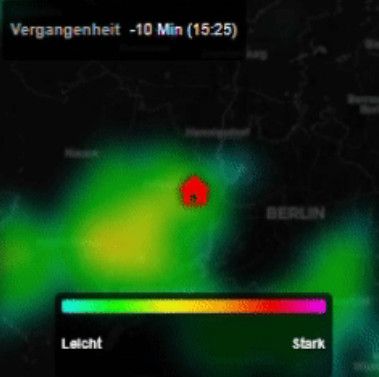
It uses data from DWD, Bright Sky API, CARTO map tiles (by Open Street Map) and the OpenLayers map engine.
you can find the module here:
https://github.com/realoliwer/MMM-RainRadarDWDAny feedback is valued, especially if you find something stupid due to the AI usage.
For now I’m happy as it is currently working as intended for me and maybe it also works for the one or other here in the forum as well.
Cheers!
-
RE: MMM-Webuntis
Also have to leave a big shout out for Heiko. He really cares about this module and helps as much as he can when it comes to all the difference configs/usage scenarios by the different schools. And the new features like the grid etc. are really nice. Thanks!!!
Edit: Feature Request: In the list the entries for cancelled lessons are crossed. In the grid view they are red. Behind my mirror glas I (with my color seeing issues) have a bit of a trouble of seeing something is canceled (my daughter don’t - its a me issue^^). But would it be possible to maybe get it also crossed or something that indicates it instead/in addition to the coloring?
-
RE: Outlook 365 calendar not loading after updating MMM-CalendarExt2
@KristjanESPERANTO Its working again, thanks buddy!
-
Outlook 365 calendar not loading after updating MMM-CalendarExt2
Hi,
I just updated MMM-CalendarExt2 and the entries from Outlook ics are not displayed anymore. Another calendar is working fine.
Also using MMM-CalendarExtPlan, so upgrading to CalendarExt3 is not an alternative for me ;)
The .ics is still reachable via browser.
Any tipps to troubleshoot this?Thanks in Advance!
-
RE: MMM-Webuntis
Data is getting displayed now, will play around with it more later. Thank you very much!
-
RE: MMM-Webuntis
@HeikoGr
added that to my config, but nothing changed.
When I login to WebUntis via Browser, I can see a “My Timetable” (Mein Stundenplan). Not sure if there is a language difference or something.
When I change the login information, I get error messages in the log, so the login itself seems to work and it gets data, even if it is just “all according to plan”. But not the data.What I also noticed is that there are two “My Timetable” in the web overview - one marked with beta.
URL for non-beta: https://ikarus.webuntis.com/timetable-students-my/
URL for beta: https://ikarus.webuntis.com/timetable-new/my-studentURL for class: https://ikarus.webuntis.com/timetable-classes/
So I think the school allowed the timetables you are asking for.
Thanks for taking your time! Let me know if I can provide further information.
-
RE: MMM-Webuntis
Hey,
first let me say thanks for this module and your work!
I have a similar issue as Eli:
I only get info “all according to plan”. Even if I use “showRegularLessons”: true, I’m not getting anything else.
in the startuplog I get this error for MMM-Webuntis:
1|MagicMirror | [2025-01-22 09:02:11.901] [LOG] [MMM-Webuntis] ERROR for : TypeError: Cannot read properties of undefined (reading ‘0’)My config is as follow (removed real data from URL:
{
                        module:"MMM-Webuntis",
                        position:"bottom_left",
                        header:"Emma Schule",
                        config: {
                                students: [
                                                {
                                                title:"",
                                                qrcode:"untis://setschool?url=ikarus.webuntis.com&school=12345&user=MyChild&key=Realkey&schoolNumber=123456789",
                                                days:"10",
                                                },
                                          ],
                                showRegularLessons: true
                                }
                },
Any help is much appreciated, cause I find the idea really good!
-
RE: Let it snow now Magic Mirror
Just updated and changed my config. Thanks for your fast response and changes!
Good work now and easier for me to play with to find perfect settings for my screen =) -
RE: Let it snow now Magic Mirror
Hey, thanks for the module! Really like it.
Just two things that come to my mind:- From other modules I’m used to only do the config in the config.js (only compliments is different, but for a good reason). For your module I have to add it in config.js, but do the module configuration in a separate file. I’d really would appreciate it, if you could move the configuration also to the config.js. Also not sure if it the config would be reverted if I have to update the module or something.
- there are two Flake Counts, one in the “defaults” part and one in the performancePresets, same for size. Not sure which wins in which situation.
Thanks again for the module!
-
RE: Forecast with default weather module not working with Openweather
That was not a rant, just wanted to make you aware. I’m really thankful you guys are doing this.
Cheers!
-
RE: Forecast with default weather module not working with Openweather
@sdetweil well, that was easy to fix, thanks buddy!
I was confused by the documentation I guess as the other endpoints are still listed there (as well as 2.5 as default API which does not match with the release notes of 2.29.0). But I think you guys are already aware of this.Thanks for working on the product!
Cheers!
-
Forecast with default weather module not working with Openweather
Hi everyone,
I’m using Openweather as the weather provider. I subscribed to the new API 3.0.
I’m using the default weather module three times in my MM and the config for current is working as well as the config for hourly. But I’m not able to get the config working again for the forecast. I was playing with lat/lon and locationID, but no matter what I’m trying the display is always saying “loading”:
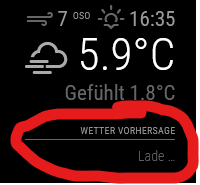
This is the config of the forecast:
{
                        module: "weather",
                        position: "top_right",
                        header: "Wetter Vorhersage",
                        config: {
                                weatherProvider:"openweathermap",
                                type: "forecast",
                                weatherEndpoint:"/forecast",
                                locationID: "2950159",
                                lat: 55.4815,
                                lon: 10.8771,
                                apiVersion: "3.0",
                                apiKey: "mykeynumberthatworksfortheothermodules",
                                units: "metric",
                                degreeLabel: "true",
                                units: "metric",
                                showPrecipitationAmount: "true",
                                maxNumberOfDays: "8",
                                colored: "true",
                        }
                },
Any help would be appreciated.
Thanks! -
RE: MagicMirror With Face Recognition
This looks pretty cool. Nice work with the styling.
Can you let me know which hardware you are using? Like the sensors and where is MM running on? -
RE: MMM-CalendarExt3
@MMRIZE said in MMM-CalendarExt3:
For the ExtPlan (and agenda view), I will provide an equivalent module for CX2 someday.
Hope you mean CX3 ;)
Will wait until its done and closely monitor the evolution of CX3. Thanks again for your contribution, really good work! -
RE: MMM-CalendarExt3
Hi, I’m using CalendarExt2 with the MMM-CalendarExtPlan Plugin. This totaly fits my needs with having several calendars next to each other with different type of information for the upcoming days. Currently it looks like this is not possible with CalendarExt3, right?
Is CalendarExt2 not going to be maintained anymore in the near future?Thanks for the great work btw,!