@evroom
You are correct sir,
I had done a git pull and forgot about it on all modules.
Yours updated me to 2.0 version and my config was from the 1.0 version.
Fixed me right up.
Thanks for your help.
Really appreciated.
 P
Offline
P
Offline
A New Chapter for MagicMirror: The Community Takes the Lead
Read the statement by Michael Teeuw here.
Read the statement by Michael Teeuw here.
Posts
-
RE: MMM-MPlayer
-
RE: MMM-MPlayer
@evroom
Version 2
I will reload it and try again.
Thanks for the information. -
MMM-MPlayer
Anyone else having trouble with MMM-MPlayer?
All the sudden I can not get it to see my camera’s, 7 of them and I have tested they all work in VLC on my laptop… I know its kind of like comparing apples to oranges.
Any Ideas. Here are How i install it.
In the home directory /home/pi
sudo apt install -y mplayer
Then I do in ~MagicMirror/modules
git clone https://github.com/evroom/MMM-MPlayer.git
Then in my Config.js{ module: "MMM-MPlayer", // disabled: true, position: "top_left", header: "", config: { useTwoWindows: false, //true, layout: "row", monitorAspect: 0, rotate: -1, windowSize: { width: 1860, height: 920 }, windowPosition: { x: 5, y: 5 }, streamInterval: 20000, streams: { window1: [ "rtsp://admin1:admin1@192.168.1.40:554/stream1", "rtsp://admin1:admin1@192.168.1.42:554/stream1", ], } } },Help me I have fallen down a rabbit hole I think…
Raspberry Pi 4 w 4gb ram
Bookworm fully updated.
MagicMirror latest version 2.32 I think.it is.PS:
It was working on this exact setup 3 days ago, but after it came backup after pm2 stop @9pm and pm2 restart @7am, it did not work… It does it automatically, happens every day. -
RE: MagicMirror² installation and setup scripts
@sdetweil
What do you mean by using a parm?
Like apply/MM ? -
RE: MagicMirror² installation and setup scripts
@sdetweil said in MagicMirror² installation and setup scripts:
I thought as much, about the renaming it back to MagicMirror, upgrade and put it back to MM.
I have moved the mm.sh out to the home/pi directory, and fixed it to see the correct directory. Then I fixed the mm.json to point to the mm.sh in home directory.
That way I can only have to fix the mm.sh each time.
Simple enough
Don’t think about it too much… It was just a thought… -
MagicMirror² installation and setup scripts
@sdetweil
Hey Sam,
on your install and update scripts is there a way to change the directory for installation? IE I would like to change the MagicMirror folder to MM on one pi
and CM on another. Just curious. I pulled down your raspberry.sh and replaced everything MagicMirror with MM and it installed but then I tried a git pull and it did not work. I did have to change the mm.sh in the installers directory, to look at MM instead of MagicMirror… then do a pm2 delete all and a pm2 start mm.sh then pm2 save and it works now… Just playing around, but got me to thinking. NOT A GOOD THING sometimes… LOL -
RE: Default Calendar Symbols
@almightyyoshi
try
symbol: false,
or maybe it’s
symbol: null,
Not sure if that will work not able to test -
RE: MMM-SmokeFree – Track your smoke-free journey
@chrisfr1976
Cool I will chec k it out sooner or later. -
RE: MMM-SmokeFree – Track your smoke-free journey
@chrisfr1976
How do I change it to US currency? -
RE: MMM-Chores - Manage and keep track of your household Chores
@mischag
So are you trying to change things by going into MM/modules/MMM-Chores/data.json and editing it? I just tried that and it does not work.
I think it is because the module assigns each grouping a specific ID that way beyond my paygrade… Wish I could be of more help…
So are you accessing it remotely i.E. from a different network?
Hope you figure it out… -
RE: MMM-Chores - Manage and keep track of your household Chores
@mischag
This is what I get when I login to MMMChores admin
http://192.168.1.223:5003
https doesn’t work for me. I don’t have it setup to work in my config.js.
Are you trying to reach it from work or from home and it is in another building???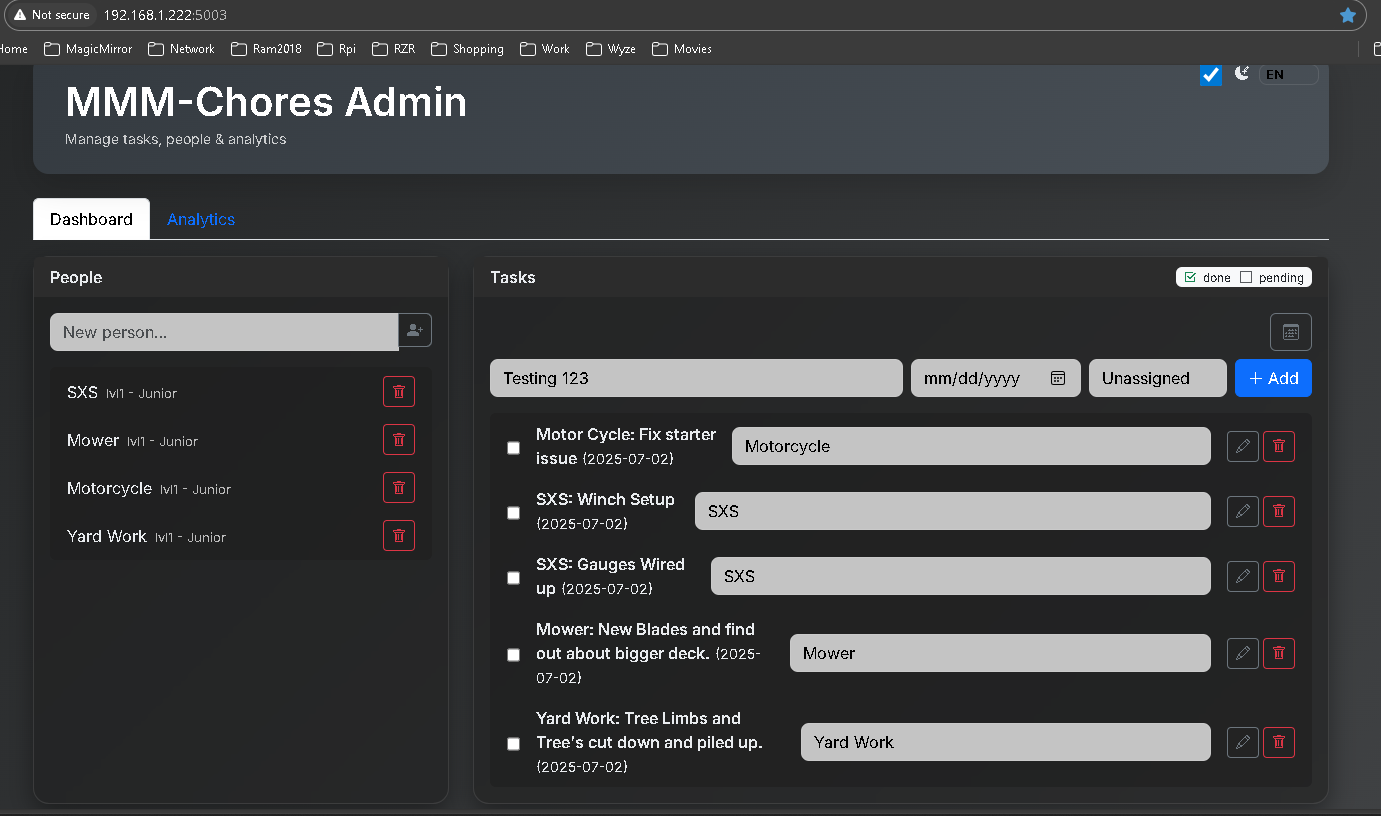
-
RE: MMM-iframes
@sdetweil
Ok, I get it now… I just need to go in and resize that logo.png file I am using and it should get rid of the slide, Correct… -
RE: MMM-Pinfo Help
@rkorell
@sdetweil
Never mind I am stupid.
I figured out that I had removed several sections of the config file that was in his readme. Then went and re numbered the lines.
Which really upset the apple cart.
I did have to change the parts you said @rkorell.
But the rest was my doing. Compare the first Config i posted and this one and you will see what I did.{ module: "MMM-Pinfo", position: "middle_center", config: { debug: false, refresh: 5000, itemAlign: "left", labelAlign: "left", valueAlign: "right", labelSize: 400, containerSize: 500, DEVICE: { labelModel: "Model", displayModel: true, orderModel: 1, labelSerial: "Serial", displaySerial: true, orderSerial: 2 }, OS: { labelOs: "OS", displayOs: true, orderOs: 3 }, NETWORK: { labelType: "NET Type", displayType: true, orderType: 4, labelIPv4: "IPv4", displayIPv4: true, orderIPv4: 5, labelIPv6: "IPv6", I deleted these 2 lines and then changed orderMac: 6 and so on down the List.. DISPLAYIPV6: FALSE, ORDERIPV6: 6, labelMac: "MAC", displayMac: true, orderMac: 7 }, RAM: { labelRam: "RAM", displayRam: true, orderRam: 8 }, STORAGE: { labelStorage: "Storage", displayStorage: true, orderStorage: 9, }, CPU: { labelType: "CPU Type", displayType: true, orderType: 10, labelUsage: "CPU Usage", displayUsage: true, orderUsage: 11, labelTemp: "CPU Temp", displayTemp: true, orderTemp: 12 }, UPTIME: { labelUptime: "Uptime", displayUptime: true, orderUptime: 13 }, WARNING: { enable: true, interval: 1000 * 60 * 5, check: { CPU_TEMP: 65, CPU_USAGE: 75, RAM_USED: 80, STORAGE_USED: 80 } }, } }, -
RE: MMM-SmokeFree – Track your smoke-free journey
@chrisfr1976 @sdetweil
Sam,
My wife and I think it was 25 year ago when I quit…
Almost went to jail because a truck driver lite up in the trailer we where unloading and it set me off, I blacked out and when I came to my coworkers said I had him by the throat pinned a foot off the ground against the inside of the trailer. I do not remember doing it but that guy was pissed. Thank fully my boss thought that the no smoking on the premises sign due to all the paper products in our warehouse should have been enough of a message, and backed me up.
So weird how that smell about makes me sick now… -
RE: Nudging a Module to different location?
Here is a little example of What Sam said to do.
Not sure what module you are trying to do that with but this will give you the idea of what to tweak in the ctrl+shift+i screen..MMM-Cocktails { Margin-top: 30px; Margin-left: 140px; Margin-right: 120px; }Hope this makes it a little clearer for you.
PS:
You can look in the modules css file for the .XXX-XXXXX name to use if you have the same difficulty I do with the window thingy… <— Technical term. -
RE: MMM-Pinfo Help
Here is what I have in my config.js and custom.css
                {
                        module: "MMM-Pinfo",
                        position: "middle_center",
                        config: {
                          debug: false,
                          refresh: 10000,
                          itemAlign: "left",
                          labelAlign: "left",
                          valueAlign: "right",
                          labelSize: "60px", //null,
                          containerSize: "180px",
                         DEVICE: {
                                labelModel: "Model:",
                                displayModel: true,
                                orderModel: 1,
                          },
                         OS: {
                                labelOs: "OS:",
                                displayOs: true,
                                orderOs: 2
                          },
                         NETWORK: {
                                labelType: "NET Type:",
                                displayType: true,
                                orderType: 3,
                                labelIPv4: "IPv4:",
                                displayIPv4: true,
                                orderIPv4: 4,
                                labelMac: "MAC:",
                                displayMac: true,
                                orderMac: 5
                          },
                         RAM: {
                                labelRam: "RAM:",
                                displayRam: true,
                                orderRam: 6
                          },
                         STORAGE: {
                                labelStorage: "Storage:",
                                displayStorage: true,
                                orderStorage: 7,
                          },
                         CPU: {
                                labelType: "CPU Type:",
                                displayType: true,
                                orderType: 8,
                                labelUsage: "CPU Usage:",
                                displayUsage: true,
                                orderUsage: 9,
                                labelTemp: "CPU Temp:",
                                displayTemp: true,
                                orderTemp: 10
                          },
                         UPTIME: {
                                  labelUptime: "Uptime:",
                                  displayUptime: true,
                                  orderUptime: 11
                                },
                         }
                },
CUSTOM.CSS ##########
.Pinfo {
        font-size: 50px;
        line-height: 55px;
}
And this is what I get
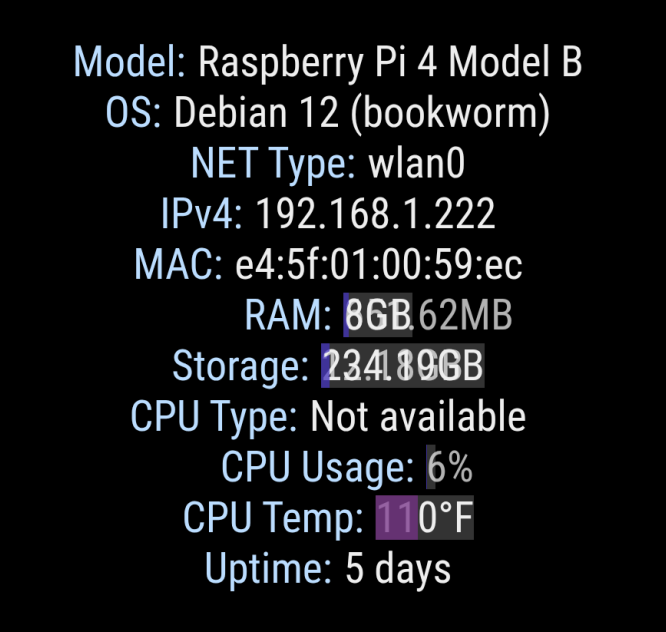
@rkorell
I tried changing the left to right and the size of the container from 80 to 1800 with absolutely no change.I made a test config.js so I could only have it on screen to test with.
Doesn’t seem to matter what I change in the config.js It stays the same .
I remove the lines from my custom.css and it is still the same only very small on my screen… 42" TV… The really weird part is it looks fine on my pi w2 -
RE: MMM-iframes
@richRiggins
Did you figure that out about the scroll bars? I have one that has the same issue that I have not been able to figure out how to get rid of… -
MMM-Pinfo Help
I am having an issue with the display being different from one Pi to another.
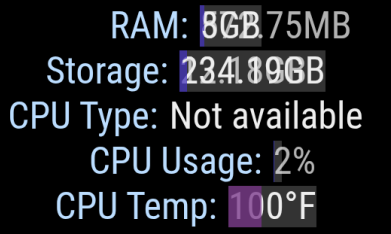
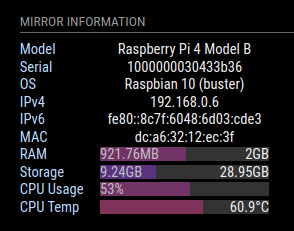
Mine is having issues with the dual lines.
both are running the same configurations… -
RE: AfterUpdate to v2.3.2 Small Problem
@sdetweil
Thank you Sam,
That fixed my issue, and let me use the default clock files…
Cool thing is with the old setting in the Custom.css file I can change the colon : color between the numbers a different color.
Fun Fun Fun. -
RE: AfterUpdate to v2.3.2 Small Problem
@sdetweil
So just replace “var(–color-text-bright)” with my preferred colors?