@big11 said in ipwhitelist - a lot of issues... can't connect remotely ..:
address: “localhost”,
Try change address: “localhost” to “0.0.0.0”
@big11 said in ipwhitelist - a lot of issues... can't connect remotely ..:
address: “localhost”,
Try change address: “localhost” to “0.0.0.0”
I use several calendars, want it were all in one module, but that each could set maximumEntries and / or maximumNumberOfDays
Now my config looks like this:
	{
		module: 'calendar',
		header: 'Nadchodzące święta',
		position: 'top_left',
		config: {
			maximumEntries: 2,
			fadePoint: 0.25,
			calendars: [
				{
				symbol: 'calendar-o ',
				url: 'webcal://www.mozilla.org/media/caldata/PolishHolidays.ics'
				}
			]
		}
	},

	{
		module: 'calendar',
		header: 'Google Calendar',
		position: 'top_left',
		config: {
			maximumNumberOfDays: 7,
			calendars: [
				{
				symbol: 'calendar-o',
				url: 'https://calendar.google.com/calendar/ical/XXXXXXXXXXX/basic.ics'
				}
			]
		}
	},

	{
		module: 'calendar',
		header: 'Facebook Calendar',
		position: 'top_left',
		config: {
			maximumNumberOfDays: 2,
			fadePoint: 0.75,
			calendars: [
				{
				symbol: 'calendar-o',
				url: 'webcal://www.facebook.com/ical/u.php?uid=XXXXXXXXX'
				},
				{
				symbol: 'birthday-cake',
				url: 'webcal://www.facebook.com/ical/b.php?uid=XXXXXXXXX'
				}
			]
		}
	},
And i want:
	{
		module: 'calendar',
		header: 'Kalendarz',
		position: 'top_left',
		config: {
			maximumEntries: 10,
			calendars: [
				{
				symbol: 'calendar-o ',
				maximumEntries: 2,
				maximumNumberOfDays: 21,
				url: 'webcal://www.mozilla.org/media/caldata/PolishHolidays.ics'
				},
				{
				symbol: 'calendar-o',
				maximumNumberOfDays: 7,
				url: 'https://calendar.google.com/calendar/ical/XXXXXXXXXXX/basic.ics'
				},
				{
				maximumNumberOfDays: 2,
				symbol: 'calendar-o',
				url: 'webcal://www.facebook.com/ical/u.php?uid=XXXXXXXXX'
				},
				{
				maximumNumberOfDays: 2,
				symbol: 'birthday-cake',
				url: 'webcal://www.facebook.com/ical/b.php?uid=XXXXXXXXX'
				}
			]
		}
	},
@ianperrin you are wizard :) big thank you, now it works excellent
@dominic try delete " * " from var temperatureRegExp = /Temperature = (.*?) *C/ig;
try it:
var temperatureRegExp = /Temperature = (.*?) C/ig;
@ianperrin nice! I still have a lot to learn. I’m just beginning to learn JS, etc.
Now is almost perfect:
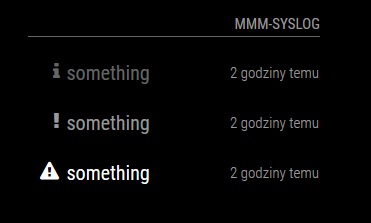
Now only center the icons and reduce the spacing between the lines.
Hi @ianperrin
| Icon | Message | Time | should be ok
I need add a symbol to text (before or behind).
Code:
getDom: function() {

		var header = document.createElement("header");
		var wrapper = document.createElement("div");
		if(this.config.title !== false){
			var title = document.createElement("header");
			title.innerHTML = this.config.title || this.name;
			wrapper.appendChild(title);
		}
		var logs = document.createElement("table");

		for (var i = this.messages.length - 1; i >= 0; i--) {
			//Create callWrapper
			var callWrapper = document.createElement("tr");
			callWrapper.classList.add("normal");


			var icon =  document.createElement("td");

			if (this.messages[i].type === "INFO"){
				icon.className = "fa fa-info";
			}
			else if (this.messages[i].type === "WARNING"){
				icon.className = "fa fa-exclamation";
			}
			else if (this.messages[i].type === "ERROR"){
				icon.className = "fa fa-exclamation-triangle";
			}
			else {
				icon.className = "fa fa-question";
			}


			//Set caller of row
			var caller =  document.createElement("td");
			caller.innerHTML = "[" + this.messages[i].type + "] " + this.messages[i].message + " " + wrapper.appendChild(icon);
			caller.classList.add("title", "small", "align-left");
			if(this.config.types.hasOwnProperty(this.messages[i].type)){
				caller.classList.add(this.config.types[this.messages[i].type]);
			}
			callWrapper.appendChild(caller);

			//Set time of row
			var time =  document.createElement("td");
			time.innerHTML = this.config.format ? moment(this.messages[i].timestamp).format(this.config.format) : moment(this.messages[i].timestamp).fromNow();
			time.classList.add("time", "light", "xsmall");
			callWrapper.appendChild(time);

			//Add to logs
			logs.appendChild(callWrapper);
		}
		wrapper.appendChild(logs);
		return wrapper;
This is effect: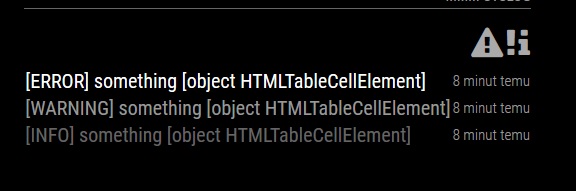
What is wrong?
Hello, i want make a own module. Sadly i don’t know how add Font Awesome to project.
getStyles: function() {
	return ["font-awesome.css"];
},
and what next?
e.g.
<i class="fa fa-cog"></i>
@paviro Nice module, it is useful with ESP8266 etc :)
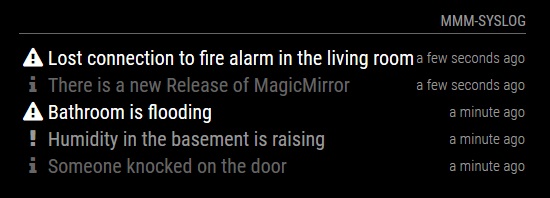
What do you think about changing the type of notifications on icons instead descriptive?
http://fontawesome.io/icon/info/
http://fontawesome.io/icon/exclamation/
http://fontawesome.io/icon/exclamation-triangle/
And adding function clear
If we send:
syslog?type=CLEAR&message=something
and we have notice “something” then is removed
I want to create a module that gets data from a website in div id.
Example:
Website code:
<b class="b2 nieb" title="Kurs EUR na żywo" id="EURPLN">4.33320</b>
And i want display value of id="EURPLN"
I want to set the config which site is to collect data and from which the ID
example:
defaults: {
		url: http://domain.com/
		findID: "EURPLN"
}
how to do it?
Note from admin: Please use Markdown on code snippets!
You could be introduced to the config options to disable showing the date (on top the clock).
When we use the calendar_monthly we have duplicated the date (and a waste of valuable space :))
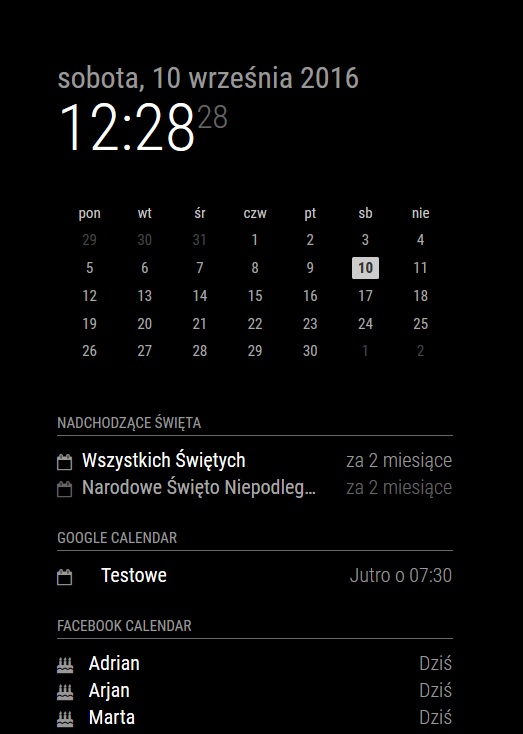
How to get ICAL for a Facebook calendar:
https://www.facebook.com/help/152652248136178/
2 different ICAL for birthdays and upcoming events :)
Useful config part: “maximumEntries: X”
And holidays calendars for many countries: https://www.mozilla.org/en-US/projects/calendar/holidays/
@strawberry-3.141 Ok, i deleted my version (who i copy manually from github) and instal by commands:
git clone https://github.com/RedNax67/MMM-WunderGround.git
to ~/MagicMirror/modules/
Now i see folder .git. Maybe the next updates this work.
@strawberry-3.141 no, in module.
cd ~/MagicMirror/modules/default/MMM-WunderGround
git pull
@strawberry-3.141 The last update is from yesterday, last updated my files was a week ago
@strawberry-3.141 but always I get an answer “Already up-to-date.”
@RedNax i have little question. I have a small question. If you want to update the module I have to copy the files manually from github? Is there a command or something that will do it automatically? Forgive the question, just starting to work with raspberry etc :)
Hi, i have little problem :)
“Whoops! There was an uncaught exception…
{ Error: socket hang up
at createHangUpError (_http_client.js:252:15)
at Socket.socketOnEnd (_http_client.js:344:23)
at emitNone (events.js:91:20)
at Socket.emit (events.js:185:7)
at endReadableNT (_stream_readable.js:973:12)
at _combinedTickCallback (internal/process/next_tick.js:74:11)
at process._tickCallback (internal/process/next_tick.js:98:9) code: ‘ECONNRESET’ }
MagicMirror will not quit, but it might be a good idea to check why this happened. Maybe no internet connection?
If you think this really is an issue, please open an issue on GitHub: https://github.com/MichMich/MagicMirror/issues”
What it could be? I have internet connection. MagicMirror runs correctly, after some time only appears in error. It occurs periodically. Probably it is the news feed.