I’m using my own script aswell, however that just turns off/on the display. I think the module actually suspends the mirror… Saving power on the pi
A New Chapter for MagicMirror: The Community Takes the Lead
Read the statement by Michael Teeuw here.
Read the statement by Michael Teeuw here.
 Offline
Posts
-
RE: Cowboysdude's Mirror
-
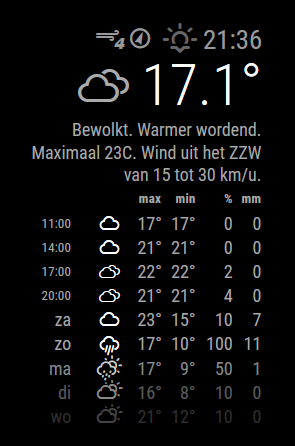
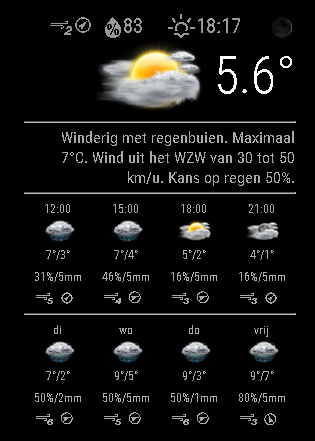
Weatherunderground - currently - hourly - daily - configurable
MMM-Wunderground is Yet Anothet Modified Weatherforecast module using Weather Underground.
Can optionally display hourly forecasts. These forecasts display the temperature in the max xolumn and the feels-like in the min column.
Daily forecasts are as you’d expect.Uses weather-icons-wind.css which means updating the weathericons package in the vendor directory in MM and adding it to vendor.js.
Alternatively you could have them in your MMM-Wunderground directory.[card:RedNax67/MMM-WunderGround]
-
RE: Weatherunderground - currently - hourly - daily - configurable
@bminer1 Pull the new version ;)
-
RE: DailyXKCD
Hi!
Since new comics only come out on monday, wednesday and friday i made a slight modification (ugly hack) to your node_helper.js…
On non comic days, after getting the current comic, the node_helper will examines the num value and generate a random number between 1 and said value. It will then get the random comic and return it in the payload.
socketNotificationReceived: function(notification, payload) { var self = this; console.log("Notification: " + notification + " Payload: " + payload); if(notification === "GET_COMIC"){ var comicJsonUri = payload.config.dailyJsonUrl; var comic; var rndcomic; var rndUrl; var body; var d = new Date(); var n = d.getDay(); request(comicJsonUri, function (error, response, body) { if (!error && response.statusCode == 200) { console.log(body); if ( this.n == 1 || this.n == 3 || this.n == 5 ) { self.sendSocketNotification("COMIC", JSON.parse(body)); } else { this.comic = JSON.parse(body); this.rndcomic = Math.floor((Math.random() * this.comic.num) + 1); this.rndUrl = "http://xkcd.com/" + this.rndcomic + "/info.0.json"; request(this.rndUrl, function (error, response, body) { if (!error && response.statusCode == 200) { console.log(body); self.sendSocketNotification("COMIC", JSON.parse(body)); } }); } } }); } }, -
RE: Weatherunderground - currently - hourly - daily - configurable
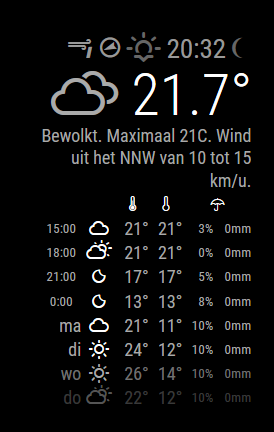
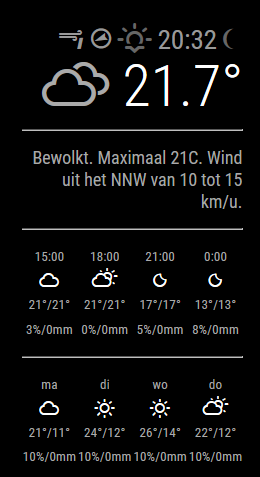
New version now shows the current moon phase and there’s a new layout option :)
in config set layout:“vertical” for the traditional layout:
or layout: “horizontal” for:
-
RE: Weatherunderground - currently - hourly - daily - configurable
@ostfilinchen Now i have, and thanks to @anatius for this!
-
RE: Weatherunderground - currently - hourly - daily - configurable
Just pushed a new version which fixes all this. Give it a try!
-
RE: Cowboysdude's Mirror
@cowboysdude said in Cowboysdude's Mirror:
I’ll update my picture as soon as it’s done… I ordered a real glass mirror but 2" longer so I can hide the PIR and Camera behind it… the new frame will be made out of mahogany… so once the mirror comes in I’ll build the new frame… next week I’m hoping…
Not entirely sure if the PIR will work (well) behind glass… http://forum.arduino.cc/index.php?topic=123750.0
As for the camera, it’ll be getting a lot less light to work with aswell…That said, lookingforward to the result… :)
-
RE: Weather based on another provider..
@cowboysdude :D Glad it’s working, enjoy!
-
RE: Help with tables?
Well you did help me solve it, but not using divs.
Turned out i had to put the icon in an inside the
and not directly in the <td><i class="fa fa-fire"> </td>instead of
<td class="fa fa-fire"></td>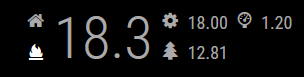
-
RE: Weatherunderground - currently - hourly - daily - configurable
Thanks! The text area is reproduced as it is delivered by WeatherUnderground… so barring any heuristics on the actual content it’s beyond our control…
-
RE: Expired session in Chrome (PC) and Brave (Android)
Hi,
Had the exact same thing. You’ll have to delete the associated cookies from your browser.
-
Made a thing
Hi,
Been having a bit of a dilemma… Made something (i think is) rather cool using a technique i haven’t seen in any module here… Spritesheet animation using css. Works great and only consists of a hand full of codelines…
However my module uses a nonpublic api to get a preformatted spritesheet (just stumbled upon it… ), so i can’t really share it i think. I could however share the code without (information) about the api used…
What do we think?

-
RE: Weatherunderground - currently - hourly - daily - configurable
@yo-less Wow, kudos… i consider regex to be black magic ;)
-
RE: Where to buy good two way mirrors ?
Any of you guys that were waiting for your mirror have any experience to share yet?
-
RE: currentweather - temperature (minimum and maximum)
@Keromida The request url is assembled here:
var url = this.config.apiBase + this.config.apiVersion + "/" + this.config.weatherEndpoint + '/' + this.getParams();The deafults are:
		apiVersion: "2.5",
		apiBase: "http://api.openweathermap.org/data/",
		weatherEndpoint: "weather"
Which makes:
http://api.openweathermap.org/data/2.5/weather/Then getParams() adds id or q depending on your config, units, lang and APPID ultimately making (example):
http://api.openweathermap.org/data/2.5/weather/?q='Dusseldorf,DE'&lang=DE&units=metric&APPID=<YOUR APPID>They returned JSON will oook like this:
{"coord":{"lon":6.78,"lat":51.22},"weather":[{"id":803,"main":"Clouds","description":"überwiegend bewölkt","icon":"04d"}],"base":"stations","main":{"temp":12.27,"pressure":1011,"humidity":63,"temp_min":10.56,"temp_max":14.44},"wind":{"speed":2.12,"deg":94.501},"clouds":{"all":76},"dt":1471496164,"sys":{"type":3,"id":192509,"message":0.0438,"country":"DE","sunrise":1471494283,"sunset":1471546042},"id":2934246,"name":"Dusseldorf","cod":200} -
MMM-TrafficCal - Dynamically display commutes based on calendar entries
[card:RedNax67/MMM-TrafficCal]
-
RE: PIR sensor behind glass?
@Cato No problem… anyone care to donate to the WWF Panda?
There’s a PIR sensor on the bottom of the mirror, out of eyesight. It detects … well… hot legs :D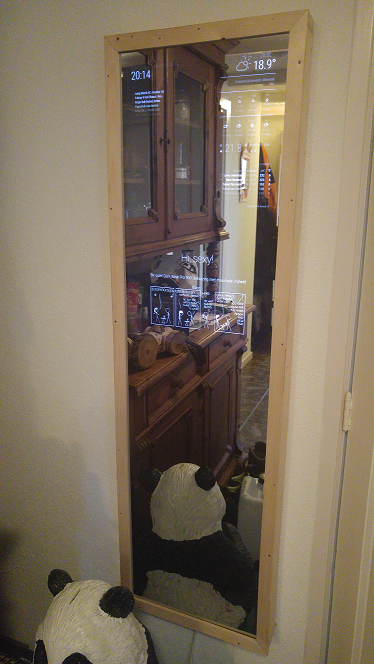
-
RE: currentweather - temperature (minimum and maximum)
@Keromida Do you mean the forecast?
http://api.openweathermap.org/data/2.5/forecast?q='Dusseldorf,DE'&lang=DE&units=metric&APPID=<APPID>You can also have a look here: http://openweathermap.org/api