It’s unfortunate that we can’t edit our own posts after the 600 seconds delay. I’ve been wanting to update my MMM-WunderGround module post as the information/pictures currently in there are no longer up-to-date. Any way around this?
R
Offline
A New Chapter for MagicMirror: The Community Takes the Lead
Read the statement by Michael Teeuw here.
Read the statement by Michael Teeuw here.
Posts
-
Why the edit timeout?
-
RE: How to install a module?
You should extract everything that’s in the zipfile as-is to the intended module destination ie:
./MagicMirror/modules/WWW-WunderGroundin case of this module…It’d be easier if you’d do a git clone in the modules directory…
pi@MagicMirrorPi:~/MagicMirror/modules/ $ git clone https://github.com/RedNax67/MMM-WunderGround.gitwhich will create the MMM-WunderGround dir and fille it with all the files from the repository. Then add the config section in
config.js.
Note from admin: Please use Markdown to format your post so it is easier to read!
-
RE: How to install a module?
You should install all the files as they appear on the github page. Also the translations dir+content.
Could you post logs of your mirror trying to start? See Troubleshooting for details on how to get logs etc.
Also, just in case: MMM-WunderGround and wuforecast are not the same thing…
-
RE: Weather based on another provider..
@cowboysdude That config isn’t for the MMM-WunderGround module… You’re using another module that’s using Weather Underground for weather info. The forecast text functionality needs to be implemented in the module itself. Or you could of course switch to using MMM-WunderGround Which is what the above screenshot is off…
-
RE: Weather based on another provider..
@cowboysdude If/when the chosen location provides any they should be displayed as per the pic…
What’s your config?
-
RE: Weather based on another provider..
If this WeatherUnderground location works for you you could use MMM-WunderGround:
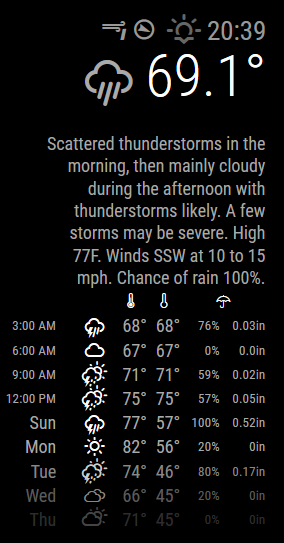
Your config section will look like this:
{ module : 'MMM-WunderGround', position : 'top_right', config : { apikey : 'xxxxxxxxxxxxx', // private; don't share! pws: 'NY/Elmira', lang : 'EN', hourly : '1', fctext : '1', fcdaycount : "5", fcdaystart : "0", hourlyinterval : "3", hourlycount : "2", alerttime : 10000, alerttruncatestring : "" } } -
RE: Weatherunderground - currently - hourly - daily - configurable
@djsunrise19 Thanks for spotting my mistake :D I’ve modified the readme accordingly. Enjoy!
-
RE: Where to buy good two way mirrors ?
@djsunrise19 IS it really 8mm thick as the site says? Must be quite heavy. I’ve also seen mirrors which consist of 2 panes with reflective foil sandwiched in between… What type is the https://www.myspiegel.de/spionspiegel-pg-2102.html one?
Any pictures to share yet?
-
RE: MMM-OpenTherm
Unfortunately can’t edit my FP…
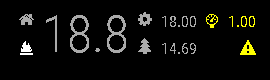
Here’s a screenshot of teh module:
-
MMM-OpenTherm
Although i suspect not a lot of people will use this, i’ll share it anyway:
https://github.com/RedNax67/MMM-OpenTherm
For this to work you’ll need:
An OpenTherm controlled heating/cooling device An OpenTherm gateway http://otgw.tclcode.com/ The OpenTherm Monitor application running somewhere http://otgw.tclcode.com/otmonitor.html
NOTE: The otmonitor version hosted on the website doesn’t have the access-allow-origin-header so the browser running MM will probably reject the json response. Luckily the author also supplies the source and instructions on how to build/compile your own version.
I’ve compiled a (RpI) version of the otmonitor program with this header included. Anyone in need of if, please let me know.
The OpenTherm module displays:
- Current roomtemperature
- Room setpoint temperature
- Outside temperature
- Central heating pressure
- Heating on/of
- Hot water on/off
- Alerts (Low pressure)
-
RE: Weatherunderground - currently - hourly - daily - configurable
Any log available? At this point i have no clue why it would stall…
-
RE: Weatherunderground - currently - hourly - daily - configurable
Could you post the relevant config.js section? Could you also check on your pi if /modules/MMM-Wunderground/MMM-Wunderground.js actually exists?
-
RE: Where to buy good two way mirrors ?
Any of you guys that were waiting for your mirror have any experience to share yet?
-
RE: Weatherunderground - currently - hourly - daily - configurable
@pugsly That’s strange! There is a setting, but it has a default 10 minute setting.
Did you look at the log for clues?updateInterval: 10 * 60 * 1000, // every 10 minutes -
RE: Help with tables?
Well you did help me solve it, but not using divs.
Turned out i had to put the icon in an inside the
and not directly in the <td><i class="fa fa-fire"> </td>instead of
<td class="fa fa-fire"></td>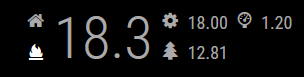
-
RE: Help with tables?
yeah, the fa-tree (which is a icon of a tree in fontawesome) needs to move. …
This issue only happens when the columns contain icons. You can define as many as you want, they all appear before the rowspanned one. As soon as i add a td with innerHTML text it appears in the correct place… As stated earlier i’m not all that versed in all this…I’ll have a look at using divs…
Thanks!
-
RE: Help with tables?
Thanks for your reply. The rowspan="2"didn’t make any difference unfortunately.
Seems to have something to do with the fa ioons…
Here’s the html:
<div class="module-content"> <div> <table class="small"> <tr> <td class="center fa fa-home"/> <td rowspan="2" class="center large bright">18.1</td> <td class="center fa fa-cog"/> <td class="center">17.50</td> <td class="center wi wi-barometer"/> <td>0.90</td> </tr> <tr> <td class="center bright wi wi-fire"/> <td class="fa fa-tree"/> <td class="center">15.06</td> <td/> <td/> <td/> <td/> </tr> </table> </div> </div>``` -
Help with tables?
trying to throw together a little module to monitor my openthermgateway.
Running into a layout problem whjich i can’t get my head around. Keep in mind i’m not experienced in html/js coding so be nice
The below code generates a table of which the second column is spanned over all rows (2). However on the second row the result is as the below pic. The second column on the second row is displayed before the second (rowspanned) column on the first row.
Am i overlooking anything in my code?
Thanks!
Arrow depicts where i would expect the image to appear…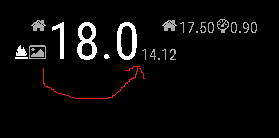
var table = document.createElement("table"); table.className = "small"; var row = document.createElement("tr"); table.appendChild(row); var homeIconCell = document.createElement("td"); homeIconCell.className = "fa fa-home"; row.appendChild(homeIconCell); var roomTemperatureCell = document.createElement("td"); roomTemperatureCell.className = "large bright"; roomTemperatureCell.setAttribute("rowspan", "0"); roomTemperatureCell.innerHTML = this.roomTemperature; row.appendChild(roomTemperatureCell); var setpointIconCell = document.createElement("td"); setpointIconCell.className = "fa fa-home"; row.appendChild(setpointIconCell); var setPointCell = document.createElement("td"); setPointCell.className = "setpoint"; setPointCell.innerHTML = this.setPoint; row.appendChild(setPointCell); var chPressureIconCell = document.createElement("td"); chPressureIconCell.className = "wi wi-barometer"; row.appendChild(chPressureIconCell); var chPressureCell = document.createElement("td"); chPressureCell.innerHTML = this.chPressure; row.appendChild(chPressureCell); var row = document.createElement("tr"); table.appendChild(row); var flameIconCell = document.createElement("td"); flameIconCell.className = "align-left bright wi " + this.flame; row.appendChild(flameIconCell); var OutsideIconCell = document.createElement("td"); OutsideIconCell.className = "fa fa-image"; row.appendChild(OutsideIconCell); var outsideTempCell = document.createElement("td"); outsideTempCell.className = "outsideTemp"; outsideTempCell.innerHTML = this.outsideTemperature; row.appendChild(outsideTempCell); wrapper.appendChild(table); -
RE: Weatherunderground - currently - hourly - daily - configurable
It’s a bit of a hack, but after getting the new version from github you can define
alerttruncatestring: "english:"in your config. The alerttext will hen be truncated at the defined word/string
-
RE: Weatherunderground - currently - hourly - daily - configurable
Could be done by manipulating the string, however this might break things when other languages are selected. Could even be dependent on your pws… I’ll have a go at making it configurable…