MagicMirror Forum
    • Recent
    • Tags
    • Unsolved
    • Solved
    • MagicMirror² Repository
    • Documentation
    • 3rd-Party-Modules
    • Donate
    • Discord
    • Register
    • Login
    1. Home
    2. shbatm
    3. Posts
    A New Chapter for MagicMirror: The Community Takes the Lead
    Read the statement by Michael Teeuw here.
    S
    Offline
    • Profile
    • Following 0
    • Followers 3
    • Topics 12
    • Posts 208
    • Groups 1

    Posts

    Recent Best Controversial
    • RE: [MMM-RTSPStream] - Video Streaming from Live Feeds & Security Cameras

      @Niggich I will need to investigate further.

      As a temporary fix, you can try deleting Line 107 and Lines 109-114 in the node_helper.js file:

          ~/MagicMirror/modules/MMM-RTSPStream/node_helper.js
      

      You should be deleting the if…else block and this line will remain:

      args.unshift("--win", `${payload.box.left}, ${payload.box.top}, ${payload.box.right}, ${payload.box.bottom}`);
      

      I do not know if this will fix the problem but it is worth a try. I have opened Issue #13 to track the position, border, and fullscreen resume problems.

      posted in Utilities
      S
      shbatm
    • RE: [MMM-RTSPStream] - Video Streaming from Live Feeds & Security Cameras

      @barnosch @Niggich - Glad you got it working. I will clarify in the next update: the camera port should be included in the url. The port setting for the stream is actually the socket ffmpeg uses (when ffmpeg is used instead of omx).

      If anyone has any additional feature requests, clarifications, config options they would like, please let me know on here. I will get back to working on this module in the coming weeks; I am Houston, TX based so I’ve been occupied with other matters recently.

      posted in Utilities
      S
      shbatm
    • RE: Auto start does not work

      See my previous post here: https://forum.magicmirror.builders/topic/1094/pm2-mm2-not-starting-on-start-up/20

      This method may help you:

      Set pm2 to startup using systemd with user pi and home directory /home/pi

      sudo pm2 startup systemd -u pi --hp /home/pi
      

      And then use pm2 save to save the state.

      posted in Troubleshooting
      S
      shbatm
    • RE: [MMM-RTSPStream] - Video Streaming from Live Feeds & Security Cameras

      @barnosch Great! I’m glad its working. You bring up an important point that I should emphasize:

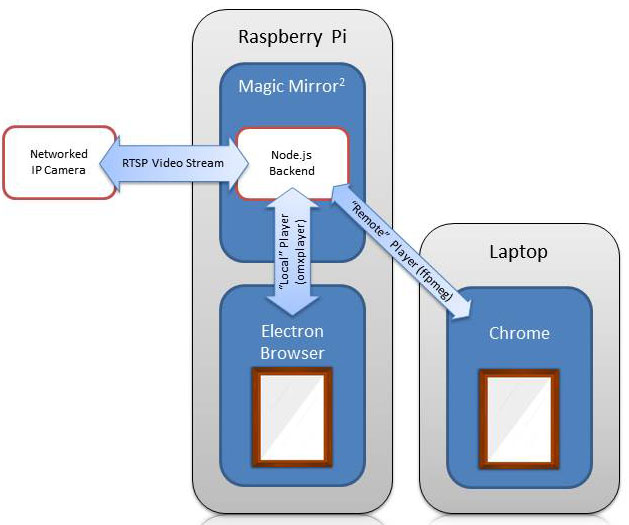
      For anyone using the OMXPlayer Version: OMXPlayer outputs directly to the screen via the GPU. The video window will show up on top of anything else and will not appear in any remote desktop, VLC, or remote browser windows. This is by design. Think of it like picture-in-picture on your TV.

      About the OMXPlayer not exiting: this is a known issue and is the reason the wip branch hasn’t been made the master yet. I thought I had a fix for it, but it’s inconsistent.

      A temporary fix is to try adding the following BEFORE the npm start line in your mirror.sh script to make sure everything is dead before restarting:

      pkill omxplayer
      pkill electron
      
      posted in Utilities
      S
      shbatm
    • RE: [MMM-RTSPStream] - Video Streaming from Live Feeds & Security Cameras

      @barnosch Here is a picture to explain:
      0_1502450595358_RTSPStream.jpg

      • Please make sure you run the following after switching branches:
          cd ~/MagicMirror/modules/MMM-RTSPStream
          npm install
      
      • Do you have any errors in the console log?
      • Please check omxplayer is installed
          which omxplayer
          # Should show '/usr/bin/omxplayer'
      
      • Please check omxplayer is running when the video should be playing:
          pgrep omx
          # Should show a number (process ID)
      
      posted in Utilities
      S
      shbatm
    • RE: [MMM-RTSPStream] - Video Streaming from Live Feeds & Security Cameras

      @imdickie Great! I’m glad it’s working!

      WRT the offset – that part is definitely a work in progress and the moduleOffset setting is a stop-gap.

      For anyone who is proficient in JavaScript – I need a better way to get the position of the camera window’s canvas tag with respect to the corner of the screen and not the browser window. Currently I’m using canvas.getBoundingClientRect() which doesn’t account for all of the borders, margins, or paddings.

      posted in Utilities
      S
      shbatm
    • RE: [MMM-RTSPStream] - Video Streaming from Live Feeds & Security Cameras

      @imdickie The 2nd one was the correct method. I made an adjustment to the code so now you can specify separate vertical & horizontal offsets.

      // Both methods below should work now:
      
      // Same Offset for Horizontal & Vertical:
      moduleOffset: -20    // any number works
      // Different Offsets for Horizontal & Vertical:
      moduleOffset: { top: -20, left: 0 }
      

      I didn’t get a chance to double check on my mirror, so please pull the update and let me know if you have any issues:

      # Run the following to update the module
      cd ~/MagicMirror/modules/MMM-RTSPStream
      git pull
      

      If you want to make any further adjustments yourself without waiting for me, see this post above on where to edit the code directly.

      posted in Utilities
      S
      shbatm
    • RE: Dynamically Moving Modules

      This version of MMM-Carousel will allow you to set different locations for a module for different slides:

      [card:shbatm/MMM-Carousel]

      See the very bottom of the README for more information

      If you’re interested in incorporating this into your own module, the relevant parts of the code are here and here

      posted in Development
      S
      shbatm
    • RE: [MMM-RTSPStream] - Video Streaming from Live Feeds & Security Cameras

      @imdickie If you were on the Master branch it makes sense now why you were getting duplicate views, it was using ffmpeg and looking at only the first port for both cameras. The work-in-progress branch does not use websockets/ports for local playback since OMXPlayer just draws directly on top of the MM’s browser window.

      For the black screen: I forgot the wip branch has an additional node package required. This should take care of your problem:

      cd ~/MagicMirror/modules/MMM-RTSPStream
      git checkout wip
      git pull
      npm install
      

      You may or may not need to also add a moduleOffset config option: see the posts above for pictures, if the video doesn’t line up with the border, you can add moduleOffset: X to shift the video over (where X is a number of pixels).

      For more information about the wip branch, there is an updated README on the Github page: https://github.com/shbatm/MMM-RTSPStream/tree/wip

      For pm2: it’s definitely not a requirement, but I find it’s nice to have; I included in the note above just in case you were already using it. It will automatically run the MM script for you on startup. See this page if you want more information.

      To all using the module: Thanks for bearing with me, I haven’t had a lot of time this past month to finish out the hardware-accelerated version (wip/development branch) but I hope to get it done in the next month or so. I really do appreciate any feedback / issues you have to help me improve this module.
      posted in Utilities
      S
      shbatm
    • RE: [MMM-RTSPStream] - Video Streaming from Live Feeds & Security Cameras

      @imdickie OK, couple more things to try:

      • Make sure you are actually on the wip branch to use OMXPlayer:
        • Run cd ~/MagicMirror/modules/MMM-RTSPStream/ && git status and the first line should say: On branch wip. If it says On branch master then run git checkout wip to switch.
      • Change the port setting of stream2 to port: 10000 (or some other free port, different than stream1 – this shouldn’t matter when using omxplayer, but if it works it means there’s probably a bug I need to fix.
      • Can you please restart the MM2 script and post (or send in a chat) your Mirror’s server log–e.g. the output to the console/log file and not the DevTools/browser?
        • If you’re using pm2 to run the MM script, this would be in ~/.pm2/logs/ on a RPi or run pm2 restart mm && pm2 logs mm
        • I’m looking for any errors and the lines that start with “Starting WebSocket server on port…” and “Starting stream stream1 with args…”
      posted in Utilities
      S
      shbatm
    • RE: [MMM-RTSPStream] - Video Streaming from Live Feeds & Security Cameras

      @imdickie I’d be happy to take a look. First thing to try: change the name property of the second stream so it is different from the first one and see if that fixes it. In your config above, both are name: 'Front Door'

      posted in Utilities
      S
      shbatm
    • RE: Update

      @zkab Looks like everything worked to me for what you’re trying to do.

      posted in Troubleshooting
      S
      shbatm
    • RE: Update

      pi@mirror:~/MagicMirror/modules/default/currentweather $ git pull && npm install

      Make sure you’re in the ~/MagicMirror directory before running the command.

      what about Changes not staged for commit and Untracked files

      Ignore them. For your purposes, you don’t need to worry about them as long as all the merge errors are gone.

      posted in Troubleshooting
      S
      shbatm
    • RE: Exit MM2 process gracefully?

      @j-e-f-f Thanks for the quick feedback!

      I was assuming I would need the cleanup routine in my module, I was just wondering if there was some routine in the core code that already listened for SIGINT and then called each module’s cleanup function (if there was one)–like it does with each node_helper.js’s start function–that way I would just have to add a function instead of add multiple SIGINT handlers (one in each module).

      It’s probably a niche requirement and it’s easy enough to add them for each module that needs one. Just curious if it existed, or was maybe worth adding.

      posted in Bug Hunt
      S
      shbatm
    • Exit MM2 process gracefully?

      I may be missing it somewhere, but does the core MM2 process call anything to clean up modules and exit gracefully?

      I was going to add a shutdown function to clean up some child processes started by my module, but was wondering if this functionality is already built into the core node-js app anywhere? This really only comes into play when restarting the MM process (without restarting the server itself).

      What I’m looking for would be something similar to the pseudo-code below:

      process.on('SIGINT', function() {
        modules.forEach( m => { 
          if (typeof m.exit === "function") {
            m.exit()
          }
        });
        setTimeout(function() { process.exit(0); }, 300 );
      );
      
      posted in Bug Hunt
      S
      shbatm
    • RE: [MMM-RTSPStream] - Video Streaming from Live Feeds & Security Cameras

      @bhepler Thank you so much for the feedback and the testing.

      The video was displaced from the border only on the PI, but not on Chrome nor Firefox whilst viewing the PI’s interface.
      Viewing the interface via Chrome or Firefox did show a video image, but it started up FFMPEG and started to heat the Pi up.
      Removing the 47 pixel offset made no difference in border position when viewing the Magic Mirror interface via Chrome or Firefox. Everything lined up perfectly.

      – This is to be expected. OMXPlayer draws the video on top of the Pi’s screen (over the desktop & electron.js running the mirror). It can only do that on the Pi itself, so if you view it in another browser, the module defaults back to FFMPEG and software decoding.

      Removing the 47 pixel offset made everything line up perfectly on the mirror itself.

      Good – I will continue looking for a way to improve how the module “finds” the border box to give to OMX. For now this offset may just get moved into a config setting.

      when I’m running this module, I cannot tell PM2 to restart the MM process. Any attempt to shut down the Magic Mirror and then start it again results in an error claiming that port 8080 is already in use. I have to reboot the Pi in order to get MM running again.

      I noticed this on my system too, but didn’t associate it back to this module. Thanks for pointing it out. Something is not getting cleaned up properly. I am able to restart MM without restarting the whole Pi by killing the electron process manually (e.g. pkill electron or ps aux | grep electron and then kill {pid} on the process number that comes up. I will work on a fix for this in the next update.

      Additional Development Notes:
      • Still working on finding a better solution to using FFMPEG to decode and then re-transmit the stream. With Chrome/Firefox removing support for NPAPI plug-ins, it’s very restricting for RTSP. If anyone has any suggestions, I’m open to them.
      posted in Utilities
      S
      shbatm
    • RE: Update

      @zkab If you know what changes you made to that file, it’s easier to do the second option above and then redo your changes. If you must try to keep your changes as is, try git reset --merge first and then the git stash sequence above, otherwise you can manually edit the file and look for the conflicts.

      Google, “git resolve failed merge” for what you’re looking for, or see below for an excerpt.

      posted in Troubleshooting
      S
      shbatm
    • RE: Update

      It looks like you’ve made some changes to the currentweather modules’ source code.

      If you want to keep your changes - this should do it

      git stash
      git pull && npm install
      git stash apply
      

      If you don’t need your changes to that file:

      git checkout -- modules/default/currentweather/currentweather.js
      git pull && npm install
      
      posted in Troubleshooting
      S
      shbatm
    • RE: Restarting MM² when config.js file changes

      For those that do a lot of testing, something I’ve found very useful as well: extract the config.js file out into it’s own git repo; then just switch between branches when you want to test something, that way you don’t break your “main” config file.

      cd ~
      mkdir mmConfig
      cd mmConfig
      git init
      mv ~/MagicMirror/config/config.js ./config.js
      ln -s /home/pi/mmConfig/config.js /home/pi/MagicMirror/config/config.js
      git commit -am "Initial Commit"
      git checkout -b testing
      # Change and test config.js without fear of breaking it!
      # Use checkout -f master to switch back to your main branch
      
      posted in Troubleshooting
      S
      shbatm
    • Restarting MM² when config.js file changes

      This has been helpful for me, but I didn’t see it mentioned anywhere, so I thought I’d share. For anyone looking for a simple way to automatically restart your MM² when you change the config.js file:

      Note: This assumes you are using pm2 to start the server, as described here: Auto Starting MagicMirror

      1. Create a file in the same location as your mm.sh script called mm.json.
      2. Paste the contents of this gist into the file (adjust if needed for your setup).
      3. Run pm2 stop mm && pm2 delete mm to stop & remove the current mm script.
      4. Run pm2 start mm.json to restart MM. Now any time you change config.js, pm2 will automatically restart the process.
      5. Run pm2 save to save your changes for the next reboot.

      That’s it!

      Originally inspired by: Restart Mirror?

      posted in Troubleshooting
      S
      shbatm
    • 1 / 1