@strawberry-3-141 Hmm… It does not seam to be any module doing it… I’m thinking it’s a “core-dump”, I noticed when restarting that it took a long time before it actually restarted. I’m guessing something did not close down properly, then the memory (or something) is dumped down to a file… Now it’s not happening any longer… Reboots normally. Only thing is that I lost my pm2 autostart of the mirror for some reason (had to do a pm2 startup and run the “setup” command sudo env PATH=$PATH:/usr/bin /usr/lib/node_modules/pm2/bin/pm2 startup systemd -u pi --hp /home/pi again… And now it starts normally again… No core file after reboots, all modules back again… Darn! :)
A New Chapter for MagicMirror: The Community Takes the Lead
Read the statement by Michael Teeuw here.
Read the statement by Michael Teeuw here.
 Offline
Posts
-
RE: All of a sudden SSH is really lagging/slow.
-
RE: All of a sudden SSH is really lagging/slow.
@strawberry-3.141 That’s what I’m doing right now… :)
-
RE: All of a sudden SSH is really lagging/slow.
@strawberry-3.141 I don’t know yet. I just rebooted my mirror now and got it back again. I’m trying to figuring it out.
Here is my MagicMirror dir after this reboot…
The file is there again… :/drwxr-xr-x 16 pi pi 4096 Mar 22 11:06 . drwxr-xr-x 21 pi pi 4096 Mar 22 11:08 .. -rw-r--r-- 1 pi pi 11172 Mar 21 13:37 CHANGELOG.md drwxr-xr-x 2 pi pi 4096 Mar 21 13:52 config -rw------- 1 pi pi 574697472 Mar 22 11:07 core drwxr-xr-x 2 pi pi 4096 Mar 21 13:37 css -rw-r--r-- 1 pi pi 266 Mar 21 13:37 docker-entrypoint.sh -rw-r--r-- 1 pi pi 378 Mar 21 13:37 Dockerfile -rw-r--r-- 1 pi pi 964 Mar 21 13:37 .dockerignore -rw-r--r-- 1 pi pi 132 Mar 21 13:37 .eslintignore -rw-r--r-- 1 pi pi 319 Mar 21 13:37 .eslintrc.json drwxr-xr-x 20 pi pi 4096 Mar 21 13:37 fonts drwxr-xr-x 8 pi pi 4096 Mar 22 11:09 .git drwxr-xr-x 2 pi pi 4096 Mar 21 13:37 .github -rw-r--r-- 1 pi pi 915 Mar 21 13:37 .gitignore -rw-r--r-- 1 pi pi 2173 Mar 21 13:37 Gruntfile.js -rw-r--r-- 1 pi pi 2337 Mar 21 13:37 index.html drwxr-xr-x 3 pi pi 4096 Mar 21 13:37 installers drwxr-xr-x 2 pi pi 4096 Mar 21 13:37 js -rw-r--r-- 1 pi pi 271 Mar 21 13:37 jsconfig.json -rw-r--r-- 1 pi pi 1118 Mar 21 13:37 LICENSE.md drwxr-xr-x 27 pi pi 4096 Mar 22 08:40 modules drwxr-xr-x 561 pi pi 20480 Mar 22 10:55 node_modules -rw-r--r-- 1 pi pi 1789 Mar 21 13:37 package.json -rw-r--r-- 1 pi pi 11431 Mar 21 13:37 README.md -rw-r--r-- 1 pi pi 141 Mar 21 13:37 run-start.sh drwxr-xr-x 2 pi pi 4096 Mar 21 13:37 serveronly -rw-r--r-- 1 pi pi 478 Mar 21 13:37 .snyk drwxr-xr-x 2 pi pi 4096 Mar 21 13:37 splashscreen -rw-r--r-- 1 pi pi 126 Mar 21 13:37 .stylelintrc drwxr-xr-x 6 pi pi 4096 Mar 21 13:37 tests drwxr-xr-x 2 pi pi 4096 Mar 21 13:37 translations -rw-r--r-- 1 pi pi 229 Mar 21 13:37 .travis.yml drwxr-xr-x 3 pi pi 4096 Mar 21 23:24 vendor -
RE: All of a sudden SSH is really lagging/slow.
@Mar If you get in to SSH, check if you have a HUGE file called “core” in your MagicMirror directory. If you do, delete it. I have had the same issue, EVERYTHING get’s slow and eventually you cant do anything. I noticed the file on my second install (again) and deleted it before it died. Now I’m trying to find how this file get’s created. It should not be there.
-
RE: [Remote-Control] Shutdown, Configure and Update your MagicMirror
@strawberry-3.141 Oh! :) That’s why… Thank you.
-
RE: [Remote-Control] Shutdown, Configure and Update your MagicMirror
@strawberry-3.141 Hmm… Can’t get it to work… Even deleted the “node_modules” before doing npm install in the mm dir, then also went in to the “vendor” dir and did the same… Still no pictures in the remote… However, I do get the “fontawesome” icons on other modules (my own included) so the pictures are there. :)
-
RE: [Remote-Control] Shutdown, Configure and Update your MagicMirror
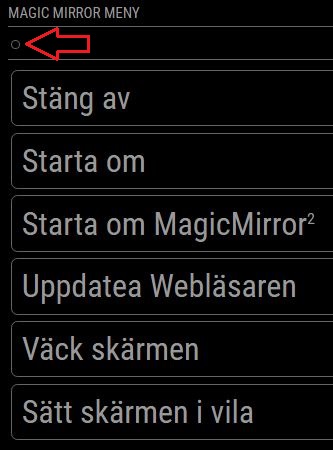
@Jopyth I have lost the “Back” button on my remote see pic…
Update: Just realized I have actually lost all the “icons”… :)
I’m on the “development” branch (both on the mirror and on your module).I have recently reinstalled my mirror (today actually) but before that it worked…
Have I missed something?
-
RE: ipWhitelist HowTo
@mochman Will do, thank you, no idea what changed the behavior. :) But at least I have a totally fresh install now! :)
-
RE: ipWhitelist HowTo
@mochman Hmm… Clearly I have missunderstood something. I thought this: “::ffff:10.0.0.1/120” was to allow my 10.0.0.x network to access, I have used that from the beginning and it has worked. But yesterday it stopped working. So I added as you suggested “10.0.0.1/24” and it works… So, Thank you! :)
In the instructions in the first post, it’s suppose to be “::ffff:10.0.0.1/120” for a full C-Net. But… Not any more obviously. :)
Thanks again! I’m all happy now!
-
RE: ipWhitelist HowTo
Hi all, anybody else having trouble accessing the mirror remotely? I have reinstalled mm (development branch and nodejs v7.7.3), default config. only added allow access from my “lan”.
The mirror shows up on the local screen, so it works.Mirrors IP: 10.0.0.112/24
ipWhitelist: ["::ffff:10.0.0.1/120", "127.0.0.1", "::ffff:127.0.0.1", "::1"],Still I get
0|mm | Access denied to IP address: 10.0.0.99In the log.
My client IP: 10.0.0.99/24
Just to be sure, here is my full config:
/* Magic Mirror Config Sample
 *
 * By Michael Teeuw http://michaelteeuw.nl
 * MIT Licensed.
 */

var config = {
	port: 8080,
	ipWhitelist: ["::ffff:10.0.0.1/120", "127.0.0.1", "::ffff:127.0.0.1", "::1"],
	language: "en",
	timeFormat: 24,
	units: "metric",

	modules: [
		{
			module: "alert",
		},
		{
			module: "updatenotification",
			position: "top_bar"
		},
		{
			module: "clock",
			position: "top_left"
		},
		{
			module: "calendar",
			header: "US Holidays",
			position: "top_left",
			config: {
				calendars: [
					{
						symbol: "calendar-check-o ",
						url: "webcal://www.calendarlabs.com/templates/ical/US-Holidays.ics"
					}
				]
			}
		},
		{
			module: "compliments",
			position: "lower_third"
		},
		{
			module: "currentweather",
			position: "top_right",
			config: {
				location: "New York",
				locationID: "",  //ID from http://www.openweathermap.org
				appid: "YOUR_OPENWEATHER_API_KEY"
			}
		},
		{
			module: "weatherforecast",
			position: "top_right",
			header: "Weather Forecast",
			config: {
				location: "New York",
				locationID: "5128581",  //ID from http://www.openweathermap.org
				appid: "YOUR_OPENWEATHER_API_KEY"
			}
		},
		{
			module: "newsfeed",
			position: "bottom_bar",
			config: {
				feeds: [
					{
						title: "New York Times",
						url: "http://www.nytimes.com/services/xml/rss/nyt/HomePage.xml"
					}
				],
				showSourceTitle: true,
				showPublishDate: true
			}
		},
	]

};

/*************** DO NOT EDIT THE LINE BELOW ***************/
if (typeof module !== "undefined") {module.exports = config;}
Everything is default, no modules installed… What am I missing?!