@Horge Yes, no problem!
You can have the “full-json” if you want? Where do you want it? :)
 S
Offline
S
Offline
A New Chapter for MagicMirror: The Community Takes the Lead
Read the statement by Michael Teeuw here.
Read the statement by Michael Teeuw here.
Posts
-
RE: Snilles Magic Mirror Project
-
RE: Snilles Magic Mirror Project
Big update: I let Home Assistant take over the mirror completely
It has been a while. This is the largest change I have made to the mirror since I moved off the Raspberry Pi, and since a lot of you here run Home Assistant too, I thought the whole story was worth writing down — including the part where I found out my mirror had been quietly burning a CPU core for years.
It started with a fan
The NUC was loud. Not “something is broken” loud, just always-working loud. I finally sat down to find out why, and the renderer process was sitting at 88% of a core, all day, every day.
The cause turned out to be wonderful:
Three
MMM-Snowinstances were running. In July. Invisible.They are scheduled to appear on three days a year. The rest of the time they are hidden — and hidden in MagicMirror does not mean stopped.
hide()setsopacity: 0, notdisplay: none. Their 90 snowflakes kept animating, 180 infinite CSS animations, holding the page at a steady 60fps around the clock.On its own that is cheap. The expensive part was that
MMM-ImmichSlideShowhad a fullscreen photo on screen, and that photo had to be re-rastered on every one of those 60 frames per second.Two A/B tests confirmed it — hide the photo and CPU went 88% → 12%; pause the snow and it went 88% → 9%. Neither half was the problem. The combination was.
The bigger problem underneath
With the snow disabled, CPU dropped to ~41%. Better. But then I counted what was actually on screen:
16 modules visible at once. The complete
watherprofile, plus the Immich slideshow on top of it.That is when I understood that four independent things were writing to the same visibility state, none of them aware of the others, none using MagicMirror’s locking:
Controls Triggered by MMM-ModuleSchedulerclass groups cron MMM-ProfileSwitcherthe profile (exclusive) CURRENT_PROFILENode-RED / HA individual modules presence, sensors MMM-Modulebarindividual modules touch Only ProfileSwitcher is exclusive —
set_profile()walks every module and either shows or hides it. The other three only touch what they point at and leave the rest alone.So my presence sensor showed the photo slideshow when nobody was there, but nothing ever told the other fifteen modules to go away. The globe kept spinning WebGL, the news feed kept scrolling, weather and electricity prices kept updating — all behind a picture nobody could see past.
The intent was right. The transport was wrong.
The fix: one owner
The rule I settled on is simple:
MMM-ProfileSwitcheris the only thing that sets visibility. Node-RED changes the profile instead of changing modules.That means:
MMM-ModuleScheduleris removed — itsglobal_schedule,notification_scheduleandmodule_scheduleall moved into Node-REDdefaultClass: "Photos", so the resting state is the slideshowincludeEveryoneToDefaultstays off, so resting state is the photo alone — walk up, presence fires, the profile comes up and brings the button bars with it- ProfileSwitcher’s
timersremoved, so there is only one thing deciding when to go back
Now everything that is not part of the profile gets
hide()d, and thereforesuspend()ed.The one CSS line everyone here should copy
This is the part I would have wanted to know years ago:
/* css/custom.css */ .module.hidden { content-visibility: hidden; }Module.suspend()in the base class is an empty hook. If a module does not implement it — and most do not — it keeps running when hidden.content-visibility: hiddenskips style, layout, paint and animation for the entire subtree, so a hidden module genuinely costs nothing.The price is that a module disappears instantly instead of fading out. Worth it.
The missing piece: the profile as a real HA entity
Here is the thing that made it all click, and the reason this is worth a post rather than a footnote.
I use MMM-HomeAssistant (my fork of ambarusa’s), which publishes every module as an MQTT switch entity. Great — but there was no way for Home Assistant to see or set the profile.
So I added one.
profileControl: truenow publishes aselectentity:{ module: "MMM-HomeAssistant", config: { moduleControl: true, profileControl: true, profiles: ["Photos", "Night", "Work", "Weather", "Media", ...], } }select.magic_mirror_hallway_profileSelecting an option sends
CURRENT_PROFILE— the same notification the on-screen buttons send. And the state is read back from ProfileSwitcher’sCHANGED_PROFILEnotification, which it emits on every change including the one it makes at startup.That last detail is what makes it genuinely useful: the entity always shows what the mirror is really displaying, even when someone pressed a button on the mirror itself. So Node-RED can tell its own command apart from a human, and hold a manual choice for 20 minutes before handing back to the schedule.
Without that feedback, an automation can only fire and hope — and it will happily fight the person standing in front of the mirror.
The profile names have to be listed in the config because Home Assistant validates against them, and there is no way to discover them: a profile is only ever a class name on some module.
What Node-RED looks like now
All of it lives on one tab. Two decisions, both edge-triggered — nothing is sent unless it differs from what the mirror reports:
1. Which profile? One function node, with the whole schedule as a table at the top. No cron strings, no month indices to get wrong:
const SCHEDULE = [
    { profile: "NewYear",   date: "12-31", always: true, from: "23:45", to: "23:59" },
    { profile: "Halloween", date: "10-31",          from: "05:55", to: "23:00" },
    { profile: "Work",      days: [1,2,3,4,5],      from: "08:00", to: "16:00" },
    { profile: "Weather",   days: [1,2,3,4,5],      from: "16:01", to: "20:29" },
    { profile: "Media",     days: [0,1,2,3,4,5,6],  from: "20:30", to: "23:00" },
];
Precedence: dark screen → night →
alwaysrows → a choice made at the mirror → nobody there → the table.2. The overlays. MagicMirror profiles are single-axis; my mirror is not. Printer cameras, the Bird Buddy panels, the Halloween video and a birthday background all come and go on events, not on the profile.
Since
set_profile()is exclusive it wipes them on every profile change. The solution needs no code: give them a class no profile uses, so they are always hidden by default, and have Node-RED re-assert them right after each profile change. Between changes it stays quiet — which is exactly what leavesMMM-Modulebarfree to toggle things by hand.“Always hidden by default” is the right way to be wrong: at worst something is missing for a second, instead of unwanted content flashing up.
Birthdays became a nice example. Instead of a whole
Birthdayprofile that replaces whatever is up, it is now one overlay rule: swap the background picture, keep the profile.Results
Before After Modules visible when idle 16 1 Renderer CPU 41.3% 12.4% Xorg CPU 18.6% 0.1% Things writing visibility 4, unlocked 1 Profile visible in HA no a real entity, both directions (Those are after the snow was already dealt with. Counting that, the renderer went from 88% to 12%.)
The Xorg number is the one that tells the real story — 18.6% to 0.1% means the repainting actually stopped, rather than merely becoming invisible.
The mirror is also just nicer now. Empty hallway: one photo, nothing else. Walk up: the right profile appears with the buttons. Walk away: back to the photo. Screen off at night puts it on an empty profile so nothing renders at all until morning.
Things that bit me along the way
MMM-Remote-Control’s fuzzy module matching. If the exact identifier does not exist it falls back to matching module names, and runs the action on every hit. A wrong module number in my flow meant every Bird Buddy visit lit up all ten of myMMM-homeassistant-sensorsinstances — silently, for years. I testedmodule_05_MMM-Profilepictureagainst my mirror recently: 10 hits. If you address modules by number, check them.- Module indices include disabled modules. Setting
disabled: truedoes not renumber anything. Handy, but not obvious. - The
cronpackage changed month indexing from 0-11 to 1-12. My Halloween, New Year and birthday schedules had silently never fired — two of them threw “no execution date within 8 years” and were simply ignored. - Xorg’s
-dpmsflag is notxset -dpms. On the X server command line it removes the extension. My screen had not actually been turning off at all since the reinstall. - A profile can never be truly empty.
everyonemodules show in every profile except the default one. I use that on purpose now — the night profile keeps the two button bars, which cost nothing.
Would I recommend it?
If you run MagicMirror with Home Assistant and more than a handful of modules: yes, and the CSS line above regardless.
The mental shift is small but it changes everything — stop telling the mirror which modules to show, and start telling it which mode it is in. Everything else follows, and you stop being able to get into contradictory states at all.
Happy to share the Node-RED flow or the module config if anyone wants a starting point. Just ask. 🙂
-
MMM-TautulliLatest
Here is a module for displaying the “latest” added Movies and TV-Shows from your Plex server (using Tautulli).
MMM-TautulliLatestOverview:

Click/Pointed on a “cover” view:
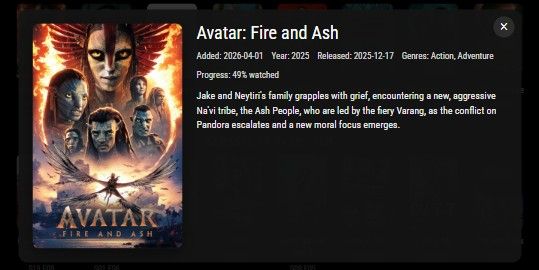
Exaple config:
{ module: "MMM-TautulliLatest", position: "middle_center", config: { tautulliProtocol: "http", tautulliHost: "192.168.1.50", tautulliPort: 8181, tautulliApiKey: "YOUR_TAUTULLI_API_KEY", itemLimit: 8, updateInterval: 5 * 60 * 1000, posterWidth: 150, posterHeight: 225, posterMaxWidth: 150, posterMaxHeight: 225, detailPosterWidth: 400, detailPosterHeight: 600, showWatchedBadge: true, user_id: 123456 } } -
RE: MMM-Remote-Control
@KristjanESPERANTO It is working!! Awesome! Thanks you very much! :)
-
RE: MMM-Remote-Control
@KristjanESPERANTO You are welcome, It’s me who should thank you for all the great stuff! :) It’s almost working…
The error messages are gone, but it still shows and hides “both” modules (MMM-MotionEye in my example clip)… :)Let me know if you want anything else? There is nothing in the “logs” now… :)
-
RE: MMM-Remote-Control
@KristjanESPERANTO
I have this problem that has been bugging me for a while…
Check this clip: https://photos.app.goo.gl/Zahc5xqttn33frbKA < From APIMy mirror have lot’s of modules many are multi instances (like MMM-MotionEye in this example).
I see the same behavior (or similar) with other modules, mainly my “MMM-homeassistant-sensors”…
I often makes API-calls from Node Red in Home Assistant, like this clip: https://photos.app.goo.gl/K9ktuXGKawoyHEez5Errors from the log:
0|mmdev  | [2026-01-05 12:24:13.812] [ERROR] undefined Error [ERR_HTTP_HEADERS_SENT]: Cannot set headers after they are sent to the client
0|mmdev  |     at ServerResponse.setHeader (node:_http_outgoing:700:11)
0|mmdev  |     at ServerResponse.header (/var/www/html/magicmirror/m/node_modules/express/lib/response.js:686:10)
0|mmdev  |     at ServerResponse.json (/var/www/html/magicmirror/m/node_modules/express/lib/response.js:249:10)
0|mmdev  |     at Class.sendResponse (/var/www/html/magicmirror/m/modules/MMM-Remote-Control/node_helper.js:687:28)
0|mmdev  |     at Class.handleSimpleSocketNotification (/var/www/html/magicmirror/m/modules/MMM-Remote-Control/node_helper.js:965:10)
0|mmdev  |     at SHOW (/var/www/html/magicmirror/m/modules/MMM-Remote-Control/node_helper.js:1024:28)
0|mmdev  |     at Class.executeQuery (/var/www/html/magicmirror/m/modules/MMM-Remote-Control/node_helper.js:1049:7)
0|mmdev  |     at Class.answerModuleApi (/var/www/html/magicmirror/m/modules/MMM-Remote-Control/API/api.js:442:14)
0|mmdev  |     at /var/www/html/magicmirror/m/modules/MMM-Remote-Control/API/api.js:299:14
0|mmdev  |     at Layer.handleRequest (/var/www/html/magicmirror/m/node_modules/router/lib/layer.js:152:17)
0|mmdev  |     at next (/var/www/html/magicmirror/m/node_modules/router/lib/route.js:157:13)
0|mmdev  |     at Route.dispatch (/var/www/html/magicmirror/m/node_modules/router/lib/route.js:117:3)
0|mmdev  |     at handle (/var/www/html/magicmirror/m/node_modules/router/index.js:435:11)
0|mmdev  |     at Layer.handleRequest (/var/www/html/magicmirror/m/node_modules/router/lib/layer.js:152:17)
0|mmdev  |     at /var/www/html/magicmirror/m/node_modules/router/index.js:295:15
0|mmdev  |     at param (/var/www/html/magicmirror/m/node_modules/router/index.js:600:14)
0|mmdev  | [2026-01-05 12:24:28.662] [ERROR] undefined Error [ERR_HTTP_HEADERS_SENT]: Cannot set headers after they are sent to the client
0|mmdev  |     at ServerResponse.setHeader (node:_http_outgoing:700:11)
0|mmdev  |     at ServerResponse.header (/var/www/html/magicmirror/m/node_modules/express/lib/response.js:686:10)
0|mmdev  |     at ServerResponse.send (/var/www/html/magicmirror/m/node_modules/express/lib/response.js:163:12)
0|mmdev  |     at ServerResponse.json (/var/www/html/magicmirror/m/node_modules/express/lib/response.js:252:15)
0|mmdev  |     at Class.sendResponse (/var/www/html/magicmirror/m/modules/MMM-Remote-Control/node_helper.js:687:28)
0|mmdev  |     at Class.handleSimpleSocketNotification (/var/www/html/magicmirror/m/modules/MMM-Remote-Control/node_helper.js:965:10)
0|mmdev  |     at HIDE (/var/www/html/magicmirror/m/modules/MMM-Remote-Control/node_helper.js:1023:28)
0|mmdev  |     at Class.executeQuery (/var/www/html/magicmirror/m/modules/MMM-Remote-Control/node_helper.js:1049:7)
0|mmdev  |     at Class.answerModuleApi (/var/www/html/magicmirror/m/modules/MMM-Remote-Control/API/api.js:442:14)
0|mmdev  |     at /var/www/html/magicmirror/m/modules/MMM-Remote-Control/API/api.js:299:14
0|mmdev  |     at Layer.handleRequest (/var/www/html/magicmirror/m/node_modules/router/lib/layer.js:152:17)
0|mmdev  |     at next (/var/www/html/magicmirror/m/node_modules/router/lib/route.js:157:13)
0|mmdev  |     at Route.dispatch (/var/www/html/magicmirror/m/node_modules/router/lib/route.js:117:3)
0|mmdev  |     at handle (/var/www/html/magicmirror/m/node_modules/router/index.js:435:11)
0|mmdev  |     at Layer.handleRequest (/var/www/html/magicmirror/m/node_modules/router/lib/layer.js:152:17)
0|mmdev  |     at /var/www/html/magicmirror/m/node_modules/router/index.js:295:15
I also experience that when calling a specific module to show with “module_number_modulename”, it often shows the “wrong” module-instance (of that type of module, like MMM-homeassistant-sensors, but the wrong one)… I don’t know if it’s related to this.
Let me know if you need anything more…
Thank you for this great module! :) -
RE: MMM-HomeAssistant
Awsome! This changes a lot in my “config”, my Mirror(s) are tightly integrated with Home Assistant.
Thank you for this module!!I’m currently running 3 different mirrors, but two of them are “mixed” with each other in HA, the third (first one) are separate :). I’ll have to do some more investigating. Have you tested with multiple mirrors against one “HA-MQTT”?
Again, thank you for this! :)
Update: I did some cleaning in the MQTT-queue (with MQTT Explorer) and now it all works. I got to have had my config(s) mixed at some point during my testing. So, now it’s all good. :)
-
RE: Snilles Magic Mirror Project
@nowayto Thank you! I’m glad to inspire!
If you have any questions, just write. :)The mirror has It’s been in use in our family now for many years. Over time it’s been more and more integrated with my Home Assistant setup as well. It’s used for daily information such as news and weather. And of course, it’s been a big part of my daughters “Birthday Treasure Hunts” (check out last years hunt here). :)
I highly recommend to build one… It’s not until you built it you understand how much you need it. :)
-
RE: MagicMirror With Face Recognition
Nicely done!
What computer hardware are you using? RPi5? -
RE: Snilles Magic Mirror Project
@justbob Thank you! Great to hear, please do! Share your ideas when you are done. It’s always fun to see what others do. :)
-
RE: MMM-HomeAssistant-Sensors (Development) - Show your HA Sensors on your Mirror
@luisestrada Yes, however, It can only be “one” control sensor / HA-module. So, if you have a bunch of lights, and you want to have only one “show” only when that specific light is “on”. You will have to add the module one time / light…
But if you have a specific light that you want to use as a “control sensor” for all the lights, only one module is needed…
I think you could also use an “icon” and some trickery to only show an Icon when the light is lit and when it’s not, not show anything… But not sure… :) -
RE: Snilles Magic Mirror Project
Updated almost all information about this project. My Mirror has been the “information HUB” (together with HA) of the family for many years now!
Even the rest of the family(!) thinks it’s good!If you want to know more, ask away! :)
-
RE: Show Module based on date
I’m doing this on my setup, I’m using “MMM-ProfileSwitcher”. There you can do just about anything regarding showing a / a group of modules on different times/ dates…
I group mu modules with the “classes” option…
So the clock looks like this:{ disabled: false, module: "clock", hiddenOnStartup: true, position: "top_left", header: "Datum och tid", classes: "default Erik Camilla Louise Media Jobba Väder Födelsedag small", config: { showDate: true, dateFormat: "YYYY-MM-DD", showWeek: true } },It’s shown for almost all profiles… :)
Here are some parts of my conf…
My global settings for the module...
		{
			disabled: false,
			module: "MMM-ProfileSwitcher",
			hiddenOnStartup: true,
			header: "Profile",
			classes: "none",
			config: {
				title: false,
				useLockStrings: false,
				defaultTime: 600000,
				enterMessages: {
					"Erik Camilla Louise Kakan Cappuccino": "Hej %profile%!",
					"Erik": ["Hoppas dagen varit bra Erik!", "Ser man på, välkommen Erik!", "Kul att se dig Erik!"],
					"Camilla": ["Toppendag hoppas jag, Camilla!", "Oh, trevligt att se dig Camilla!", "Kul att se dig Camilla!"],
					"Louise": ["Kul i skolan idag Louise?", "Lekt något skoj idag Louise?", "Kul att se dig Louise!"],
					"Media": ["Hej, här är allt nytt!", "Här finns mycket nytt!", "Ny media!", "Hoppas det finns något att se."],
					"Jobba": ["Dags att jobba nu!", "Jobba på nu!", "Var på tiden!", "Dagen är inte slut än!"],
					"Klocka": ["Var på tiden!"],
					"Väder": ["Dags för väder!", "Här är allt om vädret!", "Hoppas det blir fint väder.", "Glöm inte att kolla vädret!"],
					"Skattjakt": ["Skattjakten är igång!", "Nu blir det skattjakt!", "Äntligen skattjakt!"],
					"Grattis": ["Bra jobbat!", "Grattis!"],
				},
				leaveMessages: {
					"everyone": "Hejdå %profile%...",
					"Erik": ["Hejdå, jag kommer sakna dig...", true],
					"Camilla": ["Hejdå Camilla.", true],
					"Louise": ["Hejdå Louise.", true],
					"Media": ["Hoppas du hittade något.", true],
					"Jobba": ["Jobbat klart redan!?", true],
					"Klocka": ["Slut på tiden.", true],
					"Väder": ["Ha så trevligt.", true],
					"Skattjakt": ["Hoppas det varit kul!"],
					"Grattis": ["Ses om ett år..."],
				},
				timers: {
					"Erik": {},
					"Camilla": {},
					"Louise": {},
					"Kakan": {},
					"Cappuccino": {},
					"Klocka": {},
				},
				ignoreModules: ["alert", "updatenotification"]
			}
		},

Then I have a specific module for halloween.... :)
		{
			disabled: false,
			module: 'MMM-Videoplayer',
			hiddenOnStartup: true,
			position: "fullscreen_below",
			classes: "scheduler turn90",
			config: {
				random: true,
				loop: true,
				hideonstart: true,
				notification: "VIDEOPLAYER1",
				videolist: ["a",
					    "list",
					    "of",
					    "videos..."],
				module_schedule: [
					{from: '0 6 31 9 *', to: '3 6 31 9 *'},
					{from: '6 6 31 9 *', to: '9 6 31 9 *'},
					{from: '12 6 31 9 *', to: '15 6 31 9 *'},
					{from: '18 6 31 9 *', to: '21 6 31 9 *'},
					{from: '24 6 31 9 *', to: '27 6 31 9 *'},
					{from: '30 6 31 9 *', to: '33 6 31 9 *'},
					{from: '36 6 31 9 *', to: '39 6 31 9 *'},
					{from: '42 6 31 9 *', to: '45 6 31 9 *'},
					{from: '48 6 31 9 *', to: '51 6 31 9 *'},
					{from: '54 6 31 9 *', to: '57 6 31 9 *'},
					{from: '0 7 31 9 *', to: '3 7 31 9 *'},
					{from: '6 7 31 9 *', to: '9 7 31 9 *'},
					{from: '12 7 31 9 *', to: '15 7 31 9 *'},
					{from: '18 7 31 9 *', to: '21 7 31 9 *'},
					{from: '24 7 31 9 *', to: '27 7 31 9 *'},
					{from: '30 7 31 9 *', to: '33 7 31 9 *'},
					{from: '36 7 31 9 *', to: '39 7 31 9 *'},
					{from: '42 7 31 9 *', to: '45 7 31 9 *'},
					{from: '48 7 31 9 *', to: '51 7 31 9 *'},
					{from: '54 7 31 9 *', to: '57 7 31 9 *'},
					{from: '0 8 31 9 *', to: '3 8 31 9 *'},
					{from: '6 8 31 9 *', to: '9 8 31 9 *'},
					{from: '12 8 31 9 *', to: '15 8 31 9 *'},
					{from: '18 8 31 9 *', to: '21 8 31 9 *'},
					{from: '24 8 31 9 *', to: '27 8 31 9 *'},
					{from: '30 8 31 9 *', to: '33 8 31 9 *'},
					{from: '36 8 31 9 *', to: '39 8 31 9 *'},
					{from: '42 8 31 9 *', to: '45 8 31 9 *'},
					{from: '48 8 31 9 *', to: '51 8 31 9 *'},
					{from: '54 8 31 9 *', to: '57 8 31 9 *'},
					{from: '0 9 31 9 *', to: '3 9 31 9 *'},
					{from: '6 9 31 9 *', to: '9 9 31 9 *'},
					{from: '12 9 31 9 *', to: '15 9 31 9 *'},
					{from: '18 9 31 9 *', to: '21 9 31 9 *'},
					{from: '24 9 31 9 *', to: '27 9 31 9 *'},
					{from: '30 9 31 9 *', to: '33 9 31 9 *'},
					{from: '36 9 31 9 *', to: '39 9 31 9 *'},
					{from: '42 9 31 9 *', to: '45 9 31 9 *'},
					{from: '48 9 31 9 *', to: '51 9 31 9 *'},
					{from: '54 9 31 9 *', to: '57 9 31 9 *'},
					{from: '0 10 31 9 *', to: '3 10 31 9 *'},
					{from: '6 10 31 9 *', to: '9 10 31 9 *'},
					{from: '12 10 31 9 *', to: '15 10 31 9 *'},
					{from: '18 10 31 9 *', to: '21 10 31 9 *'},
					{from: '24 10 31 9 *', to: '27 10 31 9 *'},
					{from: '30 10 31 9 *', to: '33 10 31 9 *'},
					{from: '36 10 31 9 *', to: '39 10 31 9 *'},
					{from: '42 10 31 9 *', to: '45 10 31 9 *'},
					{from: '48 10 31 9 *', to: '51 10 31 9 *'},
					{from: '54 10 31 9 *', to: '57 10 31 9 *'},
					{from: '0 11 31 9 *', to: '3 11 31 9 *'},
					{from: '6 11 31 9 *', to: '9 11 31 9 *'},
					{from: '12 11 31 9 *', to: '15 11 31 9 *'},
					{from: '18 11 31 9 *', to: '21 11 31 9 *'},
					{from: '24 11 31 9 *', to: '27 11 31 9 *'},
					{from: '30 11 31 9 *', to: '33 11 31 9 *'},
					{from: '36 11 31 9 *', to: '39 11 31 9 *'},
					{from: '42 11 31 9 *', to: '45 11 31 9 *'},
					{from: '48 11 31 9 *', to: '51 11 31 9 *'},
					{from: '54 11 31 9 *', to: '57 11 31 9 *'},
					{from: '0 12 31 9 *', to: '3 12 31 9 *'},
					{from: '6 12 31 9 *', to: '9 12 31 9 *'},
					{from: '12 12 31 9 *', to: '15 12 31 9 *'},
					{from: '18 12 31 9 *', to: '21 12 31 9 *'},
					{from: '24 12 31 9 *', to: '27 12 31 9 *'},
					{from: '30 12 31 9 *', to: '33 12 31 9 *'},
					{from: '36 12 31 9 *', to: '39 12 31 9 *'},
					{from: '42 12 31 9 *', to: '45 12 31 9 *'},
					{from: '48 12 31 9 *', to: '51 12 31 9 *'},
					{from: '54 12 31 9 *', to: '57 12 31 9 *'},
					{from: '0 13 31 9 *', to: '3 13 31 9 *'},
					{from: '6 13 31 9 *', to: '9 13 31 9 *'},
					{from: '12 13 31 9 *', to: '15 13 31 9 *'},
					{from: '18 13 31 9 *', to: '21 13 31 9 *'},
					{from: '24 13 31 9 *', to: '27 13 31 9 *'},
					{from: '30 13 31 9 *', to: '33 13 31 9 *'},
					{from: '36 13 31 9 *', to: '39 13 31 9 *'},
					{from: '42 13 31 9 *', to: '45 13 31 9 *'},
					{from: '48 13 31 9 *', to: '51 13 31 9 *'},
					{from: '54 13 31 9 *', to: '57 13 31 9 *'},
					{from: '0 14 31 9 *', to: '3 14 31 9 *'},
					{from: '6 14 31 9 *', to: '9 14 31 9 *'},
					{from: '12 14 31 9 *', to: '15 14 31 9 *'},
					{from: '18 14 31 9 *', to: '21 14 31 9 *'},
					{from: '24 14 31 9 *', to: '27 14 31 9 *'},
					{from: '30 14 31 9 *', to: '33 14 31 9 *'},
					{from: '36 14 31 9 *', to: '39 14 31 9 *'},
					{from: '42 14 31 9 *', to: '45 14 31 9 *'},
					{from: '48 14 31 9 *', to: '51 14 31 9 *'},
					{from: '54 14 31 9 *', to: '57 14 31 9 *'},
					{from: '0 15 31 9 *', to: '3 15 31 9 *'},
					{from: '6 15 31 9 *', to: '9 15 31 9 *'},
					{from: '12 15 31 9 *', to: '15 15 31 9 *'},
					{from: '18 15 31 9 *', to: '21 15 31 9 *'},
					{from: '24 15 31 9 *', to: '27 15 31 9 *'},
					{from: '30 15 31 9 *', to: '33 15 31 9 *'},
					{from: '36 15 31 9 *', to: '39 15 31 9 *'},
					{from: '42 15 31 9 *', to: '45 15 31 9 *'},
					{from: '48 15 31 9 *', to: '51 15 31 9 *'},
					{from: '54 15 31 9 *', to: '57 15 31 9 *'},
					{from: '0 16 31 9 *', to: '3 16 31 9 *'},
					{from: '6 16 31 9 *', to: '9 16 31 9 *'},
					{from: '12 16 31 9 *', to: '15 16 31 9 *'},
					{from: '18 16 31 9 *', to: '21 16 31 9 *'},
					{from: '24 16 31 9 *', to: '27 16 31 9 *'},
					{from: '30 16 31 9 *', to: '33 16 31 9 *'},
					{from: '36 16 31 9 *', to: '39 16 31 9 *'},
					{from: '42 16 31 9 *', to: '45 16 31 9 *'},
					{from: '48 16 31 9 *', to: '51 16 31 9 *'},
					{from: '54 16 31 9 *', to: '57 16 31 9 *'},
					{from: '0 17 31 9 *', to: '3 17 31 9 *'},
					{from: '6 17 31 9 *', to: '9 17 31 9 *'},
					{from: '12 17 31 9 *', to: '15 17 31 9 *'},
					{from: '18 17 31 9 *', to: '21 17 31 9 *'},
					{from: '24 17 31 9 *', to: '27 17 31 9 *'},
					{from: '30 17 31 9 *', to: '33 17 31 9 *'},
					{from: '36 17 31 9 *', to: '39 17 31 9 *'},
					{from: '42 17 31 9 *', to: '45 17 31 9 *'},
					{from: '48 17 31 9 *', to: '51 17 31 9 *'},
					{from: '54 17 31 9 *', to: '57 17 31 9 *'},
					{from: '0 18 31 9 *', to: '3 18 31 9 *'},
					{from: '6 18 31 9 *', to: '9 18 31 9 *'},
					{from: '12 18 31 9 *', to: '15 18 31 9 *'},
					{from: '18 18 31 9 *', to: '21 18 31 9 *'},
					{from: '24 18 31 9 *', to: '27 18 31 9 *'},
					{from: '30 18 31 9 *', to: '33 18 31 9 *'},
					{from: '36 18 31 9 *', to: '39 18 31 9 *'},
					{from: '42 18 31 9 *', to: '45 18 31 9 *'},
					{from: '48 18 31 9 *', to: '51 18 31 9 *'},
					{from: '54 18 31 9 *', to: '57 18 31 9 *'},
					{from: '0 19 31 9 *', to: '3 19 31 9 *'},
					{from: '6 19 31 9 *', to: '9 19 31 9 *'},
					{from: '12 19 31 9 *', to: '15 19 31 9 *'},
					{from: '18 19 31 9 *', to: '21 19 31 9 *'},
					{from: '24 19 31 9 *', to: '27 19 31 9 *'},
					{from: '30 19 31 9 *', to: '33 19 31 9 *'},
					{from: '36 19 31 9 *', to: '39 19 31 9 *'},
					{from: '42 19 31 9 *', to: '45 19 31 9 *'},
					{from: '48 19 31 9 *', to: '51 19 31 9 *'},
					{from: '54 19 31 9 *', to: '57 19 31 9 *'},
					{from: '0 20 31 9 *', to: '3 20 31 9 *'},
					{from: '6 20 31 9 *', to: '9 20 31 9 *'},
					{from: '12 20 31 9 *', to: '15 20 31 9 *'},
					{from: '18 20 31 9 *', to: '21 20 31 9 *'},
					{from: '24 20 31 9 *', to: '27 20 31 9 *'},
					{from: '30 20 31 9 *', to: '33 20 31 9 *'},
					{from: '36 20 31 9 *', to: '39 20 31 9 *'},
					{from: '42 20 31 9 *', to: '45 20 31 9 *'},
					{from: '48 20 31 9 *', to: '51 20 31 9 *'},
					{from: '54 20 31 9 *', to: '57 20 31 9 *'},
					{from: '0 21 31 9 *', to: '3 21 31 9 *'},
					{from: '6 21 31 9 *', to: '9 21 31 9 *'},
					{from: '12 21 31 9 *', to: '15 21 31 9 *'},
					{from: '18 21 31 9 *', to: '21 21 31 9 *'},
					{from: '24 21 31 9 *', to: '27 21 31 9 *'},
					{from: '30 21 31 9 *', to: '33 21 31 9 *'},
					{from: '36 21 31 9 *', to: '39 21 31 9 *'},
					{from: '42 21 31 9 *', to: '45 21 31 9 *'},
					{from: '48 21 31 9 *', to: '51 21 31 9 *'},
					{from: '54 21 31 9 *', to: '57 21 31 9 *'},
					{from: '0 22 31 9 *', to: '3 22 31 9 *'},
					{from: '6 22 31 9 *', to: '9 22 31 9 *'},
					{from: '12 22 31 9 *', to: '15 22 31 9 *'},
					{from: '18 22 31 9 *', to: '21 22 31 9 *'},
					{from: '24 22 31 9 *', to: '27 22 31 9 *'},
					{from: '30 22 31 9 *', to: '33 22 31 9 *'},
					{from: '36 22 31 9 *', to: '39 22 31 9 *'},
					{from: '42 22 31 9 *', to: '45 22 31 9 *'},
					{from: '48 22 31 9 *', to: '51 22 31 9 *'},
					{from: '54 22 31 9 *', to: '57 22 31 9 *'},
				]
			}
		},
Basically it plays a random video in the background of the mirror every 6 minutes from 06:00 to 23. :)
I hope this gives some ideas how to do stuff… :)
-
RE: MMM-homeassistant-sensors no icons after MM upgrade to 2.19.0
Hang on, I just reset everything “back”, reset the MMM-homeassistant-sensors
to it’s “original” state but let the IP be set in the config… And now it works?
What’s going on here?! :)All modules that are fetching pictures from other places are now working!?
So, the config needs to have the actual IP of the mirror set now. I have been using 0.0.0.0 all the time… Also tried “localhost” and it did not work. But the actual IP works!Great!! Thank you all for helping out! :)
-
RE: MMM-homeassistant-sensors no icons after MM upgrade to 2.19.0
@karsten13 in the (pm2 log) I get:
0|MagicMirror  | [11.04.2022 23:30.43.266] [LOG]
0|MagicMirror  | cors url: http://10.0.0.249:8123/api/camera_proxy/camera.xiaomi_cloud_map_extractor?token=5b341e663bd99335792031e6f0129db5502c3eddfc4e297f70bdbfbc284a528e
For every try. Now it no longer works in the browser… And if I curl it…
curl -sL http://10.0.0.112:8080/cors?url=http://10.0.0.249:8123/api/camera_proxy/camera.xiaomi_cloud_map_extractor?token=562f09c026b6a8a87de4dc0ed7bfe5273e23429c1fb152be3597c37cf1b6d2d0I get nothing… :)
So, something is not working more now… :) -
RE: MMM-homeassistant-sensors no icons after MM upgrade to 2.19.0
@karsten13 Almost… I can’t use “localhost” because then I cant access the “remote control” (and therefore can not open DevTools) from anywhere… So I have to set at least the “IP” of the mirror… But I still get the broken image…
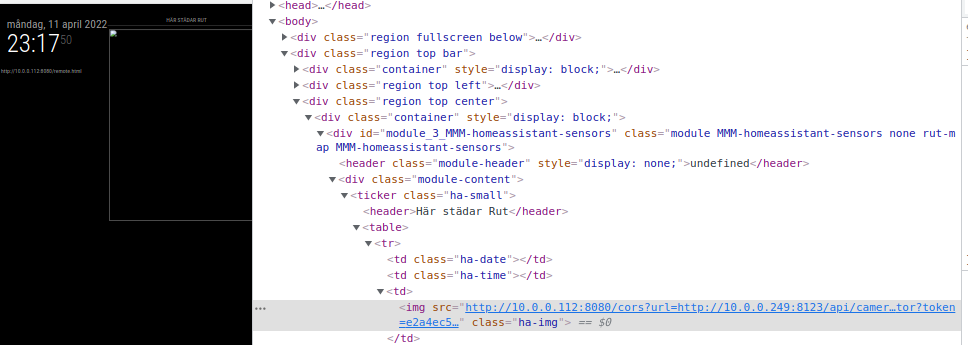
But I get no errors in the console now… Hmm… -
RE: MMM-homeassistant-sensors no icons after MM upgrade to 2.19.0
@sdetweil Correct, it’s the cors error:
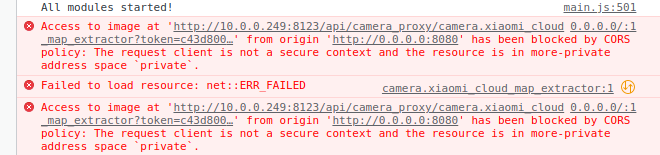
-
RE: MMM-homeassistant-sensors no icons after MM upgrade to 2.19.0
@sdetweil Correct, and in a normal browser it works. And for me, the “person.sensor” works too (now?)…
Anyway, here you have the “Map-extract” from HA, also using my module for showing the picture of the vacuum-map… In the browser it works, on the Mirror it does not… :)
Browser:
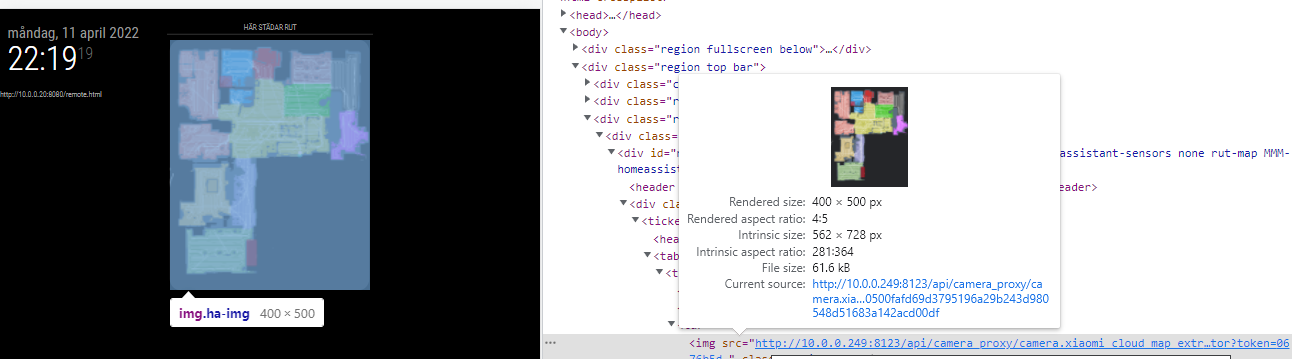
Mirror:
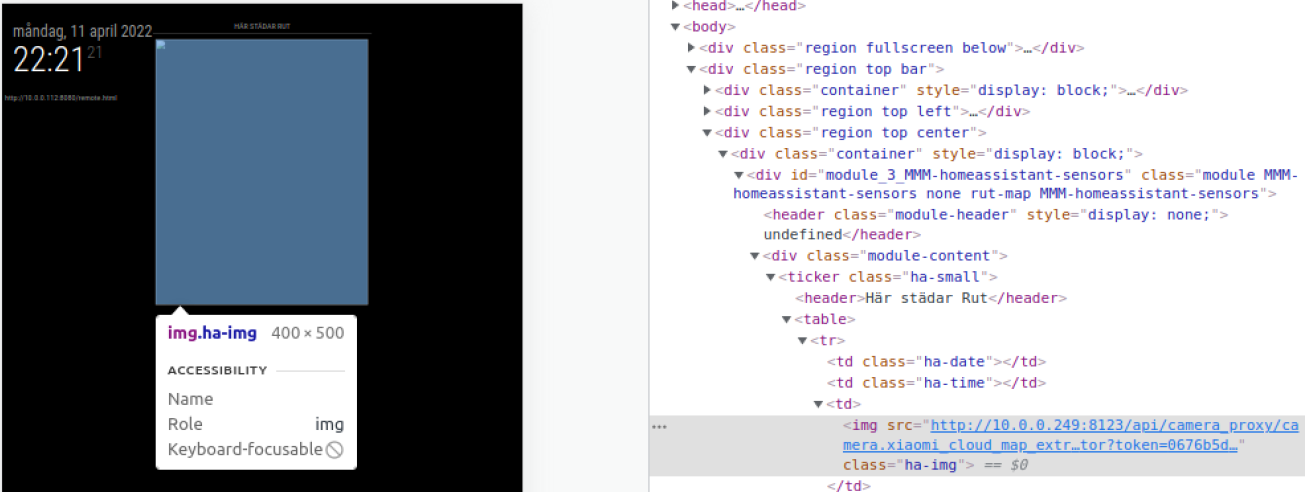
Here is “part” of the extract object (including the picture):
...
        ],
            "model": "roborock.vacuum.s5",
            "used_api": "xiaomi",
            "entity_picture": "/api/camera_proxy/camera.xiaomi_cloud_map_extractor?token=1e870c95e944a30b0731ae4b3a3bc8dsf65231b6ba03fd91d8s96af38d05c6ce",
            "friendly_name": "Xiaomi Cloud Map Extractor",
            "supported_features": 1
        },
...
For some reson the Browser works… Confused yet? :)
-
RE: MMM-homeassistant-sensors no icons after MM upgrade to 2.19.0
@sdetweil This is what you get back (as a picture) from HA when adding a person as a sensor looks like this:
https://your.haipaddress.here:443/api/image/serve/d5b50f6cf5e15d2e1d3f5457293458f6/512x512So, before “cors” I just did:
<img src="https://your.haipaddress.here:443/api/image/serve/d5b50f6cf5e15d2e1d3f5457293458f6/512x512" class="ha-img">And it worked (still does in a browser), but not on the mirror.
The whole “person”-object looks like this:
{
    "entity_id": "person.firstname_lastname",
    "state": "at Some Place",
    "attributes": {
        "editable": false,
        "id": "9cd6gj3a4eb8ds4d0bfd2b0e1e57804ea",
        "latitude": 16.1241928,
        "longitude": 82.9718906,
        "gps_accuracy": 18,
        "source": "device_tracker.google_maps_105082325327346729172",
        "user_id": "402df0jd89b84230bf8fe3g7ff653048",
        "entity_picture": "/api/image/serve/a2dc96037s5b9dg86s4cc6336b62d742/512x512",
        "friendly_name": "FirstName LastName"
    },
    "last_changed": "2022-04-11T18:17:53.738567+00:00",
    "last_updated": "2022-04-11T19:53:55.043510+00:00",
    "context": {
        "id": "2489fb6bas56fgdds142155e5668093a28",
        "parent_id": null,
        "user_id": null
    }
}
Don’t know if this helps… :)