MagicMirror Forum
    • Recent
    • Tags
    • Unsolved
    • Solved
    • MagicMirror² Repository
    • Documentation
    • 3rd-Party-Modules
    • Donate
    • Discord
    • Register
    • Login
    1. Home
    2. sonicgoose
    3. Posts
    A New Chapter for MagicMirror: The Community Takes the Lead
    Read the statement by Michael Teeuw here.
    S
    Offline
    • Profile
    • Following 0
    • Followers 1
    • Topics 13
    • Posts 84
    • Groups 0

    Posts

    Recent Best Controversial
    • Any way to fix this?

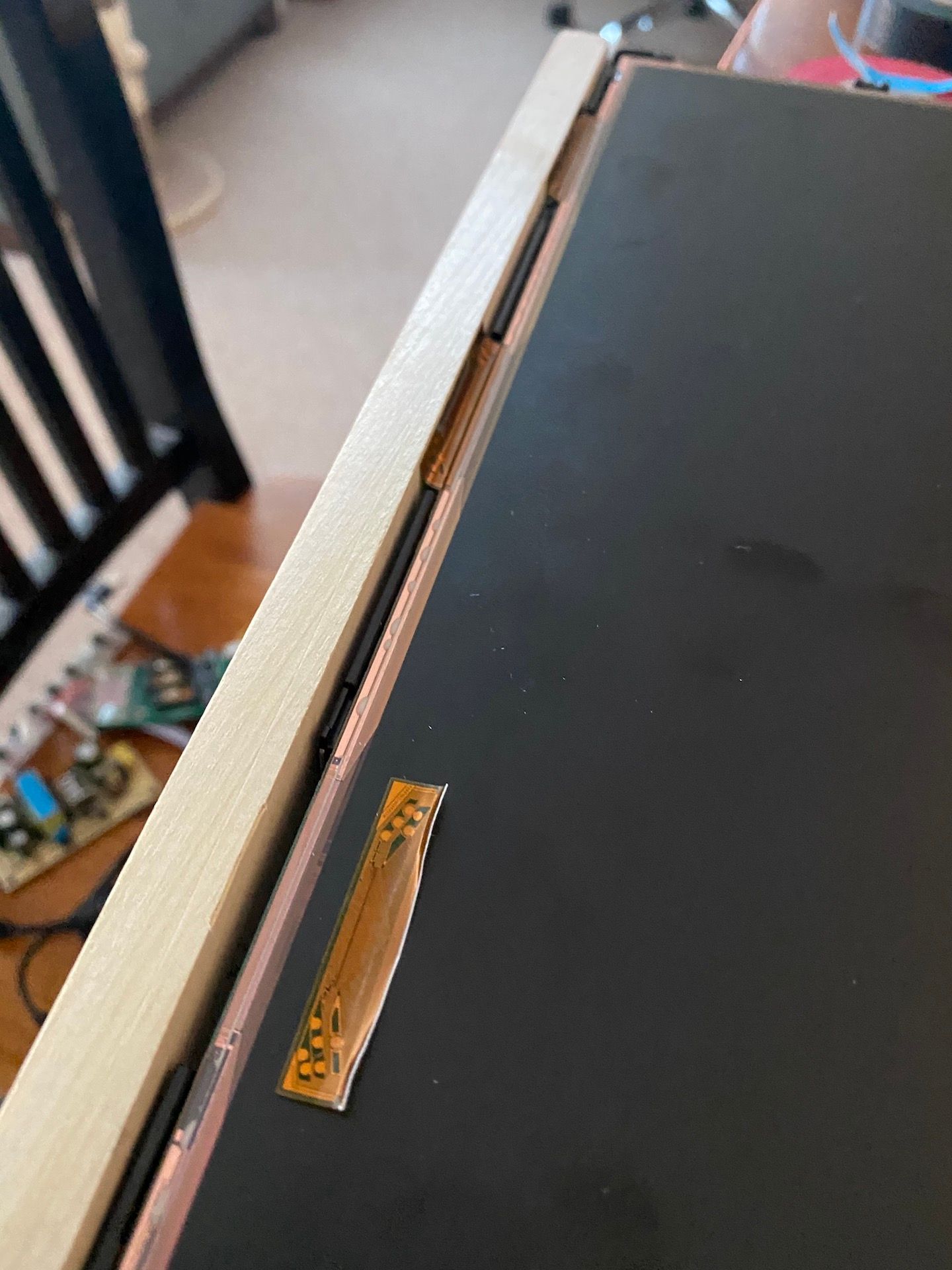
      In assembling my mirror, I somehow managed to rip off this small piece of circuitry from the side of my display. It connects to the lcd matrix and provide power to the bottom third of the monitor. As it stands now, I can see only the top two-thirds of the display, so the monitor isn’t totally dead. You can see the other two pieces if you follow the wood with your eyes. It’s just a thin piece that attaches to (I think) the front side of the lcd matrix, but I don’t know if it can be repaired. Suggestions?

      IMG_8513.jpeg

      posted in Hardware
      S
      sonicgoose
    • RE: Safest method for attaching boards to back of display

      @sdetweil I’m limited by the length of the wires attached to the boards, so mounting to the case, which is plastic, is not an option. They have to be mounted to the back of the display, which is metal.

      posted in Hardware
      S
      sonicgoose
    • Safest method for attaching boards to back of display

      I’m working on a revise to my smart mirror (original is here) using legit glass instead of acrylic and mirrored film. Looks sooooooo much better. But I’m wondering now what the best way is to attached the lcd inverter board, power board and my rpi to the back of the display. Wasn’t an issue the first time around because I used a different display with the inverter board and power already assembled on the back. This time I’m using a different display and need to have these boards attached to the back without shorting out. Suggestions?

      posted in Hardware
      S
      sonicgoose
    • RE: GoogleFit - Kg's to lbs

      @Fulcrum1973 In Terminal, edit MMM-GoogleFit.js and locate the line that starts with:

      if (weight) {
      

      Insert the following after that line:

       
      config.units = "imperial";


      So that’s a blank line, followed by the above code, followed by another blank line. Restart MM and voilà, pounds instead of kilograms.

      posted in Troubleshooting
      S
      sonicgoose
    • RE: resolved.. MMM-NetworkScanner

      @DarrenHill Are you #&%*ing kidding me?!? An n? That’s what’s been driving me nuts? Aaaaaarrrrrrgggghhhhhhhhh!

      It works now.

      Thank you all very much for your help. Even when I gave up, you guys didn’t, and I appreciate that.

      posted in Utilities
      S
      sonicgoose
    • RE: resolved.. MMM-NetworkScanner

      I’ve done a complete reinstall of MagicMirror, all the modules I had, from scratch, and this one still produces only a list, not nice columns and rows of icons. I’ve officially given up.

      posted in Utilities
      S
      sonicgoose
    • RE: resolved.. MMM-NetworkScanner

      @sdetweil Thanks. I appreciate the help and that you took the time to look at the code. I wish I knew more about how this stuff works. I’m learning, but I’m also getting frustrated. I’ll revisit this another time.

      posted in Utilities
      S
      sonicgoose
    • RE: resolved.. MMM-NetworkScanner

      @sdetweil said in resolved.. MMM-NetworkScanner:

      slametps

      I’ve removed the version I had and installed the repo found here, which has outdated instructions telling me to install the ianperrin version. (I didn’t.) After restarting MM on my RPi, I know get just a list of mac addresses as I entered them in the config where I was getting at least a list of device names and icons. I’m getting really frustrated with this. Maybe time to take a break from it…

      posted in Utilities
      S
      sonicgoose
    • RE: resolved.. MMM-NetworkScanner

      @sdetweil Thanks. Github is to me about as intuitive as theoretical physics. How exactly do I go about that?

      posted in Utilities
      S
      sonicgoose
    • RE: resolved.. MMM-NetworkScanner

      @DarrenHill

      git remote -v
      

      shows

      origin	https://github.com/spitzlbergerj/MMM-NetworkScanner.git (fetch)
      origin	https://github.com/spitzlbergerj/MMM-NetworkScanner.git (push)
      

      but as you suggested I did find “sjj:” in some comments. Do you have a link to the fork that works for you? slametps doesn’t come up with anything on GitHub.

      posted in Utilities
      S
      sonicgoose
    • RE: resolved.. MMM-NetworkScanner

      @bhepler The commas inside the quotes are a find and replace issue, easily fixed. The main problem is that this module says it offers different displays: list, columns, or columns with new lines—but all I get is the list. What I want is the columns with new lines, as shown on the module’s GitHub page (see link in first post.)

      posted in Utilities
      S
      sonicgoose
    • RE: resolved.. MMM-NetworkScanner

      So I’ve wanted this module to work for a long time. I’ve just installed the version from spitzlbergerj, which looks like it offers a compact display for devices—and considering I have almost 60 on my network, compact is what I need. However, all I keep getting is a list, in relatively large font, that takes up the whole depth of my MM screen. Here’s my config:

      {
                              disabled: false,
                              module: 'MMM-NetworkScanner',
                              header: 'Network',
                              position: 'bottom_center', 
                              config: {
                                      devices: [
                                                  { macAddress: "7c:d1:c3:31:33:b7", name: "Apple,", icon: "mobile" },
                                                  { macAddress: "68:64:4b:41:e7:19", name: "Apple,", icon: "mobile" },
                                                  { macAddress: "68:5b:35:b5:78:d6", name: "Apple,", icon: "mobile" },
                                                  { macAddress: "00:05:cd:21:3a:bb", name: "D&M", icon: "mobile" },
                                                  { macAddress: "00:23:12:54:d4:b4", name: "Apple,", icon: "mobile", showInNewRow: true },
                                                  { macAddress: "00:17:f2:10:08:7b", name: "Apple,", icon: "mobile" },
                                                  { macAddress: "c8:e0:eb:59:e4:b3", name: "Apple,", icon: "mobile" },
                                                  { macAddress: "68:5b:35:7a:94:14", name: "Apple,", icon: "mobile" },
                                                  { macAddress: "a8:bb:cf:15:03:32", name: "Apple,", icon: "mobile" },
                                                  { macAddress: "00:1c:26:3e:b0:88", name: "Hon", icon: "mobile" },
                                                  { macAddress: "b8:27:eb:33:61:38", name: "PiAware South", icon: "raspberry-pi" },
                                                  { macAddress: "b8:27:eb:21:5d:13", name: "PiAware West", icon: "raspberry-pi" },
                                                  { macAddress: "98:90:96:ae:95:cb", name: "Dell", icon: "mobile" },
                                                  { macAddress: "b8:27:eb:85:59:61", name: "ProximityPi", icon: "raspberry-pi" },
                                                  { macAddress: "80:c5:f2:0d:b4:25", name: "AzureWave", icon: "mobile" },
                                                  { macAddress: "b8:27:eb:cc:e8:26", name: "PortaPi E", icon: "raspberry-pi" },
                                                  { macAddress: "b8:27:eb:99:bd:73", name: "PortaPi W", icon: "raspberry-pi" },
                                                  { macAddress: "70:bc:10:94:cc:fb", name: "Microsoft", icon: "mobile" },
                                                  { macAddress: "70:bc:10:94:cc:fb", name: "Microsoft", icon: "mobile" },
                                                  { macAddress: "d4:f5:47:96:3f:8e", name: "Google,", icon: "mobile" },
                                                  { macAddress: "44:07:0b:32:4f:c7", name: "Google,", icon: "mobile" },
                                                  { macAddress: "7c:d9:5c:22:4b:4d", name: "Google,", icon: "mobile" },
                                                  { macAddress: "7c:70:bc:57:16:67", name: "IEEE", icon: "mobile" },
                                                  { macAddress: "c0:4a:00:f3:4c:a4", name: "TP-LINK", icon: "mobile" },
                                                  { macAddress: "00:22:41:8a:22:d0", name: "Apple,", icon: "mobile" },
                                                  { macAddress: "b8:27:eb:87:f7:fb", name: "Optiplex", icon: "mobile" },
                                                  { macAddress: "B8:27:EB:30:F5:10", name: "MagicMirror2", icon: "raspberry-pi" },
                                      ],
                                      sort: true,
                                      showUnknown: false,
                                      showDeviceColumns: true,
                              },
                      },
      

      I’m stumped why this doesn’t work properly.

      Also, the included arps2mm.sh for generating the list of devices doesn’t work properly. It duplicates some devices and ignores others.

      posted in Utilities
      S
      sonicgoose
    • RE: MMM-CountUP (COVID19 example)

      @sdetweil Well I don’t get it but I just did an rm -R on modules/MMM-CountUp again and once again did a git clone from your repo and now it works fine. Thanks for your help.

      posted in Utilities
      S
      sonicgoose
    • RE: MMM-CountUP (COVID19 example)

      @sdetweil You’re right, it is the original. But how? I removed the entire folder and did a git pull again from your repo!

      posted in Utilities
      S
      sonicgoose
    • RE: MMM-CountUP (COVID19 example)

      @sdetweil I’m using your fixed repo on two installs of MagicMirror, both completely up to date. One shows the correct number of days, hours, minutes and seconds, and the second does not. I copied my config from the working one to the not working one to ensure they are the same, and even deleted and reinstalled your repo on the not working one just now. I’m really confused by this.

      Screen Shot 2020-05-05 at 11.05.37 AM.png

      Not working on left; working on right. Date I’m basing this on is 2020-03-17. Any ideas what could be wrong?

      posted in Utilities
      S
      sonicgoose
    • RE: MMM-CountUP (COVID19 example)

      @Bromley47 How did you get it to show up? I don’t see a solution here and the other posts appear to now be gone.

      posted in Utilities
      S
      sonicgoose
    • RE: MMM-CountUP (COVID19 example)

      @Bromley47 @bibaldo Same problem here. My config:

                      {
                              disabled: false,
                              module: "MMM-CountUp",
                              position: "bottom_left",
                              config: {
                                      header: "Days Working From Home",
                                      date: '2020-03-17',
                                      time: '00:00:00',
                              },
                       },
      
      posted in Utilities
      S
      sonicgoose
    • RE: Remote-Control shows but does not respond

      @Stoffbeuteluwe said in Remote-Control shows but does not respond:

      @TamP https://forum.magicmirror.builders/topic/12485/has-anyone-got-mmm-remote-control-working-on-mm-2-11

      The solution here worked for me. Thanks!

      posted in Troubleshooting
      S
      sonicgoose
    • RE: Remote-Control shows but does not respond

      @TamP I’m having the same issue on two different RPi’s after the latest MM update.

      EDIT: Uninstalled the repo and reinstalled it using the script provided at https://github.com/Jopyth/MMM-Remote-Control with still no luck. In fact, it’s now worse.

      posted in Troubleshooting
      S
      sonicgoose
    • RE: Remote-Control shows but does not respond

      @TamP I’m having the same issue on two different RPi’s after the latest MM update.

      posted in Troubleshooting
      S
      sonicgoose
    • 1 / 1