MagicMirror Forum
    • Recent
    • Tags
    • Unsolved
    • Solved
    • MagicMirror² Repository
    • Documentation
    • 3rd-Party-Modules
    • Donate
    • Discord
    • Register
    • Login
    1. Home
    2. StrIIker
    3. Posts
    A New Chapter for MagicMirror: The Community Takes the Lead
    Read the statement by Michael Teeuw here.
    S
    Offline
    • Profile
    • Following 1
    • Followers 0
    • Topics 9
    • Posts 51
    • Groups 0

    Posts

    Recent Best Controversial
    • RE: Modules with Images not Displaying

      @mykle1

      Yes, I did run the nom install command from the MMM-EARTH directory and it completed the install. I also have the config in place as listed. Please see a screen shot of the lower portion of my display… (and yes, that news headline is terrifying!) ;)

      Here’s my command summary from when I installed MMM-EARTH

      pi@raspberrypi:~/MagicMirror/modules $ git clone https://github.com/mykle1/MMM-EARTH.git
      Cloning into 'MMM-EARTH'...
      remote: Enumerating objects: 361, done.
      remote: Total 361 (delta 0), reused 0 (delta 0), pack-reused 361
      Receiving objects: 100% (361/361), 1.73 MiB | 2.15 MiB/s, done.
      Resolving deltas: 100% (202/202), done.
      pi@raspberrypi:~/MagicMirror/modules $ cd MMM-EARTH/
      pi@raspberrypi:~/MagicMirror/modules/MMM-EARTH $ npm install
      npm notice created a lockfile as package-lock.json. You should commit this file.
      added 49 packages in 41.578s
      

      0_1539637161553_Screen Shot 2018-10-15 at 4.57.03 PM.png

      EDIT: Here’s a link to the other module which is having issues:

      https://github.com/spectroman/mmm-moon-phases/issues/11

      posted in Troubleshooting
      S
      StrIIker
    • Modules with Images not Displaying

      I have been trying to add a few modules which are supposed to display images to my mirror. Thus far, none of them have been loading the images. I have tried MMM-moon-phases, MMM-earth, and MMM-mars and none load their image. I get the header and some form of a spinning icon or a square outline etc. I saw that a couple people pointed out elsewhere that the moon phase module was not working for them either.

      I am running the latest build of Magic Mirror (2.5.0). Has anyone else who is using these modules or other similar modules which load an image from a remote site run into issues? If not, are you on an older build of Magic Mirror? Thanks!

      posted in Troubleshooting
      S
      StrIIker
    • MMM-earth

      Hello,

      I wanted to load up this module but it does not appear to be working correctly. I get Hello, Mother Earth. (and a spinning icon). Can anyone confirm that this still works or has the source for the images been shut down? Thanks!

      posted in Troubleshooting
      S
      StrIIker
    • RE: MMM-darksky-hourly

      @mykle1
      Ahh! I missed the .bright one you listed. For some reason I did not enter that… (/bonk)

      It’s working exactly as I wanted now. Thank you so much!

      posted in Requests
      S
      StrIIker
    • RE: MMM-darksky-hourly

      @mykle1
      Hi! Thank you! This has almost solved the issue. I still see the current temperature from the darksky-hourly module. Can you identify what I can alter to remove that?

      posted in Requests
      S
      StrIIker
    • MMM-darksky-hourly

      Hello,
      Is it possible to modify the MMM-darksky-hourly module to just show the hourly forecast rows and exclude the current conditions which are at the top? The reason I was looking to do this is that I like the default module for current weather as it includes wind, sunrise / sunset details. I currently have both but the redundant current conditions are bothersome and don’t match due to differing sources… I assume there’s something in the module javascript which I could remove but I am not familiar with this… Thank you to anyone who can help…

      posted in Requests
      S
      StrIIker
    • RE: Magic Mirror Blanks Several Hours

      @madscientist said in Magic Mirror Blanks Several Hours:

      @striiker Could it be the screensaver? Have you tried updating to 2.5.0 or downgrading to 2.3.x? I am pretty sure I didn’t have the problem with 2.3. In my case it’s enough to reload the MM only once a day. Also I had noticed that my Pi was reeeeeeeaaaaaaallllllyyyyyyy slow when connecting via shh after the screen blanked. Slow to the point I thought it crashed. Pretty sure it was a memory leak or so.

      I haven’t updated to 2.5 yet as I want to wait and see what problems other users experience :face_with_stuck-out_tongue_winking_eye:

      Well, I have disabled the screensaver via config settings as advised by several of the tutorials for setting up the mirror. Plus, if it were blanking or a screensaver, it would wake when I move the mouse or type. When I try to type etc, nothing shows, just the black screen. Ctrl-R or CTRL-Q works.
      I am on the latest (2.5) and have not tried downgrading. I assume that would require a full wipe and re-install but may be worth trying… When I experience this condition, I see no slowness while connected to ssh. I’m sure this is some odd leak which crashes some aspect of whatever displays the modules over time. I’m just surprised that nobody else (in any significant number) is experiencing this. It happens with a new everything… (Pi3B, latest firmware and latest mirror version)

      posted in Troubleshooting
      S
      StrIIker
    • RE: MMM-Darksky-hourly - change icons

      This is great! I was wondering if you could help me. I would like to decrease the spacing between the rows which list the hourly forecast. I feel the spacing is a little too large. Is there something I can change within the custom CSS which you posted to achieve this? Thank you in advance!

      posted in Custom CSS
      S
      StrIIker
    • RE: Magic Mirror Blanks Several Hours

      @chief said in Magic Mirror Blanks Several Hours:

      @madscientist It was always black - if I don’t run with sudo it quits almost immediately. I’m not sure exactly what the issue was, but I went ahead and restored a backup from 2.4.1 and it’s working fine now (removed the update alert on the top bar).

      If you need to run this as sudo then your installation probably has root as the owner of the files. A simple way to check this is log in as pi and type cd ~ and then ls -al you should see the list of files and directories and a column of pi pi (shows owner and group membership of the file or directory). If you see a lot of root root then you ran something which changed ownership of these files and directories…

      ls -al
      total 221604
      drwxr-xr-x  17 pi pi      4096 Oct 10 16:00 .
      drwxr-xr-x  27 pi pi      4096 Oct 10 10:33 ..
      -rw-r--r--   1 pi pi     24164 Oct  8 18:56 CHANGELOG.md
      drwxr-xr-x   2 pi pi      4096 Oct  8 18:56 clientonly
      drwxr-xr-x   2 pi pi      4096 Oct  8 19:00 config
      -rw-------   1 pi pi 498610176 Oct 10 16:00 core
      drwxr-xr-x   3 pi pi      4096 Oct  8 19:16 css
      -rw-r--r--   1 pi pi       856 Oct  8 18:56 dangerfile.js
      -rw-r--r--   1 pi pi       132 Oct  8 18:56 .eslintignore
      -rw-r--r--   1 pi pi       448 Oct  8 18:56 .eslintrc.json
      drwxr-xr-x   3 pi pi      4096 Oct  8 19:00 fonts
      drwxr-xr-x   8 pi pi      4096 Oct 10 10:33 .git
      drwxr-xr-x   2 pi pi      4096 Oct  8 18:56 .github
      -rw-r--r--   1 pi pi      1074 Oct  8 18:56 .gitignore
      -rw-r--r--   1 pi pi      2385 Oct  8 18:56 Gruntfile.js
      -rw-r--r--   1 pi pi      2675 Oct  8 18:56 index.html
      drwxr-xr-x   3 pi pi      4096 Oct  8 18:56 installers
      drwxr-xr-x   2 pi pi      4096 Oct  8 18:56 js
      -rw-r--r--   1 pi pi       271 Oct  8 18:56 jsconfig.json
      -rw-r--r--   1 pi pi      1118 Oct  8 18:56 LICENSE.md
      drwxr-xr-x   4 pi pi      4096 Oct  8 18:56 modules
      -rw-r--r--   1 pi pi      1040 Oct  8 18:56 module-types.ts
      drwxr-xr-x 642 pi pi     20480 Oct  8 19:00 node_modules
      -rw-r--r--   1 pi pi      2195 Oct  8 18:56 package.json
      -rw-r--r--   1 pi pi    271341 Oct  8 19:00 package-lock.json
      -rw-r--r--   1 pi pi     14450 Oct  8 18:56 README.md
      -rw-r--r--   1 pi pi       142 Oct  8 18:56 run-start.sh
      drwxr-xr-x   2 pi pi      4096 Oct  8 18:56 serveronly
      -rw-r--r--   1 pi pi       478 Oct  8 18:56 .snyk
      drwxr-xr-x   2 pi pi      4096 Oct  8 18:56 splashscreen
      -rw-r--r--   1 pi pi       126 Oct  8 18:56 .stylelintrc
      drwxr-xr-x   6 pi pi      4096 Oct  8 18:56 tests
      drwxr-xr-x   2 pi pi      4096 Oct  8 18:56 translations
      -rw-r--r--   1 pi pi       285 Oct  8 18:56 .travis.yml
      drwxr-xr-x   3 pi pi      4096 Oct  8 19:00 vendor
      

      If you have a permissions issue, you can fix it easily by typing:

      sudo chown -R pi:pi /home/pi
      

      This will change owner and group membership to pi

      posted in Troubleshooting
      S
      StrIIker
    • RE: Magic Mirror Blanks Several Hours

      I’m still having the issue where my screen blanks (modules stop loading) after about 5-6 hours. I perform a Ctrl-r to reload and it continues. Has anyone else figured out a cause or a solution? I’ll have to add several more cron jobs to reload modules periodically. I am not running anything beyond the core modules at present. I even performed a fresh install and still see this happen. I can’t see this being normal or people just tolerating it…

      Thoughts?

      /* Magic Mirror Config Sample
      *
      * By Michael Teeuw http://michaelteeuw.nl
      * MIT Licensed.
      */
      var config = {
      	"port": 8080,
      	"language": "en",
      	"timeFormat": 24,
      	"units": "imperial",
      	"modules": [
      		{
      			"module": "alert"
      		},
      		{
      			"module": "clock",
      			"position": "top_left"
      		},
      		{
      			"module": "calendar",
      			"header": "Calendar",
      			"position": "top_left",
      			"config": {
      				"calendars": [
      					{
      						"symbol": "calendar-check-o ",
      						"url": "webcal://www.calendarlabs.com/templates/ical/US-Holidays.ics",
      						"color": "#FFFFFF"
      					},
      					{
      						"symbol": "calendar ",
      						"url": "https://eleted",
      						"color": "#04f448",
      						"fetchInterval": 30000
      					},
      					{
                                                      "symbol": "birthday-cake ",
                                                      "url": "https://deleted                              "color": "#DA70D6",
                                                      "fetchInterval": 30000
      					},
      				],
      				"colored": true,
      				timeFormat: "absolute",	
      				showEnd: false,
      				fullDayEventDateFormat: 'Do MMM',
      			}
      		},
      		{
      			"module": "compliments",
      			"position": "lower_third"
      		},
      		{
      			"module": "currentweather",
      			"position": "top_right",
      			"config": {
      				"location": "deleted",
      				"locationID": "deleted",
      				"appid": "deleted
      			}
      		},
      		{
      			"module": "weatherforecast",
      			"header": "Weather Forecast",
      			"position": "top_right",
      			"config": {
      				"location": "deleted",
      				"locationID": "deleted",
      				"appid": "deleted",
      				"colored": "true"
      			}
      		},
      		{
      			"module": "newsfeed",
      			"position": "bottom_bar",
      			"config": {
      				"feeds": [
      					{
      						"title": "New York Times",
      						"url": "http://www.nytimes.com/services/xml/rss/nyt/HomePage.xml"
      					},
      					{
      						"title": "BBC World News",
      						"url": "http://feeds.bbci.co.uk/news/world/us_and_canada/rss.xml"
      					},
      					{
      						"title": "Reuters Science News",
      						"url": "http://feeds.reuters.com/reuters/scienceNews"
      					},
      				],
      				"showSourceTitle": true,
      				"showPublishDate": true
      			}
      		},
      		{
      			"module": "MMM-Admin-Interface"
      		}
      	],
      	"address": "0.0.0.0",
      	"ipWhitelist": [
      		"127.0.0.1",
      		"::ffff:127.0.0.1",
      		"::1",
      		"deleted"
      	]
      };
      /*************** DO NOT EDIT THE LINE BELOW ***************/ 
      if (typeof module !== 'undefined') {module.exports = config;}

      
      posted in Troubleshooting
      S
      StrIIker
    • RE: Magic Mirror Blanks Several Hours

      @sdetweil said in Magic Mirror Blanks Several Hours:

      @striiker is this version 2.4.1?

      The update module was throwing an error causing the black screen.

      I would comment out that module

      I’m in the same boat as @MadScientist in that my module rotation still dies necessitating a restart of the modules. Canceling the update check did improve the situation in that it apparently does not crash out as often.

      posted in Troubleshooting
      S
      StrIIker
    • RE: Magic Mirror Blanks Several Hours

      @madscientist Could you please share what you use in your cronjob to reload the modules? Thanks!

      posted in Troubleshooting
      S
      StrIIker
    • RE: Audio Recording Issue

      It looks like the issue is around what I was attempting to use to record audio. I was using a Logitech Webcam 9000 Pro, intending to use just the microphone for the project. I ran out and bought a cheap desktop microphone to test and my voice recording now plays back normally. I assume there may be some kind of global sample rate which needs to be set for the microphone in the webcam (or drivers). I decided to just buy a Sony Playstation Eye from Amazon as I have read several stories of success with it. I will close this as solved since the cause has been identified even if the solution was not. Thank you for your help!

      posted in Troubleshooting
      S
      StrIIker
    • RE: Seeking Help on First Build and Alexa

      @richland007 said in Seeking Help on First Build and Alexa:

      @StrIIker LOL OK well good luck too you … it is a fun and slightly addictive project :)
      Myself and a bunch of other fellows in here have gotten quite further down the road …
      it is very fun and worth it… however there is one catch… we all have the PIRs and the LEDs around the mirror working etc etc… or the Spotify and bunches of other utility modules but one thing we can not seem to figure out is how to get Alexa (which is present and working on the Mirror itself) to control the actual Mirror such as this https://github.com/joanaz/MMM-MirrorMirrorOnTheWall and the actual skill which is this … https://github.com/joanaz/MirrorMirrorOnTheWallSkill
      It is the only way to total control and customization of your Mirror… and the further you dig the more you will end up looking at the above as we all are :)
      any how lets keep chatting
      Dee

      Thank you for the words of encouragement. Can I ask you (or anyone else really) which Alexa module setup I should go for? I have seen one suggestion to use AlexaPi and then additionally add MMM-Alexa. I have seen MMM-Awesome-Alexa which I was contemplating trying. Any thoughts on these? I appreciate your feedback and suggestions. Thank you.

      posted in General Discussion
      S
      StrIIker
    • RE: Audio Recording Issue

      @sdetweil said in Audio Recording Issue:

      If u take off the rate, does it work ok?

      I decided to wipe / rebuild the Pi and Magic Mirror install. I saved my configs etc. so it was pretty straight forward. I will leave this open incase I have the same issue again.

      One odd thing I noticed was that if I moved the USB mic to a different port, I could properly record my voice but AlexaPi was still not working with it. When I rebooted, the “munchkin voice” was back. Any suggestion around which Alexa install I should do? I tried AlexaPi last time but maybe I should just go with Awesome-Alexa (or some other?) Any thoughts?

      posted in Troubleshooting
      S
      StrIIker
    • Audio Recording Issue

      Hello,

      I am working on my AlexiPi configuration. When the system boots, I get the “hello” playback on the speakers. I can play a sample wav file and it plays back just fine. When I record my voice as a test, it appears to be fine but when I play it back, it sounds like it was recorded at slow speed so playback makes my voice sound high pitched and fast (like a chipmunk or something). I’ve been working on troubleshooting this but have not yet found a solution. I think this is my last obstacle to getting Alexa working… I’m not sure what details I can post here as a starting point. Here is what I enter:

      arecord -f S16_LE -r 16000 -D pulse test.wa
      

      Here is what I use to play back:

      aplay -f S16_LE -r 16000 test.wav
      

      Here is the text output when it plays back:

      Playing WAVE 'test.wav' : Signed 16 bit Little Endian, Rate 16000 Hz, Mono
      

      My recording details:

      arecord -l
      **** List of CAPTURE Hardware Devices ****
      card 1: U0x46d0x809 [USB Device 0x46d:0x809], device 0: USB Audio [USB Audio]
        Subdevices: 0/1
        Subdevice #0: subdevice #0
      

      I’m hoping that someone may have some insight into this issue and can steer me in the right direction. Thank you in advance.

      posted in Troubleshooting
      S
      StrIIker
    • RE: AlexaPi Issue

      Well, I determined the cause of the issue I think. I decided to remove everything prior to the line with “playback_handler” and pasted it from the template. I then manually entered the values under sound but this time, included two leading spaces to match the original config under sound where "input_device: “” had the spaces…
      My config now looks like:

      # See https://github.com/alexa-pi/AlexaPi/wiki/Audio-setup-&-debugging
      # to get a better idea of how to set things in here
      
      # Level of log output
      # default: INFO
      # set to DEBUG for verbose logging
      logging: INFO
      
      sound:
        # Name of your microphone device in PortAudio
        # leave empty for default
        input_device: "pulse"
        output: "pulse"
        output_device: ""
      
        playback_handler: "vlc"
      

      Now I have new issues related to ALSA I think as there are errors related to this in the logs.

      posted in Troubleshooting
      S
      StrIIker
    • RE: AlexaPi Issue

      @sdetweil said in AlexaPi Issue:

      did u edit this with an editor that left line ends and carriage returns (like windows editor?)

      No, I do this from the command line using vim…

      posted in Troubleshooting
      S
      StrIIker
    • AlexaPi Issue

      Hello,
      I previously had AlexaPi running from its initial install. When starting up the computer, I would hear it say “hello”. I have since connected a microphone and went through the configuration steps listed in the git wiki for AlexaPi. I have validated that the microphone works (I can record my voice to a wave file and play it back). What is not working now is AlexaPi… I see the following in the status error message now…

      Oct 04 13:35:21 mirror01 python[578]: File "/usr/local/lib/python2.7/dist-packages/yaml/parser.py", line 98, in check_event
      Oct 04 13:35:21 mirror01 python[578]: self.current_event = self.state()
      Oct 04 13:35:21 mirror01 python[578]: File "/usr/local/lib/python2.7/dist-packages/yaml/parser.py", line 439, in parse_block_mapping_key
      Oct 04 13:35:21 mirror01 python[578]: "expected <block end>, but found %r" % token.id, token.start_mark)
      Oct 04 13:35:21 mirror01 python[578]: yaml.parser.ParserError: while parsing a block mapping
      Oct 04 13:35:21 mirror01 python[578]: in "/etc/opt/AlexaPi/config.yaml", line 7, column 1
      Oct 04 13:35:21 mirror01 python[578]: expected <block end>, but found '<block mapping start>'
      Oct 04 13:35:21 mirror01 python[578]: in "/etc/opt/AlexaPi/config.yaml", line 16, column 3
      Oct 04 13:35:21 mirror01 systemd[1]: AlexaPi.service: main process exited, code=exited, status=1/FAILURE
      Oct 04 13:35:21 mirror01 systemd[1]: Unit AlexaPi.service entered failed state.
      

      When I examine /etc/opt/AlexaPi/config.yaml , I do not see any issues… Here’s the start of the file… row 7 is where the logging is set…

      # See https://github.com/alexa-pi/AlexaPi/wiki/Audio-setup-&-debugging
      # to get a better idea of how to set things in here
      
      # Level of log output
      # default: INFO
      # set to DEBUG for verbose logging
      logging: INFO
      
      sound:
        # Name of your microphone device: "raspberrypi"
        # leave empty for default
      input_device: "pulse"
      output: "pulse"
      output_device: ""
      
        playback_handler: "vlc"
      
        # you can go here with alsa, pulse or others
        # keep blank for the best audio output selected by the underlying code
        output: "alsa"
        # output device: "raspberrypi"
        # currently supports ALSA only
        output_device: "default"
      

      Has anyone else run into this? Should I uninstall and reinstall Alexapi? This seems related to the steps I went through to enable the recording device…

      posted in Troubleshooting
      S
      StrIIker
    • RE: Calendar Module +1 day Error

      @nilnik said in Calendar Module +1 day Error:

      Hello again!
      I Think that you shouldn’t put quotes rond false
      Here is my config:

      module: ‘calendar’,
      header: ‘Kalender, Helg-och födelsedagar’,
      position: ‘top_left’,
      config: {
      colored: true,
      timeFormat: ‘absolute’,
      maximumEntries: 12,
      urgency: 2,
      dateFormat: ‘Do MMM’,
      fullDayEventDateFormat:‘Do MMM’,
      showEnd: false,
      getRelative: 48,

      Hi! That did it! Thank you for your patience and help! I greatly appreciate the help and will certainly help others whenever I can.

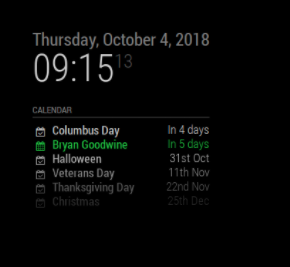
      To get this issue resolved, I had to include the showEnd value AND set the timeFormat to absolute as you have. Now my calendar displays the date correctly…

      0_1538659054639_Screen Shot 2018-10-04 at 9.17.02 AM.png

      posted in Troubleshooting
      S
      StrIIker
    • 1
    • 2
    • 3
    • 2 / 3