MagicMirror Forum
    • Recent
    • Tags
    • Unsolved
    • Solved
    • MagicMirror² Repository
    • Documentation
    • 3rd-Party-Modules
    • Donate
    • Discord
    • Register
    • Login
    1. Home
    2. wishmaster270
    3. Posts
    A New Chapter for MagicMirror: The Community Takes the Lead
    Read the statement by Michael Teeuw here.
    Offline
    • Profile
    • Following 0
    • Followers 6
    • Topics 16
    • Posts 340
    • Groups 2

    Posts

    Recent Best Controversial
    • RE: MMM-MplayerRadio

      @electros
      mplayer -cache 256 -playlist PLAYLISTFILE

      I will try to reduce the flickering but I don’t think this will stop the problem of your stations not being played.
      I spent the last hour to read more about Xmms2. I don’t think that I can implement an easy way to switch between the two players. One of the main problems is that Xmms2 does not provide the current stream info of the station.

      posted in Entertainment
      wishmaster270W
      wishmaster270
    • RE: MMM-MplayerRadio

      @electros I just realised that the flickering means that the module tries to switch to the sender but the mplayer process runs into an error.
      Does it work if you run the command directly in the shell?

      posted in Entertainment
      wishmaster270W
      wishmaster270
    • RE: MMM-MplayerRadio

      @electros
      Sorry for that.
      I will check it tomorrow. It is curious because I did not change anything in the backend.

      posted in Entertainment
      wishmaster270W
      wishmaster270
    • RE: MMM-MplayerRadio

      Found a hack:
      You can create an own m3u file which contains this url “http://stream.laut.fm/magicfm”. This one is working fine with mplayer

                                             {
      						title: "Test",
      						url: "/home/pi/test.m3u",
      					}
      
      posted in Entertainment
      wishmaster270W
      wishmaster270
    • RE: MMM-MplayerRadio

      I tried this link on the command line:
      mplayer -cache 256 -playlist http://www.surfmusik.de/m3u/magicfm,14949.m3u

      Mplayer complains that the station is to slow. It doesn’t even start playing in my case.
      It looks like mplayer has some known problems with aac.

      But you are right. If i use xmms2 it works.
      The problem is, that xmms2 uses a totally different interface.

      But also some good news. I released a new version 0.0.2 which adds two volume buttons.

      posted in Entertainment
      wishmaster270W
      wishmaster270
    • RE: MMM-MplayerRadio

      @electros I will check if I can include two control buttons to increase/decrease the volume by sending notifications to MMM-Volume.

      posted in Entertainment
      wishmaster270W
      wishmaster270
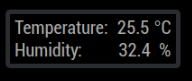
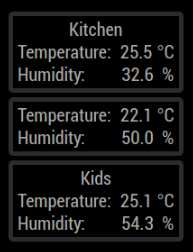
    • MMM-Temperature

      Description:

      This is a simple module which uses external scripts as data source to display the temperature and humidity of different sensors.
      As i use an HTU21 sensor a script to read the values is included already. There scripts to read data of DHT11, DHT22, BME280, DS18B20 included as of version 0.0.2.

      Download:

      MMM-Temperature
      [card:Tom-Hirschberger/MMM-Temperature]


      Version 0.0.10

      • added a wrapper script to call the Python scripts within a virtual environment
      • updated the instructions and default values to use the new wrapper script

      Version 0.0.9

      • added support for SHTC3 sensors

      Version 0.0.8

      • use spawnSync instead of execSync to call the scripts now. execSync caused “Error: write EFAULT” exceptions so this change was necessary

      Version 0.0.7

      • The values send via notification now can be parsed if they are in JSON version 5 format, too

      Version 0.0.6

      • the bme280 scripts now supports setting the I2C address via command line

      Version 0.0.5

      • additional values like wind speed, uv and rain can be displayed now
        
      • modified some of the examples to get a more reliable wifi connection on the esp32 boards and added a new example
        

      Version 0.0.4

      This new version 0.0.4 provides the following features:

      • the values of sensors no can be updated in a single notification which has an json structure as payload. if the keys “temperature_c”, “temperature_f” or “humidity” are present the values get updated. if either “temperature_c” or “temperature_f” is missing but the other one is present the missing value is calculated automatically.

      Version 0.0.3

      This new version 0.0.3 provides the following features:

      • it is now possible to specify a useValueCnt for each sensor. If the sensor provides data less periodically than the updateInterval (i.e. because the sensor sends the data via MQTT less frequently) the data can be used multiple intervals before it gets invalidated and “na” will be displayed.
      • added an example of howto provide data of an DHT11 (or DHT21, DHT22) sensor connected to an ESP8266 board which uses MQTT and deep sleep.
      • added an example of howto provide data of an DHT11 (or DHT21, DHT22) sensor connected to an ESP8266 board which uses plain tcp

      Version 0.0.2

      This new version provides the following improvements:

      • The values of sensors now can be updated via notification now.
      • It is possible to hide the temperature and humidity section for either all sensors or specific ones.
      • There are now scripts included to read values of DHT11, DHT22, BME280, HTU21 or DS18B20 connected to the Raspberry Pi.
      • There are different examples of howto read values of sensors connected to micro controllers via plain TCP or MQTT (with help of the MMM-MQTTbridge module).
      • As every wrapper now gets specific css classes assign you can customize the colors more easy

      Version 0.0.1

      The initial release provides the following features

      • read temperature of sensors by calling scripts with arguments
      • multiple sensors with different data scripts can be added
      • sensors can be displayed with or without name
      • an example script to read the data of an HTU21 sensor attached to the I2C bus of the raspberry is included and will be used as default data source
      • an example of how to connect an HTU21 sensor to an ESP32 micro controller with build-in wifi is included also

      Screenshots

      posted in Utilities
      wishmaster270W
      wishmaster270
    • RE: Motion Sensor/PIR

      Hi,

      i wrote an complete example recently and added it to my module:
      HC-SR501 PIR Example

      I translated it to german language as well: HC-SR501 PIR Beispiel

      posted in Troubleshooting
      wishmaster270W
      wishmaster270
    • RE: MMM-MplayerRadio

      Hi,

      normally mplayer is very fast. Can you try to reduce the caching with the “mplayerCache” option either for one station or globally for all. The default value is 512 and may be a little high.

      There already exists an module to control the volume MMM-Volume which i use in my setup.

      posted in Entertainment
      wishmaster270W
      wishmaster270
    • RE: Another PIR sensor

      Sorry if it look liked i am taking the things personal that wasn’t my goal.
      I want my modules to work and not to cause problems…

      Could it be that you run two Browser (maybe build in and a second head) because the notifications get fired twice?

      Edit: The delay seems to work. Because there are 20 seconds between the first time the gpio fires and the second time.

      posted in Requests
      wishmaster270W
      wishmaster270
    • RE: Another PIR sensor

      Maybe the problem is not the GPIO. Did you find same useful information in the log. Is the GPIO module fireing that often?

      If an delay is configured in the GPIO module any events within this time range will be ignored. It is a simple mechanism and does not depend on the sensor. I use it with three PIRs in my setup without any problems.

      Edit: There should be some entry like “MMM-GPIO-Notifications: : Skipped notifcation…” in the log if the delay works and the sensor fires

      posted in Requests
      wishmaster270W
      wishmaster270
    • RE: Another PIR sensor

      Ps.: My modules write a lot of debug output to the log file. Maybe there is a hint in “~/.pm2/logs/MagicMirror-out.log”

      posted in Requests
      wishmaster270W
      wishmaster270
    • RE: Another PIR sensor

      Sorry, my mistake. Sure the profiles option in the GPIO config will cause the module to only fire the notification on pageOneEveryone.

      What kind of PIR are you using, a HC-SR501? Maybe your jumper is set to pulse a signal as long as a object is in distance.

      posted in Requests
      wishmaster270W
      wishmaster270
    • RE: Another PIR sensor

      @DaVinki said in Another PIR sensor:

      MMM-ProfileSwitcher

      Hi,
      your configuration of MMM-ProfileSwitcher is wrong. In your case it will simply look like this:

      {
          module: 'MMM-ProfileSwitcher',
          config: {
              // See 'Configuration options' for more information.
          } 
      }
      

      But you need to add the classes part to your MMM-Wallpaper module:

       {  
            module: 'MMM-Wallpaper',
            config: {
                ...
            }
            classes: 'pageOneEveryone',
      }, 
      

      So your config will look like this:

      {
          module: 'MMM-ProfileSwitcher',
          config: {
              defaultClass: "pageOneEveryone",
              ignoreModules: ["moduleVisiableOnEveryPageOne", "moduleVisibleOnEveryPageTwo"]
          } 
      },
      {  
            module: 'MMM-Wallpaper',
            config: {
               //Add your wallpaper config here
            }
            classes: 'pageOneEveryone',
      }, 
      {
           module: 'MMM-ProfileControl',
           position: 'bottom_bar',
           config: {
              profiles: [
                 ['pageOneEveryone'],
                 ['pageTwoEveryone'],
              ],
           }
      },
      {
           module: 'MMM-GPIO-Notifications',
           config: {
               '22': {
                   gpio_state: 1,
                   gpio_debounce: 10,
                   delay: 1000,
                   notifications: [
                       {
                          notification: 'PROFILE_DECREMENT_HORIZONTAL',
                       },
                   ]
              }
        }
      },
      

      The result will be two pages “pageOneEveryone” and “pageTwoEveryone”.
      Every time your PIR triggers an “1” the GPIO Module will send an Notification to switch to the next page (and start again with “pageOneEveryone” if the end is reached).

      You then can add “classes: ‘pageOneEveryone’,” to every module you want to be displayed an “pageOneEveryone” and “classes: ‘pageTwoEveryone’,” to every module you want to be displayed on “pageTwoEveryone”.

      If you want to have modules displayed on every page you can add them to the ignore list of MMM-ProfileSwitcher.

      posted in Requests
      wishmaster270W
      wishmaster270
    • RE: Another PIR sensor

      Hi,

      to me it sounds more like pages/profiles you are looking for.
      My https://github.com/Tom-Hirschberger/MMM-GPIO-Notifications module is able to trigger notifications based on GPIO events.
      In combination with https://github.com/tosti007/MMM-ProfileSwitcher and https://github.com/Tom-Hirschberger/MMM-ProfileControl you could toggle through the profiles with your PIR sensor.

      posted in Requests
      wishmaster270W
      wishmaster270
    • RE: Forum Git-Card feature broken?

      Thanks for the reply. I added download links to all my posts for the moment.

      posted in Forum
      wishmaster270W
      wishmaster270
    • RE: MMM-MplayerRadio

      @omoioli
      Hi, great if you like it.
      What exactly do you mean. Currently there are a lot of problems with the forum. Are the screenshots not visible or do you like to have an different one?

      posted in Entertainment
      wishmaster270W
      wishmaster270
    • MMM-SynologySurveillance

      Description:

      This module querys the mjpeg streams of cams connected to Synology Diskstations with the syno api and displays the cams in an column based grid.
      One cam can be displayed in a bigger view. This cam can either be changed by notification or click/touch.

      I use the mjpeg streams because i do not need any other tools to render/display them. The quality is not that good as with RTSP streams but for need the quality is good enough.

      Download:

      MMM-SynologySurveillance
      [card:Tom-Hirschberger/MMM-SynologySurveillance]

      Screenshots

      Vertical

      Horizontal


      Version 0.2.5

      • fixed not working alias for mjpeg cams
      • if a mjpeg cam is configured with a alias but without a name the alias is used as name now
      • updated the mjpeg example in the readme to use name instead of alias

      Version 0.2.4

      • fixed the replacement of the host and port parts in the URLs
      • if debug is enabled the clean URLs of the cams will be logged now. They can be directly entered to a browser to check the validity

      Version 0.2.3

      • fixed the module being crashed cause of the changes in 0.2.2
      • fixed the wrong camera being displayed in big profiles had been visited in the meantime where the whole module was hidden
      • introducing a new option moduleIsDisplayedInEveryProfile which needs to be set to true if MMM-ProfileSwitcher is used but the module is set to the ignore list and is displayed on all profiles

      Version 0.2.2

      • fixed current big camera and displayed cameras did not match the current used profile in some rare cases

      Version 0.2.1

      • increased the compatibility to older DSM versions. The paths of the web apis now will be queried with api versions instead of using a fixed one.
      • if the debug flag is set to true the MySynoSSClient prints more information, too.

      Version 0.2.0

      • instead of the syno library a custom implementation is used now. The custom implementation is compatible with newer releases of Surveillance Station (> 9.1) now
      • support of the skipOnPrivilegeError config option is dropped with the new implementation. If configured it will be ignored now.
      • cause the new implementation is able to fetch all information at once the refreshes of the gui could been reduced. Now all information of all DiskStations is fetched and the gui is refreshed once.
      • introducing a new config option changedPositionAnimationSpeed with this release. If the position of one cam changes and the gui needs to be refreshed this animation speed is used instead of the “usual” one. The option is set to 0 as default to reduce flickering.
      • if a position update fails for a cam the position indicator will now be reset to the previous position
      • reduced the console output of the module but introducing the debug config option to re-enable more output

      Version 0.1.4

      • introducing the new option imgDecodeCheckInterval which can either be set for all or for single cams. If the option is set to a value higher than 0 the module periodically (unit is seconds) checks if the displayed cam image is still decodeable. If not the URL gets reset and a refresh of all URLs is triggered. This is to avoid freezed cam images.
      • introducing minimumTimeBetweenRefreshs which prevents to refresh the URLs to often (i.e. cause of the new imgDecodeCheckInterval). The unit is milliseconds!
      • the module now tries to restore the old big cam setting if profiles get changed. So the last selected cam is displayed in big before the profile changed. To disable the new feature the new config option restoreBigAfterProfileChange can be set to false.
      • fixed all issues reported by the new automatic module scanning script developed by @KristjanESPERANTO

      Version 0.1.3

      • fixed a rare issue which caused position changes to not work with some nodejs versions (i.e. 16.3.1)

      Version 0.1.2

      • fixed host part not being replaced properly

      Version 0.1.1

      • Did a total refactoring of the code that creates the HTML elements
      • Did a refactoring of the code that fetches the URLs of the cameras from the NAS to increase the error handling
      • Added a option to add a timestamp to MJPEG URLs to avoid caching issues
      • Added the possibility to invalidate the cam URLs with a notification to force a refresh
      • Fixed animationSpeed being ignored if module is shown after it was hidden
      • Fixed profiles not working properly in all cases

      Version 0.1.0

      • It is now possible to display any mjpeg stream by adding dummy diskstations with cams that have a url configured

      Version 0.10.0

      • introducing the replacePortPart option which is need to use encrypted connections (https). The api returns the http port even if the information is fetched via an encrypted connection.

      Version 0.0.9

      • fixed timestamps being added to cam urls although the option disabled in the configuration
      • fixed timestamps only being added to the big cam in vertical view. Now the timestamps get added to all cam urls (if the option is enabled)

      Version 0.0.8

      • Catching errors of the Synology API in more scenarios now and keep the old url in these cases
      • added an option to force a update of the dom objects of this module if it gets shown after it was hidden (to avoid caching issues with the new electron version of MagicMirror 2.18 and above)
      • added an option to add an timestamp to the cam urls (to avoid caching issues with the new electron version of MagicMirror 2.18 and above)
      • added an option to specify the apiVersion in the configuration (only the versions supported by syno library can be used)

      Version 0.0.7

      • the Synology Diskstations throw privilege errors randomly; this is a known bug and caused some cams to disappear although an valid url had been provided at the last refresh; the default behavior now is to ignore this errors and keep the last url or position information; this can be changed with an new config option (skipOnPrivilegeError)
      • if an error occurs during the fetch of the position information of a camera the cam will be displayed without the information; next time the information is provided it will be updated

      Version 0.0.6

      • fixed an issue which caused position (ptz) changes to not work correctly if the internal position index differed to the ones used in the SynologyStation (i.e. because stations got deleted)
      • the view now only will be refreshed if either the cam stream or the ptz information changed after a fetch
      • it is now possible to force a refresh of the cam information by clicking on the dummy icon if no information had been provided previously
      • the PTZ information now only will be fetched if either showPositions or showBigPositions is active

      Version 0.0.5

      • fixed cam streams not updating after connection is to ds or cam is lost
      • fixed update issues of cam positions
      • fixed styles issues if cams with and without positions are mixed

      Version 0.0.4

      • it is now possible to move the cam to positions stored in the ds either by notification or by click/touch
      • the positions can be displayed as squares either only for the big and/or for the small cams
      • if next or prev position notification is called without specifying a cam the big one is used automatically

      Version 0.0.3

      • fixed a bug which caused wrong media URLs if multiple Diskstations are used
      • it is now possible to replace the protocol and host part of the media URLs (http://XXX.XXX.XXX.XXX) with the values configured. The Diskstation returns private IPs although the access is through a public IP otherwise.

      Version 0.0.2

      • Layouting is now organized with flex box layout instead of tables
      • Added two layouts (horizontal, vertical) which can be choosen by configuration
      • Column count of vertical layout now needs to be configured via css

      Version 0.0.1

      • query the urls of cams of Synology Diskstations with the syno api
      • display the cams in an grid based on columns
      • show one cam in a bigger view
      • change the bigger view cam by notification or click/touch
      • display different cams in different profiles
      posted in Utilities
      wishmaster270W
      wishmaster270
    • Forum Git-Card feature broken?

      Hi,

      i normally added cards to my module descriptions in the showcase are.
      Currently the cards are not being included. Is this feature broken?
      I tried it with Firefox and Chromium, both with the same result.

      posted in Forum
      wishmaster270W
      wishmaster270
    • MMM-MplayerRadio

      Description:

      I use an HifiBerry DAC+ on my mirror to play Spotify and Radio.
      The aim of this module is to provide a simple mechanism to play online radios on the mirror and switch between different stations.
      Because my wife and i like different stations i added profile support as well.
      The module can be controlled either by notifications or touch.
      It uses the Raspian “mplayer” to play “m3u” playlist files my favorite webpage of online radios (http://www.surfmusik.de/) provides. But you can use any m3u file you like.

      Download:

      MMM-MplayerRadio
      [card:Tom-Hirschberger/MMM-MplayerRadio]


      Version 0.1.3

      • the vlcWrapper.bash and vlcPaWrapper.bash scripts now stop vlc with a kill followed by a kill -9 after one second delay. The processes did not stop with the current versions of vlc otherwise.

      Version 0.1.2

      • the streamlink wrapper supports additional custom arguments like the vlc wrappers now

      Version 0.1.1

      • the vlcWrapper.bash and vlcPaWrapper.bash now support a variable count of custom options that can be added after the stream url. The options will be added directly to the vlc command line i.e. to disable certificate verification.

      Version 0.1.0

      • it is possible to display the current stream information if vlc is used now. Use the provided vlcWrapper.bash script to start vlc with the options needed.
      • modified the vlcPaWrapper.bash script to use the additional options needed to start vlc with enabled stream information support.
      • updated the options and URLs in the readme

      Version 0.0.14

      • added a new wrapper called vlcPaWrapper.bash which uses vlc to play a stream but sets the audio of vlc with pa_volume to a configurable value before

      Version 0.0.13

      • The module now waits for the old process to stop before it starts the new one during station changes which is essential for the xmms2 and HiFiBerryOS wrapper.
      • During a station change the module does not signal a stop of the old station and the start of the new station but only the station change to the frontend now. This is to reduce flickering.
      • The wrapper of HiFiBerryOS is now more robust if the station gets changed or if the playback gets stopped at the HiFiBerryOS interface

      Version 0.0.12

      • fixed wrong state (playing/stopped) if customCommand is used and the wrapper/program stops

      Version 0.0.11

      • All CSS classes are prefixed with the module name now
      • A new wrapper script is included to control a remote HiFiBerryOS instance via ssh

      Version 0.0.10

      • added a new wrapper script (streamlinkWrapper.bash) which can be used to play streams that do not send continuously

      Version 0.0.9

      This now Version 0.0.9 provides:

      • fixed the stations not being stopped if the module gets stopped (i.e. if the mirror gets stopped)

      Version 0.0.8

      This new Version 0.0.8 provides:

      • Fixed a bug which caused the module to ignore the initStation parameter at the first RADIO_PLAY notification

      Version 0.0.7

      This new Version 0.0.7 provides:

      • Fixed a bug which caused the module to be not loaded if only one station is used

      Version 0.0.6

      This new Version 0.0.6 provides:

      • the stations now get displayed correctly if scroll is disabled and there are less stations than needed (count of stations before the current station, the current station and the count of stations to display after)

      Version 0.0.5

      This new Version 0.0.5 provides:

      • The module got a total redesign. Instead of old styling with a table a new flexbox layout is used which makes it possible to do a lot more customization via css.
      • There is a new option which can be used to display more than one station before and after the currently active one.
      • There is a new option to enable scrolling (if active all stations will be displayed in a scrollable container).
      • If scrolling is active a new option can be enabled to focus the currently active station even if it has been changed by notification.
      • The streamInfo line can be hidden with a config option new.
      • The initial state feature (yellow radio instead of stations) has been removed.

      As there are a lot of problems with mplayer at the moment i strongly suggest to use the customCommand feature to play the stations with vlc. See the readme for details!

      Version 0.0.4

      • The flickering has been reduced massively.

      Version 0.0.3

      • it is possible to configure a custom script to play the stations. This way it is possible to use in example xmms2 instead of mplayer
      • added an autoplay feature. Simply add the index of the station you want to start automatically after the module started to the new config option “autoplay”. The index starts with 0.
      • reduced the flickering caused by station and profile changes

      Version 0.0.2

      • added buttons to increase/decrease the volume (send notification to MMM-Volume)

      Version 0.0.1

      The initial release provides the following features

      • Using multiple stations and add an logo for each one
      • The stations can be switched by notification or touch
      • Stations either can have no profile (valid for all profiles) or an profile string

      Screenshots

      posted in Entertainment
      wishmaster270W
      wishmaster270
    • 1
    • 2
    • 13
    • 14
    • 15
    • 16
    • 17
    • 16 / 17