MagicMirror Forum
    • Recent
    • Tags
    • Unsolved
    • Solved
    • MagicMirror² Repository
    • Documentation
    • 3rd-Party-Modules
    • Donate
    • Discord
    • Register
    • Login
    A New Chapter for MagicMirror: The Community Takes the Lead
    Read the statement by Michael Teeuw here.

    MMM-CalendarExt3

    Scheduled Pinned Locked Moved Utilities
    689 Posts 82 Posters 2.8m Views 86 Watching
    Loading More Posts
    • Oldest to Newest
    • Newest to Oldest
    • Most Votes
    Reply
    • Reply as topic
    Log in to reply
    This topic has been deleted. Only users with topic management privileges can see it.
    • H Offline
      hrmax23 @MMRIZE
      last edited by

      @MMRIZE

      This is a much more elegant solution than what I came up with. Many thanks!

      1 Reply Last reply Reply Quote 0
      • AssassinsA Offline
        Assassins
        last edited by

        Will it be possible to pull out the birthday that is associated with a contact person from icloud. ???

        M 1 Reply Last reply Reply Quote 0
        • luisestradaL Offline
          luisestrada @luisestrada
          last edited by

          @MMRIZE , just a note. I also use the browser to open the mirror and works in all platforms I’ve tested except one, Tizen browser (Samsung TVs). All modules work but this, no idea what happens but probably any form of javascript may not be supported by Tizen.

          I’m quite happy with the module though

          M 1 Reply Last reply Reply Quote 0
          • M Offline
            MMRIZE @Assassins
            last edited by

            @Assassins

            Will it be possible to pull out the birthday that is associated with a contact person from cloud. ???

            AFAIK, impossible (at least, no automatic way);

            First; This module is not for parsing calendar events but for showing events already parsed. It means other ics format parser (like the original default calendar module) has to do that work.

            Second, The birthday calendar of iCloud contacts is not a general calendar which could be sharable. If you want to export the contact birthday to any normal calendar; export the contacts as VCONTACT(.vcf) format, then convert it to VEVENT(.ics) then import them to your target calendar. But I’m not sure there is any convenient converter for this job.

            1 Reply Last reply Reply Quote 0
            • M Offline
              MMRIZE @luisestrada
              last edited by

              @luisestrada
              Tizen is using Chromium nowadays, but the version is a bit old. The latest Tizen 6.5(Model 2022) is still using M85. (Current the newest Chromium is M100, M85 was 2-years ago). And if your Samsung TV has some age, It probably is too old to run the modern JS features. (Model 2021 => M76, Model2020=>M69, …)

              luisestradaL 1 Reply Last reply Reply Quote 0
              • H Offline
                hrmax23
                last edited by hrmax23

                @MMRIZE Is there a way to show a rolling 4/5 week in the month mode? Basically something like -1 week to +3 weeks rather than showing basically the current month until that month is over.

                Also, is there a trick to get the calendar to re-render completely on some interval? On my MM right now, it’s currently showing the current day in the 5th week (i.e. still showing April as the current month). If I restart MM, it will update to show May as current month, but doesn’t seem to do it automatically. I only have 1 scene so not using MMM-Scenes.

                M R 3 Replies Last reply Reply Quote 0
                • M Offline
                  MMRIZE @hrmax23
                  last edited by

                  @hrmax23
                  It sounds unexpected bug. Can you show(or send mail) the screenshot and config?

                  1 Reply Last reply Reply Quote 0
                  • M Offline
                    MMRIZE @hrmax23
                    last edited by

                    @hrmax23 said in MMM-CalendarExt3:

                    Is there a way to show a rolling 4/5 week in the month mode? Basically something like -1 week to +3 weeks rather than showing basically the current month until that month is over.

                    I will consider that option.

                    it’s currently showing the current day in the 5th week (i.e. still showing April as the current month). If I restart MM, it will update to show May as current month, but doesn’t seem to do it automatically.

                    This seems unexpected behaviour. I need your configuration to represent it.

                    Also, is there a trick to get the calendar to re-render completely on some interval?

                    I think notification CX3_MOVE_CALENDAR with payload {step:0} would refresh current view , but it needs emission from other module.
                    Anyway, the view is refreshed by schedule of original calendar fetch. So I don’t think it needs self-refresh timer. And when we solve above unexpected behaviour, you don’t need self-refreshing.

                    H 1 Reply Last reply Reply Quote 0
                    • H Offline
                      hrmax23 @MMRIZE
                      last edited by

                      @MMRIZE sometime yesterday the calendar finally refreshed so that May is the current month so it appears to have resolved itself. I’m not sure what would have finally triggered it but I’ll check my calendar settings.

                      Thanks for considering the rolling 5 week idea!

                      1 Reply Last reply Reply Quote 0
                      • BKeyportB Offline
                        BKeyport Module Developer @MMRIZE
                        last edited by

                        @MMRIZE

                        Well, shoot, here I am waiting for a new Daily and current view. 😢

                        If I could get the built in calendar to do what I want it to do, I’d be using that.

                        The "E" in "Javascript" stands for "Easy"

                        1 Reply Last reply Reply Quote 0
                        • luisestradaL Offline
                          luisestrada @MMRIZE
                          last edited by

                          @MMRIZE Thank you for your answer. :)

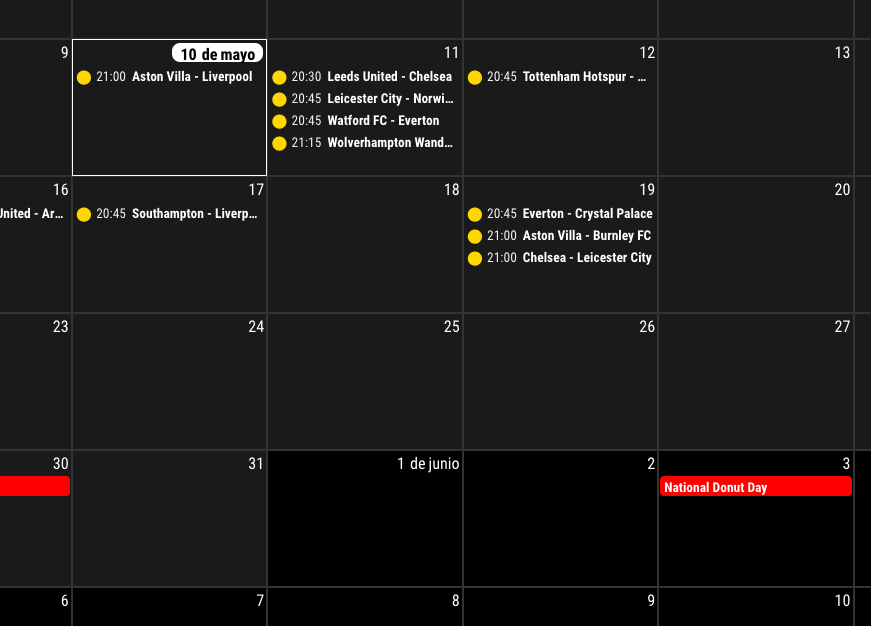
                          Another question, where does this take the Spanish translation from? For some reason the number is not separated from the text.

                          It says ā€œ9de Mayoā€ instead or ā€œ9 de Mayoā€

                          M 1 Reply Last reply Reply Quote 0
                          • M Offline
                            MMRIZE @luisestrada
                            last edited by

                            @luisestrada

                            This might be a help.

                            /* In your custom.css */
                            .CX3 .cellDate .dateParts.literal {
                              margin-left: 5px;
                            }
                            

                            24198132-fbaa-4626-b8b9-742353751b09-image.png

                            1 Reply Last reply Reply Quote 0
                            • luisestradaL Offline
                              luisestrada
                              last edited by

                              @MMRIZE said in MMM-CalendarExt3:

                              /* In your custom.css */
                              .CX3 .cellDate .dateParts.literal {
                              margin-left: 5px;
                              }

                              Thank you so much, muchas gracias :)

                              1 Reply Last reply Reply Quote 0
                              • M Offline
                                MMRIZE
                                last edited by

                                1.1.0 (2022-05-29)

                                • ADDED : control interval of refreshing on fetching calendar
                                  • config option waitFetch for waiting for too frequent fetching.
                                  • config option refreshInterval for refresh view by force.
                                  • config option glanceTime for focusing temporal moment then returning to current moment
                                  • config option animationSpeed for update animation
                                • ADDED : calendar symbol can be used. (config option useSymbole)
                                • ADDED : weather forecast could be displayable. (From MM 2.20 released or MM 2.19 develop branch)
                                • CHANGED : Now, month view could has a fit weeks by the days not fixed 6 weeks.

                                1.1.0

                                1 Reply Last reply Reply Quote 0
                                • A Offline
                                  almightyyoshi
                                  last edited by

                                  Just a couple of quick questions. First, how do you remove icons from events? I see in the sample pics that it’s been done, but I can’t seem to make it happen. Second, in CalExt2, I could style event borders and would show/color those instead of having a completely filled in event color. I could also show only certain borders (for full day I only had the left and bottom, but single day events only had the left border). Is that possible with CalExt3?

                                  M 1 Reply Last reply Reply Quote 0
                                  • M Offline
                                    MMRIZE @almightyyoshi
                                    last edited by

                                    @almightyyoshi

                                    1. Not to use symbol: useSymbol: false
                                    // config of your module;
                                    ...
                                    config: {
                                      useSymbol: false,
                                    ...
                                    
                                    1. Is this what you wanted?
                                      f730144a-9e08-47ef-89e2-115b91f16306-image.png
                                    /* in your custom.css */
                                    .CX3 .event.fullday,
                                    .CX3 .event.multiday {
                                      border-left: 4px solid var(--calendarColor);
                                      border-bottom: 1px solid var(--calendarColor);
                                      background-color: rgba(0, 0, 0, 0.2);
                                    }
                                    
                                    .CX3 .event.singleday {
                                      border-left:4px solid var(--calendarColor);
                                    }
                                    
                                    .CX3 .event.singleday:not(.useSymbol)::before {
                                      content: '';
                                    }
                                    
                                    A 1 Reply Last reply Reply Quote 0
                                    • A Offline
                                      almightyyoshi @MMRIZE
                                      last edited by

                                      @MMRIZE That’s perfect. Thanks. I just wasn’t sure if those attributes were available and I honestly just didn’t feel like experimenting at that moment. Last question (think): Is there a way to hide the default calendar module and still populate CX3. I found a way to hide the module (by editing the calendar module’s base config) on startup, but then CX3 doesn’t have any events. Here’s what I used (courtesy of @sdetweil from a thread a couple of years ago):

                                      hidden: false, 
                                      
                                      
                                      suspend: function(){
                                          this.hidden=true
                                      },
                                      
                                      restore: function(){
                                           this.hidden=false
                                      },
                                      
                                      notificationReceived: function(notification, payload, source){
                                         // this comes before the first call to getDom()
                                         if(notification === "ALL_MODULES_STARTED")
                                            this.hidden=true;
                                      }.
                                      
                                      getDom: function (){
                                      var wrapper=document.createElement('div')
                                      if(this.hidden==false){ 
                                           //create normal content
                                      }
                                      return wrapper;
                                      },
                                      
                                      S M 2 Replies Last reply Reply Quote 0
                                      • S Do not disturb
                                        sdetweil @almightyyoshi
                                        last edited by

                                        @almightyyoshi I think you will have to use css to hide, vs code

                                        Sam

                                        How to add modules

                                        learning how to use browser developers window for css changes

                                        1 Reply Last reply Reply Quote 0
                                        • M Offline
                                          MMRIZE @almightyyoshi
                                          last edited by

                                          @almightyyoshi
                                          You can hide it with CSS, or just drop out ā€œpositionā€.

                                          A 1 Reply Last reply Reply Quote 0
                                          • A Offline
                                            almightyyoshi @MMRIZE
                                            last edited by

                                            @MMRIZE Dropping position worked. I thought I’d get an error or blank screen for that. Thanks again!

                                            luisestradaL 1 Reply Last reply Reply Quote 0

                                            Hello! It looks like you're interested in this conversation, but you don't have an account yet.

                                            Getting fed up of having to scroll through the same posts each visit? When you register for an account, you'll always come back to exactly where you were before, and choose to be notified of new replies (either via email, or push notification). You'll also be able to save bookmarks and upvote posts to show your appreciation to other community members.

                                            With your input, this post could be even better šŸ’—

                                            Register Login
                                            • 1
                                            • 2
                                            • 3
                                            • 4
                                            • 5
                                            • 34
                                            • 35
                                            • 1 / 35
                                            • First post
                                              Last post
                                            Enjoying MagicMirror? Please consider a donation!
                                            MagicMirror created by Michael Teeuw.
                                            Forum managed by Sam, technical setup by Karsten.
                                            This forum is using NodeBB as its core | Contributors
                                            Contact | Privacy Policy