Read the statement by Michael Teeuw here.
MMM-CalendarExt3
-
// In the config of the module; config: { weekIndex: 0, // From which week the view starts; -1 : last week, 0: this week 2: 2 weeks later, ... weeksInView: 3, // How many weeks will be shown from `weekIndex` ... } -
@sdetweil I managed to solve it to show the calendar how I wanted to. Thanks
-
@sdetweil
I’m already with weeksInView: 1, my screen is in portrait mode, so the boxes are not very wide. I would have liked an automatic lineup. I tried to decrease the font size, but it doesn’t show anything anymore. If anyone has a solution, thanks in advance. -
// In the config of the module;
config: {
  fontSize: '12px', // default would be 18px.
  eventHeight: '16px', // the height of the event block. default would be 22px. usually 4px greater than `fontSize` would be pretty to look.
  maxEventLines: 5, // How many events will be displayed in a day cell. The overflowed events will be hidden.
...
}
I don’t recommend wrapup long text to the multi-lines in the cell instead of one-line clipped. Because it could make misalignments, it might look more complex to glance at the events and unpretty.
What I suggest are;
- Use with default calendar view or
MMM-CalendarExt3Agendato look for more detailed information for upcoming events. Do you really want the exact title of the events which will come 3 weeks later? - To distinguish events more clearly, instead of a long title, you can transform it into a shorter obvious form with the acronym, emoji, color…
For example, you can shorten allOOO's birthdayto🎂 OOO. It would be a more intuitive form than lengthy text.
eventTransformer: (ev) => { if (ev.title.search('birthday') > -1) ev.title = '🎂' + ev.title.replace("'s birthday", ' ') return ev } - Use with default calendar view or
-
@Ottosophie to echo @MMRIZE here - I would also recommend CX3Agenda as well, over in it’s thread, https://forum.magicmirror.builders/topic/16976/mmm-calendarext3agenda/ MMRize and I have hashed out how to do all sorts of pretty things with it, including wrapping long events, etc. You actually may find that in CX3A’s current state, it would replace CX3 completely.
-
@BKeyport thanks, I’m going to try it.
-
Can anyone help me with theese issues. This is probably easy coding, but for a newbie as me, I need som help.
I want the first letter in the weekdays to be capital. How to do that?
I want to display a symbol in front of a specific calendar events. I have one calendar for all the birthdays during a year, and I want for example a cake as a symbol in front of all the events from this specific calendar. All the other calendars should be without a symbol. -
@Lilleberg ext3 gets the symbol info from the base calendar module. so create a custom event if u can to identify those entries and specify a symbol.
-
I want the first letter in the weekdays to be capital. How to do that?
By default, there is no transformation for the letter of weekday name. Your locale decides it. What are your language and locale?
-
@Lilleberg said in MMM-CalendarExt3:
I want to display a symbol in front of a specific calendar events. I have one calendar for all the birthdays during a year, and I want for example a cake as a symbol in front of all the events from this specific calendar. All the other calendars should be without a symbol.
You can assign a symbol to the specific calendar on the default
calendarmodule’s configuration, notMMM-CalendarExt3’s.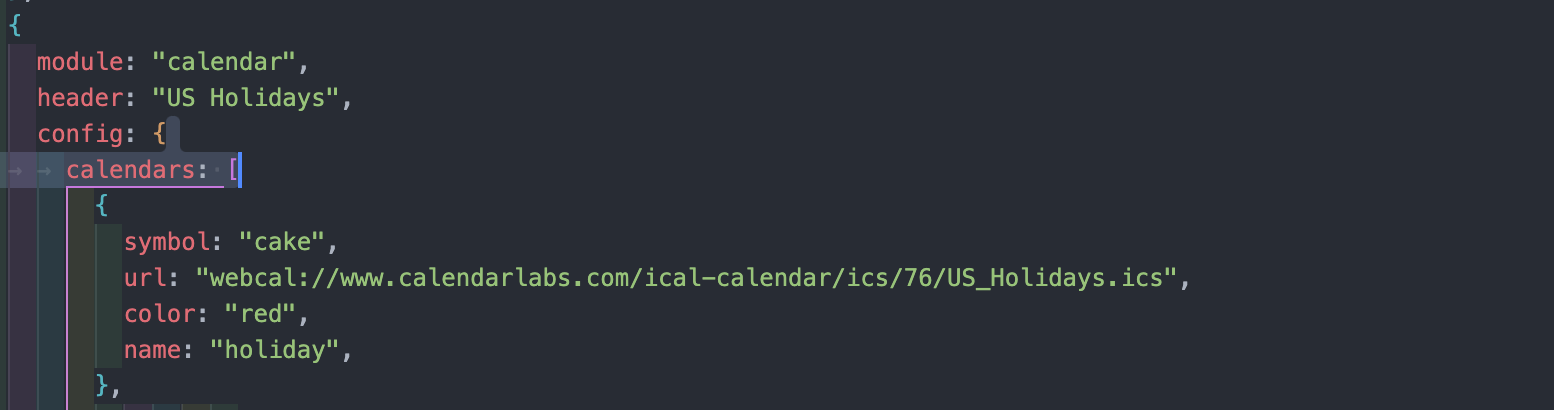
Or you can transform data of event itself by
eventTransformerproperty, like this;
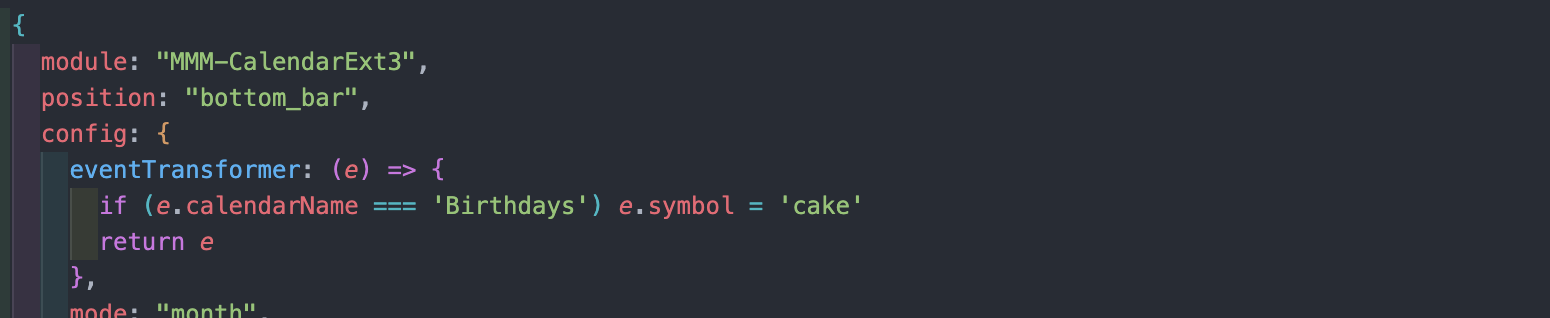
I recommend prior.
-
How do i add the week number in a own colum, not in first monday. As this is taking up space in colum for monday.
Would like to have in it´s own colum. As i understand i will need to do something in custom.css but unsure how to resolve this.Any one have a solution for this?
-
@fedale it only shows in the header of the 1st day of the week.
you cannot use CSS to create another column,
one would have to change the code -
Okay so it´s not in the css. Thought i had something todo with the weeks mark one. As this can change colour and other things if i don´t recall wrong.
I saw it like this before https://imgur.com/mwwPwEl
Thats why i though this was possible.I have it 1st day of the week now. And if displayed more than 3-4 items in the 1st day of the week. Then not all items will show. due to the week number takes up a slot there.
As i am showing 3 weeks at time i have a amount of space at liberty.But i really like the week number ;)
-
@fedale i only see the wn 42 in the header of the 1st day of the week cell, same as the examples in the doc
-
New to MMM-CalendarExt3 so perhaps just missing the obvious… how do I get event locations to show up? In Ext2 there was a hidden div that could be shown via CSS if I recal, but I don’t see that with Ext3?
Other question is, is it possible to wrap longer event title names? I see the default calendar module has options around this, but they don’t seem to impact what Ext3 is doing, which I suppose makes sense.
-
@fedale
For CX2, I thought it was not pretty to have the week number column separately, and it is a bit of waste to occupy the expensive real estate of the MM screen, so in CX3, I put the week number into the cell as small as possible.
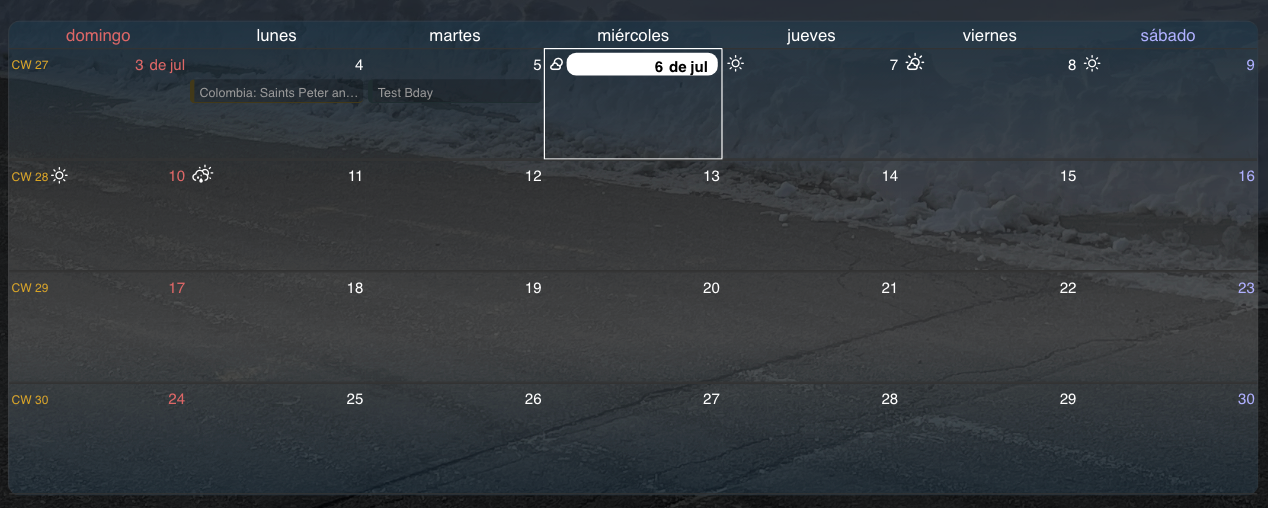
Conclusively, a separated week number column is not possible in CX3 atm, And I think it would be undesirable, so I’ll not consider it.
-
Ok thanks for the feedback.
I have another question
The new calendarExt3 and the i cant seem to get this transform fuction to work anymore. I had the transform in the config.js file and the custom.css with different words to get different color on each work, as we have family calendar.
Tried to change it to cx3 without any luck. (/* */ is only to stop the code here.)Example
/*
transform: function(event) {
if (event.title.search(“Jobb”) > -1) {
event.icon = “ic:outline-work-outline”;
event.className = “Jobb”;
}*/
In the custom.css:
/*
}
.CX3 .Jobb.fullday {
background-color:rgba(0,128,128);
color:#000;
}
.CX3 .Jobb {
background-color:rgba(0,128,128);
color:#000;
}*/
-
@fedale
‘eventTransformer’ -
Updated 1.2.5 (2022-11-04)
- Added Display legend of the calendar (
displayLegend: trueand when you set the calendar name on thecalendarmodule) - Fixed Some CSS fixture
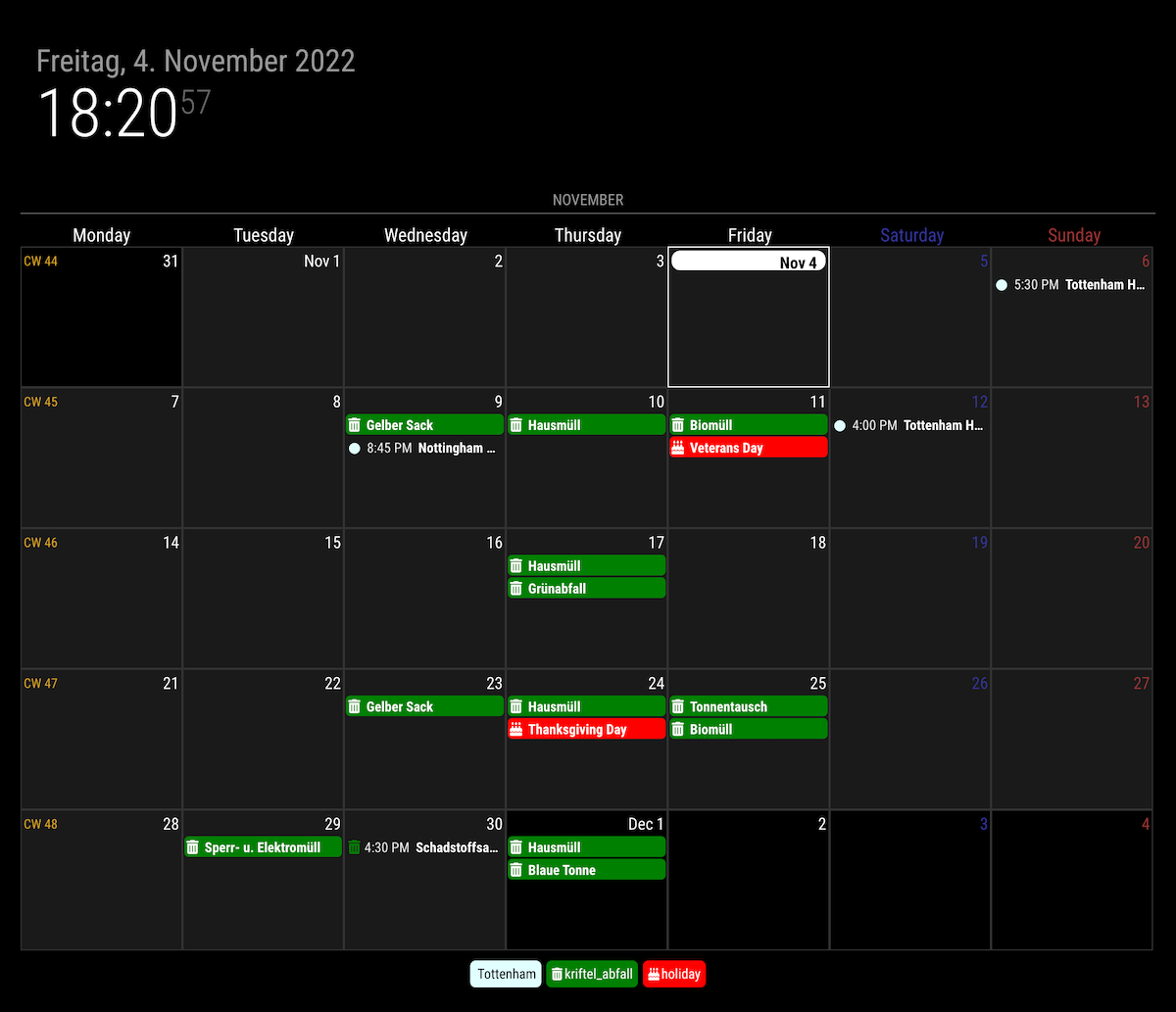
- Added Display legend of the calendar (
-
@MMRIZE I’m trying to update the module but it seems like the update doesn’t work. Maybe I’m doing it wrong? I have copied in the commands I’m using in the terminal. According to that it looks like the update is working fine. But when I start the MagicMirror there is still a notification at the top that the CalendarExt3 module is “2 commits behind the main grenen”.
Also I can’t display the legend when I insert this under the config in the CalendarExt3 module.lilleberg@raspberrypi:~ $ cd ~/MagicMirror/modules/MMM-CalendarExt3 lilleberg@raspberrypi:~/MagicMirror/modules/MMM-CalendarExt3 $ git pull Updating 04883bc..ecd6b7a error: Your local changes to the following files would be overwritten by merge: MMM-CalendarExt3.css MMM-CalendarExt3.js Please commit your changes or stash them before you merge. Aborting lilleberg@raspberrypi:~/MagicMirror/modules/MMM-CalendarExt3 $ npm install up to date, audited 1 package in 598ms found 0 vulnerabilities

Hello! It looks like you're interested in this conversation, but you don't have an account yet.
Getting fed up of having to scroll through the same posts each visit? When you register for an account, you'll always come back to exactly where you were before, and choose to be notified of new replies (either via email, or push notification). You'll also be able to save bookmarks and upvote posts to show your appreciation to other community members.
With your input, this post could be even better 💗
Register Login