Read the statement by Michael Teeuw here.
Error with GooglePhotos API
-
@sdetweil just create new credentials and see ;)
For old compatibility:

-
@bugsounet so it should have worked for either type
-
I’m sorry. what should I do?
The credentials.json file is generated automatically from the google developers console… :astonished_face: -
@dum @bugsounet suggests you pick a different app type, and download a new credentials file
-
@sdetweil thanks for the suggestion, I tried “desktop app” with same result.
the other app types require more data which I dont know how to fill. -
@dum u need to pick Web Application (1st entry)
need the redirect uri…
where on your system can the api call back to put up the verification screen
should work… its all fake…
-
thanks. I understand I need to write “localhost” the same as you have done.
But no luck. still error in generate_token:pi-photoframe@raspberrypi:~/MagicMirror/modules/MMM-GooglePhotos $ node generate_token.js [GPHOTOS:CORE] TypeError: Cannot read properties of undefined (reading 'client_id') /home/pi-photoframe/MagicMirror/modules/MMM-GooglePhotos/GPhotos.js:133 throw e ^ TypeError: Cannot read properties of undefined (reading 'client_id') at new Auth (/home/pi-photoframe/MagicMirror/modules/MMM-GooglePhotos/GPhotos.js:35:44) at GPhotos.onAuthReady (/home/pi-photoframe/MagicMirror/modules/MMM-GooglePhotos/GPhotos.js:130:14) at GPhotos.generateToken (/home/pi-photoframe/MagicMirror/modules/MMM-GooglePhotos/GPhotos.js:141:10) at Object.<anonymous> (/home/pi-photoframe/MagicMirror/modules/MMM-GooglePhotos/generate_token.js:10:9) at Module._compile (node:internal/modules/cjs/loader:1165:14) at Object.Module._extensions..js (node:internal/modules/cjs/loader:1219:10) at Module.load (node:internal/modules/cjs/loader:1043:32) at Function.Module._load (node:internal/modules/cjs/loader:878:12) at Function.executeUserEntryPoint [as runMain] (node:internal/modules/run_main:81:12) at node:internal/main/run_main_module:22:47 -
By the way!!! I can start magic mirror… but I’m really trying to set a google photos photframe… the rest of the modules can be checked later.
-
@dum said in Error with GooglePhotos API:
node generate_token.js
ah, you should be using
node generate_token_v2.js
from the doc at
https://github.com/hermanho/MMM-GooglePhotosNow, open your termial cd ~/MagicMirror/modules/MMM-GooglePhotos node generate_token_v2.js -
@sdetweil thanks, next step passed using “Desktop app”
But now, google blocks the access even when I try to grant it:
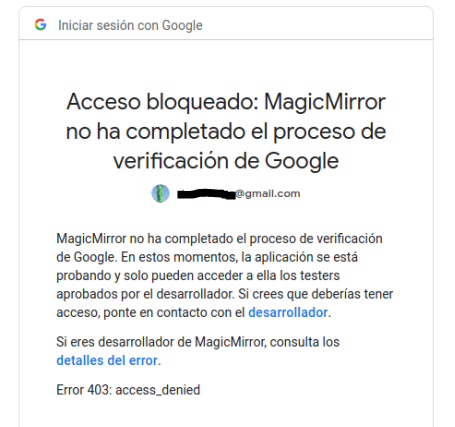
-
@dum u don’t want desktop. you want web
-
This post is deleted! -
@sdetweil
in
https://github.com/hermanho/MMM-GooglePhotos
they say crearly and as “IMPORTANT!!” to select desktop :dizzy_face: :face_with_monocle:

-
So… select it… and apply the rules!
What do you want us to tell you…(I forget that I work with the google team!)
Do it yourself :)
-
dear @bugsounet & @sdetweil
thanks for your support, I didn’t mean to be rude, I suppose that I was frustrated for all the time I spent, while you were trying to help someone that you didn’t know and without experience :confounded_face:
But finally I made it work!!!
For future readers that may have my same problem, following:
https://github.com/hermanho/MMM-GooglePhotosFinally I used “desktop app”, but the biggest issue was to allow the user:
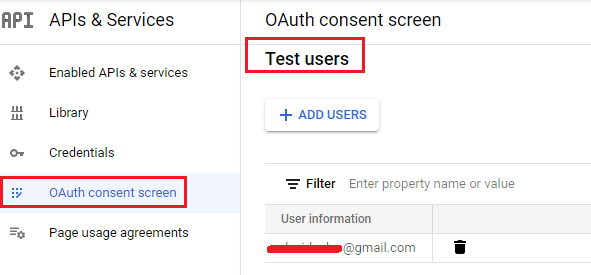
-
@dum cool. never had to do that

Hello! It looks like you're interested in this conversation, but you don't have an account yet.
Getting fed up of having to scroll through the same posts each visit? When you register for an account, you'll always come back to exactly where you were before, and choose to be notified of new replies (either via email, or push notification). You'll also be able to save bookmarks and upvote posts to show your appreciation to other community members.
With your input, this post could be even better 💗
Register Login