Read the statement by Michael Teeuw here.
MMM-InternetMonitor
-
Hi, I’m having issues with the above module. It just shows up a line with Internet Monitor on the screen (header), but nothing else?
Any thoughts?{
module: ‘internet-monitor’,
position: ‘top_left’,
header: ‘Internet Monitor’,
config: {
type: ‘minimal’,
maxTime: 20000,
updateInterval: 50000,
verbose: false,
displayStrength: false,
displaySpeed: false,
strengthIconSize: 80,
maxGaugeScale:1000,
},
}, -
@Bungle68 which are you using? see
https://forum.magicmirror.builders/topic/625/internet-monitor/104?_=1669937006036 -
-
@Bungle68 np… one thing… when u post config, please use the code block markers…
paste the text,
select it all
hit the button above that looks like </> -
@sdetweil here, let’s try again
code_text { module: ‘internet-monitor’, position: ‘top_left’, header: ‘Internet Monitor’, config: { type: ‘’, serverId: “53937”, maxTime: 20000, updateInterval: 30000, verbose: false, displayStrength: false, displaySpeed: true, strengthIconSize: 80, maxGaugeScale: 1000, wifiSymbol: { size: 50, fullColour: ‘#3afc25’, almostColour: ‘#ffff0c’, halfColour: ‘#ff1111’ }, }, }, -
@Bungle68 just another quirk… when u copy the previously posted text without the code markers
the " and ’ chars become the word processing style slanted
and THAT will cause a problem if anyone (including you) try to use that info… forum software …
-
@sdetweil always learning 👍
-
@Bungle68 said in MMM-InternetMonitor:
@sdetweil thanks again, I now at last have the small meters showing, but now it’s not registering any speed at all 🤔 @bhepler, any suggestions?
It’s all zero?I tried your configuration on my system and got this:
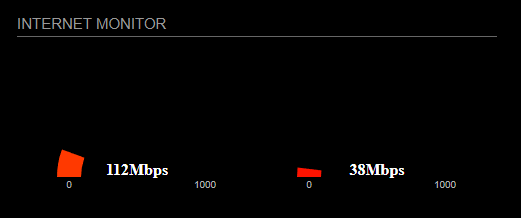
One thing I notice straight away is that your maximum speed is set to 1000 Mb/s. My fiber connection is rated at like 1/10th of that speed. I don’t know what kind of internet connection you have running to your house, but my guess is that you’re not seeing any data because your connection is just a sliver of the available graph.
Try this: set the
maxGuageScaleto 100 in yourconfig.jsentry. -
@bhepler
Hi - I am looking to replace my last mirror build with an updated one.this module is throwing an error on my install. I suspect I must have gone astray in the install?
I started out with a clean install of raspbian and magic mirror
Started it up with the default settings and it seems to work fineThis was the first module I added
Commands I issued were:
-
cd MagicMirror/modules
-
git clone https://github.com/BrianHepler/internet-monitor.git
-
cd internet-monitor
NPM install showed some warnings:added 191 packages, and audited 192 packages in 3m
9 packages are looking for funding
runnpm fundfor details
3 moderate severity vulnerabilities
To address all issues (including breaking changes), run:
npm audit fix --force
Runnpm auditfor details.
When I NPM start now it throws an error:
[22.01.2023 15:19.07.139] [ERROR] WARNING! Could not load config file. Starting with default configuration. Error found: Error: Cannot find module '/home/richard/MagicMirror/modules/internet-monitor/node_modules/lzma-native/ binding-v4.0.6-electron-v22.0-linux-arm64/lzma_native.node' Require stack: - /home/richard/MagicMirror/modules/internet-monitor/node_modules/lzma-native/index.js - /home/richard/MagicMirror/modules/internet-monitor/node_modules/decompress-tarxz/index.js - /home/richard/MagicMirror/modules/internet-monitor/node_modules/speedtest-net/index.js - /home/richard/MagicMirror/modules/internet-monitor/node_helper.js - /home/richard/MagicMirror/js/app.js - /home/richard/MagicMirror/js/electron.js - /home/richard/MagicMirror/node_modules/electron/dist/resources/default_app.asar/main.js -
-
@Richtw the error is about 20 lines closer to the top
-
@Richtw said in MMM-InternetMonitor:
binding-v4.0.6-electron-v22.0-linux-arm64/lzma_native.node
looks like not built for arm and electron 22…
so, you could try this
create a file in the module home foldercd ~/MagicMirror/modules/internet-monitor touch builditthen nano buildit, and paste this into the editor
#!/bin/bash

if [ ! -f ../../node_modules/.bin/electron-rebuild ]; then
	cd ../..
	npm install electron-rebuild >/dev/null 2>&1
	cd -
fi
../../node_modules/.bin/electron-rebuild
ctrl-o to save, ctrl-x to exit
chmod +x builditthen ./buildit
-
@Richtw - Yeah, that error usually means that there is an error in your
config.jsfile.Couple suggestions:
- Try this out in the MagicMirror folder:
npm run config:check. It will let you know if there are any errors in yourconfig.jsfile. - Post the relevant section of your
config.jsfile in this thread. Be sure to use the markdown features of the forum for readability.
[Dammit, I am about this close to just deleting my repository. It’s not my module and I’m sick of fixing it.]
- Try this out in the MagicMirror folder:
-
@bhepler
thanks everyone for all the suggestions. Still stuck:
For the suggestion - @Richtw the error is about 20 lines closer to the top - Here’s the top
richard@raspberrypi:~/MagicMirror/config $ npm startmagicmirror@2.22.0 start
DISPLAY=“${DISPLAY:=:0}” ./node_modules/.bin/electron js/electron.js[24.01.2023 17:51.15.999] [LOG] Starting MagicMirror: v2.22.0
[24.01.2023 17:51.16.006] [LOG] Loading config …
[24.01.2023 17:51.16.014] [LOG] Loading module helpers …
[24.01.2023 17:51.16.017] [LOG] No helper found for module: alert.
[24.01.2023 17:51.16.053] [LOG] Initializing new module helper …
[24.01.2023 17:51.16.054] [LOG] Module helper loaded: updatenotification
[24.01.2023 17:51.16.056] [LOG] No helper found for module: clock.
[24.01.2023 17:51.16.534] [LOG] Initializing new module helper …
[24.01.2023 17:51.16.535] [LOG] Module helper loaded: calendar
[24.01.2023 17:51.17.618] [ERROR] WARNING! Could not load config file. Starting with default configuration. Error found: Error: Cannot find module ‘/home/richard/MagicMirror/modules/internet-monitor/node_modules/lzma-native/binding-v4.0.6-electron-v22.0-linux-arm64/lzma_native.node’For the suggestion - npm run config:check. I ran it and it did not find anything
Your configuration file doesn’t contain syntax errors :)Here’s my config file
{
                        module: 'internet-monitor',
                        position: 'upper_third',
                        header: 'Internet Monitor',
                        config:{
                                type: '',
                                maxTime: 20000,
                                updateInterval: 30000,
                                verbose: false,
                                displayStrength: true,
                                displaySpeed: true,
                                strengthIconSize: 80,
                                maxGuageScale: 1000,
                        }
                },
I tried that buildit script but it kicked back with:
./buildit: line 8: …/…/node_modules/.bin/electron-rebuild: Permission deniedRunning with sudo gave same result
-
@Richtw can you show results of
ls ~/MagicMirror/node_modules/.bin/electron-rebuild -laF -
@sdetweil said in MMM-InternetMonitor:
ls ~/MagicMirror/node_modules/.bin/electron-rebuild -laF
thanks for the reply!
richard@raspberrypi:~/MagicMirror $ ls ~/MagicMirror/node_modules/.bin/electron-rebuild -laF lrwxrwxrwx 1 richard richard 34 Jan 24 17:57 /home/richard/MagicMirror/node_modules/.bin/electron-rebuild -> ../electron-rebuild/lib/src/cli.js -
@Richtw weird.
edit the buildit script we wrote and add
-bat end of the last line, w a space before it. see if we can find where it is have permissions error
-
@sdetweil Here’s the script I’m running
!/bin/bash

if [ ! -f ../../node_modules/.bin/electron-rebuild ]; then
        cd ../..
        npm install electron-rebuild >/dev/null 2>&1
        cd -
fi
../../node_modules/.bin/electron-rebuild -b
Here’s the result
richard@raspberrypi:~/MagicMirror/modules/internet-monitor $ sudo ./buildit ./buildit: line 8: ../../node_modules/.bin/electron-rebuild: Permission denied -
@Richtw sorry. I do not understand the problem jetey, and cannot reproduce it on my own
Hello! It looks like you're interested in this conversation, but you don't have an account yet.
Getting fed up of having to scroll through the same posts each visit? When you register for an account, you'll always come back to exactly where you were before, and choose to be notified of new replies (either via email, or push notification). You'll also be able to save bookmarks and upvote posts to show your appreciation to other community members.
With your input, this post could be even better 💗
Register Login