MagicMirror Forum
    • Recent
    • Tags
    • Unsolved
    • Solved
    • MagicMirror² Repository
    • Documentation
    • 3rd-Party-Modules
    • Donate
    • Discord
    • Register
    • Login
    A New Chapter for MagicMirror: The Community Takes the Lead
    Read the statement by Michael Teeuw here.

    Multiple screens fo MM.

    Scheduled Pinned Locked Moved General Discussion
    36 Posts 13 Posters 26.4k Views 15 Watching
    Loading More Posts
    • Oldest to Newest
    • Newest to Oldest
    • Most Votes
    Reply
    • Reply as topic
    Log in to reply
    This topic has been deleted. Only users with topic management privileges can see it.
    • K Offline
      karam @BKeyport
      last edited by

      @BKeyport this answer inspired me to test it, so I have a solution:

      1. create two different folders.
      2. configure each install as you like.
      3. edit each electron file in each folder “js/electron.js”
      4. change the default resolution and position based on your screens.
        here is my config:
      let electronOptionsDefaults = {
                      width: 1280,
                      height: 1024,
                      x: 1366,
                      y: 0,
                                   }
      

      NOTE: there are many better methods (electron-multi-monitor for example) but this is the easiest that I could find

      S 1 Reply Last reply Reply Quote 0
      • S Do not disturb
        sdetweil @karam
        last edited by sdetweil

        @karam u can set the electronOptions in config.js, you don’t need to edit the source file

        then you can do it with one folder,
        and two config files

        environment variable
        MM_CONFIG=config1.js
        for one

        and
        MM_CONFIG=config2.js
        for the other

        all modules for both are installed in modules folder, only ones referenced in config file are used

        installers/mm.sh is the script used by my pm2 setup routine
        copy that to mm2.sh
        and then add the export MM_CONFIG=
        to each

        then copy the pm2_magicmirror.json
        and change the title and the mm.sh filename

        then pm2 start installers/??? (whatever name u copied the json file to for the second mm)
        pm2 save
        then on reboot you will get both

        Sam

        How to add modules

        learning how to use browser developers window for css changes

        C S 2 Replies Last reply Reply Quote 1
        • C Offline
          cburchett @sdetweil
          last edited by

          @sdetweil: can you please share an example? I am not sure how to indicate the secondary display in the config files. Thank you!

          S 1 Reply Last reply Reply Quote 0
          • S Do not disturb
            sdetweil @cburchett
            last edited by

            @cburchett it’s one big display, so you have to tell it how far from the left edge to start this display.
            see
            https://forum.magicmirror.builders/topic/6623/multiple-screens-fo-mm/18?_=1666468889775

            only need x for horizontal monitors
            or y for vertical

            Sam

            How to add modules

            learning how to use browser developers window for css changes

            C 1 Reply Last reply Reply Quote 0
            • S sdetweil referenced this topic on
            • C Offline
              cburchett @sdetweil
              last edited by

              @sdetweil Perfect! Thank you.

              1 Reply Last reply Reply Quote 0
              • S Offline
                Sagar73594 @sdetweil
                last edited by

                @sdetweil said in Multiple screens fo MM.:

                MM_CONFIG=config1.js

                Can you please elaborate, a little bit more? I’m trying this, but not understood well.
                Thank You.

                S 1 Reply Last reply Reply Quote 0
                • S Do not disturb
                  sdetweil @Sagar73594
                  last edited by sdetweil

                  @Sagar73594 if you have a bash or sh script, you can set environment variables that the MM code will read

                  export MM_CONFIG=??? filename

                  will cause filename to be used as the name of the file to read for configuration (replacing config.js)

                  if you use my install script and selected use pm2, then the script is
                  ~/MagicMirror/installers/mm.sh

                  before the line
                  npm start
                  add the line above to set the file name

                  so, by using different config files, one could launch multiple instances of MagicMirror from the same set of files.
                  some could target one display and others another, and some could be server only as weill.

                  one could also install 50 modules and use the same 25 in all instances and some mix of the others in different instances, all from the same set of files in the MagicMirror folder tree.

                  Sam

                  How to add modules

                  learning how to use browser developers window for css changes

                  C 2 Replies Last reply Reply Quote 0
                  • C Offline
                    chichi1887 @sdetweil
                    last edited by

                    @sdetweil said in Multiple screens fo MM.:

                    @Sagar73594 if you have a bash or sh script, you can set environment variables that the MM code will read

                    export MM_CONFIG=??? filename

                    will cause filename to be used as the name of the file to read for configuration (replacing config.js)

                    if you use my install script and selected use pm2, then the script is
                    ~/MagicMirror/installers/mm.sh

                    before the line
                    npm start
                    add the line above to set the file name

                    so, by using different config files, one could launch multiple instances of MagicMirror from the same set of files.
                    some could target one display and others another, and some could be server only as weill.

                    one could also install 50 modules and use the same 25 in all instances and some mix of the others in different instances, all from the same set of files in the MagicMirror folder tree.

                    1 Reply Last reply Reply Quote 0
                    • C Offline
                      chichi1887 @sdetweil
                      last edited by

                      @sdetweil said in Multiple screens fo MM.:

                      @Sagar73594 if you have a bash or sh script, you can set environment variables that the MM code will read

                      export MM_CONFIG=??? filename

                      will cause filename to be used as the name of the file to read for configuration (replacing config.js)

                      if you use my install script and selected use pm2, then the script is
                      ~/MagicMirror/installers/mm.sh

                      before the line
                      npm start
                      add the line above to set the file name

                      so, by using different config files, one could launch multiple instances of MagicMirror from the same set of files.
                      some could target one display and others another, and some could be server only as weill.

                      one could also install 50 modules and use the same 25 in all instances and some mix of the others in different instances, all from the same set of files in the MagicMirror folder tree.

                      Hi Sagar,

                      Hello Sagar, thank you for your guidance. Unfortunately, I keep encountering an error upon startup. A version starts automatically with the familiar error message “npm run config: check”. I stop the MagicMirror and manually start it from the MagicMirror folder with npm start, but then it allegedly cannot find the config. As you described, I created config1 and config2, then edited installers/mm.sh and mm2.sh. It looks something like this now:
                      cd ~/MagicMirror
                      export MM_CONFIG=config2.js
                      DISPLAY=:2 npm start

                      I also copied the pm2_MagicMirros.json once and simply appended a “1” to the name. The configuration looks like this:
                      “apps” : [{
                      “name” : “MagicMirror”,
                      “script” : “/home/pi/MagicMirror/installers/mm.sh”,
                      “watch” : [“/home/pi/MagicMirror/config/config1.js”]

                      Do you perhaps have any tips for me on what I might be doing wrong?

                      S 1 Reply Last reply Reply Quote 0
                      • S Do not disturb
                        sdetweil @chichi1887
                        last edited by sdetweil

                        @chichi1887 well, you need two pm2_MagcMirror.json, right? and each points to a different mm.sh, right?
                        original
                        pm2_MagicMirror.json

                        "apps" : [{
                        "name" : "MM_Screen1",
                        "script" : "/home/pi/MagicMirror/installers/mm.sh",
                        "watch" : ["/home/pi/MagicMirror/config/config.js"]
                        

                        new pm2_MagicMirror2.json

                        "apps" : [{
                        "name" : "MM_Screen2",
                        "script" : "/home/pi/MagicMirror/installers/mm2.sh",
                        "watch" : ["/home/pi/MagicMirror/config/config2.js"]
                        

                        then
                        pm2 start each json
                        and then pm2 save

                        to test before pm2 start , you can

                        cd ~/MagicMirror
                        installers/mm2.sh
                        

                        or

                        cd ~/MagicMirror
                        installers/mm.sh
                        

                        to start them both, open another terminal window or ssh session, starting one in each

                        ctrl-c in the term window will end that instance

                        Sam

                        How to add modules

                        learning how to use browser developers window for css changes

                        C 1 Reply Last reply Reply Quote 0
                        • C Offline
                          chichi1887 @sdetweil
                          last edited by

                          @sdetweil said in Multiple screens fo MM.:

                          cd ~/MagicMirror
                          installers/mm2.sh

                          Hey,

                          the mm.sh starts without a problem but the second has this
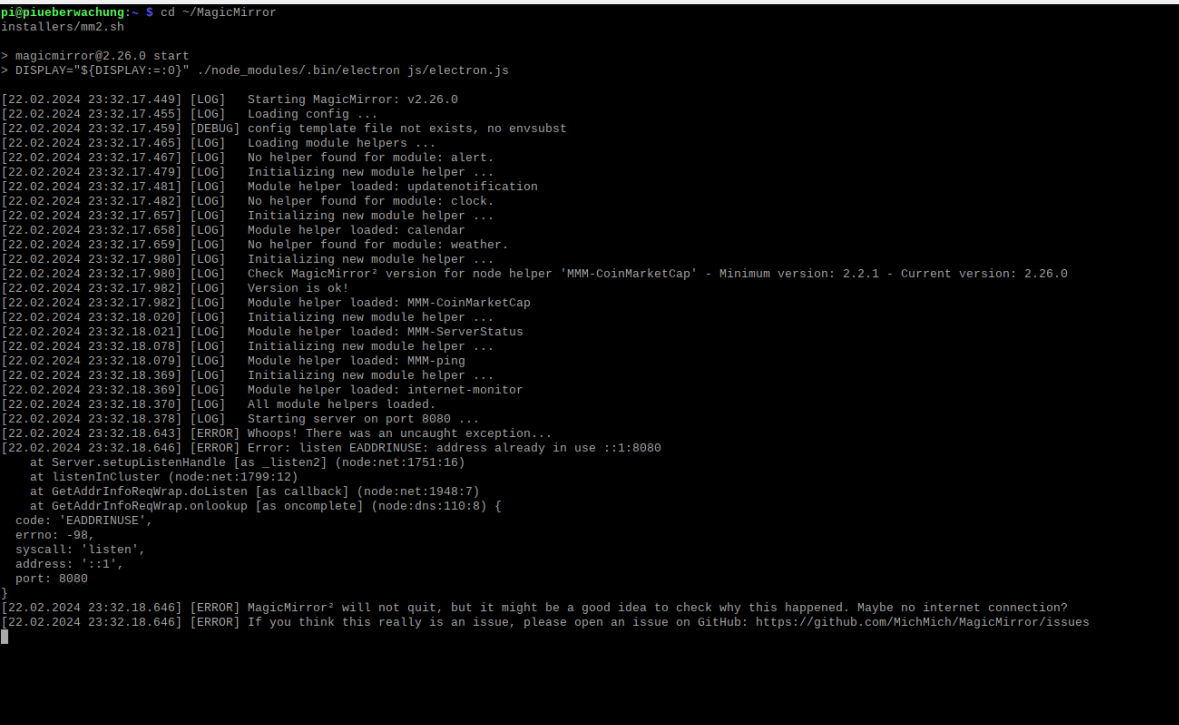
                          1863d5e6-be0a-4a84-9954-d34ffff430c0-image.png

                          all modules that starts on the mm.sh are disable in the mm2 config.
                          Display=0 in both are correkt or the second must be nr.1?

                          C 1 Reply Last reply Reply Quote 0
                          • C Offline
                            chichi1887 @chichi1887
                            last edited by

                            When I start the mm2.sh script, despite the correct configuration, it takes the config.js instead of the config2.js. Therefore, it seems unable to start both instances simultaneously because it attempts to open the same config.js. The configuration looks like this in the mm2.sh script:
                            cd ~/MagicMirror
                            export MM_CONFIG=config2.js
                            DISPLAY=:0 npm start

                            the pm2_MagicMirror2.json is copy and paste from u ;-)

                            S 1 Reply Last reply Reply Quote 0
                            • S Do not disturb
                              sdetweil @chichi1887
                              last edited by

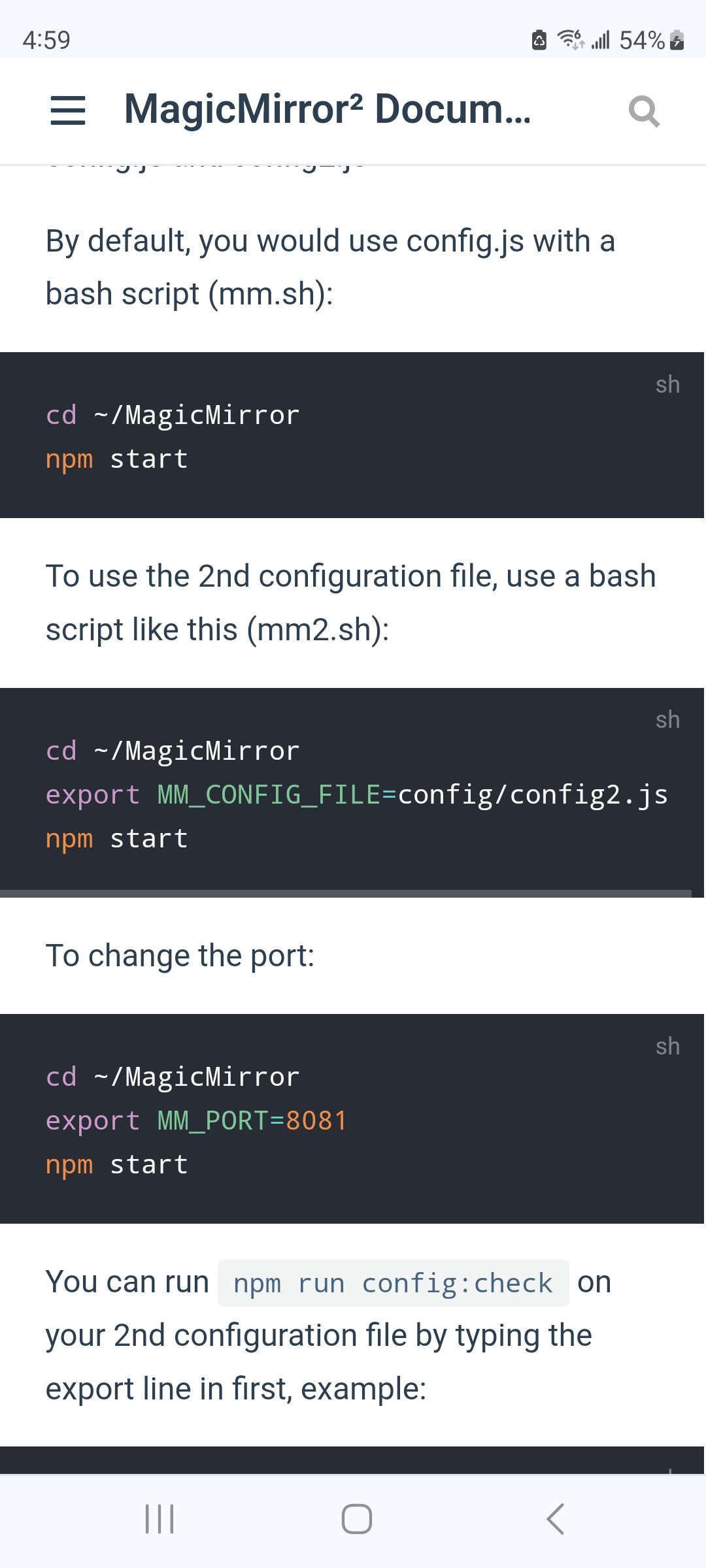
                              @chichi1887 see this from the doc

                              Screenshot_20240222_165935_Chrome.jpg

                              Sam

                              How to add modules

                              learning how to use browser developers window for css changes

                              C 1 Reply Last reply Reply Quote 0
                              • C Offline
                                chichi1887 @sdetweil
                                last edited by

                                @sdetweil
                                thx so much, both starts, only problem both start at the same Screen and i can’t change the position or start screen. Must change the Display from 0 to 1 oder in the mm.sh config?

                                S 1 Reply Last reply Reply Quote 0
                                • S Do not disturb
                                  sdetweil @chichi1887
                                  last edited by sdetweil

                                  @chichi1887 yes , Linux treats the two monitors as one big display, so you have to add

                                  electronOptions:{ left:xxxx}
                                  above the modules:[] list

                                  to one of the config.js to move the second mm over one screen width size

                                  if vertical, then it’s y:xxxx

                                  Sam

                                  How to add modules

                                  learning how to use browser developers window for css changes

                                  BKeyportB C 2 Replies Last reply Reply Quote 0
                                  • BKeyportB Offline
                                    BKeyport Module Developer @sdetweil
                                    last edited by

                                    @sdetweil said in Multiple screens fo MM.:

                                    electronOptions:{ left:xxxx}
                                    above the modules:[] list

                                    if vertical, then it’s y:xxxx

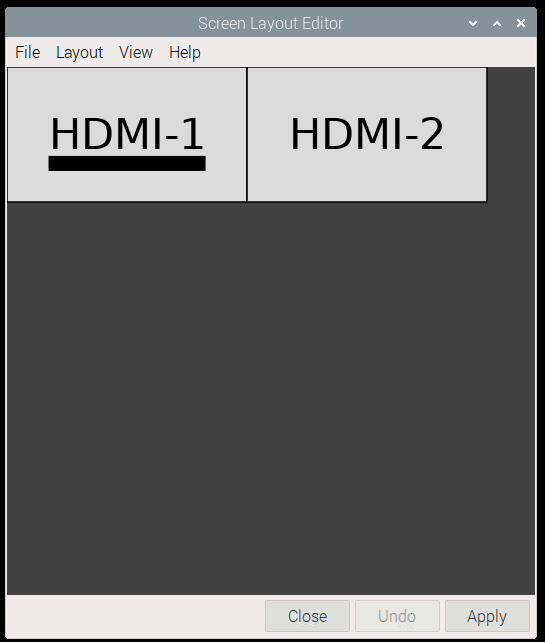
                                    Live example - I use two 1920x1080 monitors, my system is using latest OS, but with X11 turned on rather than Wayland for compatibility reasons to some background tasks:

                                    var config = {
                                    	address: "0.0.0.0",
                                    	port: 8081, 
                                    	electronOptions: { x: 1920 },  // Right here! 
                                    	ipWhitelist: [], 
                                    	language: "en",
                                    	timeFormat: 12,
                                    	units: "imperial",
                                    	customCss: "css/custom2.css",
                                    	modules: [
                                    

                                    1c41beef-1c43-4b99-9f28-95964cbf3989-image.png

                                    The "E" in "Javascript" stands for "Easy"

                                    1 Reply Last reply Reply Quote 0
                                    • C Offline
                                      chichi1887 @sdetweil
                                      last edited by

                                      @sdetweil thx u so much. All Modules and configs works Perfect. thx

                                      S 1 Reply Last reply Reply Quote 1
                                      • S Do not disturb
                                        sdetweil @chichi1887
                                        last edited by

                                        @chichi1887 awesome. thanks for the feedback

                                        Sam

                                        How to add modules

                                        learning how to use browser developers window for css changes

                                        1 Reply Last reply Reply Quote 0

                                        Hello! It looks like you're interested in this conversation, but you don't have an account yet.

                                        Getting fed up of having to scroll through the same posts each visit? When you register for an account, you'll always come back to exactly where you were before, and choose to be notified of new replies (either via email, or push notification). You'll also be able to save bookmarks and upvote posts to show your appreciation to other community members.

                                        With your input, this post could be even better 💗

                                        Register Login

                                        • 1
                                        • 2
                                        • 2 / 2
                                        • First post
                                          Last post
                                        Enjoying MagicMirror? Please consider a donation!
                                        MagicMirror created by Michael Teeuw.
                                        Forum managed by Sam, technical setup by Karsten.
                                        This forum is using NodeBB as its core | Contributors
                                        Contact | Privacy Policy