MagicMirror Forum
    • Recent
    • Tags
    • Unsolved
    • Solved
    • MagicMirror² Repository
    • Documentation
    • 3rd-Party-Modules
    • Donate
    • Discord
    • Register
    • Login
    A New Chapter for MagicMirror: The Community Takes the Lead
    Read the statement by Michael Teeuw here.

    MagicMirror does not start in full screen

    Scheduled Pinned Locked Moved Solved Troubleshooting
    42 Posts 2 Posters 26.5k Views 2 Watching
    Loading More Posts
    • Oldest to Newest
    • Newest to Oldest
    • Most Votes
    Reply
    • Reply as topic
    Log in to reply
    This topic has been deleted. Only users with topic management privileges can see it.
    • S Do not disturb
      sdetweil @drx1984
      last edited by

      @drx1984 try this

      stop MagicMirror

      pm2 stop all
      

      then

       cd ~
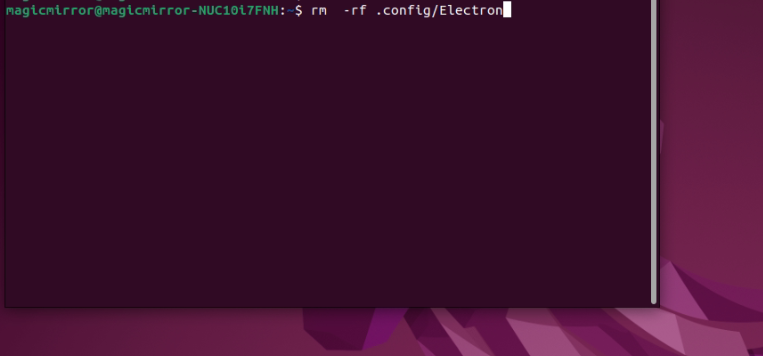
      rm  -rf .config/Electron
      

      note the dot in front of config

      then restart MagicMirror

      Sam

      How to add modules

      learning how to use browser developers window for css changes

      D S 2 Replies Last reply Reply Quote 0
      • D Offline
        drx1984 @sdetweil
        last edited by

        @sdetweil
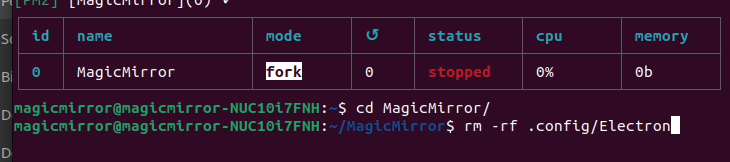
        Do you mean under the path execute this command?
        like on the picture?
        So:MM-3.png ??
        1 Reply Last reply Reply Quote 0
        • S Do not disturb
          sdetweil @sdetweil
          last edited by

          @sdetweil said in MagicMirror does not start in full screen:

          cd MagicMirror

          no…
          I said

          cd ~
          

          this means

          change to the users home folder

          Sam

          How to add modules

          learning how to use browser developers window for css changes

          D 1 Reply Last reply Reply Quote 0
          • D Offline
            drx1984 @sdetweil
            last edited by

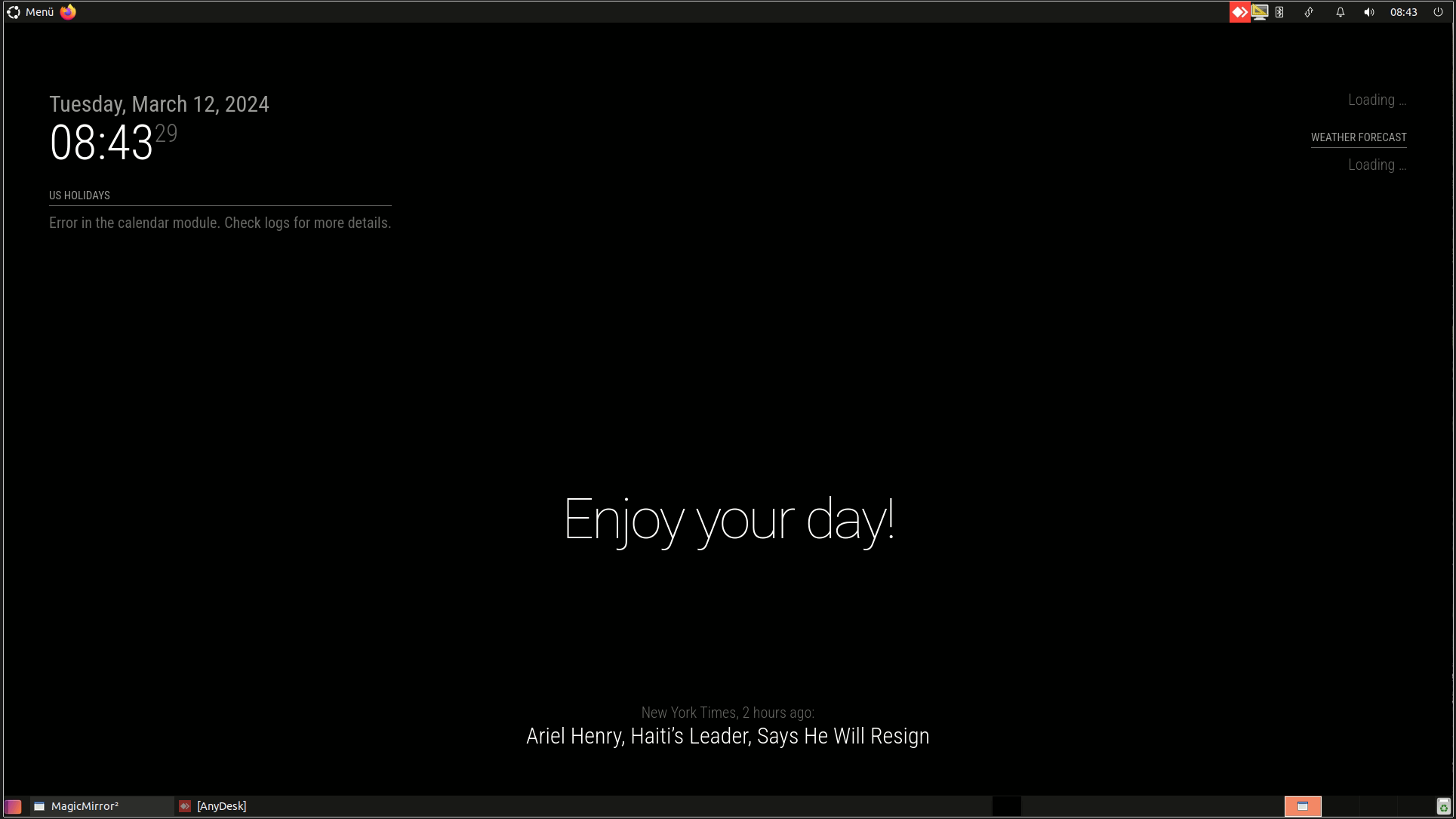
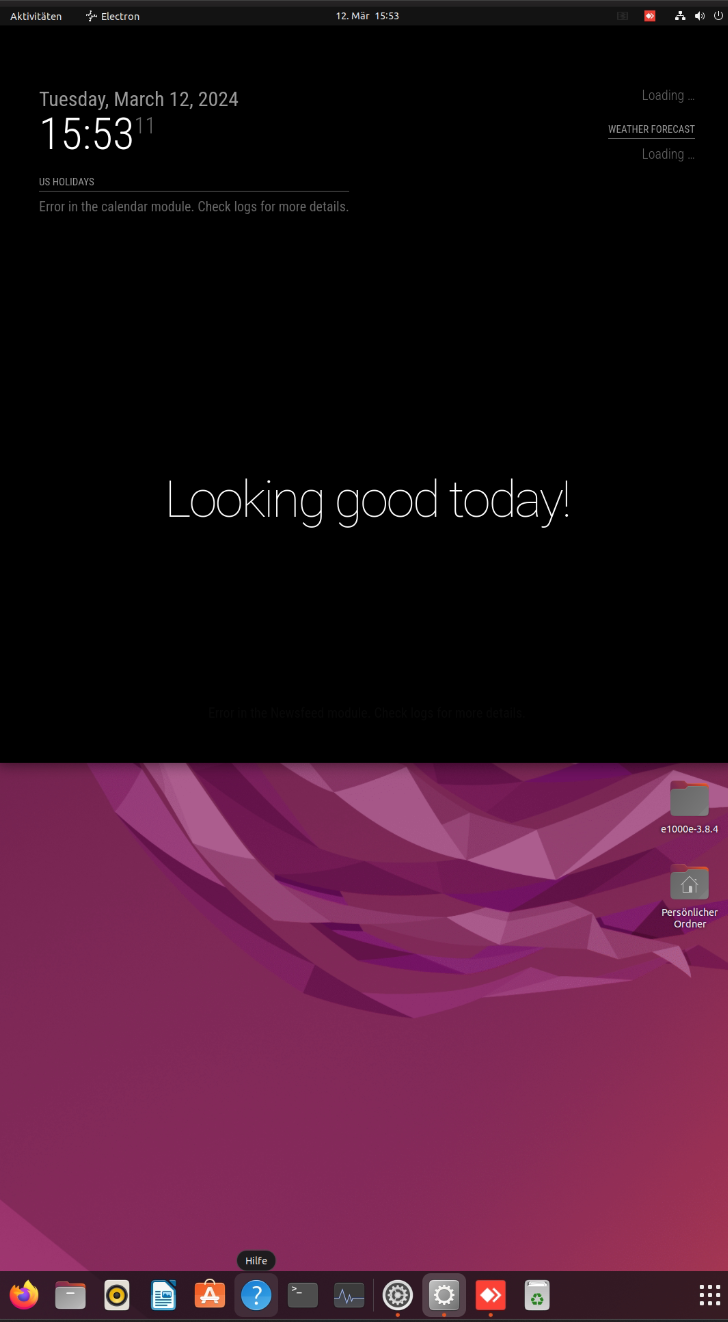
            @sdetweil ah ok sry, now I’ve done it like this and when I restart the Intel Nuc, the MagicMirror still doesn’t start in full screen.
            mm-4.png

            mm-5.png

            why is this happening:-(

            S 1 Reply Last reply Reply Quote 0
            • S Do not disturb
              sdetweil @drx1984
              last edited by

              @drx1984 because the title bar is showing, is this thru vnc?

              vnc sets its own screen size and doesn’t tell the truth …

              not you CAN override in the config.js
              in the same group as address add

              electronOptions:{width:xxxx, height:yyyy},
              

              where xxxx and yyyy are the width and height of the screen

              Sam

              How to add modules

              learning how to use browser developers window for css changes

              D 1 Reply Last reply Reply Quote 0
              • D Offline
                drx1984 @sdetweil
                last edited by

                @sdetweil said in MagicMirror does not start in full screen:

                electronOptions:{width:xxxx, height:yyyy},

                The AnyDesk program is installed.
                Should I uninstall this?? I broke the tool to get to IntelNuc.

                can I fix the problem with this entry? and in which line do I add this “electronOptions:{width:xxxx, height:yyyy}” parameter in config.js

                S 1 Reply Last reply Reply Quote 0
                • S Do not disturb
                  sdetweil @drx1984
                  last edited by

                  @drx1984 said in MagicMirror does not start in full screen:

                  can I fix the problem with this entry? and in which line do I add this “electronOptions:{width:xxxx, height:yyyy}” parameter in config.js

                  as I said, in the same group of properties as the address: property

                  Sam

                  How to add modules

                  learning how to use browser developers window for css changes

                  D 1 Reply Last reply Reply Quote 0
                  • D Offline
                    drx1984 @sdetweil
                    last edited by

                    @sdetweil Sorry, I don’t fully understand you. can you enlighten me?

                    S 1 Reply Last reply Reply Quote 0
                    • S Do not disturb
                      sdetweil @drx1984
                      last edited by sdetweil

                      @drx1984
                      anywhere in this group

                      
                      	address: "0.0.0.0", 	// Address to listen on, can be:
                      							// - "localhost", "127.0.0.1", "::1" to listen on loopback interface
                      							// - another specific IPv4/6 to listen on a specific interface
                      							// - "0.0.0.0", "::" to listen on any interface
                      							// Default, when address config is left out or empty, is "localhost"
                      	port: 8090,
                      	basePath: "/", 	// The URL path where MagicMirror² is hosted. If you are using a Reverse proxy
                      					// you must set the sub path here. basePath must end with a /
                      	ipWhitelist: [], 	// Set [] to allow all IP addresses
                      															// or add a specific IPv4 of 192.168.1.5 :
                      															// ["127.0.0.1", "::ffff:127.0.0.1", "::1", "::ffff:192.168.1.5"],
                      															// or IPv4 range of 192.168.3.0 --> 192.168.3.15 use CIDR format :
                      															// ["127.0.0.1", "::ffff:127.0.0.1", "::1", "::ffff:192.168.3.0/28"],
                      
                      	useHttps: false, 		// Support HTTPS or not, default "false" will use HTTP
                      	httpsPrivateKey: "", 	// HTTPS private key path, only require when useHttps is true
                      	httpsCertificate: "", 	// HTTPS Certificate path, only require when useHttps is true
                      
                      	language: "en",
                      	locale: "en-US",
                      	logLevel: ["INFO", "LOG", "WARN", "ERROR"], // Add "DEBUG" for even more logging
                      	timeFormat: 24,
                      	units: "metric",
                      	// serverOnly:  true/false/"local" ,
                      	// local for armv6l processors, default
                      	//   starts serveronly and then starts chrome browser
                      	// false, default for all NON-armv6l devices
                      	// true, force serveronly mode, because you want to.. no UI on this device
                      

                      Sam

                      How to add modules

                      learning how to use browser developers window for css changes

                      D 1 Reply Last reply Reply Quote 0
                      • D Offline
                        drx1984 @sdetweil
                        last edited by

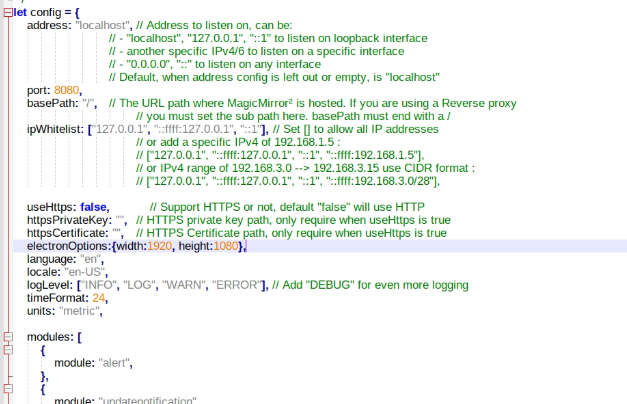
                        @sdetweil Can’t you tell me exactly which line?
                        I have now entered it as shown in the picture but unfortunately it doesn’t work.
                        mm-6.png

                        S 1 Reply Last reply Reply Quote 0
                        • S Do not disturb
                          sdetweil @drx1984
                          last edited by sdetweil

                          @drx1984 in between ANY line in that group… js is a name/value pair, so it doesn’t matter the order…

                          BUT you have the wrong values in portrait mode…

                          height is 1920, width is 1080

                          is it correct on the physical screen?

                          from the eletron doc

                          https://www.electronjs.org/docs/latest/api/browser-window
                          
                          new BrowserWindow([options])
                          options BrowserWindowConstructorOptions (optional)
                          width Integer (optional) - Window's width in pixels. Default is 800.
                          height Integer (optional) - Window's height in pixels. Default is 600.
                          x Integer (optional) - (required if y is used) Window's left offset from screen. Default is to center the window.
                          y Integer (optional) - (required if x is used) Window's top offset from screen. Default is to center the window.
                          useContentSize boolean (optional) - The width and height would be used as web page's size, which means the actual window's size will include window frame's size and be slightly larger. Default is false.
                          center boolean (optional) - Show window in the center of the screen. Default is false.
                          minWidth Integer (optional) - Window's minimum width. Default is 0.
                          minHeight Integer (optional) - Window's minimum height. Default is 0.
                          

                          Sam

                          How to add modules

                          learning how to use browser developers window for css changes

                          D 1 Reply Last reply Reply Quote 0
                          • D Offline
                            drx1984 @sdetweil
                            last edited by

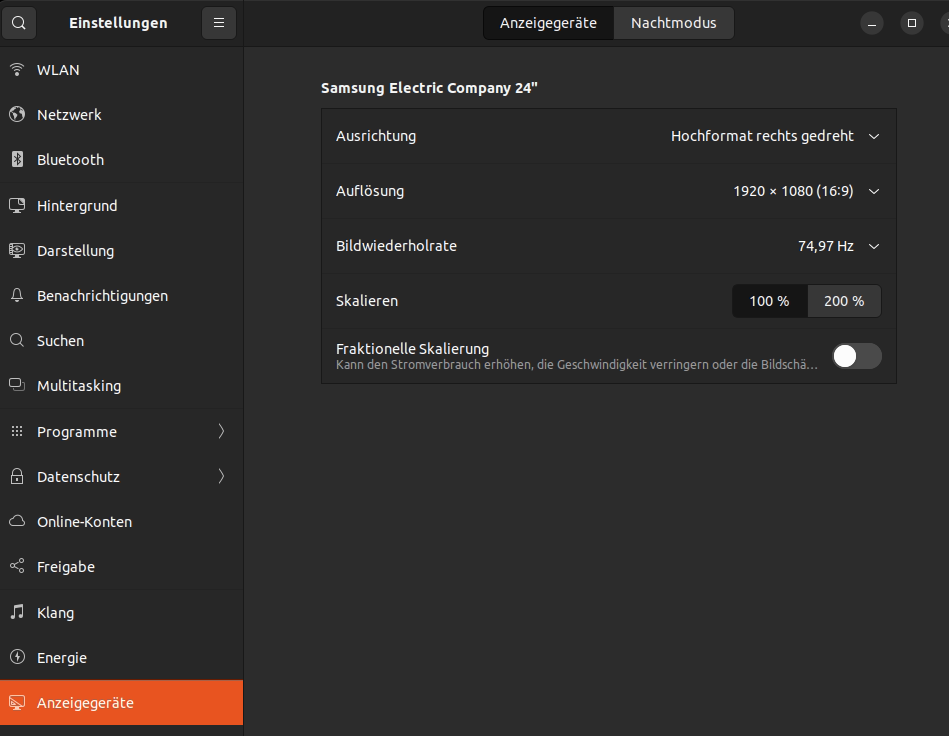
                            @sdetweil yes, the resolution is as follows under system settings:
                            The monitor is a 24 inch/full HD and is set to portrait format.
                            then the values should be correct 1920x1080 right?
                            mm-7.png

                            S 1 Reply Last reply Reply Quote 0
                            • S Do not disturb
                              sdetweil @drx1984
                              last edited by sdetweil

                              @drx1984 wider than taller (1920x1080) (w,h) is landscape mode

                              taller than wider (1080x1920) (w,h) is portrait mode

                              are you trying to do both at the same time?

                              landscape on physical screen and portrait over connection?

                              can’t do that, physical screen wins

                              Sam

                              How to add modules

                              learning how to use browser developers window for css changes

                              D 1 Reply Last reply Reply Quote 0
                              • D Offline
                                drx1984 @sdetweil
                                last edited by

                                @sdetweil
                                Good morning,
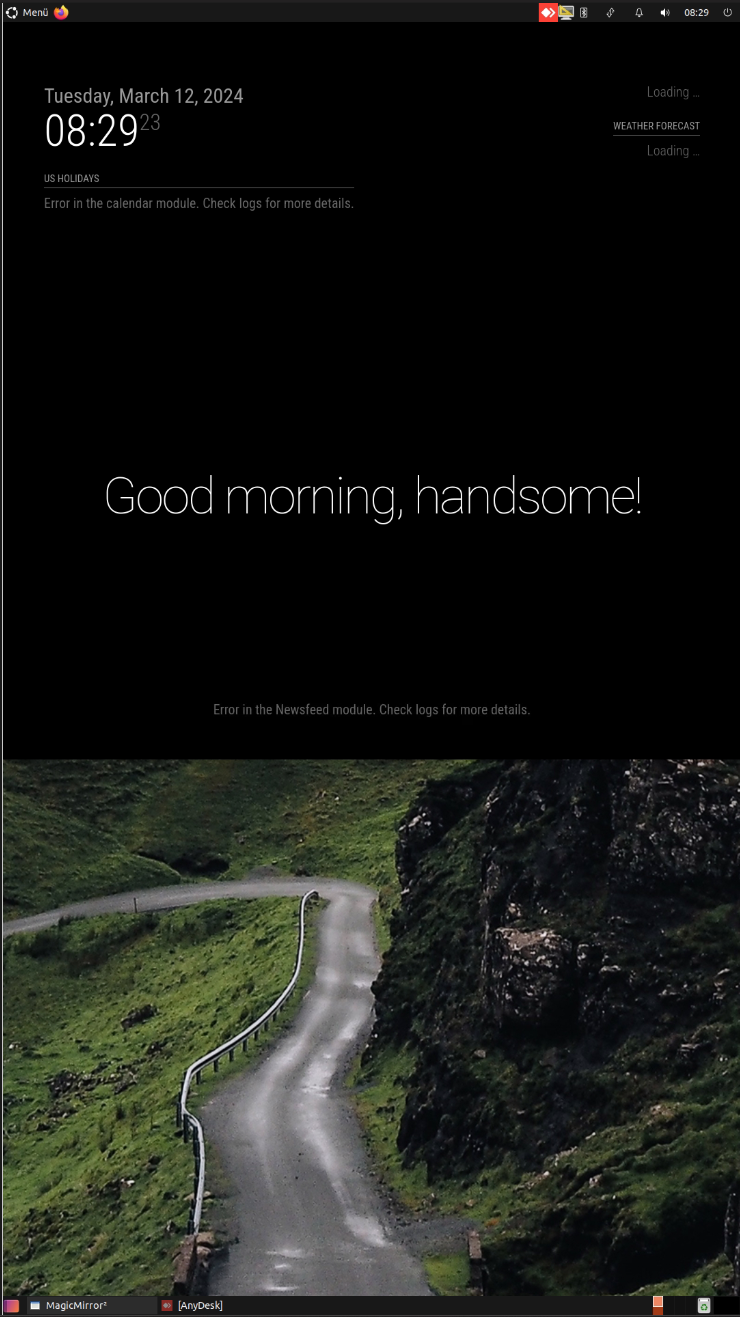
                                So even if I set physical landscape format and restart the system, the MagicMirror doesn’t appear in full screen >> look at the photo I took on my cell phone without Anydesk access.
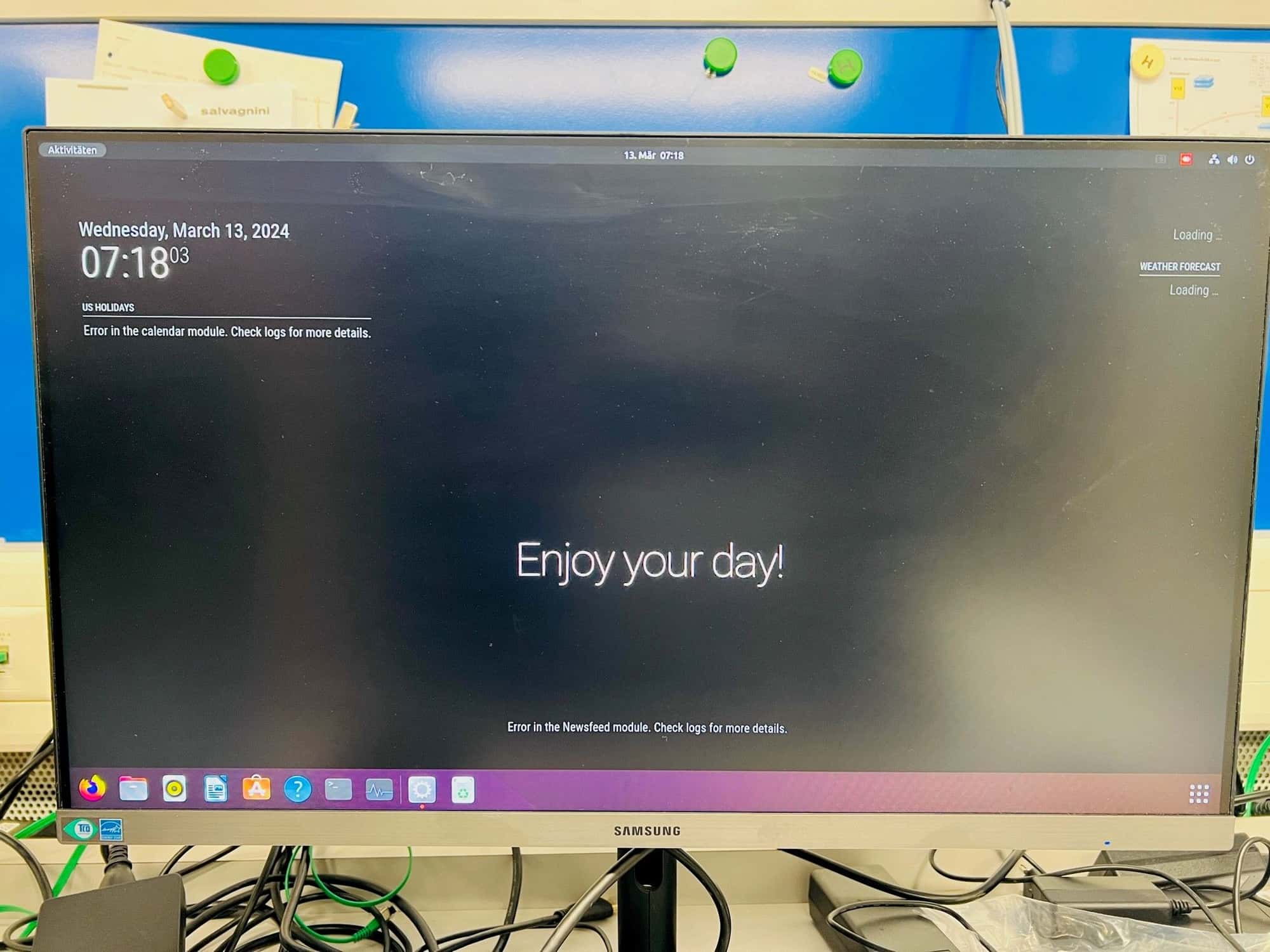
                                mm-quer.jpg

                                And I uploaded a video clip to YouTube: https://www.youtube.com/watch?v=gjiYQ21SoKI

                                And I entered the entry with: electronOptions:{width:xxxx, height:yyyy}:
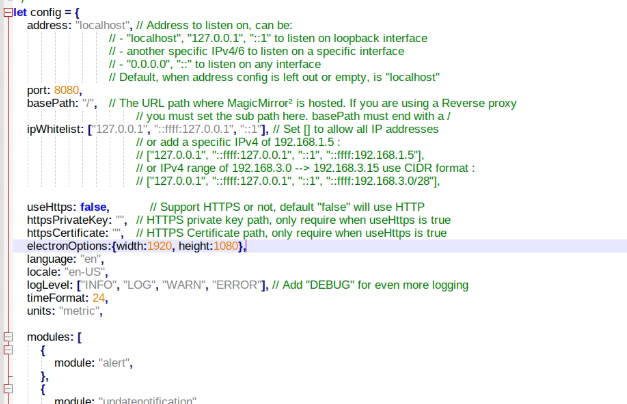
                                mm-6.png

                                Where else can the problem be?
                                Thanks for your help.

                                S 1 Reply Last reply Reply Quote 0
                                • S Do not disturb
                                  sdetweil @drx1984
                                  last edited by

                                  @drx1984 in the electronOptions add at the end

                                  ,fullScreen:true
                                  

                                  note the leading comma, as this will be after the height:1080

                                  Sam

                                  How to add modules

                                  learning how to use browser developers window for css changes

                                  D 1 Reply Last reply Reply Quote 0
                                  • D Offline
                                    drx1984 @sdetweil
                                    last edited by

                                    @sdetweil Is that what you mean>> electronOptions:{width:1920, height:1080, fullScreen:true}, ?
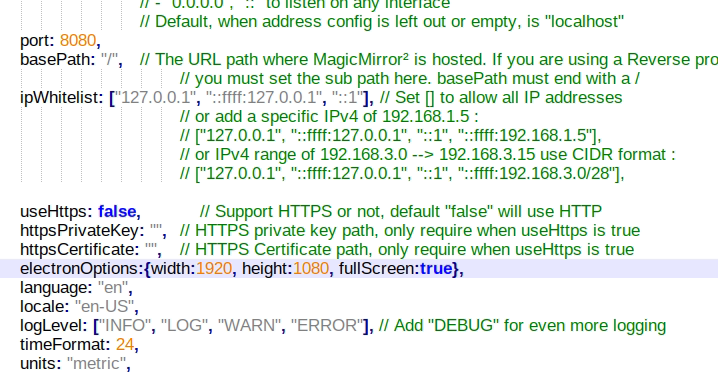
                                    1.png

                                    unfortunately nothing came of it

                                    S 1 Reply Last reply Reply Quote 0
                                    • S Do not disturb
                                      sdetweil @drx1984
                                      last edited by sdetweil

                                      @drx1984 yes…

                                      what OS is this

                                      show results of

                                      lsb_release -a
                                      uname -a
                                      

                                      also, stop MagicMirror and then delete the .config for Electron as before

                                      then restart MagicMirror

                                      Sam

                                      How to add modules

                                      learning how to use browser developers window for css changes

                                      D 1 Reply Last reply Reply Quote 0
                                      • D Offline
                                        drx1984 @sdetweil
                                        last edited by

                                        @sdetweil Unfortunately I have to leave now sry, I’ll get back to you tomorrow.
                                        There is an Ubuntu 22.04.4 installed on an IntelNuc.

                                        I have another YouTube video >you can see how it is briefly in full screen at the start and then the full screen goes away again. Watch the video clip until the end: https://www.youtube.com/watch?v=5fRf2pJuET8

                                        thanks

                                        S 1 Reply Last reply Reply Quote 0
                                        • S Do not disturb
                                          sdetweil @drx1984
                                          last edited by

                                          @drx1984 ok, how are u launching mm?

                                          show results of

                                          pm2 status

                                          Sam

                                          How to add modules

                                          learning how to use browser developers window for css changes

                                          D 1 Reply Last reply Reply Quote 0
                                          • D Offline
                                            drx1984 @sdetweil
                                            last edited by

                                            @sdetweil
                                            Good morning, MagicMirror actually starts when I restart, but I can also start MagicMirror in the terminal with pm2 start.
                                            1.png

                                            If I start the MagicMirror myself via the terminal, everything is displayed in full screen, but not when I reboot.

                                            I installed MagicMirror with this script: bash -c “$(curl -sL https://raw.githubusercontent.com/sdetweil/MagicMirror_scripts/master/raspberry.sh)”

                                            Everything works, except the full screen doesn’t work when IntelNuc is restarted.
                                            2.png

                                            S 1 Reply Last reply Reply Quote 0

                                            Hello! It looks like you're interested in this conversation, but you don't have an account yet.

                                            Getting fed up of having to scroll through the same posts each visit? When you register for an account, you'll always come back to exactly where you were before, and choose to be notified of new replies (either via email, or push notification). You'll also be able to save bookmarks and upvote posts to show your appreciation to other community members.

                                            With your input, this post could be even better 💗

                                            Register Login

                                            • 1
                                            • 2
                                            • 3
                                            • 1 / 3
                                            • First post
                                              Last post
                                            Enjoying MagicMirror? Please consider a donation!
                                            MagicMirror created by Michael Teeuw.
                                            Forum managed by Sam, technical setup by Karsten.
                                            This forum is using NodeBB as its core | Contributors
                                            Contact | Privacy Policy