MagicMirror Forum
    • Recent
    • Tags
    • Unsolved
    • Solved
    • MagicMirror² Repository
    • Documentation
    • 3rd-Party-Modules
    • Donate
    • Discord
    • Register
    • Login
    A New Chapter for MagicMirror: The Community Takes the Lead
    Read the statement by Michael Teeuw here.

    My custom mirror

    Scheduled Pinned Locked Moved Show your Mirror
    16 Posts 5 Posters 8.9k Views 8 Watching
    Loading More Posts
    • Oldest to Newest
    • Newest to Oldest
    • Most Votes
    Reply
    • Reply as topic
    Log in to reply
    This topic has been deleted. Only users with topic management privileges can see it.
    • G Offline
      greedyvegan
      last edited by greedyvegan

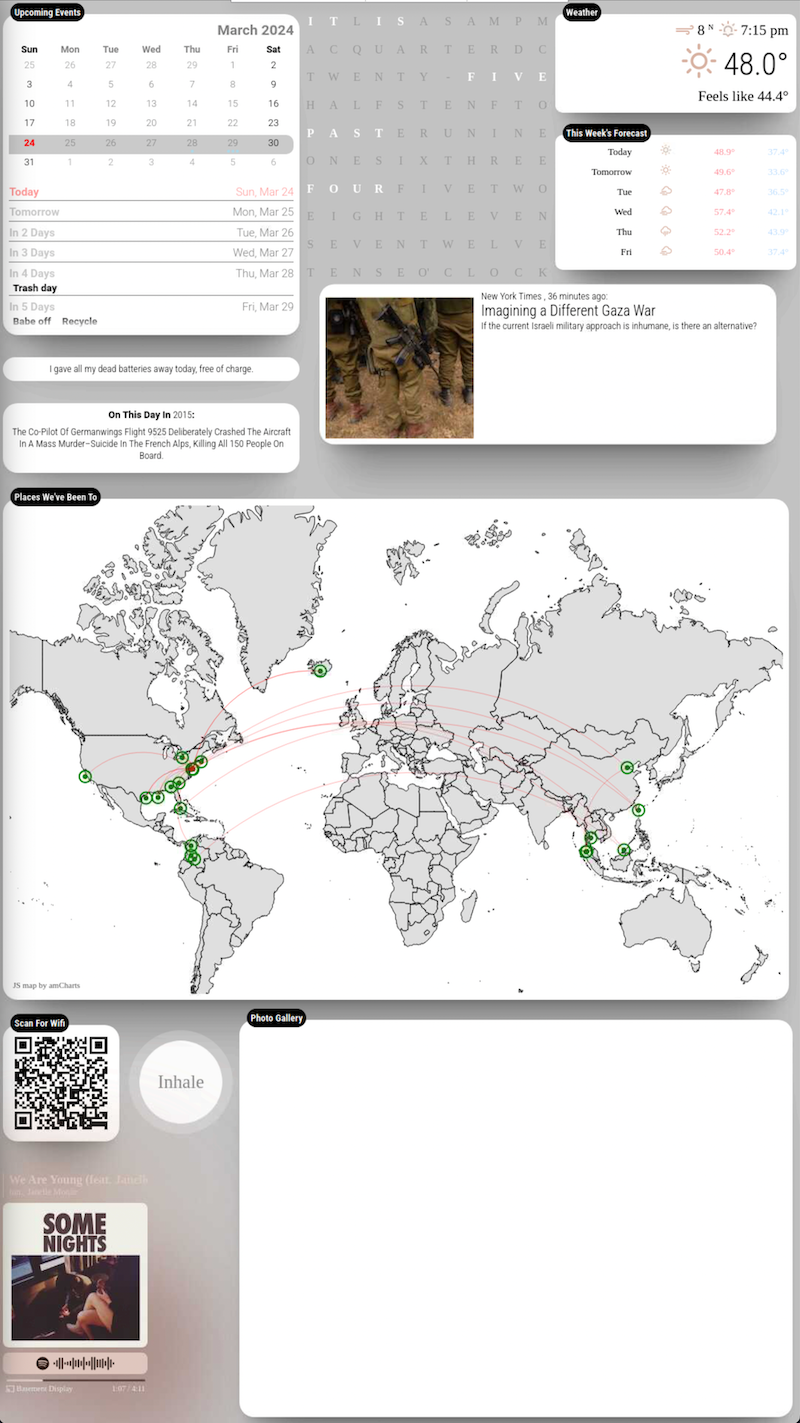
      Raspberry Pi 4 connected to a 40" tv, mounted on a wall, vertically.
      I built a box around the tv and used paint stirrers for the front of the frame

      Modules:
      MMM-anotherNewsFeed (default newsfeed with image of article)
      MMM-Breathwork (a reminder to inhale and exhale)
      MMM-CalendarExt3Agenda (mini month view and agenda)
      MMM-Chuck-Norris (silly Chuck Norris ‘jokes’)
      MMM-Chess-Daily (visibly hidden until you play a game)
      MMM-Dad-Jokes
      MMM-GooglePhotos (slideshow of google photos folder)
      MMM-iHaveBeenThere (the places that my wife &. I have visited
      MMM-OnSpotify (displays the currently playing song)
      MMM-OnThisDayWikiApi (things that happened on today’s date)
      MMM-Snake (play vintage snake game in full screen)
      MMM-text-clock (the current time written in words)
      Screenshot 2024-03-24 at 4.07.05 PM.png

      Here’s what gives each module its own “floating” background.
      (you have to modify the positions & regions in custom.css)

      /* css/custom.css */

      html {
        cursor: default;
        overflow: hidden;
        background: #c4c4c4;
      }
      
      
      body {
        margin: 10px;
        position: absolute;
        width: calc(100% - 20px);
        height: calc(100% - 20px);
        margin-bottom: -10px;
        font-size: 1rem;
        font-weight: 300;
        line-height: 1.5;
        color: black;
        background: transparent;
      }
      
      header {
        background: transparent;
        padding: 0.5rem;
        text-align: center;
        border-bottom: 0.7px solid rgba(0, 0, 0, 0.1);
        color: black;
        font-size: 20px;
      }
      .dimmed {
        color: black;
      }
      
      .normal {
        color: black;
      }
      
      .bright {
        color: black;
      }
      
      /**
       * module.color_border_shadow
       */ 
       .module.clock,
       .module.calendar,
       .module.newsfeed,
       .module.weatherforecast,
       .module.currentweather,
       .module.compliments {
        padding:8px;
        border-radius: 10px;
        box-shadow: 0 15px 20px -15px rgba(0, 0, 0, 0.3), 0 55px 50px -35px rgba(0, 0, 0, 0.3), 0 85px 60px -25px rgba(0, 0, 0, 0.1);
        background: white;
      }
      
      .clock .time {
       font-size: 80px;
       text-align: center;
       margin-top: 25px;
       color: black;
       padding: 15px;
      }
      .clock .date {
        background: transparent;
        padding: 5px;
        text-align: center;
        border-bottom: 0.7px solid rgba(0, 0, 0, 0.1);
        color: black;
        font-size: 20px;
      }
      
      
      /**
       * module.width_height
       */
      .module.calendar {
        width:450px;
        height: 320px;
      }
      .module.weatherforecast {
        width:400px;
        height: 220px;
      }
      .module.currentweather {
        height: 180px;
        width:400px;
        text-align: center;
      }


      thank you @MMRIZE & @sdetweil for your assistance.

      BerkSmash1984B M 2 Replies Last reply Reply Quote 3
      • BerkSmash1984B Offline
        BerkSmash1984 @greedyvegan
        last edited by

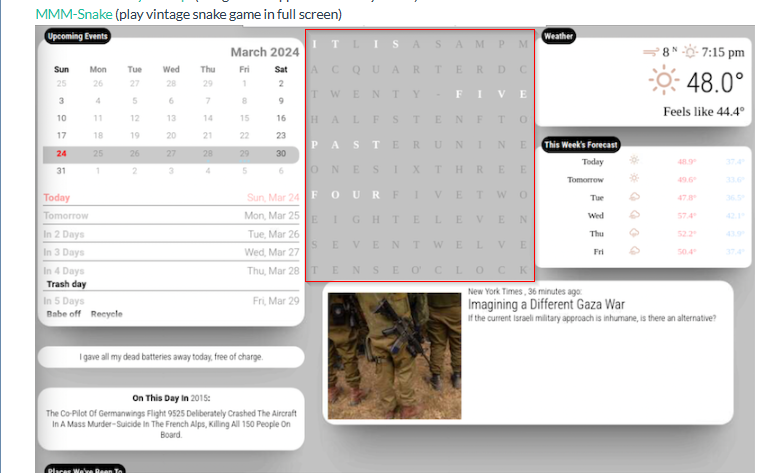
        @greedyvegan very cool! Which module are you using for the word clock?
        8850dc5c-59ad-408e-9ff2-f782a5b0a856-image.png

        G 1 Reply Last reply Reply Quote 0
        • M Offline
          MMRIZE @greedyvegan
          last edited by

          @greedyvegan
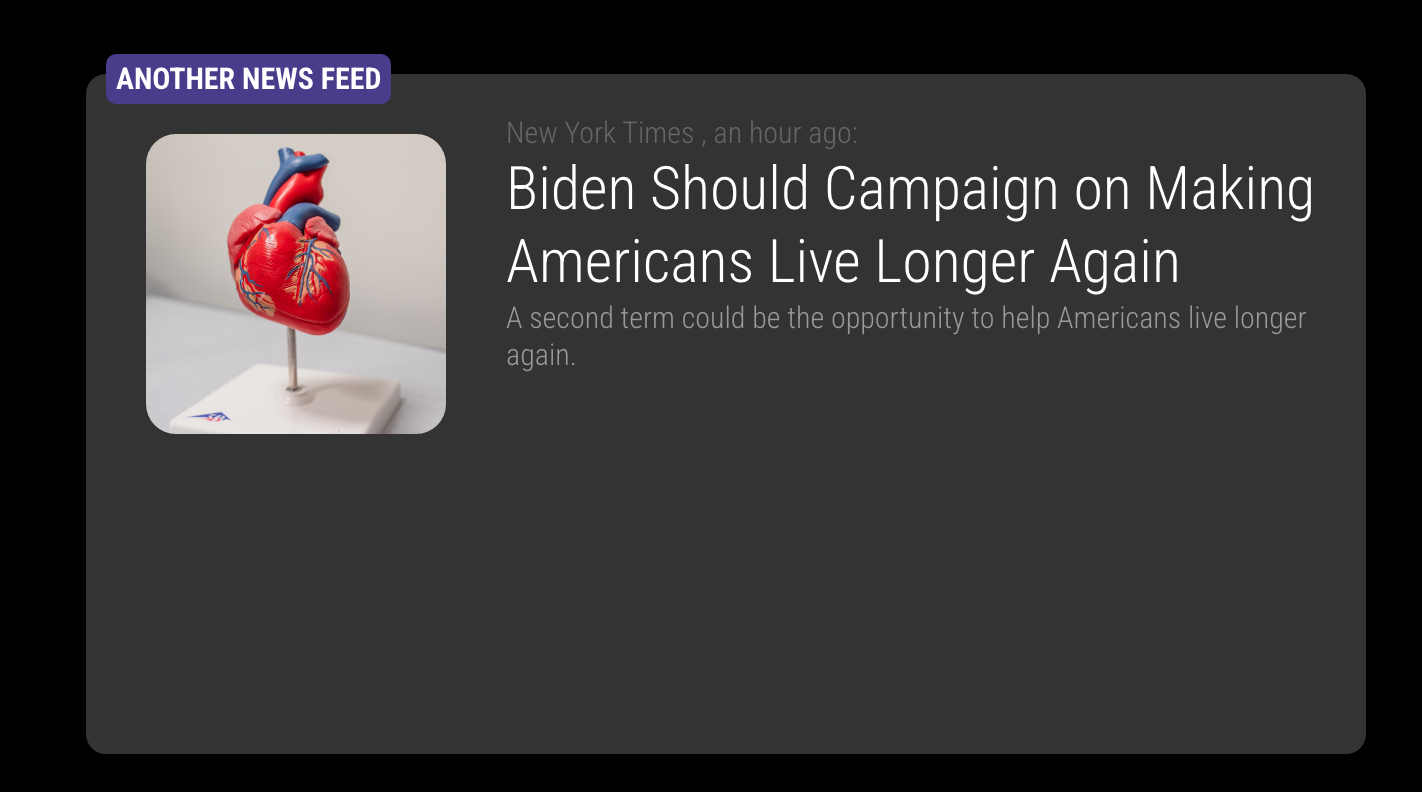
          It will look better to arrange newsfeed module more harmonized.
          e8141981-add2-44af-a0f5-206b918e5e3d-image.png

          /* css/custom.css */
          /* This is just and example. Adjust to your color and dimensions */
          
          .MMM-anotherNewsFeed .newsfeed-image {
            min-width: 150px;
            min-height: 150px;
            max-width: 150px;
            max-height: 150px;
            margin: 10px 20px 10px 10px;
            border-radius: 15px;
            background-repeat: no-repeat;
            background-position: center center;
            background-size: cover;
          }
          
          .region .module.MMM-anotherNewsFeed {
            width: 600px;
            height: 300px;
            border-radius: 15px;
            margin-top: 0;
            background-color: #333; 
          }
          
          G 2 Replies Last reply Reply Quote 1
          • G Offline
            greedyvegan @MMRIZE
            last edited by

            @MMRIZE nice, I like that; thank you

            1 Reply Last reply Reply Quote 0
            • G Offline
              greedyvegan @BerkSmash1984
              last edited by

              @BerkSmash1984 https://github.com/ngnijland/MMM-text-clock

              BerkSmash1984B 1 Reply Last reply Reply Quote 0
              • G Offline
                greedyvegan @MMRIZE
                last edited by

                @MMRIZE
                how do I get the news article image to have a permanent position, whether it appears/loads or not?? just like in your image.

                is that float or margin?

                |(image) (text text text text) |

                M 1 Reply Last reply Reply Quote 0
                • M Offline
                  MMRIZE @greedyvegan
                  last edited by MMRIZE

                  @greedyvegan
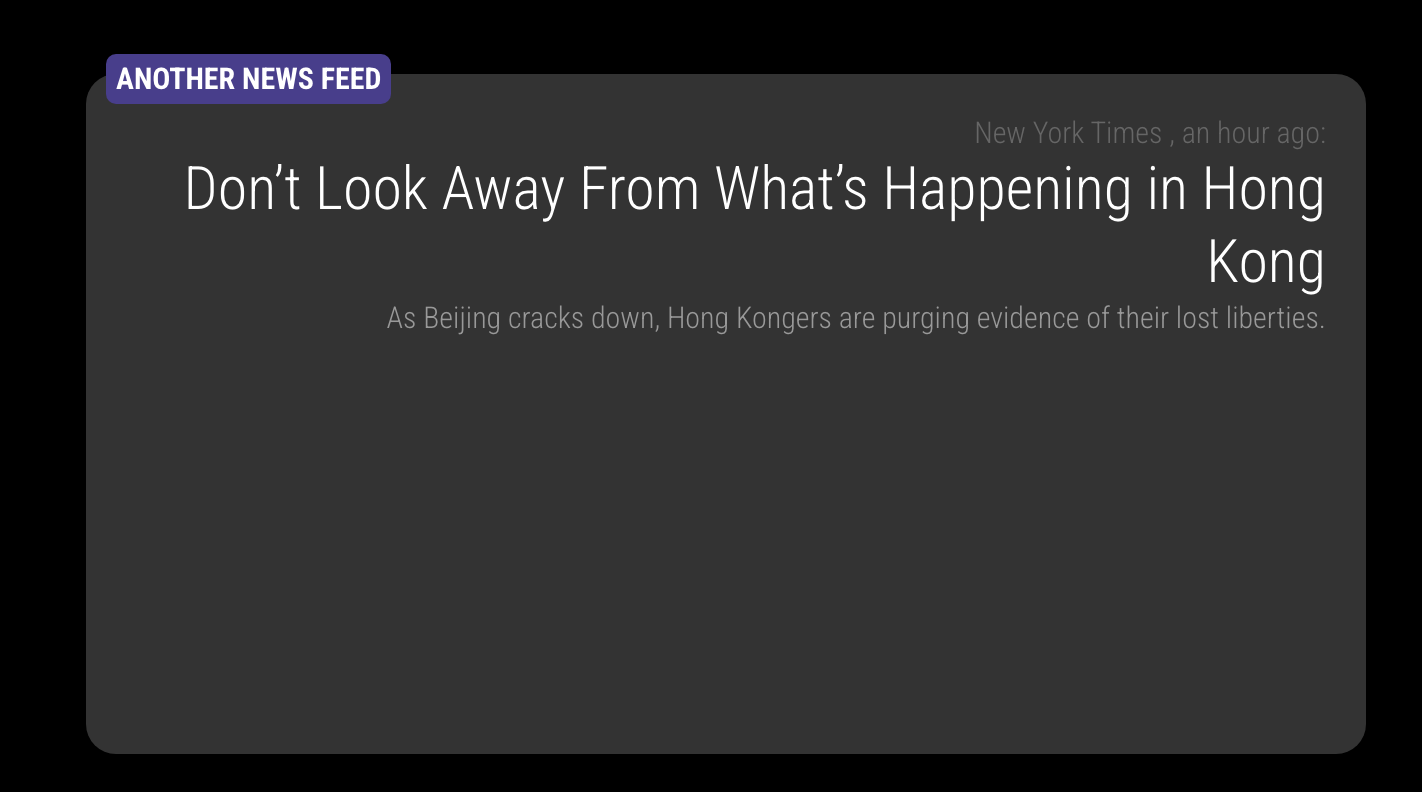
                  newsfeed item could have a container with selector withImage or not.

                          <div class="container {% if config.showImage and image %} withImage {% endif %}">
                              {% if config.showImage and image %}
                                  <div class="newsfeed-image" style="background-image: url({{image}})"></div>
                              {% endif %}
                  

                  So you can specify your style for each case, withImage or not.

                  .MMM-anotherNewsFeed .module-content .container {
                    text-align: right;
                    ...
                  }
                  

                  fc0671ae-8451-47b4-b647-4c515179fdb6-image.png

                  .MMM-anotherNewsFeed .module-content .container.withImage {
                    text-align: left;
                    ...
                  }
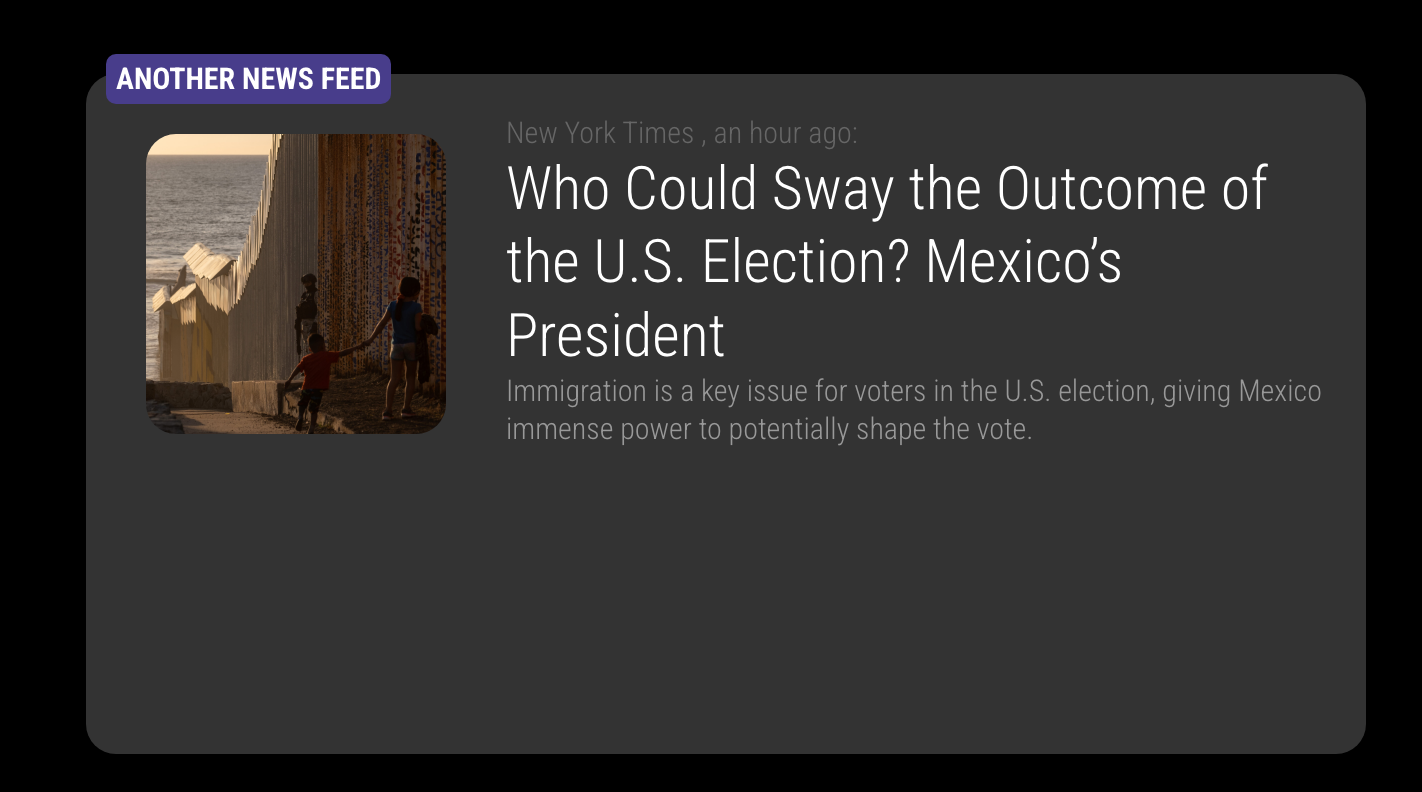
                  

                  7a295813-9cae-4c78-b023-736ab62634df-image.png

                  Image and contents are arranged by container’s display:flex so you can reorder or justify with flex-related attributes.

                  G 1 Reply Last reply Reply Quote 1
                  • BerkSmash1984B Offline
                    BerkSmash1984 @greedyvegan
                    last edited by

                    @greedyvegan Thanks!

                    1 Reply Last reply Reply Quote 0
                    • G Offline
                      greedyvegan @MMRIZE
                      last edited by

                      @MMRIZE
                      thank you very much, what’s the hierarchy levels as far as region, container, module in css?

                      S 1 Reply Last reply Reply Quote 0
                      • S Offline
                        sdetweil @greedyvegan
                        last edited by

                        @greedyvegan use the developers window elements view to see it

                        Sam

                        How to add modules

                        learning how to use browser developers window for css changes

                        G 1 Reply Last reply Reply Quote 0
                        • G Offline
                          greedyvegan @sdetweil
                          last edited by

                          @sdetweil I understood you here but I’m asking about priority overall, the developer window doesn’t display that.

                          S 1 Reply Last reply Reply Quote 0
                          • S Offline
                            sdetweil @greedyvegan
                            last edited by sdetweil

                            @greedyvegan absolutely does.

                            unless overridden, they are element ordered, outer to inner. some styles can be inherited from parent, never from grandparent

                            the text above the console box shows the stack for the selected element.

                            the right window shows the exact inheritance and override, and sources for styles

                            the most specific style setting wins unless overridden ( !important)

                            Sam

                            How to add modules

                            learning how to use browser developers window for css changes

                            G 1 Reply Last reply Reply Quote 0
                            • G Offline
                              greedyvegan @sdetweil
                              last edited by

                              @sdetweil ok, thanks. I need to look up web developers for dummies now.

                              1 Reply Last reply Reply Quote 0
                              • bugsounetB bugsounet referenced this topic on
                              • R Offline
                                ric
                                last edited by

                                I like the colours of the agenda and weather module. Can you tell me how you changed the colours? Thank you

                                G 1 Reply Last reply Reply Quote 0
                                • G Offline
                                  greedyvegan @ric
                                  last edited by

                                  @ric

                                  sorry for the delay , I’ve updated the post with the custom css

                                  R 1 Reply Last reply Reply Quote 0
                                  • R Offline
                                    ric @greedyvegan
                                    last edited by

                                    @greedyvegan

                                    thank you

                                    1 Reply Last reply Reply Quote 1

                                    Hello! It looks like you're interested in this conversation, but you don't have an account yet.

                                    Getting fed up of having to scroll through the same posts each visit? When you register for an account, you'll always come back to exactly where you were before, and choose to be notified of new replies (either via email, or push notification). You'll also be able to save bookmarks and upvote posts to show your appreciation to other community members.

                                    With your input, this post could be even better 💗

                                    Register Login

                                    • 1 / 1
                                    • First post
                                      Last post
                                    Enjoying MagicMirror? Please consider a donation!
                                    MagicMirror created by Michael Teeuw.
                                    Forum managed by Sam, technical setup by Karsten.
                                    This forum is using NodeBB as its core | Contributors
                                    Contact | Privacy Policy