Read the statement by Michael Teeuw here.
MM won't launch at startup, but will launch manually
-
I installed MM via sdetweil’s script on Ubuntu 24.04. Everything seems to work fine after installation, but after a reboot MM doesn’t start up. Checking the pm2 logs shows these errors, and then it just keeps looping.
[35781:0511/163537.061675:ERROR:ozone_platform_x11.cc(244)] Missing X server or $DISPLAY
[35781:0511/163537.061869:ERROR:env.cc(257)] The platform failed to initialize.  Exiting.
Authorization required, but no authorization protocol specified
I can run MM successfully using
npm startfrom the MagicMirror folder. Any ideas on how I can get it to run at startup?
-
Hi, this is how I’m running it for now, maybe it will help someone.
I will install PM2 according to the instructions
I will skip the command “pm2 startup”
After installation i proceed like this
i will create another boot file
cd ~
nano mm_start.sh
Add the following lines:
echo Start PM2......
pm2 start mm.sh
read;
set permissions
chmod +x mm_start.shwe will set up the script after booting Ubuntu
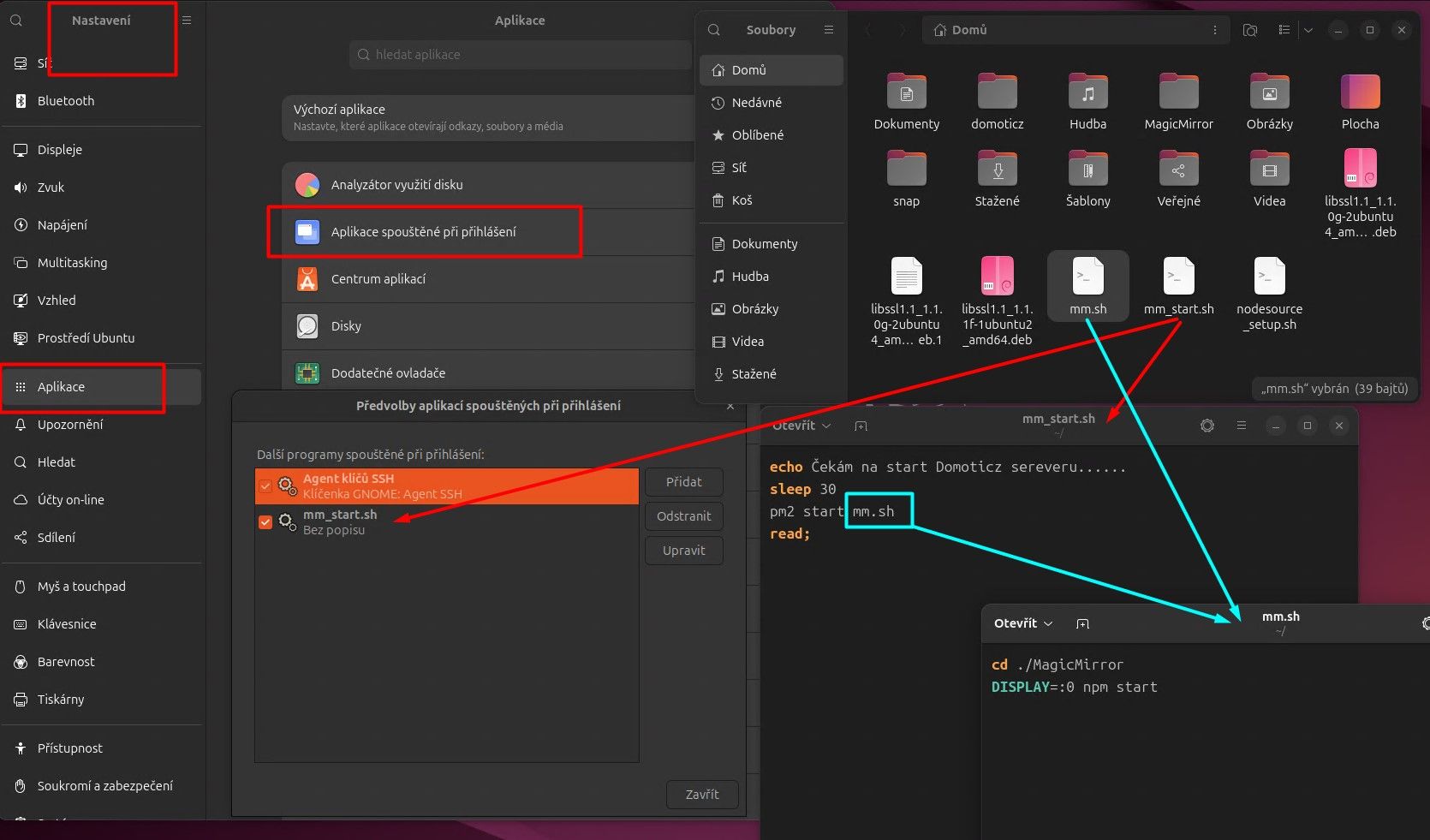
now i can start and stop services at will.
-
@ajgonzales what user were you logged on as when you can my script?
can u try to run the fixuppm2 script? last one on the list of my scripts…
as a user, not root
-
@ajgonzales said in MM won't launch at startup, but will launch manually:
[35781:0511/163537.061675:ERROR:ozone_platform_x11.cc(244)] Missing X server or $DISPLAY
is 24.04 using wayland instead of x11??
dops -ef | grep -i wayis a terminal window
-
@ajgonzales I am downloading 24.04 now to test in vm…
-
@sdetweil
was logged in as a user, not root. got the same errors after running the fixuppm2 script and rebooting. here are the results from the other command. looks like it does use wayland:aj 2524 2226 0 16:06 tty2 00:00:00 /usr/libexec/gdm-wayland-session env GNOME_SHELL_SESSION_MODE=ubuntu /usr/bin/gnome-session --session=ubuntu aj 2938 2674 0 16:06 ? 00:00:03 /usr/bin/Xwayland :0 -rootless -noreset -accessx -core -auth /run/user/1000/.mutter-Xwaylandauth.QXB9M2 -listenfd 4 -listenfd 5 -displayfd 6 -initfd 7 -byteswappedclients aj 393102 390657 0 19:44 pts/0 00:00:00 grep --color=auto -i way -
@ajgonzales ok thanks.
-
@ajgonzales yep, I can recreate this… so far no hack fix has helped…
I now have my system where it won’t finish booting… pm2 is uninstalled…
so something is different between UBUNTU and RASPI OS
cause we don’t see this problem on raspi -
In case anyone else has this issue, I was able to able to get it to run via pm2 by running this command first:
xhost +si:localuser:[username]Next steps are to figure out how to automatically run that command at startup prior to MM.
-
@ajgonzales add that to the launch script
you can find that by doing
pm2 status
then use the name or number of the row of the apppm2 info x
where x is the name or numbercan you give more info on the system?
lsb_release -a
uname -a -
@sdetweil
I did try adding the command to the first line of the mm.sh script in the installers folder but that didn’t work. Here’s the sequence I run after rebooting, after which I have no issues.pm2 stop 0 xhost +si:localuser:[username] pm2 start 0Here’s the output from those other two commands:
lsb_release -a No LSB modules are available. Distributor ID: Ubuntu Description: Ubuntu 24.04 LTS Release: 24.04 Codename: noble uname -a Linux [computername] 6.8.0-31-generic #31-Ubuntu SMP PREEMPT_DYNAMIC Sat Apr 20 00:40:06 UTC 2024 x86_64 x86_64 x86_64 GNU/Linux -
@ajgonzales yeh 24.04
pm2 has an issue on 24.04 during boot up. I opened an issue a couple weeks ago.
https://github.com/Unitech/pm2/issues/5820I think you are also running the new Wayland display manager…
to verify
ps -ef | grep wayfireso x11 commands won’t work
-
Hi, this is how I’m running it for now, maybe it will help someone.
I will install PM2 according to the instructions
I will skip the command “pm2 startup”
After installation i proceed like this
i will create another boot file
cd ~
nano mm_start.sh
Add the following lines:
echo Start PM2......
pm2 start mm.sh
read;
set permissions
chmod +x mm_start.shwe will set up the script after booting Ubuntu
now i can start and stop services at will.
-
@majsoft cool. don’t know if we have that on other systems
sometimes if you do
sudo npm remove pm2 -gthen reboot and run the fixuppm2 script in my scripts list
-
S sdetweil has marked this topic as solved on
Hello! It looks like you're interested in this conversation, but you don't have an account yet.
Getting fed up of having to scroll through the same posts each visit? When you register for an account, you'll always come back to exactly where you were before, and choose to be notified of new replies (either via email, or push notification). You'll also be able to save bookmarks and upvote posts to show your appreciation to other community members.
With your input, this post could be even better 💗
Register Login