Read the statement by Michael Teeuw here.
MMM-NewsAPI
-
@dondula ok, can you look at the logs?
pm2 logs --lines=100100 is any number, its the last xxxx lines. it defaults to 15…
so as its tuesday there could be a lot of info there…
could try to clear the logs and restart … to get just the newest
pm2 flush
pm2 restart MagicMirror
wait
then
pm2 logs --lines=50 -
Here are the logs, I do see this one error regarding an expired certificate but I wasn’t sure what that meant.
0|MagicMir | [16.04.2024 10:46.13.203] [LOG] [NEWS] Error : https://newsapi.org/v2/top-headlines?sources=the-verge&pageSize=20&apiKey=a5a6d37d5e934351b7e8dbac65312e82 FetchError: request to https://newsapi.org/v2/top-headlines?sources=the-verge&pageSize=20&apiKey=a5a6d37d5e934351b7e8dbac65312e82 failed, reason: certificate has expired
0|MagicMir | at ClientRequest. (/home/pi/MagicMirror/modules/MMM-News/node_modules/node-fetch/lib/index.js:1491:11)
0|MagicMir | at ClientRequest.emit (events.js:315:20)
0|MagicMir | at TLSSocket.socketErrorListener (_http_client.js:426:9) -
@dondula said in MMM-NewsAPI:
MMM-News
Hi. My module is MMM-NewsAPI. Are you referring to my module? I have not released any updates and since you have not refreshed the module I am unsure why. As Sam advised, if you could send us any errors in the logs we can then browse over that and see.
-
Hi there, thanks for the response. When I went to reinstall this module it was pulling from your git repository, so I assumed it was yours as well.
If I am wrong please let me know. I had posted my log errors above and wasn’t sure what was going on.
-
@dondula said in MMM-NewsAPI:
/home/pi/MagicMirror/modules/MMM-News/node_modules
Unfortunately this shows MMM-News and not MMM-NewsAPI. Can you show me the module detail in the
~/MagicMirror/config/config.js? Everything except your API key. -
@dondula I have just tested MMM-NewsAPI with the config that you have and it works just fine.
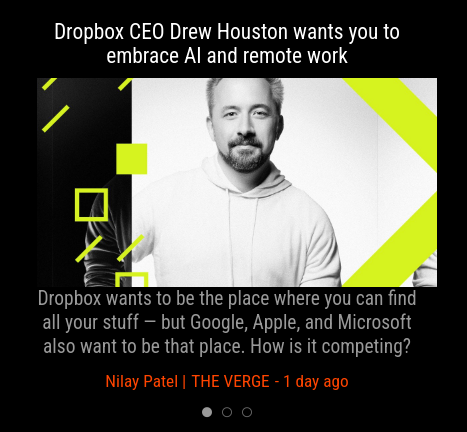
Config used:
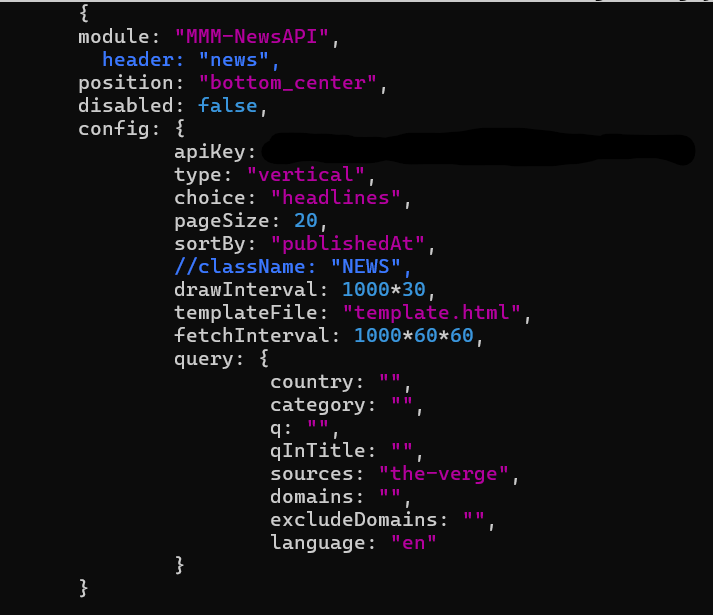
Your key seems to be working fine as well using MMM-NewsAPI.
-
See below
disabled: false,
classes: “hide”,
module: “MMM-News”,
position: “middle_center”,
config: {
debug: false,
apiKey: “”,// set your newsapi.org API Key
type: “vertical”, // “horizontal”, “vertical” You can make your own type with CSS class selector.// See https://newsapi.org/sources for available query options('sources' or `country`, `category`). query : [ { sources: "the-verge", // A comma-seperated string of identifiers for the news sources or blogs you want headlines from. // Too many `sources` at once could make API error. If you want, split them to several queries. // `sources` are not able to be mixed with `country` and `category`. }, ], items: 20, // number of how many headlines to get from each query. max 100 timeFormat: "relative", // Or You can use "YYYY-MM-DD HH:mm:ss" format. drawInterval: 1000*30, // How long time each article will be shown. scanInterval: 1000*60*30, // Delay before rescan news (limited to 100 query by day and 50 query for 12 hours) touchable: false, // When you have a touchable or clickable interface on your MM. templateFile: "template.html"}
}, -
@dondula Just thinking out loud, there was a MMM-News which has been archived now I believe. I handed it back to the original author of the module. You can install MMM-NewsAPI if you like? Same config, just need to update the module name in the config.js from MMM-News to MMM-NewsAPI.
-
I appreciate the suggestion, unfortunately someone else built this mirror for me and it has multiple pages of widgets that were preconfigured for me. So the config file is pretty complex and points to that old module in various config settings. When I try to update the name of the old module to the new one and reboot MM, it just goes to a black screen.
Would you have any idea what the expired certificate error could mean in my previous log post? I’m just wondering if it’s something I can fix on my end to make the old module work again.
If it’s not too much trouble could you post me a clean config for the new module with the settings from my current one applied? I’m sure some of these old settings are messing with your new module.
Again I really appreciate your assistance on this.
-
@dondula Yeah, MMM-News was handed back to original author and archived. You should install MMM-NewsAPI and use that instead.
-
Hi all, setting up this amazing module but it seems to not work for me and I have no idea why. I tried already:
- Test api on postman. It works perfectly
- Check on the console. Nothing seems to be wrong
- Delete all modules except this one. Nothing changes
I´m also using it on an vertical screen but I don´t thing the type can make any changes to it. Tried already and nothing.
This is my config at the moment.
{
			module: "MMM-NewsAPI",
			header: "news",
			position: "bottom_bar",
			pages: { "sport": "bottom_bar" },
			config: {
				apiKey: "MYAPIKEY",
				type: "horizontal",
				choice: "everything",
				pageSize: 20,
				sortBy: "publishedAt",
				drawInterval: 1000 * 30,
				templateFile: "template.html",
				fetchInterval: 1000 * 60 * 60,
				query: {
					country: "",
					category: "",
					q: "",
					qInTitle: "",
					sources: "",
					domains: "bbc.co.uk",
					excludeDomains: "",
					language: ""
				}
			}
		},
Thanks for the help !!
-
Hi. What is the below config for?
@ufransa said in MMM-NewsAPI:pages: { “sport”: “bottom_bar” },
-
@mumblebaj I think he was doing MMM-pages but got the name wrong, should be classes:
-
@sdetweil Ah, got you.
-
@sdetweil I am assuming he is using your fork of MMM-pages and was probably trying to do the below.
{
  module:"MMM-NewsAPI",
  classes:"sport",
}
If I remember the README from your fork it calls for page1 page2 etc. I kinda remember carousel has the type of config he was trying to implement but a little different.
@ufransa can you confirm what you are trying to achieve or which module you using for page control?
-
@mumblebaj said in MMM-NewsAPI:
If I remember the README from your fork it calls for page1 page2 etc. I kinda remember carousel has the type of config he was trying to implement but a little different.
yes, the default pages and carousel use the module name in the ‘modules’ or ‘slides’ config. in the pages module this is really the module CLASSname (carousel can ONLY use module NAME in the ‘slides’ config )
which puts all the config in the pages module, but makes it hard for multi-instance as module name doesn’t work there , so you HAVE to use classes to ADD something unique
but when looking at config.js, you cant TELL what is where, you have to toggle back and forth between the text and the pages config… (I find this maddening)
so, just add a name for the page name (page1, dad, mom, billy, sue, stocks, weather, whatever)and use that in the classes field on each appropriate module…
then you can see it right there…
oh, dad AND weather… easy
oh, this is the calendar instance I created for billys schedule… easy,… add that to the classes field… done
I just used page1, page2 as examples to distinguish the groupings of modules
------ mmm-carousel does this to look thru the modules
modules = MM.getModules().exceptModule(this).filter(function (module) { // this looks thru modules, code uses module name
------ mmm-pages does this
MM.getModules()
.exceptWithClass(modulesToShow) // this filters modules by classname -
Hi ! Nono, I´m not using pages, it´s that another module I assume, right?
-
@ufransa You will need to advise which other module you are using. I am assuming that the config you passing in may not be correct. When I run
domains: "bbc.co.uk"it worked fine for me without that extra config. Can you confirm which other module you are using so I can check if you have specified that config setting correct. -
@mumblebaj Of course ! This is all my config file:
/* Config Sample * * For more information on how you can configure this file * see https://docs.magicmirror.builders/configuration/introduction.html * and https://docs.magicmirror.builders/modules/configuration.html * * You can use environment variables using a `config.js.template` file instead of `config.js` * which will be converted to `config.js` while starting. For more information * see https://docs.magicmirror.builders/configuration/introduction.html#enviromnent-variables */ let config = { address: "localhost", // Address to listen on, can be: // - "localhost", "127.0.0.1", "::1" to listen on loopback interface // - another specific IPv4/6 to listen on a specific interface // - "0.0.0.0", "::" to listen on any interface // Default, when address config is left out or empty, is "localhost" port: 8080, basePath: "/", // The URL path where MagicMirror² is hosted. If you are using a Reverse proxy // you must set the sub path here. basePath must end with a / ipWhitelist: ["127.0.0.1", "::ffff:127.0.0.1", "::1"], // Set [] to allow all IP addresses // or add a specific IPv4 of 192.168.1.5 : // ["127.0.0.1", "::ffff:127.0.0.1", "::1", "::ffff:192.168.1.5"], // or IPv4 range of 192.168.3.0 --> 192.168.3.15 use CIDR format : // ["127.0.0.1", "::ffff:127.0.0.1", "::1", "::ffff:192.168.3.0/28"], useHttps: false, // Support HTTPS or not, default "false" will use HTTP httpsPrivateKey: "", // HTTPS private key path, only require when useHttps is true httpsCertificate: "", // HTTPS Certificate path, only require when useHttps is true language: "es", locale: "es-ES", logLevel: ["INFO", "LOG", "WARN", "ERROR"], // Add "DEBUG" for even more logging timeFormat: 24, units: "metric", modules: [ { module: "alert", }, { module: "clock", position: "top_left" }, { module: "calendar", position: "top_left", config: { broadcastPastEvents: true, calendars: [ { url: "calendar.ics", name: "ufransa", color: "orange" }, { url: "calendar.ics", name: "lupita", color: "green" }, ] } }, { module: "MMM-CustomElementTime" }, { module: "MMM-CountEvents", position: "top_right", config: { /* Common default properties */ locale: null, refresh: 1000 * 60, unit: "days", repeat: false, ignoreBefore: false, ignoreAfter: false, className: "default", output: `<dl><dt class="title"></dt><dd class="output"></dd></dl>`, numericAlways: false, reverse: false, numberOnly: false, numberSign: false, useQuarter: false, onPassed: null, onUpdated: null, events: [ { title: "the event", targetTime: "2025-07-12", ignoreAfter: 1000 * 60 * 60 * 24, }, ] } }, { module: "weather", position: "top_right", config: { weatherProvider: "openmeteo", type: "current", lat: 40.5290869, lon: -3.4765786 } }, { module: "weather", position: "top_right", header: "Weather Forecast", config: { weatherProvider: "openmeteo", type: "forecast", lat: 40.5290869, lon: -3.4765786 } }, { module: "MMM-CalendarExt3", position: "bottom_bar", title: "", config: { mode: "month", instanceId: "basicCalendar", locale: 'es-ES', maxEventLines: 5, firstDayOfWeek: 1, // eventHeight: 22, fontSize: 50, calendarSet: ['ufransa', 'lupita'], } }, { module: "MMM-NewsAPI", header: "Noticias del mundo", position: "bottom_bar", config: { apiKey: "APIKEY", type: "horizontal", choice: "everything", pageSize: 20, sortBy: "publishedAt", drawInterval: 1000 * 30, templateFile: "template.html", fetchInterval: 1000 * 60 * 60, query: { country: "", category: "", q: "", qInTitle: "", sources: "", domains: "", excludeDomains: "", language: "en" } } }, ] }; /*************** DO NOT EDIT THE LINE BELOW ***************/ if (typeof module !== "undefined") { module.exports = config; } -
@ufransa Ok, I don’t see anything in your config that would cause a problem. However, you do have both MMM-NewsAPI and MMM-calendarExt3 in the exact same position. I am thinking that MMM-CalendarExt3 may be pushing the module off the screen, they both cannot occupy the same space. Try using it in a different position and use the
verticaloption.

Hello! It looks like you're interested in this conversation, but you don't have an account yet.
Getting fed up of having to scroll through the same posts each visit? When you register for an account, you'll always come back to exactly where you were before, and choose to be notified of new replies (either via email, or push notification). You'll also be able to save bookmarks and upvote posts to show your appreciation to other community members.
With your input, this post could be even better 💗
Register Login