Read the statement by Michael Teeuw here.
MMM-CalendarExt3 not showing events on calendar, but does on list after 2.30 update
-
I updated MM to 2.30 and also updated my node.js, but for some reason my calendarExt3 won’t show the events on the actual calendar, but on the side where it lists them, they show up.
I ran the update script and everything seems to be up to date.
Anyone else running into this issue?
-
-
@tke499 like the other issue , did you use my scripts or manual upgrade?
if manual, you may have to run npm install to get the extension installed again
i use ext3 W 2.30 wo problems
-
well I went in and updated node by itself, but then I also ran these scripts:
bash -c “$(curl -sL https://raw.githubusercontent.com/sdetweil/MagicMirror_scripts/master/upgrade-script.sh)”
bash -c “$(curl -sL https://raw.githubusercontent.com/sdetweil/MagicMirror_scripts/master/raspberry.sh)”
still no change
-
did you try to do npm install again in the ext 3 folder
on the last two of my command scripts
upgrade without the apply parm is just a test, no changes
upgrade WITH apply and already on the same release will do nothing
upgrade with force will redo upgrade over same version
install will not install over an existing system
so they both did nothing
-
@sdetweil I deleted and re-installed Ext3, no change.
-
@tke499 can you look at the output of npm start for the cal broadcast message
-
R redfishbluefish referenced this topic on
-
@tke499 also ext3 is done all in browser.
can you open the developer window, ctrl-shift-i,
select the console tab, put ext in the filter field -
What are you asking for? I am still learning. Thanks
-
@sdetweil This is everything that is showing up when I run MM
magicmirror@2.30.0 start
npm run start:x11magicmirror@2.30.0 start:x11
DISPLAY=“${DISPLAY:=:0}” ./node_modules/.bin/electron js/electron.js[2025-01-01 20:24:29.256] [LOG] Starting MagicMirror: v2.30.0
[2025-01-01 20:24:29.289] [LOG] Loading config …
[2025-01-01 20:24:29.294] [LOG] config template file not exists, no envsubst
[2025-01-01 20:24:29.834] [INFO] Checking config file /home/robert/MagicMirror/config/config.js …
[2025-01-01 20:24:29.926] [INFO] Your configuration file doesn’t contain syntax errors :)
[2025-01-01 20:24:29.927] [INFO] Checking modules structure configuration …
[2025-01-01 20:24:30.058] [INFO] Your modules structure configuration doesn’t contain errors :)
[2025-01-01 20:24:30.061] [LOG] Loading module helpers …
[2025-01-01 20:24:30.062] [LOG] No helper found for module: alert.
[2025-01-01 20:24:30.069] [LOG] Initializing new module helper …
[2025-01-01 20:24:30.070] [LOG] Module helper loaded: updatenotification
[2025-01-01 20:24:30.071] [LOG] No helper found for module: clock.
[2025-01-01 20:24:30.214] [LOG] Initializing new module helper …
[2025-01-01 20:24:30.214] [LOG] Module helper loaded: calendar
[2025-01-01 20:24:30.216] [LOG] No helper found for module: weather.
[2025-01-01 20:24:30.216] [LOG] No helper found for module: MMM-Traffic.
[2025-01-01 20:24:30.252] [LOG] Initializing new module helper …
[2025-01-01 20:24:30.252] [LOG] Module helper loaded: mmm-nest-status
[2025-01-01 20:24:30.363] [LOG] Initializing new module helper …
[2025-01-01 20:24:30.363] [LOG] Module helper loaded: newsfeed
[2025-01-01 20:24:30.364] [LOG] No helper found for module: MMM-CalendarExt3.
[2025-01-01 20:24:30.364] [LOG] All module helpers loaded.
[2025-01-01 20:24:30.389] [LOG] Starting server on port 8080 …
[2025-01-01 20:24:31.322] [LOG] Server started …
[2025-01-01 20:24:31.323] [LOG] Connecting socket for: updatenotification
[2025-01-01 20:24:31.324] [LOG] Starting module helper: updatenotification
[2025-01-01 20:24:31.325] [LOG] Connecting socket for: calendar
[2025-01-01 20:24:31.326] [LOG] Starting node helper for: calendar
[2025-01-01 20:24:31.327] [LOG] Connecting socket for: mmm-nest-status
[2025-01-01 20:24:31.328] [LOG] Starting node_helper for module [mmm-nest-status]
[2025-01-01 20:24:31.329] [LOG] Connecting socket for: newsfeed
[2025-01-01 20:24:31.331] [LOG] Starting node helper for: newsfeed
[2025-01-01 20:24:31.332] [LOG] Sockets connected & modules started …
[2025-01-01 20:24:31.694] [LOG] Launching application.
[2025-01-01 20:24:32.841] [INFO] System information:SYSTEM: manufacturer: ; model: ; virtual: false
OS: platform: linux; distro: Debian GNU/Linux; release: 12; arch: arm64; kernel: 6.6.62+rpt-rpi-v8
VERSIONS: electron: 32.2.7; used node: 22.12.0; installed node: 22.12.0; npm: 10.9.0; pm2: 5.4.3
OTHER: timeZone: America/New_York; ELECTRON_ENABLE_GPU: undefined
[4696:0101/202433.175100:ERROR:gbm_wrapper.cc(74)] Failed to get fd for plane.: No such file or directory (2)
[4696:0101/202433.175511:ERROR:gbm_wrapper.cc(257)] Failed to export buffer to dma_buf: No such file or directory (2)
[4696:0101/202433.175885:ERROR:gbm_wrapper.cc(74)] Failed to get fd for plane.: No such file or directory (2)
[4696:0101/202433.176005:ERROR:gbm_wrapper.cc(257)] Failed to export buffer to dma_buf: No such file or directory (2)
[4696:0101/202433.176180:ERROR:gbm_wrapper.cc(74)] Failed to get fd for plane.: No such file or directory (2)
[4696:0101/202433.176283:ERROR:gbm_wrapper.cc(257)] Failed to export buffer to dma_buf: No such file or directory (2)
[4696:0101/202433.176443:ERROR:gbm_wrapper.cc(74)] Failed to get fd for plane.: No such file or directory (2)
[4696:0101/202433.176539:ERROR:gbm_wrapper.cc(257)] Failed to export buffer to dma_buf: No such file or directory (2)
[4696:0101/202433.176688:ERROR:gbm_wrapper.cc(74)] Failed to get fd for plane.: No such file or directory (2)
[4696:0101/202433.176787:ERROR:gbm_wrapper.cc(257)] Failed to export buffer to dma_buf: No such file or directory (2)
[4696:0101/202433.176939:ERROR:gbm_wrapper.cc(74)] Failed to get fd for plane.: No such file or directory (2)
[4696:0101/202433.177033:ERROR:gbm_wrapper.cc(257)] Failed to export buffer to dma_buf: No such file or directory (2)
[4696:0101/202433.177181:ERROR:gbm_wrapper.cc(74)] Failed to get fd for plane.: No such file or directory (2)
[4696:0101/202433.177270:ERROR:gbm_wrapper.cc(257)] Failed to export buffer to dma_buf: No such file or directory (2)
[4696:0101/202433.178472:ERROR:gbm_wrapper.cc(74)] Failed to get fd for plane.: No such file or directory (2)
[4696:0101/202433.178599:ERROR:gbm_wrapper.cc(257)] Failed to export buffer to dma_buf: No such file or directory (2)
[4696:0101/202433.178765:ERROR:gbm_wrapper.cc(74)] Failed to get fd for plane.: No such file or directory (2)
[4696:0101/202433.178886:ERROR:gbm_wrapper.cc(257)] Failed to export buffer to dma_buf: No such file or directory (2)
[4696:0101/202433.179046:ERROR:gbm_wrapper.cc(74)] Failed to get fd for plane.: No such file or directory (2)
[4696:0101/202433.179135:ERROR:gbm_wrapper.cc(257)] Failed to export buffer to dma_buf: No such file or directory (2)
[4696:0101/202433.179281:ERROR:gbm_wrapper.cc(74)] Failed to get fd for plane.: No such file or directory (2)
[4696:0101/202433.179369:ERROR:gbm_wrapper.cc(257)] Failed to export buffer to dma_buf: No such file or directory (2)
[4696:0101/202433.179516:ERROR:gbm_wrapper.cc(74)] Failed to get fd for plane.: No such file or directory (2)
[4696:0101/202433.179604:ERROR:gbm_wrapper.cc(257)] Failed to export buffer to dma_buf: No such file or directory (2)
[4696:0101/202433.179750:ERROR:gbm_wrapper.cc(74)] Failed to get fd for plane.: No such file or directory (2)
[4696:0101/202433.179876:ERROR:gbm_wrapper.cc(257)] Failed to export buffer to dma_buf: No such file or directory (2)
[4696:0101/202433.180031:ERROR:gbm_wrapper.cc(74)] Failed to get fd for plane.: No such file or directory (2)
[4696:0101/202433.180119:ERROR:gbm_wrapper.cc(257)] Failed to export buffer to dma_buf: No such file or directory (2)
[2025-01-01 20:24:34.889] [LOG] Create new calendarfetcher for url: http://p159-caldav.icloud.com/published/2/Mjc5OTI2NzkxMjc5OTI2N_OGitwGbVHoaRgKm45s40567NS6ia83VwuU3ZKztGC0 - Interval: 300000
[2025-01-01 20:24:34.932] [LOG] Create new newsfetcher for url: https://moxie.foxnews.com/google-publisher/latest.xml - Interval: 300000
[2025-01-01 20:24:35.001] [INFO] updatenotification: Updater Class Loaded!
[2025-01-01 20:24:35.002] [INFO] updatenotification: Checking PM2 using…
[2025-01-01 20:24:35.003] [INFO] updatenotification: [PM2] You are not using pm2
[2025-01-01 20:24:35.004] [INFO] Checking git for module: MMM-Traffic
[2025-01-01 20:24:35.029] [INFO] Checking git for module: mmm-nest-status
[2025-01-01 20:24:35.073] [INFO] Checking git for module: MMM-CalendarExt3
[2025-01-01 20:24:35.203] [INFO] Checking git for module: MagicMirror
[2025-01-01 20:24:36.256] [INFO] Calendar-Fetcher: Broadcasting 128 events from .
[2025-01-01 20:24:36.467] [INFO] Newsfeed-Fetcher: Broadcasting 25 items.
[4587:0101/202451.558237:ERROR:CONSOLE(1)] “Request Autofill.enable failed. {“code”:-32601,“message”:”‘Autofill.enable’ wasn’t found"}“, source: devtools://devtools/bundled/core/protocol_client/protocol_client.js (1)
[4587:0101/202451.558687:ERROR:CONSOLE(1)] “Request Autofill.setAddresses failed. {“code”:-32601,“message”:”‘Autofill.setAddresses’ wasn’t found”}", source: devtools://devtools/bundled/core/protocol_client/protocol_client.js (1)
[4587:0101/202533.885618:ERROR:CONSOLE(1)] “Uncaught (in promise) SyntaxError: Unexpected token ‘H’, “HTTP/1.1 4”… is not valid JSON”, source: devtools://devtools/bundled/devtools_app.html?remoteBase=https://chrome-devtools-frontend.appspot.com/serve_file/@6cd35584827031630286f7d1b4c986f9ebd175df/&can_dock=true&toolbarColor=rgba(223,223,223,1)&textColor=rgba(0,0,0,1)&experiments=true (1)
[2025-01-01 20:29:36.818] [INFO] Calendar-Fetcher: Broadcasting 128 events from http://p159-.
[2025-01-01 20:29:37.507] [INFO] Newsfeed-Fetcher: Broadcasting 25 items.
[2025-01-01 20:31:34.526] [LOG] Shutting down server…
[2025-01-01 20:31:34.528] [LOG] Stopping module helper: updatenotification
[2025-01-01 20:31:34.529] [LOG] Stopping module helper: calendar
[2025-01-01 20:31:34.529] [LOG] Stopping module helper: mmm-nest-status
[2025-01-01 20:31:34.530] [LOG] Stopping module helper: newsfeed
[2025-01-01 20:31:34.531] [LOG] Node_helpers stopped … -
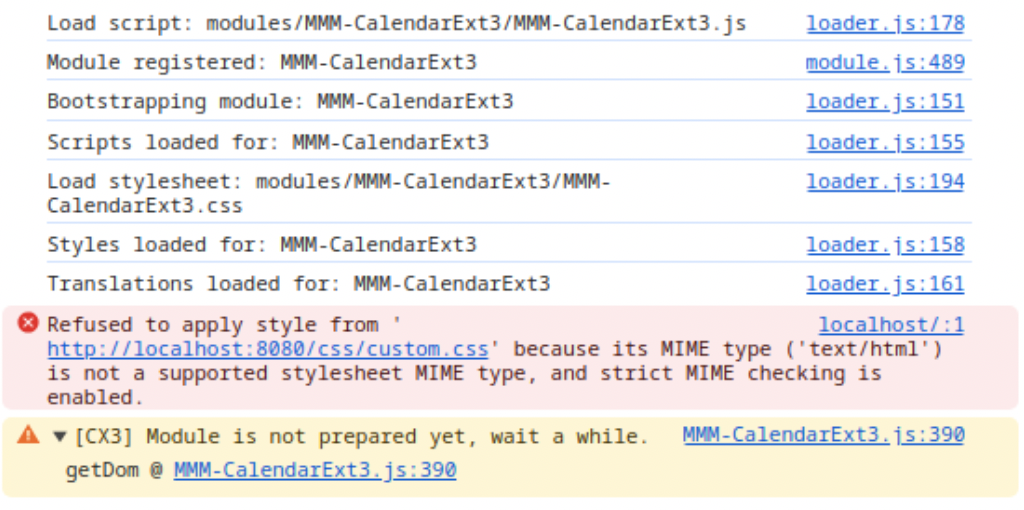
@sdetweil This is what I get in the console
-
@tke499 calendar is broadcasting, so that’s not it
-
Generally,

This message is just an warning can be ignored.
However, in practice, stopping at that point usually corresponds to the following cases:-
(Most common case): The CX3 module has not been properly installed. In most situations, this happens because the
CX3_Sharedlibrary is not correctly installed. To resolve this, navigate to the CX3 directory, rungit pull, and then executenpm install. This resolves most issues. If it doesn’t, simply delete the entire CX3 directory and reinstall it. It only takes about 15 seconds. -
In very rare cases, other modules may cause errors during DOM creation, which can have an impact. However, this is highly uncommon, so the cause is typically case 1.
-
-
@MMRIZE I have re-installed CX3 3 times now. Still having the same issue
-
@MMRIZE I only have 2 other modules installed, one for nest and the other for traffic.
-
@tke499
Send me your ics file or url. (eouia0819@gmail.com) -
@tke499 what is the settings in the default calendar,
xxx out your urlset :maximumEvents:100,
-
@sdetweil I set it to 100. The events now show up, but low the list on the side goes to the bottom of the screen. Not the desired effect.
-
@tke499 use limitdays
there are 50 knobs to adjust
-
@tke499 you can try maximumEvents:12 or 15
there is also a way with css. i will test and document in a little while
this should hide more than 10 events in the default calendar
in custom.css.calendar table tr:nth-child(n+10) { display: none; } -
@tke499 I have confirmed the css approach works…
in ~/MagicMirror/css/.custom.css.calendar table tr:nth-child(n+10) { /* 10 is the number of rows you want showing */ display: none; }I have maximumEvents:200
and only 10 lines show with the css posted
without it, it goes to the bottom of the screen

Hello! It looks like you're interested in this conversation, but you don't have an account yet.
Getting fed up of having to scroll through the same posts each visit? When you register for an account, you'll always come back to exactly where you were before, and choose to be notified of new replies (either via email, or push notification). You'll also be able to save bookmarks and upvote posts to show your appreciation to other community members.
With your input, this post could be even better 💗
Register Login