MagicMirror Forum
    • Recent
    • Tags
    • Unsolved
    • Solved
    • MagicMirror² Repository
    • Documentation
    • 3rd-Party-Modules
    • Donate
    • Discord
    • Register
    • Login
    A New Chapter for MagicMirror: The Community Takes the Lead
    Read the statement by Michael Teeuw here.

    MMM-pages - how to know which page index my module has?

    Scheduled Pinned Locked Moved Development
    29 Posts 4 Posters 8.2k Views 4 Watching
    Loading More Posts
    • Oldest to Newest
    • Newest to Oldest
    • Most Votes
    Reply
    • Reply as topic
    Log in to reply
    This topic has been deleted. Only users with topic management privileges can see it.
    • S Do not disturb
      sdetweil @evroom
      last edited by sdetweil

      @evroom sorry, don’t quite understand

      your module would support the suspend/resume functions and be called at each appropriately

      MMM-pages calls hide and show
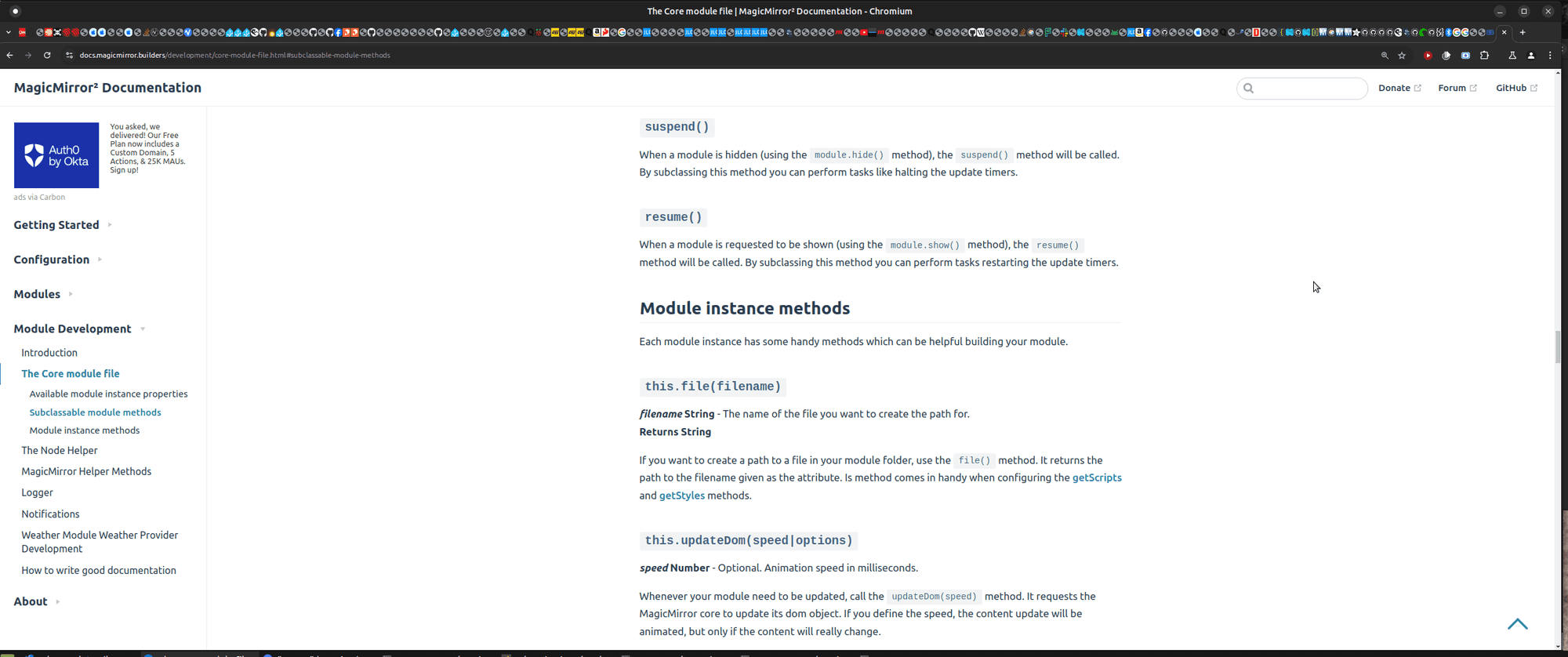
      Screenshot at 2025-01-18 09-39-22.png

      there is also a ‘different’ way to configure pages

      use an arbitrary name for each page

      and then add that to the classes of the modules you want on that page
      see https://github.com/sdetweil/MMM-pages?tab=readme-ov-file#class-based-configuration
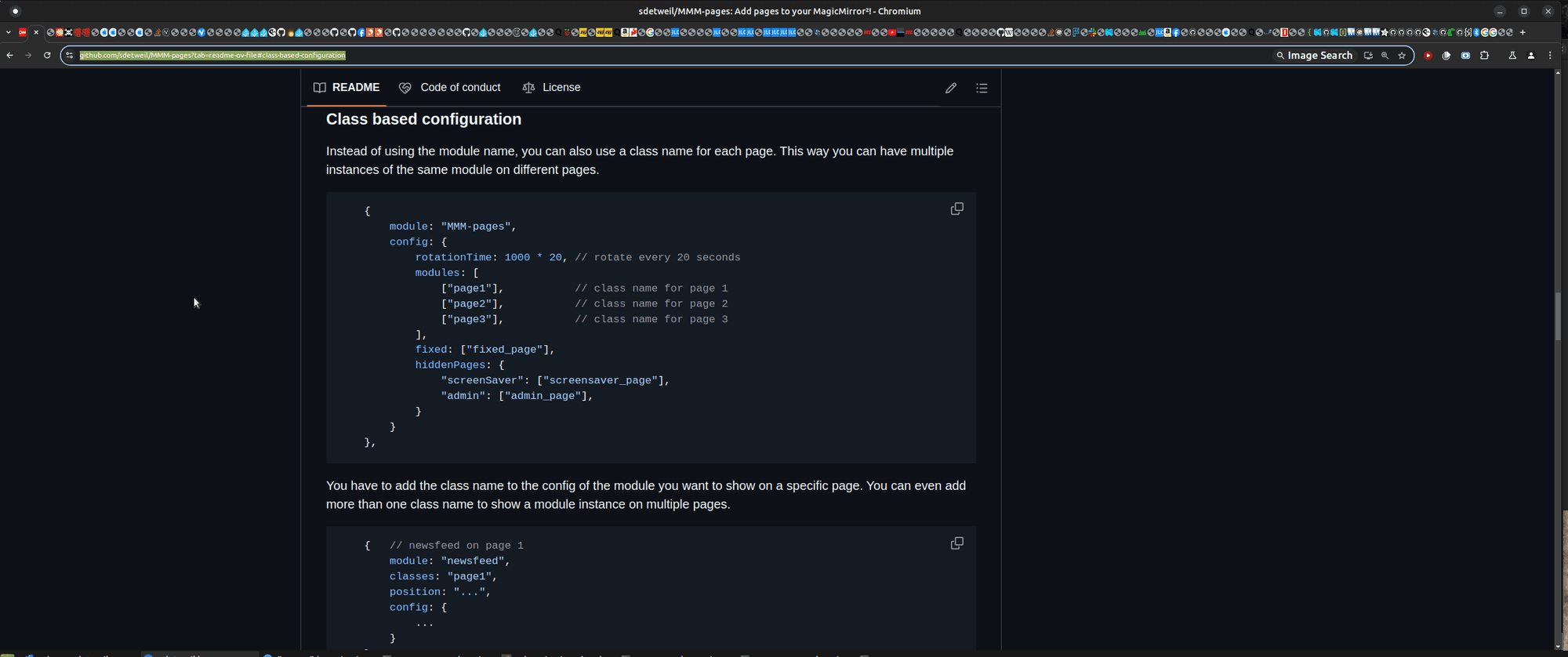
      Screenshot at 2025-01-18 09-36-17.png

      Sam

      How to add modules

      learning how to use browser developers window for css changes

      S 1 Reply Last reply Reply Quote 0
      • S Do not disturb
        sdetweil @sdetweil
        last edited by

        @evroom

        from my SampleModule.js

        	// system notification your module is being hidden
        	// typically you would stop doing UI updates (getDom/updateDom) if the module is hidden
        	suspend: function(){
        
        	},
        
        	// system notification your module is being unhidden/shown
        	// typically you would resume doing UI updates (getDom/updateDom) if the module is shown
        	resume: function(){
        
        	},
        

        Sam

        How to add modules

        learning how to use browser developers window for css changes

        S evroomE 2 Replies Last reply Reply Quote 0
        • S Do not disturb
          sdetweil @sdetweil
          last edited by

          @evroom my MMM-SleepWake uses an external trigger to cause modules to be shown/hidden (screen saver where the screen won’t turn off)

          I provide a commandline command to interact with the module…
          i use a webcam with the motion project daemon to trigger show/hide

          Sam

          How to add modules

          learning how to use browser developers window for css changes

          1 Reply Last reply Reply Quote 0
          • evroomE Offline
            evroom @sdetweil
            last edited by

            @sdetweil
            Yeah, this module is kind of in my foster care.
            I did not come up with the code; only made some tweaks and made it available.
            There is not suspend or resume to been seen in the code.

            But I will study the stuff you mentioned and will try to implement that.

            Thx.

            MagicMirror version: 2.33.0
            Raspberry Pi 4 Model B Rev 1.5 (8 GB RAM)
            Raspbian GNU/Linux 12 (bookworm)

            Test environment:
            MagicMirror version: v2.33.0
            Raspberry Pi 3 Model B Plus Rev 1.3 (1 GB RAM)
            Raspbian GNU/Linux 12 (bookworm)

            evroomE 1 Reply Last reply Reply Quote 0
            • evroomE Offline
              evroom @evroom
              last edited by

              As a workaround, I will make it a requirement to put the MMM-Player on the first page (page index 0).
              When I receive 0, then I will start streaming, otherwise I will stop streaming.
              That seems to work.

              MagicMirror version: 2.33.0
              Raspberry Pi 4 Model B Rev 1.5 (8 GB RAM)
              Raspbian GNU/Linux 12 (bookworm)

              Test environment:
              MagicMirror version: v2.33.0
              Raspberry Pi 3 Model B Plus Rev 1.3 (1 GB RAM)
              Raspbian GNU/Linux 12 (bookworm)

              evroomE M 3 Replies Last reply Reply Quote 0
              • evroomE Offline
                evroom @evroom
                last edited by

                @sdetweil
                Short question:

                There are 2 versions of MMM-pages:

                https://github.com/edward-shen/MMM-pages
                https://github.com/sdetweil/MMM-pages

                They seem in-sync, but which one would be the preferred one to take?

                MagicMirror version: 2.33.0
                Raspberry Pi 4 Model B Rev 1.5 (8 GB RAM)
                Raspbian GNU/Linux 12 (bookworm)

                Test environment:
                MagicMirror version: v2.33.0
                Raspberry Pi 3 Model B Plus Rev 1.3 (1 GB RAM)
                Raspbian GNU/Linux 12 (bookworm)

                S 1 Reply Last reply Reply Quote 0
                • S Do not disturb
                  sdetweil @evroom
                  last edited by sdetweil

                  @evroom the core function is the same
                  i added the ability to have different page display times

                  i wrote the doc on the fixed page name approach

                  as you are using a notification now
                  just move that to suspend (same as index=0)
                  and the resume wakes you back up

                  Sam

                  How to add modules

                  learning how to use browser developers window for css changes

                  plainbrokeP 1 Reply Last reply Reply Quote 0
                  • plainbrokeP Offline
                    plainbroke @sdetweil
                    last edited by

                    @sdetweil
                    He has the MMM-MPlayer working in pages and I am now using pages and MPlayer in my main MM.
                    Kinda of cool to be able to show a RSTP camera or 2 again…

                    Slow learner. But trying anyways.
                    MM is on Raspberry Pi 4B w/8gb ram loaded on a 128gb nvme drive.
                    Running Trixie and the latest MM version.

                    S 1 Reply Last reply Reply Quote 0
                    • S Do not disturb
                      sdetweil @plainbroke
                      last edited by

                      @plainbroke cool

                      Sam

                      How to add modules

                      learning how to use browser developers window for css changes

                      1 Reply Last reply Reply Quote 0
                      • M Offline
                        mvrlogins @evroom
                        last edited by

                        @evroom said in MMM-pages - how to know which page index my module has?:

                        As a workaround, I will make it a requirement to put the MMM-Player on the first page (page index 0).
                        When I receive 0, then I will start streaming, otherwise I will stop streaming.
                        That seems to work.

                        Hi

                        Trying to use the mmm-mplayer module with mmm-pages, and it works fine, as you say, when the page index is 0.

                        However, I’d like to use it to only show video when called via notification

                        I have a single main page (without mplayer) - that shows all the time - and a single hidden page (with mplayer) to be shown when called via notification and then return the the main page with another notification.

                        I can’t currently implement this. Any ideas?

                        Thanks very much

                        S 1 Reply Last reply Reply Quote 0
                        • S Do not disturb
                          sdetweil @mvrlogins
                          last edited by sdetweil

                          @mvrlogins why not? what triggers the notification??

                          button, command , …

                          you could prove this with the MMM-CommandtoNotification module

                          Sam

                          How to add modules

                          learning how to use browser developers window for css changes

                          M 1 Reply Last reply Reply Quote 0
                          • M Offline
                            mvrlogins @sdetweil
                            last edited by

                            @sdetweil

                            I’m using MMM-Remote Control

                            The issue is that the video is shown all the time on page0.

                            I have 2 pages set up with MMM-Pages

                            • 1 page to be shown all the time
                            • 1 hidden page to be shown only when called.

                            The video needs to be on the hidden page. If I put classes : “hidden_page” under MMM-Player, the video feed shows on the page0 regardless.

                            The hidden page, when called, shows only the header fro MMM-Player and is otherwise blank

                            The page calling works fine with MMM-RemoteControl

                             {
                                    module: "MMM-pages",
                                    config: {
                                        rotationTime: 1000 * 20, // rotate every 20 seconds
                                        modules: [
                                            ["page1"],           // class name for page 1
                                        ],
                                        fixed: ["fixed_page"],
                                        hiddenPages: {
                                            "Doorbell": ["doorbell_page"],
                                       
                                        }
                                    }
                                },


                            and

                            {
                            	module: 'MMM-MPlayer',
                                    classes: "doorbell_page",
                                    disabled: false,
                                    position: "top_left",
                                    header: "MPlayer",
                            	config: {
                            	  useTwoWindows: true,
                            	  layout: 'column',
                            	  monitorAspect: 0,
                            	  rotate: -1,
                            	  windowSize: { width: 640, height: 480 },
                            	  windowPosition: { x: 5, y: 225 },
                            	  streamInterval: 30000,
                            	  streams: {
                            		window1: [
                            		  'rtsp://10.0.1.1:7447/gv9eHrB9yZyPhgvN',
                            		],
                            		window2: [
                            		  'rtsp://10.0.1.1:7447/D89zTJyDwN8YtKix',
                            		  
                            		]
                            	  }
                            	}
                            },
                            
                            M 1 Reply Last reply Reply Quote 0
                            • M Offline
                              mvrlogins @mvrlogins
                              last edited by mvrlogins

                              Only thing I can think of right now is to put the video on page0 and the rest on page1

                              and then use a combination of the PAGE_CHANGED and PAUSE_ROTATION notifications to get what I want

                              Or is there a way to permanently pause rotation?

                              Then I can only use the PAGE_CHANGED call to get to the page I want

                              would the below disable rotation?

                              rotationTime: 1000 * 0,

                              S 1 Reply Last reply Reply Quote 0
                              • S Do not disturb
                                sdetweil @mvrlogins
                                last edited by sdetweil

                                @mvrlogins i believe so. but you should have been able to send the notification for the named hidden page

                                “SHOW_HIDDEN_PAGE”, “Doorbell”

                                right?!

                                Sam

                                How to add modules

                                learning how to use browser developers window for css changes

                                M 1 Reply Last reply Reply Quote 0
                                • M Offline
                                  mvrlogins @sdetweil
                                  last edited by

                                  @sdetweil said in MMM-pages - how to know which page index my module has?:

                                  @mvrlogins i believe so. but you should have been able to send the notification for the named hidden page

                                  “SHOW_HIDDEN_PAGE”, “Doorbell”

                                  right?!

                                  Yes, the notification works fine.

                                  But mplayer does not show up on the hidden page, only on the main page

                                  S 2 Replies Last reply Reply Quote 0
                                  • S Do not disturb
                                    sdetweil @mvrlogins
                                    last edited by

                                    @mvrlogins hm, that makes no sense as the MagicMirror operations are the same

                                    Sam

                                    How to add modules

                                    learning how to use browser developers window for css changes

                                    M 1 Reply Last reply Reply Quote 0
                                    • S Do not disturb
                                      sdetweil @mvrlogins
                                      last edited by sdetweil

                                      @mvrlogins i opened this issue
                                      https://github.com/evroom/MMM-MPlayer/issues/4

                                      try my fork

                                      cd ~/MagicMirror/modules
                                      rename the existing folder out of the way
                                      git clone https://github.com/sdetweil/MMM-MPlayer
                                      

                                      change the page config to have the hidden page and the
                                      remote_control notification

                                      I submitted this change to the module for inclusion, depending on your results.

                                      Sam

                                      How to add modules

                                      learning how to use browser developers window for css changes

                                      M 1 Reply Last reply Reply Quote 0
                                      • M Offline
                                        mvrlogins @sdetweil
                                        last edited by

                                        @sdetweil said in MMM-pages - how to know which page index my module has?:

                                        @mvrlogins hm, that makes no sense as the MagicMirror operations are the same

                                        Maybe something to do with mplayer itself, not the module MMM-Mplayer?

                                        S 1 Reply Last reply Reply Quote 0
                                        • S Do not disturb
                                          sdetweil @mvrlogins
                                          last edited by

                                          @mvrlogins no, i fixed in my fork

                                          Sam

                                          How to add modules

                                          learning how to use browser developers window for css changes

                                          1 Reply Last reply Reply Quote 0
                                          • M Offline
                                            mvrlogins @sdetweil
                                            last edited by mvrlogins

                                            @sdetweil said in MMM-pages - how to know which page index my module has?:

                                            git clone https://github.com/sdetweil/MMM-MPlayer

                                            Did as you suggested

                                            The video appears only on page index 0 and not on the hidden page

                                            See the 2 video images on the attached screenshot - both are over the weather module

                                            The header for the MPlayer appears on the hidden page

                                            I can change to the hidden page with Remote Control, no problem

                                                {
                                                    module: "MMM-pages",
                                                    config: {
                                                        rotationTime: 1000 * 86400, // rotate every 20 seconds
                                                        modules: [
                                            	
                                                            ["page1"],           // class name for page 1
                                                     //       ["page2"],           // class name for page 2
                                                    //        ["page3"],           // class name for page 3
                                                        ],
                                                        fixed: ["fixed_page"],
                                                        hiddenPages: {
                                                            "Doorbell": ["doorbell_page"],
                                                       
                                                        }
                                                    }
                                                },
                                            
                                            {
                                            	module: 'MMM-MPlayer',
                                                    classes: "doorbell_page",
                                                    disabled: false,
                                                    position: "top_left",
                                                    header: "MPlayer",
                                            	config: {
                                            	  useTwoWindows: true,
                                            	  layout: 'column',
                                            	  monitorAspect: 0,
                                            	  rotate: -1,
                                            	  windowSize: { width: 640, height: 360 },
                                            	  windowPosition: { x: 5, y: 225 },
                                            	  streamInterval: 30000,
                                            	  streams: {
                                            		window1: [
                                            		  'rtsp://10.0.1.1:7447/gv9eHrB9yZyPhgvN',
                                            		],
                                            		window2: [
                                            		  'rtsp://10.0.1.1:7447/D89zTJyDwN8YtKix',
                                            		  
                                            		]
                                            	  }
                                            	}
                                            },
                                            

                                            ScreenFloat Shot of Preview at 20 Feb 2025 at 16_57_07.jpg

                                            1 Reply Last reply Reply Quote 0

                                            Hello! It looks like you're interested in this conversation, but you don't have an account yet.

                                            Getting fed up of having to scroll through the same posts each visit? When you register for an account, you'll always come back to exactly where you were before, and choose to be notified of new replies (either via email, or push notification). You'll also be able to save bookmarks and upvote posts to show your appreciation to other community members.

                                            With your input, this post could be even better 💗

                                            Register Login

                                            • 1
                                            • 2
                                            • 1 / 2
                                            • First post
                                              Last post
                                            Enjoying MagicMirror? Please consider a donation!
                                            MagicMirror created by Michael Teeuw.
                                            Forum managed by Sam, technical setup by Karsten.
                                            This forum is using NodeBB as its core | Contributors
                                            Contact | Privacy Policy

