MagicMirror Forum
    • Recent
    • Tags
    • Unsolved
    • Solved
    • MagicMirror² Repository
    • Documentation
    • 3rd-Party-Modules
    • Donate
    • Discord
    • Register
    • Login
    A New Chapter for MagicMirror: The Community Takes the Lead
    Read the statement by Michael Teeuw here.

    cron job hdmi on and off

    Scheduled Pinned Locked Moved Solved Troubleshooting
    29 Posts 4 Posters 6.6k Views 4 Watching
    Loading More Posts
    • Oldest to Newest
    • Newest to Oldest
    • Most Votes
    Reply
    • Reply as topic
    Log in to reply
    This topic has been deleted. Only users with topic management privileges can see it.
    • S Offline
      Sam 0 @sdetweil
      last edited by sdetweil

      @evroom Thanks for your explanation, I have made adjustments and will check tonight if it works. I will report this back. Thanks for the effort.

      1 Reply Last reply Reply Quote 0
      • S Offline
        Sam 0
        last edited by

        unfortunately it still doesn’t work what am I doing

        wrong?!

        6df4646c-2d05-4f37-ab98-06602edb7242-image.png
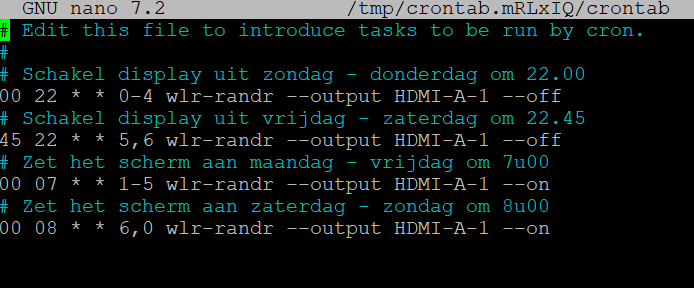
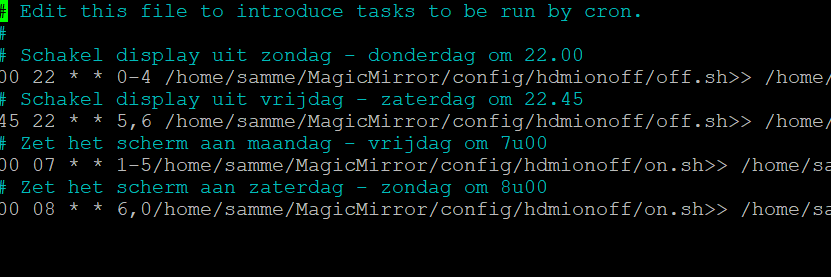
        cron info

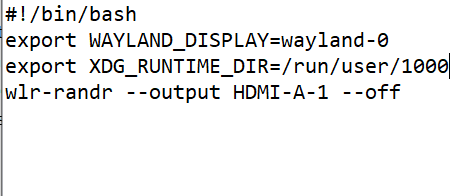
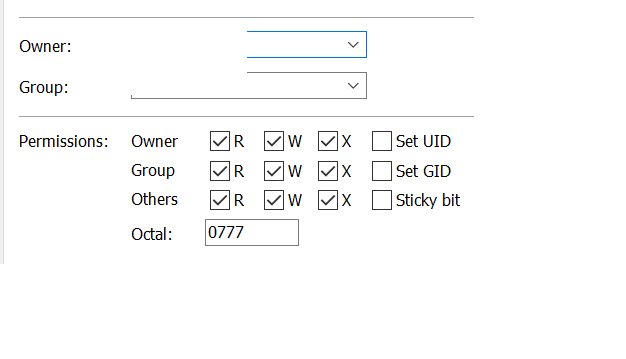
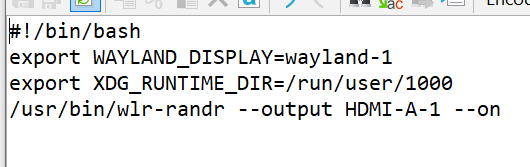
        on sh file
        5579a93f-27f3-4e53-b75e-59c5306798b8-image.png

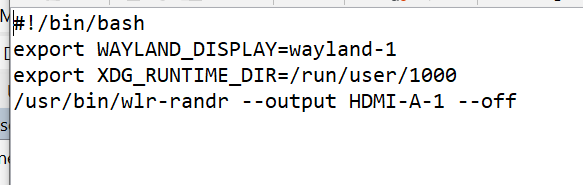
        off sh file
        e7e6712a-47f1-4210-b91f-6eb6bc5c7230-image.png

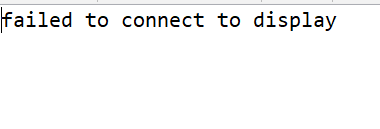
        error logfile:
        2d8cad2e-a6e6-496d-a3eb-34dfff1f115d-image.png

        evroomE 3 Replies Last reply Reply Quote 0
        • evroomE Offline
          evroom @Sam 0
          last edited by

          @Sam-0

          So it seems that the cronjob is okay.

          Can you do:
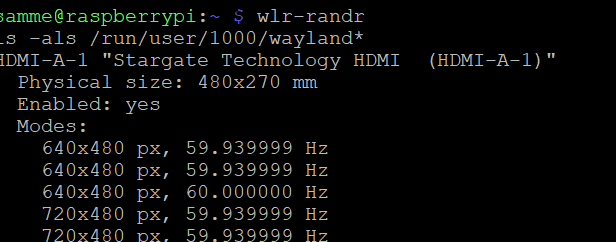
          ˋˋˋls -als /run/user/1000/wayland*ˋˋˋ

          I think you need wayland-0 iso wayland-1.

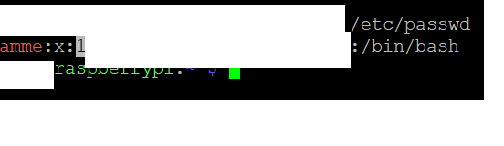
          With ˋˋˋ grep username /etc/passwdˋˋˋ (use your username) you can verify that your user has uid 1000.

          1 Reply Last reply Reply Quote 0
          • evroomE Offline
            evroom @Sam 0
            last edited by

            @Sam-0

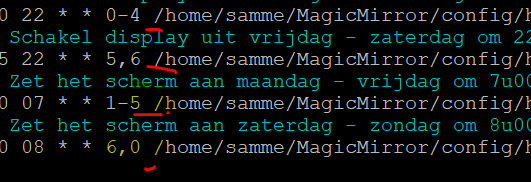
            In de laatste 2 regels mist een spatie bij /home.

            1 Reply Last reply Reply Quote 0
            • evroomE Offline
              evroom @Sam 0
              last edited by

              This post is deleted!
              1 Reply Last reply Reply Quote 0
              • S Offline
                Sam 0
                last edited by

                ok i checked some more and did some tests

                73aa8bb5-2eeb-4bac-888c-2822ba96a7ad-image.png

                when I execute the following I get the error message that I also see in the log

                /usr/bin/wlr-randr --output H DMI-A-1 --off
                failed to connect to display

                also running the sh files via putty gives the error
                it seems that the command:
                /usr/bin/wlr-randr --output H DMI-A-1 --off
                the error message gives the question is this command incorrect or is there an underlying problem?

                4e3a1bda-3953-4e39-899b-35fbcae43297-image.png

                mumblebajM S 2 Replies Last reply Reply Quote 0
                • mumblebajM Offline
                  mumblebaj Module Developer @Sam 0
                  last edited by

                  @Sam-0 Can you run the following from the command line and she your results:
                  wlr-randr
                  ls -als /run/user/1000/wayland*

                  Share your results. Either the wayland-1 is different as indicated by @evroom or HDMI-A-1 is actually a different version on your system.

                  Share the results from the above and we take it from there. Also, @evroom has indicated the there is supposed to be a space before /home on the crontab.

                  Check out my modules at: https://github.com/mumblebaj?tab=repositories
                  Check my blog-post: https://mumblebaj.xyz/
                  Check my MM Container: https://hub.docker.com/repository/docker/mumblebaj/magicmirror/general

                  1 Reply Last reply Reply Quote 0
                  • S Offline
                    Sam 0 @Sam 0
                    last edited by

                    @Sam-0 this is the result
                    ecf36ac0-1805-459a-8f09-a634f156946a-image.png

                    54d35d64-8643-4566-8e74-cf1a8fa93552-image.png

                    checked the cron see below
                    82e1d136-77d8-4e8a-b06b-544ba9c05629-image.png

                    evroomE 1 Reply Last reply Reply Quote 0
                    • evroomE Offline
                      evroom @Sam 0
                      last edited by

                      @Sam-0

                      So as stated before you most probably need to change wayland-1 to wayland-0 in your scripts.
                      Give it a try.
                      Furthermore the .lock file may cause a problem, but I guess this will show in your error log.
                      And temporarily change the times in your cronjob to speed things up a bit.
                      Waiting till ten and midnight is not really necessary :-)

                      mumblebajM S 2 Replies Last reply Reply Quote 1
                      • mumblebajM Offline
                        mumblebaj Module Developer @evroom
                        last edited by

                        @evroom *.lock should not cause an issue. I have same on my system and no issues with it. I agree with the wayland-1 change to wayland-0.

                        Check out my modules at: https://github.com/mumblebaj?tab=repositories
                        Check my blog-post: https://mumblebaj.xyz/
                        Check my MM Container: https://hub.docker.com/repository/docker/mumblebaj/magicmirror/general

                        1 Reply Last reply Reply Quote 0
                        • S Offline
                          Sam 0 @evroom
                          last edited by

                          @evroom

                          should it be modified in this way?

                          output HDMI-A-1 --on
                          Into
                          output HDMI-A-0 --on

                          evroomE 1 Reply Last reply Reply Quote 0
                          • evroomE Offline
                            evroom @Sam 0
                            last edited by

                            @Sam-0 said in cron job hdmi on and off:

                            @evroom

                            should it be modified in this way?

                            output HDMI-A-1 --on
                            Into
                            output HDMI-A-0 --on

                            No, like this:

                            export WAYLAND_DISPLAY=wayland-0

                            In both scripts.

                            S 1 Reply Last reply Reply Quote 0
                            • S Offline
                              Sam 0 @evroom
                              last edited by

                              @evroom said in cron job hdmi on and off:

                              export WAYLAND_DISPLAY=wayland-0

                              this way?
                              0e8d7510-9711-4d3a-906d-9694419deee4-image.png

                              S 1 Reply Last reply Reply Quote 0
                              • S Offline
                                sdetweil @Sam 0
                                last edited by

                                @Sam-0 no… the exports have to be before the wlr_randr

                                Sam

                                How to add modules

                                learning how to use browser developers window for css changes

                                S 1 Reply Last reply Reply Quote 0
                                • S Offline
                                  Sam 0 @sdetweil
                                  last edited by

                                  @sdetweil
                                  thank you i made the adjustment
                                  cbeb7a77-bad4-46f5-8f51-485262e43fea-image.png

                                  evroomE 1 Reply Last reply Reply Quote 0
                                  • evroomE Offline
                                    evroom @Sam 0
                                    last edited by

                                    @Sam-0

                                    You only had to change the 1 into a 0.
                                    Not to move the lines around, especially not the ones with export.

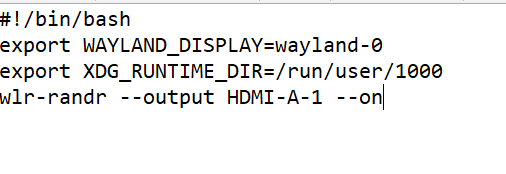
                                    #!/bin/bash
                                    export WAYLAND_DISPLAY=wayland-0
                                    export XDG_RUNTIME_DIR=/run/user/1000
                                    wir-randr --output HDMI-A-1 --on
                                    

                                    But you are slowly getting there :-)
                                    Wax on, wax off
                                    Screen on, screen off.

                                    S 2 Replies Last reply Reply Quote 0
                                    • S Offline
                                      Sam 0 @evroom
                                      last edited by

                                      @
                                      ok i will adjust it and see if it works

                                      1 Reply Last reply Reply Quote 0
                                      • S Offline
                                        Sam 0 @evroom
                                        last edited by

                                        @evroom said in cron job hdmi on and off:

                                        @Sam-0

                                        You only had to change the 1 into a 0.
                                        Not to move the lines around, especially not the ones with export.

                                        #!/bin/bash
                                        export WAYLAND_DISPLAY=wayland-0
                                        export XDG_RUNTIME_DIR=/run/user/1000
                                        wir-randr --output HDMI-A-1 --on
                                        

                                        But you are slowly getting there :-)
                                        Wax on, wax off
                                        Screen on, screen off.

                                        Man who catch fly with chopstick, accomplish anything😆

                                        S 1 Reply Last reply Reply Quote 0
                                        • S Offline
                                          Sam 0
                                          last edited by

                                          ok is this good now? :) let me know the result tomorrow…
                                          677dcde8-ec68-4ede-8705-41e842eb790c-image.png

                                          7504475c-a69b-45c2-a5fb-e1d57751b929-image.png

                                          S 1 Reply Last reply Reply Quote 0
                                          • S Offline
                                            sdetweil @Sam 0
                                            last edited by

                                            @Sam-0 think so yes

                                            Sam

                                            How to add modules

                                            learning how to use browser developers window for css changes

                                            1 Reply Last reply Reply Quote 0

                                            Hello! It looks like you're interested in this conversation, but you don't have an account yet.

                                            Getting fed up of having to scroll through the same posts each visit? When you register for an account, you'll always come back to exactly where you were before, and choose to be notified of new replies (either via email, or push notification). You'll also be able to save bookmarks and upvote posts to show your appreciation to other community members.

                                            With your input, this post could be even better 💗

                                            Register Login

                                            • 1
                                            • 2
                                            • 1 / 2
                                            • First post
                                              Last post
                                            Enjoying MagicMirror? Please consider a donation!
                                            MagicMirror created by Michael Teeuw.
                                            Forum managed by Sam, technical setup by Karsten.
                                            This forum is using NodeBB as its core | Contributors
                                            Contact | Privacy Policy