Read the statement by Michael Teeuw here.
Netatmo module will not shown
-
@sdetweil
Hello sam, first of all thank you for your support and your testing!Then why create MM for Proxmox? If it can’t find a network?
But in your screenshot I see Netatmo, it is displayed, or are you missing the values?
What does your testing and your statements tell me as a layman from MM?
Can I now not use Netatmo in the LXC container with Proxmox?
Other modules such as calender, clock public transfer hafas and RNV work perfectly.Thank you for any clarification so that I can understand it.
EDIT:
Hello Sam, if I use your config posted here and copy it in exactly the same way, netatmo is displayed but only with Hamburg and not my station…but it works…
I have used my code stored in the developer account as ID and secret key.
Shouldn’t MM then also show my location?
as soon as I set “MockData” to false, netatmo is no longer displayed…so you can say that the module itself works but not with the real data…think it’s the secret token…I read something here on the board
look:
https://forum.magicmirror.builders/topic/18690/mmm-netatmothermostat/2
-
so I’ll contact you again…es is displayed…perfekr…I took the template from SAM here and then adapted it again accordingly…now it works…thanks to everyone and especially once again to SAM …;-)
-
@kusselin
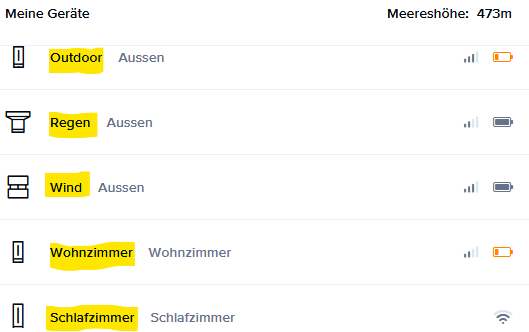
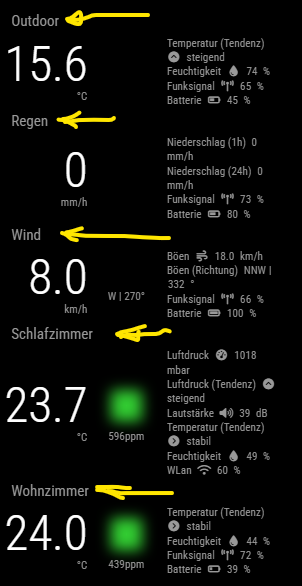
In your configuration, I’m missing the entry modulOrder. This entry was essential for me! I initially used the default name until I realized that it only works if the module name is stored exactly as you configured it in the web-app (https://auth.netatmo.com/de-de/access/login):my config:
		{
		module: 'netatmo',
		position: 'middle_center', // the location where the module should be displayed
		config: {
			clientId: '*myID*', // your app id
			clientSecret: '*mysecret*', // your app secret
			refresh_token: *'mytoken*', // your generated refresh token
			moduleOrder: ["Outdoor","Regen","Wind","Schlafzimmer","Wohnzimmer"], //take same names from web-app!
			updateInterval: 6, // every 3 minutes, refresh interval on netatmo is 10 minutes
			animationSpeed: 1000,
			design: 'bubbles', // classic or bubbles
			horizontal: false,
			lastMessageThreshold: 600, // in seconds (10 minutes)
			showLastMessage: true,
			showBattery: true,
			showRadio: true,
			showWiFi: true,
			showTrend: true,
			showMeasurementIcon: true,
			showMeasurementLabel: true,
			showStationName: false,
			showModuleNameOnTop: true,
			fontClassModuleName: 'small', // xsmall, small, medium, large, xlarge
			fontClassPrimary: 'large',
			fontClassSecondary: 'xsmall',
			fontClassMeasurement: 'xsmall',
			thresholdCO2Average: 800,
			thresholdCO2Bad: 1800,
			mockData: false,
		}
		},
https://home.netatmo.com/control/dashboard
MM:
-
@kusselin congratulations!!! i’m glad you got it working
-
@Lusbueb said in Netatmo module will not shown:
@kusselin
In your configuration, I’m missing the entry modulOrder. This entry was essential for me! I initially used the default name until I realized that it only works if the module name is stored exactly as you configured it in the web-app (https://auth.netatmo.com/de-de/access/login):my config:
		{
		module: 'netatmo',
		position: 'middle_center', // the location where the module should be displayed
		config: {
			clientId: '*myID*', // your app id
			clientSecret: '*mysecret*', // your app secret
			refresh_token: *'mytoken*', // your generated refresh token
			moduleOrder: ["Outdoor","Regen","Wind","Schlafzimmer","Wohnzimmer"], //take same names from web-app!
			updateInterval: 6, // every 3 minutes, refresh interval on netatmo is 10 minutes
			animationSpeed: 1000,
			design: 'bubbles', // classic or bubbles
			horizontal: false,
			lastMessageThreshold: 600, // in seconds (10 minutes)
			showLastMessage: true,
			showBattery: true,
			showRadio: true,
			showWiFi: true,
			showTrend: true,
			showMeasurementIcon: true,
			showMeasurementLabel: true,
			showStationName: false,
			showModuleNameOnTop: true,
			fontClassModuleName: 'small', // xsmall, small, medium, large, xlarge
			fontClassPrimary: 'large',
			fontClassSecondary: 'xsmall',
			fontClassMeasurement: 'xsmall',
			thresholdCO2Average: 800,
			thresholdCO2Bad: 1800,
			mockData: false,
		}
		},
https://home.netatmo.com/control/dashboard
MM:
Thanks s lot for your config…i changed it and now ist good and the netatmo Modul is running very well
-
S sdetweil has marked this topic as solved on
-
Hello everyone, netatmo is no longer working today :-(
I haven’t changed anything -
@kusselin need to see the logs again
always 1st place to look
-
Hi sam, look here again…
verbose cli /usr/bin/node /usr/bin/npm
1 info using npm@10.9.2
2 info using node@v22.15.0
3 silly config load:file:/usr/lib/node_modules/npm/npmrc
4 silly config load:file:/opt/magicmirror/.npmrc
5 silly config load:file:/root/.npmrc
6 silly config load:file:/usr/etc/npmrc
7 verbose title npm run seerver
8 verbose argv "run" "seerver"
9 verbose logfile logs-max:10 dir:/root/.npm/_logs/2025-05-03T14_24_21_403Z-
10 verbose logfile /root/.npm/_logs/2025-05-03T14_24_21_403Z-debug-0.log
11 silly logfile start cleaning logs, removing 1 files
12 silly logfile done cleaning log files
13 verbose stack Error: Missing script: "seerver"
13 verbose stack
13 verbose stack Did you mean this?
13 verbose stack   npm run server # run the "server" package script
13 verbose stack
13 verbose stack To see a list of scripts, run:
13 verbose stack   npm run
13 verbose stack     at #run (/usr/lib/node_modules/npm/lib/commands/run-script.js:111:13)
13 verbose stack     at async RunScript.exec (/usr/lib/node_modules/npm/lib/commands/run-script.js:40:7)
13 verbose stack     at async Npm.exec (/usr/lib/node_modules/npm/lib/npm.js:207:9)
13 verbose stack     at async module.exports (/usr/lib/node_modules/npm/lib/cli/entry.js:74:5)
14 error Missing script: "seerver"
14 error
14 error Did you mean this?
14 error   npm run server # run the "server" package script
14 error
14 error To see a list of scripts, run:
14 error   npm run
15 verbose cwd /opt/magicmirror
16 verbose os Linux 6.8.12-8-pve
17 verbose node v22.15.0
18 verbose npm  v10.9.2
19 verbose exit 1
20 verbose code 1
21 error A complete log of this run can be found in: /root/.npm/_logs/2025-05-03T14_24_21_403Z-debug-0.log
and the latest Log:
0 verbose cli /usr/bin/node /usr/bin/npm
1 info using npm@10.9.2
2 info using node@v22.15.0
3 silly config load:file:/usr/lib/node_modules/npm/npmrc
4 silly config load:file:/opt/magicmirror/.npmrc
5 silly config load:file:/root/.npmrc
6 silly config load:file:/usr/etc/npmrc
7 verbose title npm run server
8 verbose argv "run" "server"
9 verbose logfile logs-max:10 dir:/root/.npm/_logs/2025-05-03T14_24_50_844Z-
10 verbose logfile /root/.npm/_logs/2025-05-03T14_24_50_844Z-debug-0.log
11 silly logfile start cleaning logs, removing 1 files
12 silly logfile done cleaning log files
13 verbose cwd /opt/magicmirror
14 verbose os Linux 6.8.12-8-pve
15 verbose node v22.15.0
16 verbose npm  v10.9.2
17 verbose exit 0
18 info ok
here is the info wenn i go into /opt/magicmirror/ and “npm run server”:
The programs included with the Debian GNU/Linux system are free software;
the exact distribution terms for each program are described in the
individual files in /usr/share/doc/*/copyright.

Debian GNU/Linux comes with ABSOLUTELY NO WARRANTY, to the extent
permitted by applicable law.
Last login: Sat May  3 16:23:40 2025 from 192.168.200.219

MagicMirror LXC Container
    🌐   Provided by: community-scripts ORG | GitHub: https://github.com/community-scripts/ProxmoxVE

    🖥️   OS: Debian GNU/Linux - Version: 12
    🏠   Hostname: magicmirror-live
    💡   IP Address: 192.168.200.74
root@magicmirror-live:~# cd /opt/magicmirror
root@magicmirror-live:/opt/magicmirror# npm run server

> magicmirror@2.31.0 server
> node ./serveronly

[2025-05-03 16:40:49.450] [LOG]   Starting MagicMirror: v2.31.0
[2025-05-03 16:40:49.469] [LOG]   Loading config ...
[2025-05-03 16:40:49.470] [LOG]   config template file not exists, no envsubst
[2025-05-03 16:40:49.876] [INFO]  Checking config file /opt/magicmirror/config/config.js ...
[2025-05-03 16:40:49.930] [INFO]  Your configuration file doesn't contain syntax errors :)
[2025-05-03 16:40:49.931] [INFO]  Checking modules structure configuration ...
[2025-05-03 16:40:50.003] [INFO]  Your modules structure configuration doesn't contain errors :)
[2025-05-03 16:40:50.519] [LOG]   Loading module helpers ...
[2025-05-03 16:40:50.528] [LOG]   No helper found for module: alert.
[2025-05-03 16:40:50.551] [LOG]   Initializing new module helper ...
[2025-05-03 16:40:50.555] [LOG]   Module helper loaded: updatenotification
[2025-05-03 16:40:50.557] [LOG]   No helper found for module: clock.
[2025-05-03 16:40:50.934] [LOG]   Initializing new module helper ...
[2025-05-03 16:40:50.936] [LOG]   Module helper loaded: calendar
[2025-05-03 16:40:50.941] [LOG]   No helper found for module: compliments.
[2025-05-03 16:40:50.943] [LOG]   No helper found for module: MMM-OpenmapWeather.
[2025-05-03 16:40:50.950] [LOG]   Initializing new module helper ...
[2025-05-03 16:40:50.952] [LOG]   Module helper loaded: netatmo
[2025-05-03 16:40:50.954] [WARN]  No /opt/magicmirror/modules/MMM-OpenWeatherForecast/MMM-OpenWeatherForecast.js found for module: MMM-OpenWeatherForecast.
[2025-05-03 16:40:50.955] [LOG]   No helper found for module: MMM-OpenWeatherForecast.
[2025-05-03 16:40:50.955] [LOG]   No helper found for module: MMM-Blitzer.
[2025-05-03 16:40:50.958] [LOG]   Initializing new module helper ...
[2025-05-03 16:40:50.960] [LOG]   Module helper loaded: MMM-ApothekenNotdienst
[2025-05-03 16:40:50.962] [LOG]   Initializing new module helper ...
[2025-05-03 16:40:50.965] [LOG]   Module helper loaded: MMM-ioBroker
[2025-05-03 16:40:50.965] [LOG]   No helper found for module: MMM-Carousel.
[2025-05-03 16:40:51.040] [LOG]   Initializing new module helper ...
[2025-05-03 16:40:51.040] [LOG]   Module helper loaded: MMM-PublicTransportHafas
[2025-05-03 16:40:51.480] [LOG]   Initializing new module helper ...
[2025-05-03 16:40:51.480] [LOG]   Module helper loaded: MMM-RNV
[2025-05-03 16:40:51.482] [LOG]   Initializing new module helper ...
[2025-05-03 16:40:51.482] [LOG]   Check MagicMirror² version for node helper 'MMM-Fuel' - Minimum version: 2.15.0 - Current version: 2.31.0
[2025-05-03 16:40:51.482] [LOG]   Version is ok!
[2025-05-03 16:40:51.483] [LOG]   Module helper loaded: MMM-Fuel
[2025-05-03 16:40:51.591] [LOG]   Initializing new module helper ...
[2025-05-03 16:40:51.591] [LOG]   Module helper loaded: MMM-Remote-Control
[2025-05-03 16:40:51.658] [LOG]   Initializing new module helper ...
[2025-05-03 16:40:51.659] [LOG]   Module helper loaded: newsfeed
[2025-05-03 16:40:51.659] [LOG]   All module helpers loaded.
[2025-05-03 16:40:51.663] [LOG]   Starting server on port 8080 ...
[2025-05-03 16:40:51.664] [WARN]  You're using a full whitelist configuration to allow for all IPs
[2025-05-03 16:40:51.673] [ERROR] Whoops! There was an uncaught exception...
[2025-05-03 16:40:51.673] [ERROR] Error: listen EADDRINUSE: address already in use 0.0.0.0:8080
    at Server.setupListenHandle [as _listen2] (node:net:1939:16)
    at listenInCluster (node:net:1996:12)
    at node:net:2205:7
    at process.processTicksAndRejections (node:internal/process/task_queues:90:21) {
  code: 'EADDRINUSE',
  errno: -98,
  syscall: 'listen',
  address: '0.0.0.0',
  port: 8080
}
[2025-05-03 16:40:51.673] [ERROR] MagicMirror² will not quit, but it might be a good idea to check why this happened. Maybe no internet connection?
[2025-05-03 16:40:51.673] [ERROR] If you think this really is an issue, please open an issue on GitHub: https://github.com/MagicMirrorOrg/MagicMirror/issues
[2025-05-03 16:40:51.783] [INFO]  System information:
### SYSTEM:   manufacturer: ; model: ; virtual: false
### OS:       platform: linux; distro: Debian GNU/Linux; release: 12; arch: x64; kernel: 6.8.12-8-pve
### VERSIONS: electron: undefined; used node: 22.15.0; installed node: 22.15.0; npm: 10.9.2; pm2: 5.4.3
### OTHER:    timeZone: Europe/Berlin; ELECTRON_ENABLE_GPU: undefined
her my Config from MM:
/*************** AUTO GENERATED BY REMOTE CONTROL MODULE ***************/

{
      module: 'netatmo',
      position: 'bottom_left',
      config: {
        clientId: '123456,
        clientSecret: '1234',
        refresh_token: '1234',
        moduleOrder: [
          'Aussenmodul',
          'Regenmesser',
          'Windmesser',
          'Wohnen'
        ],
        updateInterval: 6,
        design: 'bubbles',
        horizontal: false,
        showStationName: false,
        showModuleNameOnTop: true,
        fontClassModuleName: 'small'
      }
    },
what I don’t understand either…because of the remote control module the config looks completely different than normal…but I think that has nothing to do with Netatmo…right?
I would be really grateful for your help…
Greetings
-
@kusselin the ‘already in use’ is because the container is running MagicMirror as a system service
you could use a different port for the test
export MM_PORT=8090
npm run servernow you have two instances running
one on 8080 and one on 8090ctrl-c to stop the one on 8090
-
@kusselin config format, yes RemoteControl, like my MMM-Config rewrites the config file and doesnt see the comments
-
@sdetweil said in Netatmo module will not shown:
Hello Sam,
If I enter this via putty in the path /opt/magicmirror, it will be there:
export MM_PORT=8090
npm run serverMagicMirror LXC Container 🌐 Provided by: community-scripts ORG | GitHub: https://github.com/community-scripts/ProxmoxVE 🖥️ OS: Debian GNU/Linux - Version: 12 🏠 Hostname: magicmirror-live 💡 IP Address: 192.168.200.74 root@magicmirror-live:~# cd /opt/magicmirror root@magicmirror-live:/opt/magicmirror# export MM_PORT=8090 root@magicmirror-live:/opt/magicmirror# npm run server > magicmirror@2.31.0 server > node ./serveronly [2025-05-03 17:00:10.347] [LOG] Starting MagicMirror: v2.31.0 [2025-05-03 17:00:10.361] [LOG] Loading config ... [2025-05-03 17:00:10.362] [LOG] config template file not exists, no envsubst [2025-05-03 17:00:10.643] [INFO] Checking config file /opt/magicmirror/config/config.js ... [2025-05-03 17:00:10.698] [INFO] Your configuration file doesn't contain syntax errors :) [2025-05-03 17:00:10.698] [INFO] Checking modules structure configuration ... [2025-05-03 17:00:10.755] [INFO] Your modules structure configuration doesn't contain errors :) [2025-05-03 17:00:11.073] [LOG] Loading module helpers ... [2025-05-03 17:00:11.076] [LOG] No helper found for module: alert. [2025-05-03 17:00:11.094] [LOG] Initializing new module helper ... [2025-05-03 17:00:11.094] [LOG] Module helper loaded: updatenotification [2025-05-03 17:00:11.094] [LOG] No helper found for module: clock. [2025-05-03 17:00:11.267] [LOG] Initializing new module helper ... [2025-05-03 17:00:11.269] [LOG] Module helper loaded: calendar [2025-05-03 17:00:11.271] [LOG] No helper found for module: compliments. [2025-05-03 17:00:11.271] [LOG] No helper found for module: MMM-OpenmapWeather. [2025-05-03 17:00:11.272] [LOG] Initializing new module helper ... [2025-05-03 17:00:11.272] [LOG] Module helper loaded: netatmo [2025-05-03 17:00:11.276] [WARN] No /opt/magicmirror/modules/MMM-OpenWeatherForecast/MMM-OpenWeatherForecast.js found for module: MMM-OpenWeatherForecast. [2025-05-03 17:00:11.276] [LOG] No helper found for module: MMM-OpenWeatherForecast. [2025-05-03 17:00:11.276] [LOG] No helper found for module: MMM-Blitzer. [2025-05-03 17:00:11.277] [LOG] Initializing new module helper ... [2025-05-03 17:00:11.277] [LOG] Module helper loaded: MMM-ApothekenNotdienst [2025-05-03 17:00:11.277] [LOG] Initializing new module helper ... [2025-05-03 17:00:11.278] [LOG] Module helper loaded: MMM-ioBroker [2025-05-03 17:00:11.278] [LOG] No helper found for module: MMM-Carousel. [2025-05-03 17:00:11.322] [LOG] Initializing new module helper ... [2025-05-03 17:00:11.322] [LOG] Module helper loaded: MMM-PublicTransportHafas [2025-05-03 17:00:11.518] [LOG] Initializing new module helper ... [2025-05-03 17:00:11.518] [LOG] Module helper loaded: MMM-RNV [2025-05-03 17:00:11.519] [LOG] Initializing new module helper ... [2025-05-03 17:00:11.519] [LOG] Check MagicMirror² version for node helper 'MMM-Fuel' - Minimum version: 2.15.0 - Current version: 2.31.0 [2025-05-03 17:00:11.519] [LOG] Version is ok! [2025-05-03 17:00:11.519] [LOG] Module helper loaded: MMM-Fuel [2025-05-03 17:00:11.595] [LOG] Initializing new module helper ... [2025-05-03 17:00:11.596] [LOG] Module helper loaded: MMM-Remote-Control [2025-05-03 17:00:11.633] [LOG] Initializing new module helper ... [2025-05-03 17:00:11.633] [LOG] Module helper loaded: newsfeed [2025-05-03 17:00:11.633] [LOG] All module helpers loaded. [2025-05-03 17:00:11.638] [LOG] Starting server on port 8090 ... [2025-05-03 17:00:11.639] [WARN] You're using a full whitelist configuration to allow for all IPs [2025-05-03 17:00:11.649] [LOG] Server started ... [2025-05-03 17:00:11.650] [LOG] Connecting socket for: updatenotification [2025-05-03 17:00:11.650] [LOG] Starting module helper: updatenotification [2025-05-03 17:00:11.650] [LOG] Connecting socket for: calendar [2025-05-03 17:00:11.651] [LOG] Starting node helper for: calendar [2025-05-03 17:00:11.651] [LOG] Connecting socket for: netatmo [2025-05-03 17:00:11.651] [LOG] Netatmo helper started ... [2025-05-03 17:00:11.651] [LOG] Connecting socket for: MMM-ApothekenNotdienst [2025-05-03 17:00:11.652] [LOG] Starting module helper: MMM-ApothekenNotdienst [2025-05-03 17:00:11.652] [LOG] Connecting socket for: MMM-ioBroker [2025-05-03 17:00:11.652] [LOG] Connecting socket for: MMM-PublicTransportHafas [2025-05-03 17:00:11.652] [LOG] Connecting socket for: MMM-RNV [2025-05-03 17:00:11.705] [LOG] Connecting socket for: MMM-Fuel [2025-05-03 17:00:11.705] [LOG] Starting module helper: MMM-Fuel [2025-05-03 17:00:11.705] [LOG] Connecting socket for: MMM-Remote-Control [2025-05-03 17:00:11.706] [LOG] Starting node helper for: MMM-Remote-Control [2025-05-03 17:00:11.708] [LOG] Connecting socket for: newsfeed [2025-05-03 17:00:11.708] [LOG] Starting node helper for: newsfeed [2025-05-03 17:00:11.708] [LOG] Sockets connected & modules started ... [2025-05-03 17:00:11.709] [INFO] >>> Ready to go! Please point your browser to: http://0.0.0.0:8090 <<< [2025-05-03 17:00:11.808] [INFO] System information: ### SYSTEM: manufacturer: ; model: ; virtual: false ### OS: platform: linux; distro: Debian GNU/Linux; release: 12; arch: x64; kernel: 6.8.12-8-pve ### VERSIONS: electron: undefined; used node: 22.15.0; installed node: 22.15.0; npm: 10.9.2; pm2: 5.4.3 ### OTHER: timeZone: Europe/Berlin; ELECTRON_ENABLE_GPU: undefinedI have changed it like this under Putty…
then press the Ctrl key and C… but then I still have to enter IP:8080 again to display the MM…with IP:8090 it doesn’t work - network overflowAll other modules are shown correctly, but Netatmo doesent shown :-( what a f…
2 day ist gos good -
@kusselin SOOOO much fun!! i do not know. and cannot debug it here
-
@sdetweil
Ok, but it looks good now, doesn’t it?
That means it’s the module again.Maybe someone here with Netatmo running will see this?
Thanks and greetings
-
@kusselin yes, dont see anything indicating the problem. all looks good
-
@sdetweil said in Netatmo module will not shown:
{
module: “netatmo”,
position: “bottom_left”,
order: “*”,
animateIn: “None”,
animateOut: “None”,
config: {
clientId: ‘1234567’, // your app id
clientSecret: ‘1212123’, // your app secret
refresh_token: ‘3223232’, // your generated refresh token
mockData: true
},
disabled: false,
hiddenOnStartup: false,
configDeepMerge: false
},I have now copied your config from here into the config again and it no longer works… can you please try it again with the mockData: true and take a picture
thanks
-
@kusselin will do, it took a few minutes , i had given up and came back and it was displaying
-
@det said in Netatmo module will not shown:
@kusselin
Also check that your registration is correct. Make sure you have a current “token.js”.Hi, Where can i find the token.js?
-
@kusselin this version doesn’t use token.js
https://github.com/CFenner/MMM-Netatmo,
uses info in config.js for this module -
Hi sam, where can i adjust the intervall time in MM when i have the module „Carousel“?
-


Hello! It looks like you're interested in this conversation, but you don't have an account yet.
Getting fed up of having to scroll through the same posts each visit? When you register for an account, you'll always come back to exactly where you were before, and choose to be notified of new replies (either via email, or push notification). You'll also be able to save bookmarks and upvote posts to show your appreciation to other community members.
With your input, this post could be even better 💗
Register Login