Read the statement by Michael Teeuw here.
Is adding Home Assistant the right way to go?
-
I have made progress (sort of). Before when I was testing the various versions of iFrames I hadn’t even tried linking to HA and was using basic websites and just couldn’t see it.
I commented out the HA Display one for now in case it was all throwing a wobbly and I tested that I could access the HA login screen from the monitor using the browser.
I have used this to add an iFrame with the URL for the HA:
           {
			module: 'iFrame',
			position: "fullscreen_above" ,	// This can be any of the regions.
			classes: "testing",
			config: {
				// See 'Configuration options' for more information.
					url: "http://xxx.xxx.xx.xx:8123/",
					width: "100%", // Optional. Default: 100%
					height: "100vh", //Optional. Default: 100px
					border: "1px",
				},
		},
I can now see it, but I cannot get it to fill the page. It is a very thin window at the top. I have tried changing height to 100%, but found something on the forum about vh. I have tried fullscreen, fullscreen_below and other sections and nothing seems to make it particularly big.
The other thing I have noticed is that on my first page “home” my google calendar is missing, or at least the data has gone. I am using MMM-CalendarExt3 and my Todoist (MMM-Todoist2) list has all gone too. the title is there, but no tasks. I had noticed that the calendar and page indicators etc needed updating so I tried that afterwards, but no luck. Is it because I have multiple places using URLs? The calendar has 5 google calendar’s, though the Todoist is using an API.
Apart from that, it is going well 😂
-
@British_Kiwi you dont want full screen_above, that puts it on top of every other module, hiding them
Try mmm-embedurl, works for me
-
@sdetweil . I’ll try that tomorrow. Just about to head to bed.
I think I might know why I lost my google calendar in the meantime. I had seen there were updates which I had been ignoring, but in the end i updated the calendar, pages and page indicator. I have since seen that the new MM update has impacts on the calendar and looks like my nodjs was an old version. I followed your instructions from here https://forum.magicmirror.builders/topic/19770/nodejs-version-update-issue/2?_=1759892047767 and have updated nodejs to v 22.18, but I still don’t have any calendars showing.
A problem for another night!
-
@British_Kiwi if you had used the upgrade script it would have been done for you
Nothing in the MagicMirror upgrade should have affected calendar.
-
@British_Kiwi MagicMirror is a 3 layer design
Full screen_below on the bottom
Module positions. (These will hide parts of fs_below)
Fullscreen_above on top (this will hide anything below it), great for a security panel when no one is around, for example -
You can also try placing it bottom right and sizing by pixel count, increasing gradually until you reach your monitors full(ish) resolution
I haven’t tried full screen. But one of my configs looks like this :
                {
                        module: "iFrame",
                        position: "bottom_right",
                        header: "HOUSE STATISTICS",
                        config: {
                                url: "http://192.168.1.4:8123/mm-dash-right",
                                        width: "410px",
                                        height: "215px"
                }
                },
If I increase width, the iframe expands to the left. If I increase height, it expands up. Worth a shot.
-
Sam, I usually use your script (not quite sure why I didn’t, blaming lack of sleep). I have run it and all running correctly. keep getting a message about environment variables, but have been running the following code which seems to sort it till the next time.
pm2 restart 0 --update -envThanks for giving more details about fullscreen below and above. I don’t have anything else on that page, so I am surprised why this didn’t fill up the screen.
@Hilt I ended up using your code about using bottom_right and after a bit of tweaking and I can now see it. just need to log in.
My main problem now (there is always one) , is that I still can’t get the calendar to populate or todoist. Of course, my last back up was not just before this stopped working and I think it was around the time I updated the module. However, I didn’t update the Todoist module so a bit baffled. I’ll have to check my code and see if I have inadvertently done something. I am using VSCode and doesn’t look like I have, but will go through it carefully after work. Here is what it looks like now:
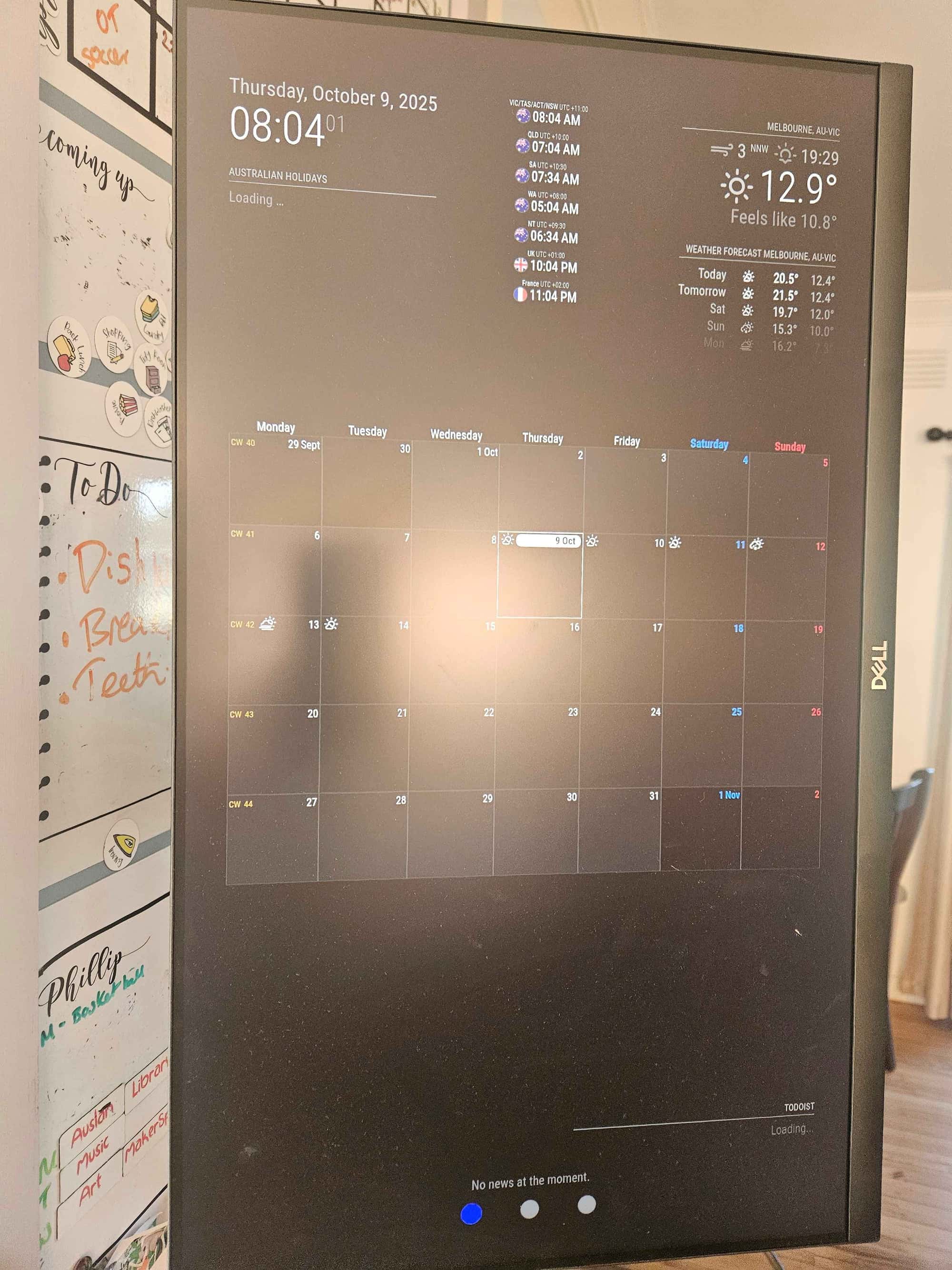
I do have to tweak my sizing of the modules on my home page as there is a little overlap when everything is populated, but apart from that this page was working well.
Anyway , have a great day :) -
Calendarext3 gets its events from the default calendar module
Do you have that configured, and does it work?
To
Make it not show just comment out its position using // in front of that lineNow, because ext3 gets events from the default calendar module, and there couple be many individual calendars contributing events, the developer doesn’t want the screen to be flashing for individual updates
So there is a cycle, refresh interval, default 10 minutes
So every 10 minutes the events received since last time will be displayedNow the first time you don’t want to wait 10 mins
So there is a waitFetch parm, 5 secondsAfter 5 seconds, whatever events have arrived will be drawn, even if none, then we wait refreshInterval and do it again
You can increase the waitFetch time, side effect is NO Display til after that time limit
-
@sdetweil the default calendar isn’t working either! I have commented out ext3, I have reduced the calendar entries on the default calendar to just Australian holidays in case Google is having a fit! It just says loading. I had not touched any of this code in the config at all. I have seen there have been cases of calendar’s not loading last January and few again now. Is it worth me raising it on the github discussion or issue list?
-
@British_Kiwi can you look at the output of npm start to see if an error is reported
-
@sdetweil not sure if I am doing this right. I thought I had made notes about how to check logs etc, but after some googling I have this (which I don’t think you were after):
admin@raspberrypihome:~/MagicMirror $ npm run config:check

> magicmirror@2.33.0 config:check
> node js/check_config.js

[2025-10-10 07:21:14.145] [INFO]  Checking config file /home/admin/MagicMirror/config/config.js ...
[2025-10-10 07:21:14.197] [INFO]  Your configuration file doesn't contain syntax errors :)
[2025-10-10 07:21:14.198] [INFO]  Checking modules structure configuration ...
[2025-10-10 07:21:14.258] [ERROR] This module configuration contains errors:
undefinedmust be object
Not too sure which module this is referring too.
Here are the pm2 logs. I’ve removed yesterdays stuff. All I have done this morning is pm2 restart 0 --updated-env (as it keeps saying something about environment variables which I haven’t seen prior to a few days ago.
admin@raspberrypihome:~/MagicMirror $ pm2 logs
[TAILING] Tailing last 15 lines for [all] processes (change the value with --lines option)
/home/admin/.pm2/pm2.log last 15 lines:
PM2        | 2025-10-10T07:15:02: PM2 log: Stopping app:MagicMirror id:0
PM2        | 2025-10-10T07:15:03: PM2 log: App [MagicMirror:0] exited with code [0] via signal [SIGINT]
PM2        | 2025-10-10T07:15:03: PM2 log: pid=617000 msg=process killed
PM2        | 2025-10-10T07:15:03: PM2 log: App [MagicMirror:0] starting in -fork mode-
PM2        | 2025-10-10T07:15:03: PM2 log: App [MagicMirror:0] online

/home/admin/.pm2/logs/MagicMirror-error.log last 15 lines:
0|MagicMir | [2025-10-10 07:15:04.251] [ERROR] This module configuration contains errors:
0|MagicMir | undefinedmust be object
0|MagicMir | [2025-10-10 07:15:04.252] [ERROR] WARNING! Could not load config file. Starting with default configuration. Error found: TypeError: Cannot read properties of undefined (reading 'module')

/home/admin/.pm2/logs/MagicMirror-out.log last 15 lines:
0|MagicMir | - VERSIONS: electron: 38.1.2; used node: 22.19.0; installed node: 22.18.0; npm: 10.9.3; pm2: 6.0.13
0|MagicMir | - ENV:      XDG_SESSION_TYPE: tty; MM_CONFIG_FILE: undefined
0|MagicMir |             WAYLAND_DISPLAY:  wayland-0; DISPLAY: :0; ELECTRON_ENABLE_GPU: undefined
0|MagicMir | - RAM:      total: 8059.20 MB; free: 6557.28 MB; used: 1501.92 MB
It does it look like there is an issue with a module, but I can’t work out which module. Any ideas on how to work it out?
At the moment I have commented out calendarext3, home assistant display, but I do have iframe showing on one of the pages.
-
@British_Kiwi if you start a private chat with me, you can paste your config and I will look at it. I agree on the ‘this’ module is unclear!..
sent you a message
-
@British_Kiwi said in Is adding Home Assistant the right way to go?:
This module configuration contains errors:
undefinedmust be objectaccidental extra comma between modules (commented out module, but the trailing comma was on a sep line)
    {
     module:"foo",
    }.
     .    <--- that guy
    {
      module:"bar",
    }
this is a bug,
opened issue
https://github.com/MagicMirrorOrg/MagicMirror/issues/3910as a separate way to avoid this, you can add
disable:true,after the module: line
to disable a module without having to comment it outdisabled: false,makes it active again
-
@sdetweil that’s a much cleaner way to disable a module. I will use that. Thanks again for your help.
Hello! It looks like you're interested in this conversation, but you don't have an account yet.
Getting fed up of having to scroll through the same posts each visit? When you register for an account, you'll always come back to exactly where you were before, and choose to be notified of new replies (either via email, or push notification). You'll also be able to save bookmarks and upvote posts to show your appreciation to other community members.
With your input, this post could be even better 💗
Register Login