Read the statement by Michael Teeuw here.
Creating a module to display daily horoscopes
-
@djbosman Hi Danie,
In the code snippet that you’ve posted (it’s a good idea to use markdown for code snippets) it looks like you are possibly using “fancy quotes”. Make sure that your
config.jsfile has these'or"and not these‘or“(it’s possible that they were only converted in your post on the forum and your config is ok). Additionally make sure you have a comma after last}bracket as shown below:{ module: 'MMM-horoscope', position: 'top_right', // This can be any of the regions. config: { // See ‘Configuration options’ for additional options and more information. sign: 'aries', // Zodiac sign } },Also since this module is using
node helperyou may need to restart electron app for MM to pickup module helper for horoscopes.
You should see these lines in the console log when you donpm start:Connecting socket for: MMM-horoscope Starting NodeHelper for MMM-horoscopemodule.Hope this helps and thanks for trying out my module.
P.S. I just added instructions about restarting MM in the README
-
i add this and get black screen only when i add the horoscope. maybe i dont know hot to install it lol. am i doing something wrong? any help is appreciated.
/* Magic Mirror Config Sample * * By Michael Teeuw http://michaelteeuw.nl * MIT Licensed. */ var config = { port: 8080, ipWhitelist: ["127.0.0.1", "::ffff:127.0.0.1", ], language: 'en', timeFormat: 12, units: 'imperial', modules: [ { module: 'alert', }, { module: "updatenotification", position: "top_bar" }, { module: 'clock', position: 'top_left' }, { module: 'calendar', header: 'MY CALENDAR', position: 'top_left', config: { fetchInterval: 1 * 60 * 1000, calendars: [ { symbol: 'calendar-check-o ', url: 'webcal://www.calendarlabs.com/templates/ical/US-Holidays.ics' }, { url: 'https://calendar.google.com/calendar/ical/5ddp1drsb3mib0a6piof8h0f8s%40group.calendar.google.com/private-xxxxxxxxxxxxxxx' } ] } }, { module: 'compliments', position: 'lower_third' }, { module: 'MMM-horoscope', position: 'bottom_right', config: { sign: 'aries', // Zodiac sign } }, { module: 'currentweather', position: 'top_right', config: { units: 'imperial', location: '', locationID: '', //ID from http://www.openweathermap.org appid: 'xxxxxxxxxxxxxxxx' } }, { module: 'MMM-Remote-Control' }, { module: 'MMM-WunderGround', position: 'top_right', config: { apikey: 'xxxxxxxxxxxxxxxx', // private; don't share! pws: 'CA/FONTANA', hourly: '1', fctext: '1', fcdaycount: "5", fcdaystart: "0", hourlyinterval: "3", hourlycount: "2", alerttime: 10000, alerttruncatestring: "english:", roundTmpDecs: 1, UseCardinals: 0, layout: "horizontal", sysstat: 0 } }, { module: 'newsfeed', position: 'bottom_bar', config: { feeds: [ { title: "Google News", url: "https://news.google.com/news?cf=all&hl=en&pz=1&ned=us&output=rss" }, { title: "New York Times", url: "http://www.nytimes.com/services /xml/rss/nyt/HomePage.xml" }, { title: "BBC Sci-Tech", url: "http://feeds.bbci.co.uk/news/video_and_audio/technology/rss.xml?edition=uk" } ], showSourceTitle: true, showPublishDate: true, maxNewsItems: 0, updateInterval: 10 * 1000, reloadInterval: 2 * 60 * 1000 } }, ] }; /*************** DO NOT EDIT THE LINE BELOW ***************/ if (typeof module !== 'undefined') {module.exports = config;} -
Run that through this: http://javascriptbeautifier.com/
to clean that up… lots of spaces in there… may not be the problem but it could become a problem at some point and it’s easier to read through it when it’s formatted ;)
But I do believe your problem is right here:
url: “http://www.nytimes.com/services
/xml/rss/nyt/HomePage.xml”That’s not valid… needs to be:
url: “http://www.nytimes.com/services/xml/rss/nyt/HomePage.xml”
-
@pflnpi0305 I believe that @cowboysdude is correct about that line spilling over. It needs to be on one line. When in doubt you can always paste your
config.jsat http://jshint.com/ and see if there are any errors (one warning about undefined variablemoduleis ok) -
@morozgrafix said in Creating a module to display daily horoscopes:
@pflnpi0305 I believe that @cowboysdude is correct about that line spilling over. It needs to be on one line. When in doubt you can always paste your
config.jsat http://jshint.com/ and see if there are any errors (one warning about undefined variablemoduleis ok)Home away from home LOL AND off topic but Thanks and congrats on being a mod :)
-
so i fixed it and added it the the java beautifier link and thenadded it back to my config.js folder and rebootbut still black screen.
cant use npm start
is it because im using pm2 to autostart my mirror? -
@pflnpi0305 if you are using pm2 then you can restart mm with
pm2 restart mm, to stop it you would runpm2 stop mm, to list processes managed by pm2 you would dopm2 listand to start you would runpm2 start mmIf you are still have issues, post your latest version of
config.jshere again. Are you getting any errors? -
so i also dropped my config in jshint.comand and javascriptbeautifier.com and all is well…i dont know what im missing. if i remove the horoscope everything works well but if i have it then it wont work.
var config = { port: 8080, ipWhitelist: [ "127.0.0.1", "::ffff:127.0.0.1", "::1", "::ffff:192.168.1.1/24" ], language: "en", timeFormat: 12, units: "imperial", modules: [ { module: "MMM-Admin-Interface" }, { module: "alert" }, { module: "updatenotification", position: "top_bar" }, { module: "clock", position: "top_left" }, { module: "calendar", header: "MY CALENDAR", position: "top_left", config: { fetchInterval: 1 * 60 * 1000, calendars: [ { symbol: "calendar-check-o ", url: "webcal://www.calendarlabs.com/templates/ical/US-Holidays.ics" }, { url:"https://calendar.google.com/calendar/ical/5ddp1drsb3mib0a6piof8h0f8s%40group.calendar.google.com/private-xxxxxxxxxxxxxxx/basic.ics" } ] } }, { module: "compliments", position: "lower_third" }, { module: "currentweather", position: "top_right", config: { units: "imperial", location: "FONTANA/CA", locationID: "", appid: "xxxxxxxxxxxxxx" } }, { module: "MMM-Remote-Control" }, { module: "MMM-WunderGround", position: "top_right", config: { apikey: "xxxxxxx", pws: "CA/FONTANA", hourly: "1", fctext: "1", fcdaycount: "5", fcdaystart: "0", hourlyinterval: "3", hourlycount: "2", alerttime: 10000, alerttruncatestring: "english:", roundTmpDecs: 1, UseCardinals: 0, layout: "horizontal", sysstat: 0 } }, { module: "MMM-Globe", position: "center", config: { style: "geoColor", imageSize: 300, ownImagePath: "", updateInterval: 10 * 60 * 1000 } }, { module: "MMM-horoscope", position: "bottom_right", config: { sign: "aries" } }, { module: "newsfeed", position: "bottom_bar", config: { feeds: [ { title: "Google News", url: "https://news.google.com/news?cf=all&hl=en&pz=1&ned=us&output=rss" }, { title: "New York Times", url: "http://www.nytimes.com/services/xml/rss/nyt/HomePage.xml" }, { title: "BBC Sci-Tech", url: "http://feeds.bbci.co.uk/news/video_and_audio/technology/rss.xml?edition=uk" } ], showSourceTitle: true, showPublishDate: true, maxNewsItems: 0, updateInterval: 10 * 1000, reloadInterval: 2 * 60 * 1000 } } ] }; if ("undefined" !== typeof module) module.exports = config; -
@pflnpi0305 Do you see any errors in the console log when you run it start the mirror with
npm start devcommand? Also are you running off the master branch or dev?
We can try to start eliminating things out to narrow down what is causing the black screen for you.Can you try this config with only horoscope module:
/* Magic Mirror Config Sample
 *
 * By Michael Teeuw http://michaelteeuw.nl
 * MIT Licensed.
 */

var config = {
	port: 8080,
	ipWhitelist: ["127.0.0.1", "::ffff:127.0.0.1", "::1"],

	language: 'en',
	timeFormat: 24,
	units: 'metric',

	modules: [
		{
			module: 'MMM-horoscope',
			position: 'bottom_right', // This can be any of the regions.
			config: {
				// See ‘Configuration options’ for additional options and more information.
				sign: 'aries', // Zodiac sign
				}
		},
	]

};

/*************** DO NOT EDIT THE LINE BELOW ***************/
if (typeof module !== 'undefined') {module.exports = config;}
Also can you please double check that
MMM-horoscopeand contents exist under~/MagicMirror/modulesdirectory? (I know I’m asking for obvious things, just trying to get some more info about your installation). -
thats the issue it doesnt exsist in there… how do i clone the git via ssh
-
@pflnpi0305 It will not work if you don’t have a copy of the module installed locally, black screen is there because MM is attempting to load JS files for the module from the directory that doesn’t exist. You need to run this in terminal while connected to your RasPi (directly or via SSH).
cd ~/MagicMirror/modules
git clone https://github.com/morozgrafix/MMM-horoscope.git
After that you would need to restart MM node process in order it to pickup new
node_helperfor horoscope module.Thanks
-
@pflnpi0305 said in Creating a module to display daily horoscopes:
thats the issue it doesnt exsist in there… how do i clone the git via ssh
Mh, you are right. The readme on github doesn’t state how to do this. Maybe @morozgrafix could add this, even though the process is always the same.
If you go to github, you see this:
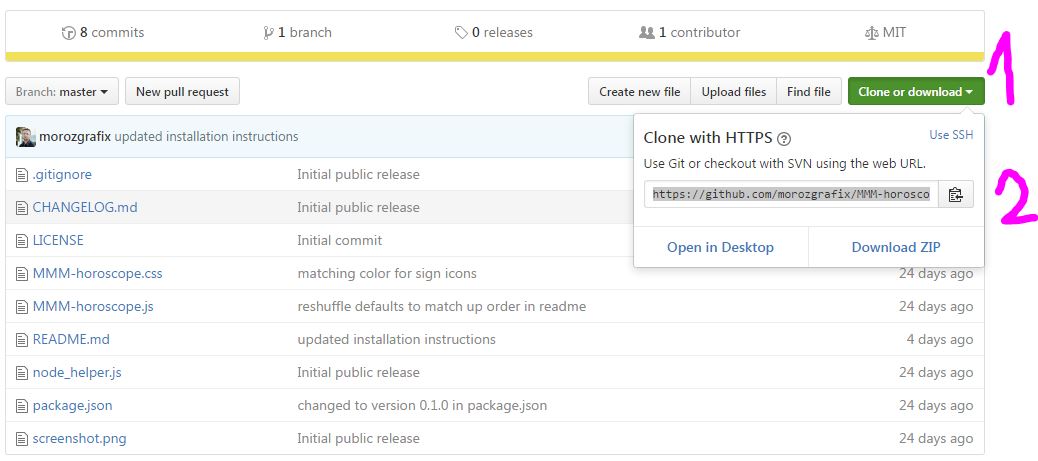
- click on “clone or download”
- copy the url or click on the icon next to it
cd ~/MagicMirror/modules
git clone https://github.com/morozgrafix/MMM-horoscope.git
cd MMM-horoscope
npm install
After that you update your config.js file, restart your magic mirror and should be fine
edit: oh, morozgrafix was faster
-
@yawns Thanks! I just added a small bit related to installation steps to the README.
-
lol thank you guys i should have thought of it but idk why it just slipped my mind i followed and i thought hmmm i need to close i think ahah…thanks i love this forum and all the help here.


Hello! It looks like you're interested in this conversation, but you don't have an account yet.
Getting fed up of having to scroll through the same posts each visit? When you register for an account, you'll always come back to exactly where you were before, and choose to be notified of new replies (either via email, or push notification). You'll also be able to save bookmarks and upvote posts to show your appreciation to other community members.
With your input, this post could be even better 💗
Register Login